Keep MyCase for your cases, billing, and client portal, and add an automation layer around it for the document chase, intake hand-offs, and client follow-ups. MyCase scores 3.3 out of 5 on our rubric for Chapter 7 and Chapter 13 firms.
We tested MyCase in an Advanced trial on a synthetic Chapter 7 case on October 24, 2026. We rechecked MyCase's public pages and prices on November 14, 2026. This page shows what MyCase runs on its own and what a custom automation layer adds.
Aretech builds automation that works around the software it reviews; here is how we score software.
Last reviewed: November 14, 2026.
TL;DR
- Keep MyCase as your case record, and add automation only around the steps it leaves to your staff.
- MyCase scores 3.3 out of 5 for bankruptcy firms on our nine-dimension rubric.
- In our test, MyCase had no document request view, and each workflow was applied to the case by hand.
- MyCase alone fits if your staff clear the document chase without a backlog.
- Next, count the hours your staff spend chasing documents and retyping intake answers.
The Short Answer: Is MyCase Enough for a Bankruptcy Firm?
MyCase is enough to run your cases, billing, and client portal, but not your document chase or your hand-offs into petition software.
Its own bankruptcy page opens one answer with "While MyCase isn't specifically designed for bankruptcy lawyers" and then lists general tools you shape yourself.
Is it a build versus buy conversation you've got to have: do you keep MyCase or build something?
Keep MyCase, and build around it. You build only for the steps MyCase leaves to staff. Owners tell us, in words like these, that "it's a build versus buy conversation". In practice, the answer is both.
- MyCase alone fits if your firm's bottleneck is organizing cases and billing.
- MyCase plus a layer fits if your firm's staff still chase documents by phone, text, and email.
- MyCase plus a layer fits if your firm retypes intake answers into its petition software.
- MyCase plus a layer fits if your firm needs an approval step before anything reaches a client.
Who This Comparison Is For (and Not For)
This comparison serves the people who choose the systems a boutique bankruptcy firm runs on.
For:
- Owner-attorneys and managing partners of Chapter 7 and Chapter 13 firms that run MyCase or are choosing it
- Operations leads who own intake, the document chase, and petition prep
- In-house developers at high-volume bankruptcy firms weighing a build on MyCase's API
Not for:
- People filing their own bankruptcy
- Petition preparers outside a law firm
- Big law and firms outside consumer bankruptcy
What MyCase Does Well for Bankruptcy Firms
MyCase holds the client, the case, billing, and the portal in one system. Its Pro plan adds intake forms, workflows, and document generation.
It is a general system, so your firm shapes it for bankruptcy work.
MyCase Features a Bankruptcy Firm Uses
MyCase's core features covered most of our synthetic Chapter 7 case.
- One flow from contact to case: a new contact saves straight into a four-step case wizard, and our first Chapter 7 case took about 6 minutes.
- Workflow templates: a workflow holds tasks and events with due dates counted from a date label, such as a retained date.
- Document automation: "Document from Template" merges case and contact fields into a Word template your firm uploads with its own merge keys. Advanced Document Automation runs in a Microsoft Word add-in on the Advanced plan, which we did not test.
- Client portal: MyCase does have a client portal, switched on per contact. Turning it on sends the client a welcome email at once.
- E-filing and calendaring partners: the InfoTrack tab says it files "throughout the busiest state court systems in the U.S.", and LawToolBox handles court-rules calendaring.
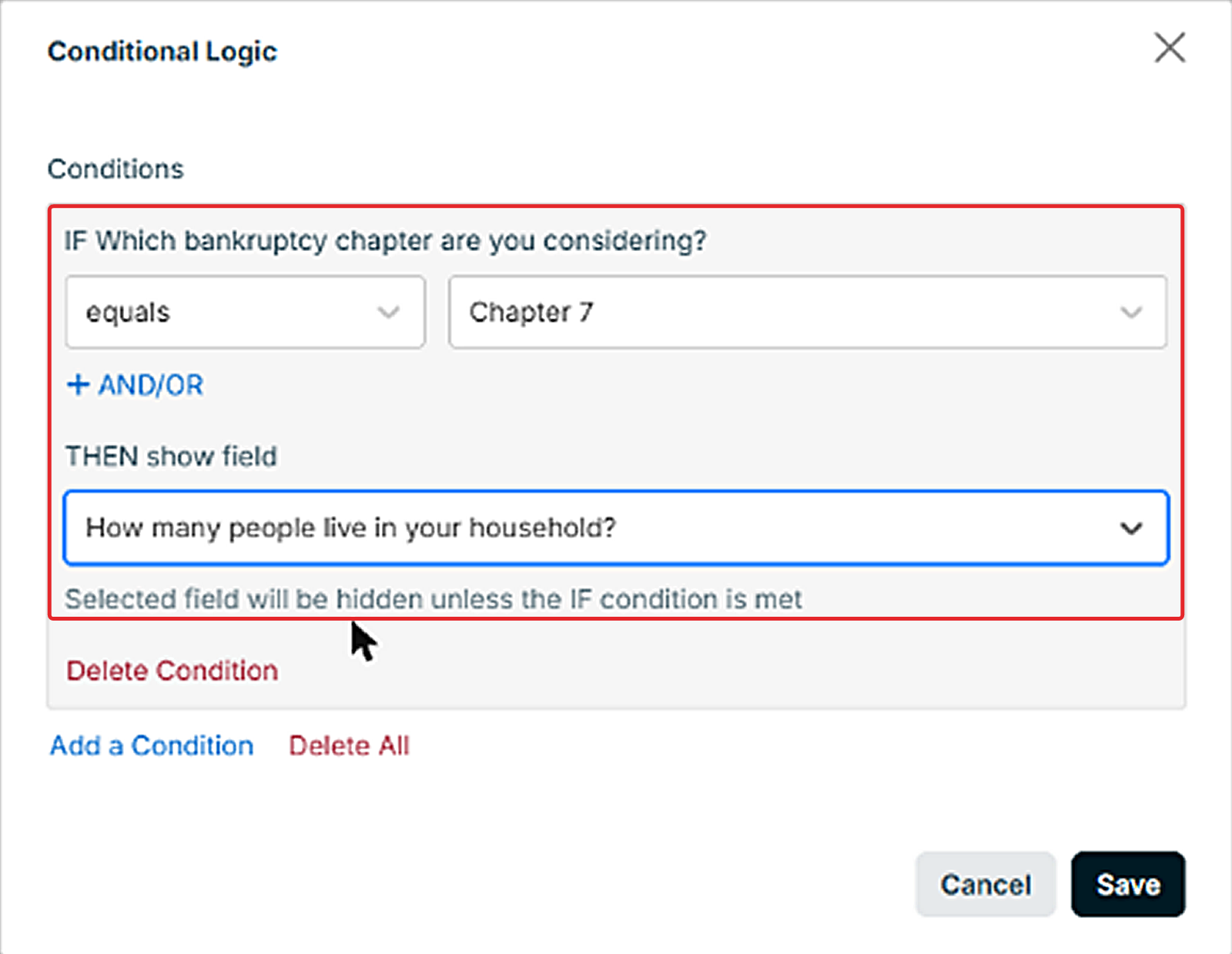
- Intake forms with conditional questions: we built an intake form in which a Chapter 7 answer reveals a household-size question, with a multi-file upload for pay stubs.
The InfoTrack tab mentions no bankruptcy court or PACER filing, so your petitions still go out through your own filing route.
What Your Firm Gains From MyCase
MyCase's features turn into these gains for your firm.
- Your staff find every client, case, document, and invoice in one record instead of across folders.
- You make fewer follow-up calls when the intake form asks the chapter question up front.
- Billing, trust accounting, and online payments sit beside the case, so you invoice without a second system.
- Guided setup and onboarding come with every plan on MyCase's pricing page, so your team does not configure it alone.
MyCase Limitations: Where Its Automation Stops for Bankruptcy Work
MyCase stored and organized the work in our Chapter 7 test. Five bankruptcy steps still had no automation or control in MyCase.
- Requesting documents and tracking what is missing
- Starting the workflow on each case
- Reminding the client
- Moving intake data into petition software
- Holding client-facing items for approval
1. No Document Request or Missing-Items View
MyCase offers no dedicated document request list, client checklist, or view of what is missing on a case.
In our test, the case Documents menu offered upload, template, eSignature, and folder options, with no request option. Asking a client for pay stubs meant an intake form with an upload field.

MyCase's help article on creating a task for your client describes a second route. The client gets an email, sees the task in the portal, and the finished task waits at "Needs Confirmation" until a firm user accepts it. We did not test that route, and the article mentions no reminder.
2. MyCase Workflow Automation Is Applied to Each Case by Hand
A MyCase workflow is a template of tasks and events that staff apply to each case by hand.
Our Chapter 7 pre-filing workflow held one task, Collect client documents.
That task carried three checklist items.
- Pay stubs for 6 months
- Bank statements for 6 months
- Federal and state tax returns
Building and applying that workflow took about 35 actions and 9 minutes. Its trigger is a date label, such as a retained date, that the due dates count from. A task can also wait on "Completion of Another Task", so later steps follow on their own once the workflow is applied.
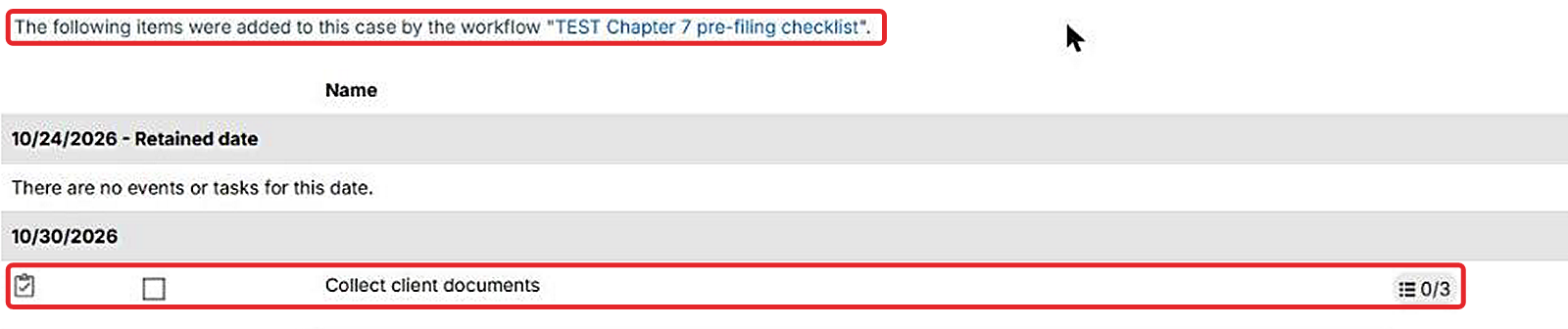
MyCase's help article on creating and applying workflows describes the same manual route from the case's Workflows button. MyCase's workflow automation page names triggers such as "an intake submission". We saw no intake-submission or new-case trigger in the trial's workflow screens.
3. Reminders Reach Your Staff, Not Your Clients
MyCase task reminders go to your staff, not your clients, and none fires when a document is missing.
Using MyCase but spending a lot of time calling, texting, and emailing clients to chase documents?
No task reminder reaches the client. In our test, a task reminder went to Me, Attorneys, Paralegals, or Staff by popup or email before the due date.

MyCase does send automated text reminders to clients for events and invoices. Its text messaging article says those come "from a different phone number that is not dedicated to your firm" and do not support replies. Texting was locked in our trial, so we did not test it.
4. No Connection to Your Petition Software
MyCase lists no bankruptcy petition software among its integrations, so intake answers move into your petition software by hand.
Are MyCase and your petition software systems that don't talk to each other?
Yes. Owners describe it to us in words like these: "three systems that don't talk to each other". In our test, the in-product integrations page held no card for Best Case, NextChapter, or Jubilee. MyCase's public integrations page lists 62 entries, and none is petition software.
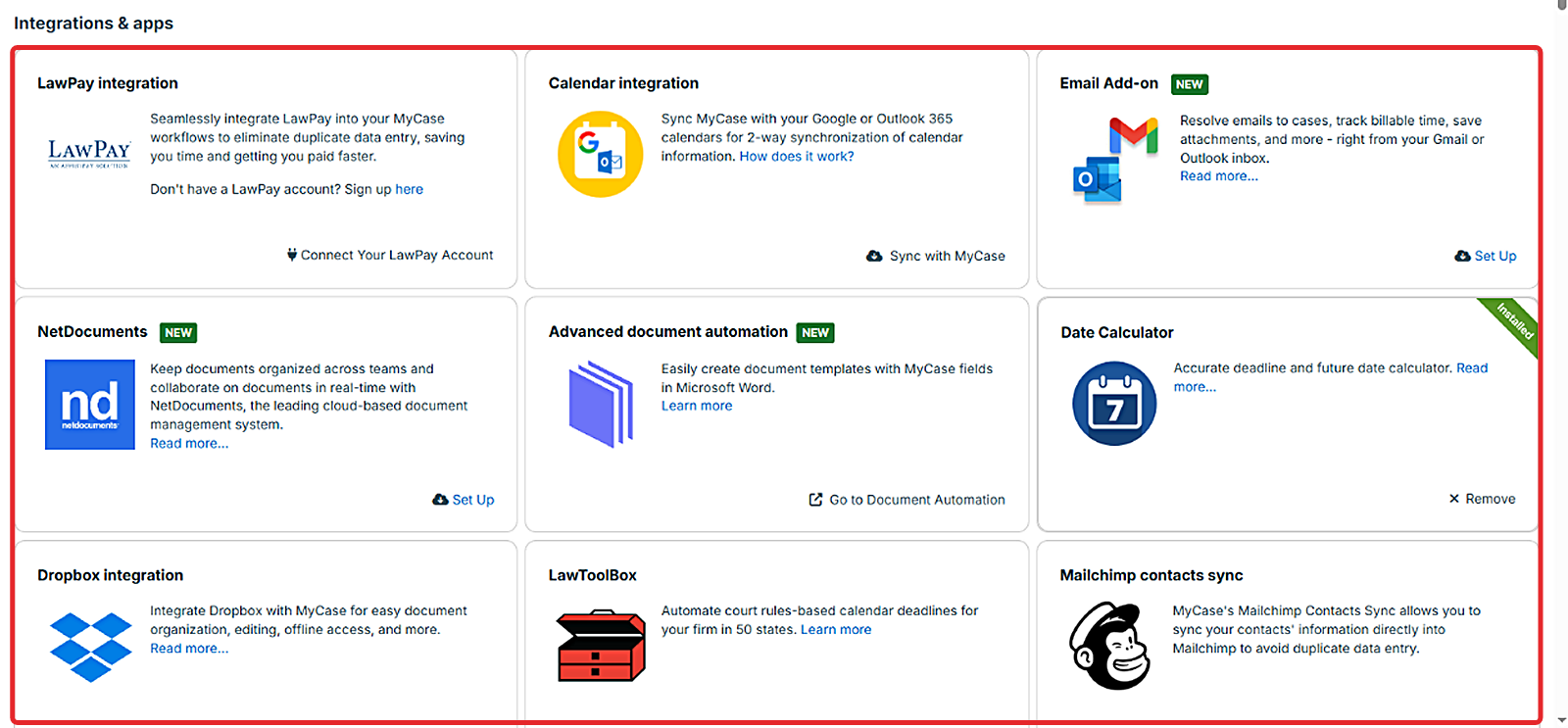
The same page lists the 8am MyCase MCP, which MyCase's pricing page includes on every plan. MyCase's MCP listing describes it as a read-only connection for Claude that needs a Claude Team or Enterprise plan.
5. Nothing Waits for an Attorney's Approval Before It Reaches a Client
In our test, MyCase had no approval step that holds a client-facing message or document for an attorney.
In the screens we saw, turning on the portal, sharing a document, and sending a message are each direct actions, with no review queue. We did not send any of them. The activity log records who did what, but only after the fact.
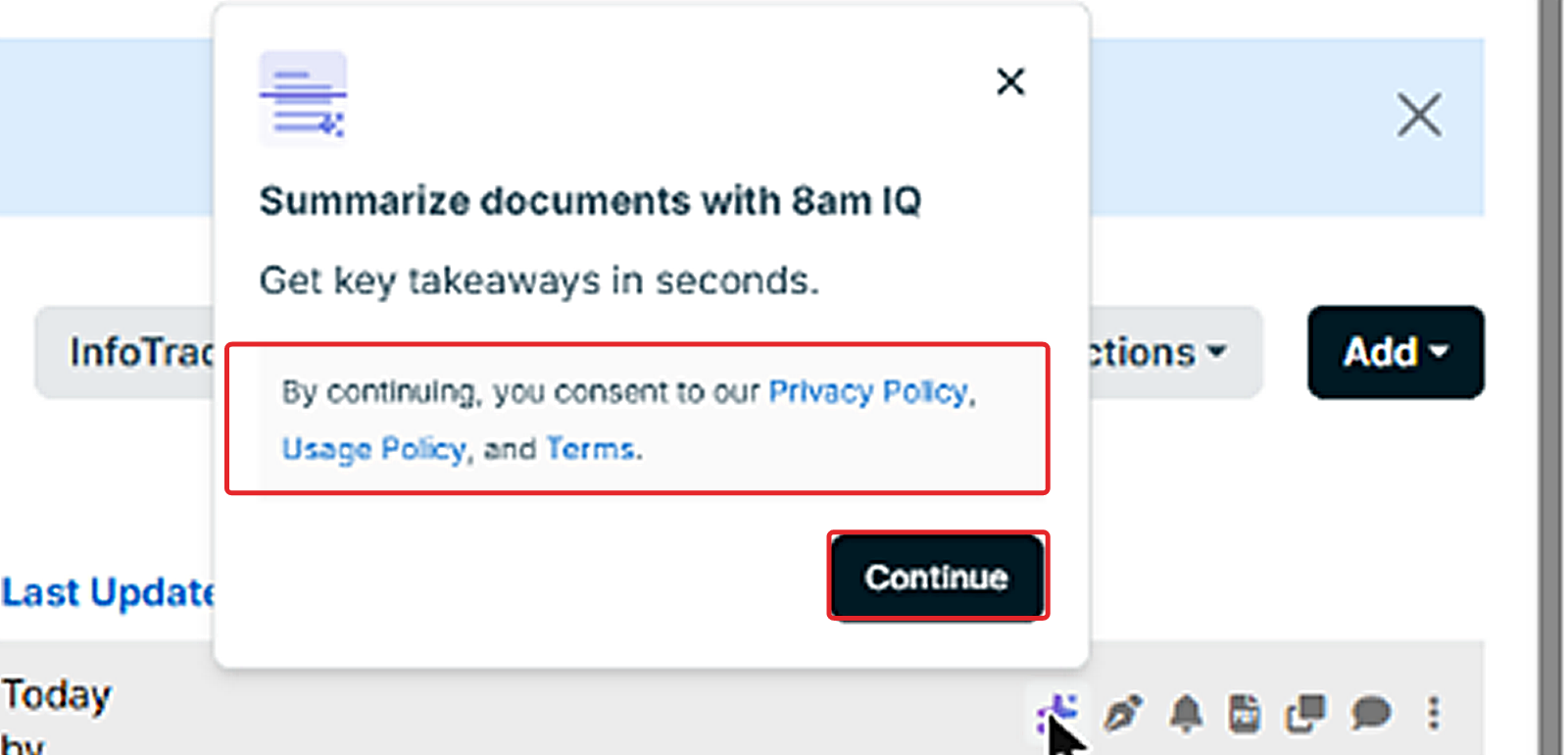
8am IQ's document summary asks each user to consent to MyCase's policies and terms before it runs. We stopped at that popup and did not run it. MyCase's 8am IQ FAQs describe a firm-wide off switch. They also advise you to "carefully review all output prior to any use or reliance on it".
MyCase Bankruptcy Software Scorecard
MyCase scores 3.3 out of 5 for bankruptcy firms on our nine-dimension rubric for software.
| Dimension | Weight | Score (1 to 5) | Basis |
|---|---|---|---|
| Core job performance | 20% | 3 | Cases, intake forms, workflows, and templates worked in our test. We found no document request view, and workflows were applied by hand. |
| Interoperability with your stack | 18% | 3 | MyCase lists 62 integrations and an Open API on Advanced, but no petition software. |
| Ease of use and setup | 12% | 4 | We found every task area we looked for without the documentation. One Escape key press closed the case wizard and lost our typed details. |
| Practice-specific depth | 10% | 2 | Beyond a Bankruptcy practice-area label, nothing came preloaded: no chapter field, no SSN field, and default stages of Discovery, In Trial, and On Hold. |
| Attorney review and AI controls | 10% | 3 | We found no approval step before a client send. 8am IQ results come back to the user, and MyCase's AI page says its Case and Discovery Assistants show citations. MyCase's 8am IQ FAQs describe a firm-wide off switch and advise reviewing all output. |
| Pricing and cost structure | 10% | 4 | MyCase's pricing page lists Basic $60, Pro $120, and Advanced $150 per user per month, billed monthly, with no setup fee (last reviewed November 14, 2026). The court-rules calendaring add-on carries no price there. |
| Data ownership and portability | 8% | 3 | You own your content, and you can create one full backup per day, but it leaves out documents and invoices. |
| Support and reliability | 7% | 5 | Guided setup comes with every plan, and data migration is included on Pro and Advanced. MyCase's support page lists chat Monday to Friday, 7am to 7pm Central, plus phone, email, and training videos, and MyCase keeps a public What's New log. |
| Security and Opinion 512 posture | 5% | 4 | Our trial showed each user's MFA status. The 8am Trust Center lists SOC 2 Type 2. |
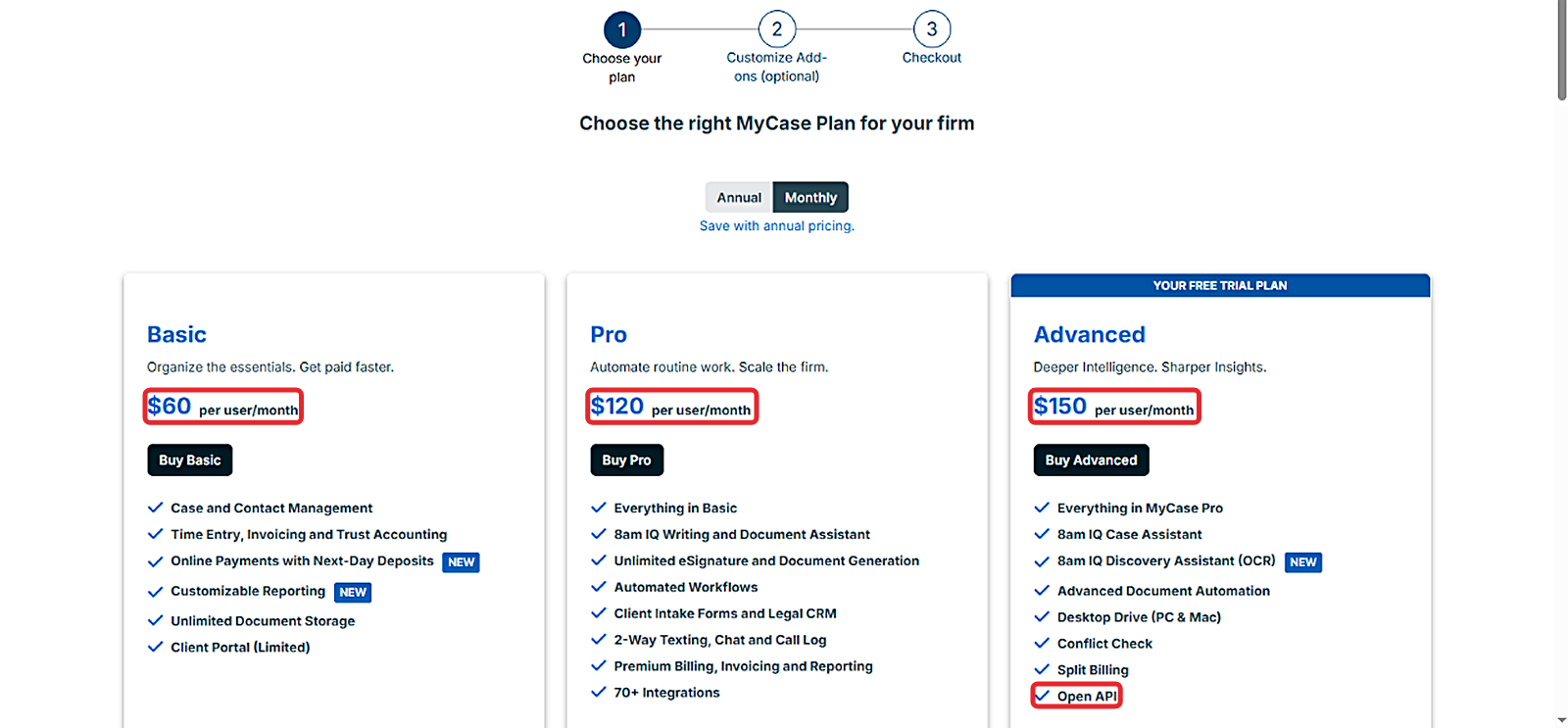
Billed annually, MyCase's tiers cost $50, $100, and $130 per user per month, last reviewed November 14, 2026. MyCase Accounting adds $39 per user per month on Pro and Advanced. The score covers MyCase only; custom automation is a service built around your software, so we do not score it.
MyCase Alone vs MyCase With Custom Automation: Side-by-Side
MyCase alone and MyCase with custom automation differ in who chases, who retypes, who approves, and who owns the rules.
| Job | MyCase alone | MyCase with custom automation |
|---|---|---|
| Document requests and missing items | Intake form uploads or client tasks; no missing-items view in our test | A request list per client, with every upload checked against it |
| Workflow start | Staff apply each workflow to each case | Intake and document events start the next step |
| Client follow-ups | Task reminders reach staff; automated texts cover events and invoices | Follow-ups in your firm's wording, on the timing your staff set |
| Intake into petition software | Staff retype answers | Data entered into your petition software for the attorney to review |
| First drafts | Merge fields in your uploaded Word templates | Drafts from your firm's own templates, reviewed by the attorney |
| Approval before client sends | None in our test | Propose-only first: nothing client-facing goes out that your firm has not approved |
| API and data path | Open API on Advanced; credentials from MyCase support; 25 requests per second | Works around your MyCase; runs in your own cloud account |
| Who owns what is built | Your content is yours; MyCase workflows live in MyCase | Your firm owns the code, data, workflows, and documentation |
| Cost structure | Per user, per month | A one-time build; no seats or subscriptions; you pay your model provider directly |
Use MyCase Alone If Your Firm Fits These Conditions
MyCase alone is the right call when its gaps cost your firm little.
- Your case volume is low enough that staff chase documents by hand without a backlog.
- Your team does not retype intake answers into petition software, or the retyping takes minutes.
- You want one vendor and per-user pricing for everything.
- You have not yet mapped which steps eat your staff's week.
Add an Automation Layer Around MyCase If These Problems Sound Familiar
An automation layer takes these problems off your staff, so you handle more cases and increase revenue without adding headcount.
- Your staff spend hours calling, texting, and emailing clients for the same documents.
- Your staff retype intake answers into your petition software, which is where petition prep automation for bankruptcy firms starts.
- Your workflows only run when someone remembers to apply them.
- You want an approval step before anything reaches a client.
MyCase Plus an Automation Layer for Bankruptcy Intake
You keep MyCase, and Aretech builds the automation that works around it, so you handle more cases and increase revenue without adding headcount.
Every build is custom, and around MyCase it covers intake automation for bankruptcy practices, the document chase, and first drafts.
The build has three layers, in this order.
- The data layer: one source of truth across your case records, petition software, storage, and phones. It is the foundation every workflow runs on.
- AI agents: they read each client upload, check it against what was asked, and flag what is missing or wrong.
- Automated workflows: they move the work from step to step, and anything the system is unsure about goes to a person for review.
On that foundation, the workflows do three jobs.
- Intake capture: the client's answers are captured once and moved into your firm's tools, including data entry into your petition software for the attorney to review.
- The document chase: each client gets a request for what they owe, each upload is checked and filed to your naming convention, and follow-ups go out in your firm's wording, on the timing your staff set.
- First drafts: drafts come from your firm's own templates, and the attorney reviews every one.
Your firm's reviewer approves each set before the attorney sees it. Nothing the system does files, signs, or takes a payment. It never contacts a court or a trustee, and it never decides anything legal. Your firm submits every petition itself.
The system lives in your own cloud account, and its AI steps call hosted frontier models. Page 11 of ABA Formal Opinion 512 (July 29, 2024) lists what to check in an AI vendor. That check rests on Model Rule 5.3, and it applies to MyCase and to the layer alike.
Free. The map is yours, even if you never hire us.
FAQs
Does MyCase Have AI, and Does MyCase Use AI on Your Data?
Yes, MyCase has AI features called 8am IQ, per MyCase's own pages. The pricing page lists the Writing and Document Assistants on Pro, and it lists the Case and Discovery Assistants on Advanced. MyCase's legal AI page says customer data "will not be used to train OpenAI models". We did not run 8am IQ in our test.
MyCase Pro vs Advanced: Which Plan Does a Bankruptcy Firm Need for Workflows and the API?
Pro covers intake forms, workflows, and document generation, at $120 per user per month billed monthly. Advanced adds the Open API and Advanced Document Automation, at $150 (both on MyCase's pricing page, last reviewed November 14, 2026). Basic has neither workflows nor intake forms. Its data migration is listed as "Limited".
Is MyCase a CRM System for a Bankruptcy Firm?
Yes, MyCase includes a Legal CRM and Client Intake Forms on its Pro and Advanced plans. In our test, the Leads area held a status board with New, Contacted, Consult Scheduled, and Pending columns, filtered by practice area. Basic includes neither.
Is MyCase Good for a Bankruptcy Firm That Runs Chapter 7 and Chapter 13 Cases?
MyCase is good for cases, billing, and the client portal, but you build the bankruptcy parts yourself. In our test, there was no chapter field, and the default stages were litigation stages. We created a "Bankruptcy chapter" custom field in Settings, and it showed up in the merge field list.
Our Petition Software Doesn't Have Full-Fledged Case Management Capabilities. Do We Need MyCase Too?
Yes, a practice-management system holds the client record, billing, calendar, and portal that petition software does not. The cost is the retyping between the two. An automation layer closes that gap by entering intake data into your petition software for the attorney to review.
This Is Not a Thing I Can't Already Build. Can We Build It Ourselves on MyCase's API?
Yes, on the Advanced plan, if you have a developer and the time to keep it running. MyCase's API documentation uses OAuth 2.0, with client credentials you request from MyCase support and a limit of 25 requests per second.
One reviewer on Trustpilot reports waiting over a month for those credentials, which we did not test. A build still needs the document chase logic, the petition software path, and upkeep when either system changes.
Is There a MyCase Backup, and Can We Get Our Data Out?
Yes, you can build a full backup, a ZIP of 16 CSV files, once per day. MyCase's export article says the backup leaves out documents and invoices, which you download separately. Our trial's Import and Export screen said each backup is kept seven days.
Under 8am's terms of service, you own your content. 8am keeps a perpetual, irrevocable license to aggregated and anonymized versions of it, excluding personal information. That license covers its internal use to improve the platform.
Where Does Client Data Go When an Automation Layer Works Around MyCase?
The layer runs in your own cloud account, and its AI steps call hosted frontier models. Under Rule 1.6(c) of the ABA Model Rules, a lawyer "shall make reasonable efforts to prevent the inadvertent or unauthorized disclosure of" client information. The rule also covers "unauthorized access to, information relating to the representation of a client". Our page on automation data security for law firms lays out that data path.
What If MyCase Is Not the Right Practice-Management System for Our Firm?
Then compare your options before you build anything around one. Our guide to CRM options compared for bankruptcy law firms weighs the systems bankruptcy firms use. The automation layer works around whichever system you keep.