NextChapter is a strong petition tool for your bankruptcy firm. You enter each debtor fact once, trace each form line to its source, and file behind a Review & File gate. However, its checklist never asks your clients for documents, and its client tools depend on your plan. Plan for that gap before you commit if your staff live in the document chase.
We put NextChapter through 15 tasks and four claim checks in a Pro Plus trial on October 24, 2026. You get our scorecard, the limitations, October 2026 pricing, the Clio sync, AI controls, exit terms, and how you automate around it.
Aretech builds automation that works around the software it reviews; here is how we score software.
TL;DR
- NextChapter fits your bankruptcy firm if the petition is your bottleneck: it scored 3.6 out of 5 on our rubric.
- One entry carries into Form 101, the means test, and Schedule E/F, and Review & File gates filing.
- Its 14-item checklist never asks clients for documents, which breaks it for you if your staff spend the week chasing pay stubs.
- Keep NextChapter, confirm in writing what the $1,399-a-year Pro Plus seat includes (last reviewed October 30, 2026), and plan the chase around it.
NextChapter Bankruptcy Software Scorecard
NextChapter scores 3.6 out of 5 on our nine-dimension software rubric for boutique bankruptcy firms.
| Dimension | Weight | Score (1 to 5) | Basis |
|---|---|---|---|
| Core job performance | 20% | 4 | In our trial, one entry carried into Form 101, the income chart, the means test, and Schedule E/F. Review & File gates filing. Collecting the debtor's facts needs the client portal module. |
| Interoperability | 18% | 3 | A once-a-day Clio sync of matters, contacts, tasks, and events, and CSV for claims and pay advices. No public API is documented. |
| Ease of use and setup | 12% | 4 | We found all 15 trial tasks without the help center, and a case opens from one four-field modal. Required fields are flagged only after Save, and templates and reminder wording sit behind add-ons. |
| Practice-specific depth | 10% | 4 | A 14-item bankruptcy checklist, 13 default tasks, the means test, and federal and district court forms. The Chapter 13 plan is sold separately. |
| Attorney review and AI controls | 10% | 3 | Review & File gates filing, and AI Connector values are shown for review before saving. We found no audit trail, and a case does not require an attorney. |
| Pricing and cost structure | 10% | 4 | Published per-user prices on a 12-month contract, last reviewed October 30, 2026. Credit reports are metered per pull. Features the pricing page includes in Pro Plus stayed locked in our Pro Plus trial. |
| Data ownership and portability | 8% | 3 | The Terms say the data is yours, and export runs per case as a zip or by request as a CSV. No deletion terms or exit window are stated. |
| Support and reliability | 7% | 4 | Weekday chat and email with published hours, webinars, and release notes. Standard support caps live help at two chats or calls a month, and Concierge setup is a paid $200 service, last reviewed October 24, 2026. |
| Security and ABA Opinion 512 posture | 5% | 3 | NextChapter describes encryption and daily backups, and two-factor sign-in is required. No SOC 2 report, data processing agreement, or current subprocessor list is published. |
Next Chapter Bankruptcy Software Review: How Does NextChapter Score for a Bankruptcy Firm?
NextChapter scores highest where the work is petition preparation and lowest where the work crosses into other systems.
Verdict by firm situation: NextChapter is strong if you want one place to prepare and file petitions. It is thinner once your work moves to client requests, reminders, and other systems.
We tested NextChapter in a Pro Plus trial on October 24, 2026, with synthetic test data. We ran 15 tasks plus four claim checks, and no task needed the help center. Where a feature stayed locked in our trial, we describe it from NextChapter's own documentation and label it that way. We scored it on our published rubric.
What Does NextChapter Do for a Bankruptcy Firm?
NextChapter takes a bankruptcy case from a four-field start to a filing-ready petition packet. Your staff enter the debtor's facts once, and they flow into the voluntary petition, the schedules, and the means test.
A Review & File check then runs before you assemble and e-file in CM/ECF.
NextChapter is the bankruptcy line of NextChapter BK, Inc., which also sells legal software for other areas of law. We review the bankruptcy software only.
The software does eight jobs:
- Starts a case from one modal that asks for name, district, and chapter, with a 14-item checklist and 13 tasks preloaded
- Carries one entry into Form 101, the income chart, the means test, and Schedule E/F
- Names the source screen behind every form line in the Petition Preview, with an edit link beside each line
- Gates filing by keeping the Assemble and File tabs inactive until Review & File passes
- Generates federal and district court forms, the Section 527 notice included, and saves them to the case
- Imports creditors from an Xactus credit report into the claims sections, per NextChapter's credit report article
- Adds a client questionnaire and portal, texting, PACER notices, firm templates, and the Chapter 13 plan as modules, per NextChapter's MyChapter article
- Runs on an iPhone and iPad through the NextChapter app in the App Store
The means test uses the current federal median income figures. We ran a one-earner Texas household, and the means test used a median family income of $66,837. That is the figure in the U.S. Trustee Program table for cases filed on or after July 15, 2026, last reviewed October 27, 2026.
We generated the Section 527 notice in two clicks, and NextChapter saved a dated PDF to the case. The statute, 11 U.S.C. § 527(a)(2), sets that notice "not later than 3 business days after the first date on which" assistance is offered.
The U.S. Bankruptcy Court for the District of Maryland lists "Next Chapter BK" among its vendors approved to use Case Upload. The court says approval "does not constitute an endorsement".
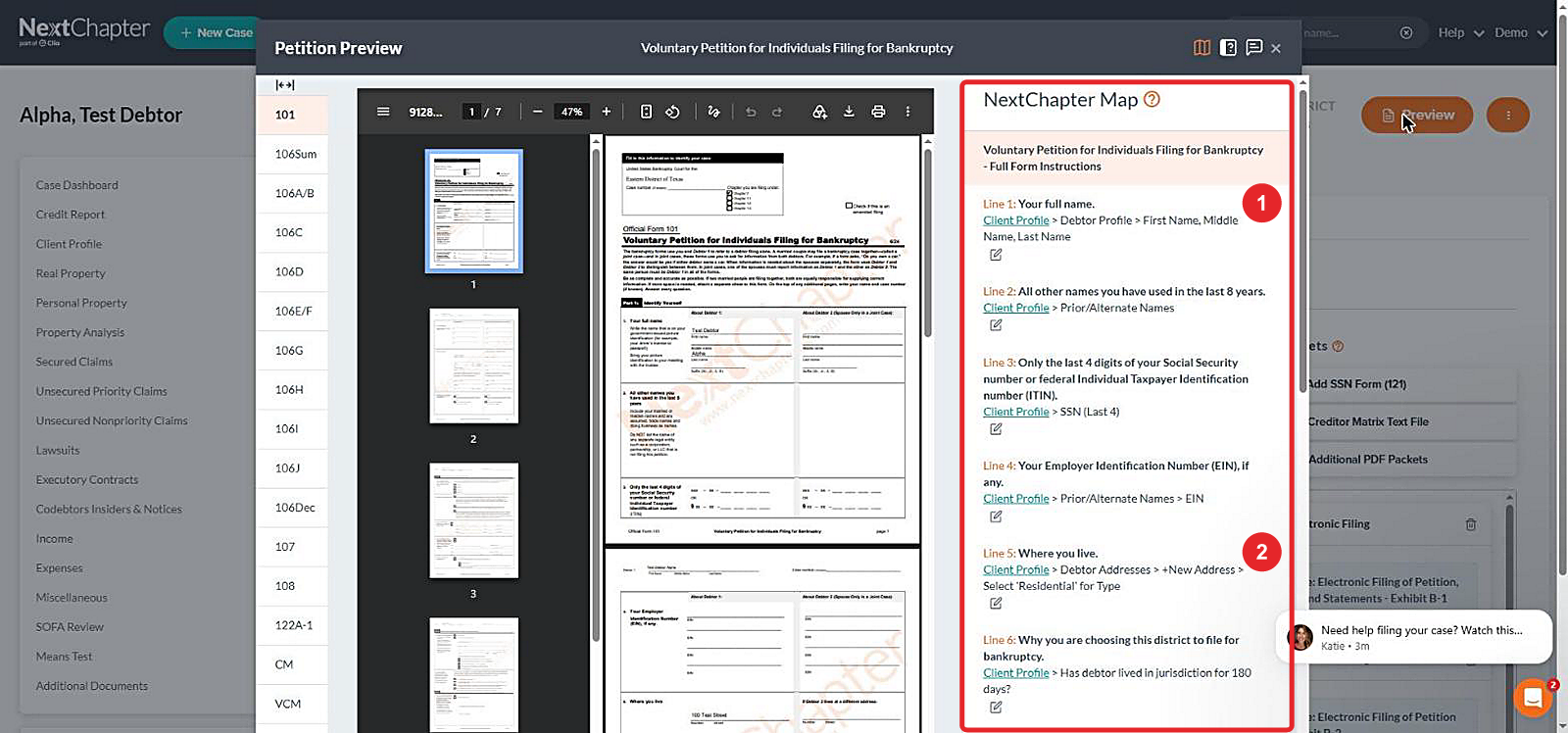
The NextChapter Map is the feature that stands out. The Petition Preview names the screen behind each Form 101 line. Line 1 traces to Client Profile, then Debtor Profile, and Line 5 traces to Debtor Addresses. Each line carries an edit link back to the entry.
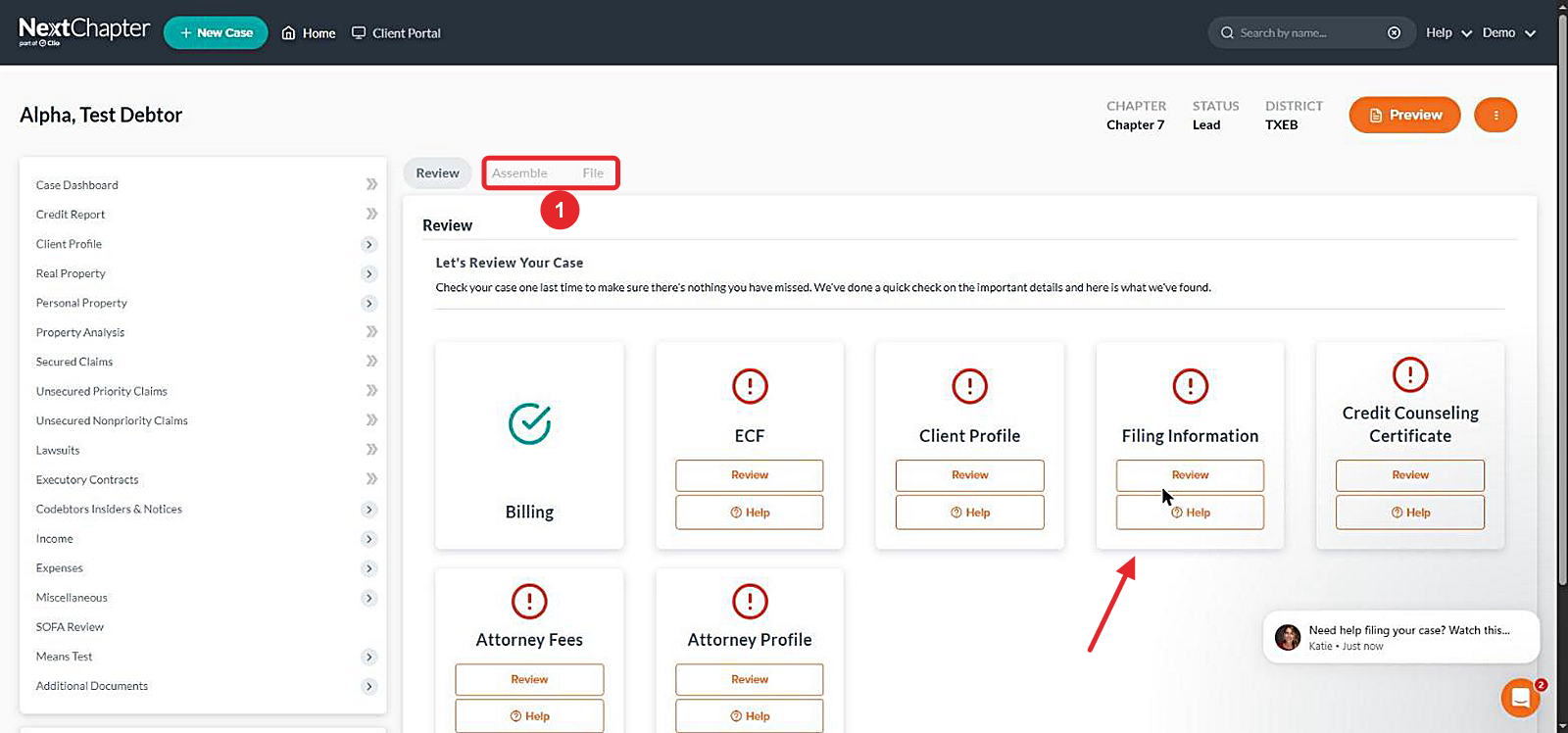
Review & File runs before anything is assembled. Its cards flag ECF, Client Profile, Filing Information, Credit Counseling Certificate, Attorney Fees, and Attorney Profile. The Assemble and File tabs stay inactive until the cards pass.
Who This Review Is For (and Not For)
We wrote this review for you if your firm runs NextChapter or weighs it, and our answers assume a consumer bankruptcy practice.
- Owner-attorneys at boutique consumer bankruptcy firms who run NextChapter or are weighing it
- Operations leads who manage the document chase and the add-on budget
- In-house developers at high-volume firms who need data to move between systems
This review is not for these readers:
- Consumers and DIY filers preparing their own bankruptcy case
- Petition preparers
- Big law firms
- Firms in other practice areas, including business Chapter 11 practices
The FAQs answer whether NextChapter fits you if you file Chapter 7 and Chapter 13 cases at volume.
What Limitations Do Bankruptcy Firms Run Into With NextChapter?
You run into NextChapter's limits around the petition, not in it.
The document checklist is a staff tick list, and the client tools depend on your plan and add-ons. Its links to your other systems are thin.
Seven limitations matter most to your boutique bankruptcy firm:
| Limitation | Who it hurts | Evidence | Workaround |
|---|---|---|---|
| The document checklist is a staff tick list. No control asks the client for a document, and an item has no due date or look-back period. | The pre-filing team chasing pay stubs and bank statements | Our trial finding on the case Docs tab, shown below. | Keep NextChapter and run the chase outside it, through the client portal module or an automation around it. |
| The client tools depend on the plan. NextChapter's pages include MyChapter, NextMessage, and Notices in Pro Plus and Whoa, yet all three stayed locked in our Pro Plus trial. | The owner budgeting the real cost | Our trial finding: the three stayed locked on the case pages, though the plan card in our trial lists them under Pro Plus. | Confirm the inclusion in writing before signing the 12-month contract, and price Doc Creator and the Chapter 13 Package separately. |
| A task has only a name and a due date, and automated reminders are NextMessage texts. | Operations leads who manage follow-ups | Our trial finding: the New Task form held two fields. NextChapter's text message recipes article describes texts tied to event dates, with no email reminders and no approval step. | Use NextMessage, keep a separate task tool, or automate reminders around NextChapter. |
| The Clio sync runs once a day at about 2am EST and covers matters, contacts, tasks, and events. Some synced fields can need manual correction, and no document sync is stated. | Firms that keep Clio as the system of record | NextChapter's Clio integration article, dated September 25, 2026 | Plan for a next-day lag and keep documents in one system. |
| No public API is documented, and the one developer-style route is a Zapier key whose integration the summer 2026 release notes list as coming next. | In-house developers and firms that want data to flow in | Our trial finding: the Zapier settings page and its key warning | Move data by CSV, or automate upstream of the petition software. |
| We found no activity log or audit trail, and a case does not require an attorney to be assigned. | Owner-attorneys supervising staff work | Our trial finding: the Attorney field on Filing Information was optional, and the settings pages held no activity log. | Assign attorneys by firm rule and keep review records outside the tool. |
| Required fields are flagged only after Save, Review cards do not name the missing field, and the case menu holds 20 top-level sections. | New staff learning the tool | Our trial finding. Software Advice reviewers describe "20 different pages to find general info" and a flow that "takes some getting used to". | Use the Help button on each Review card and NextChapter's training videos. |
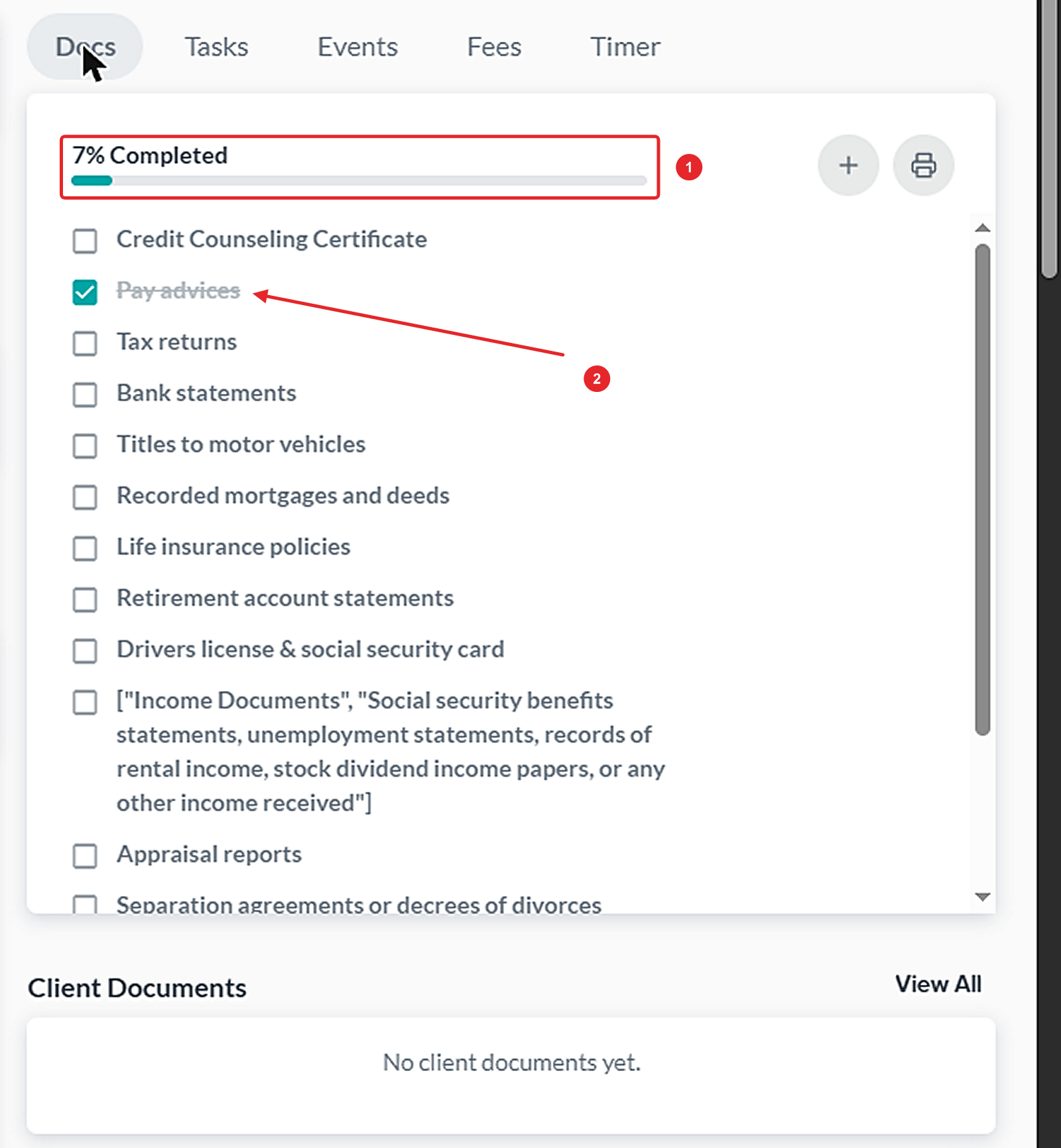
The checklist limit shows on the case Docs tab. The bar moved to 7% completed when we ticked Pay advices, while the Client Documents panel still read "No client documents yet". Two default items also display as raw code.
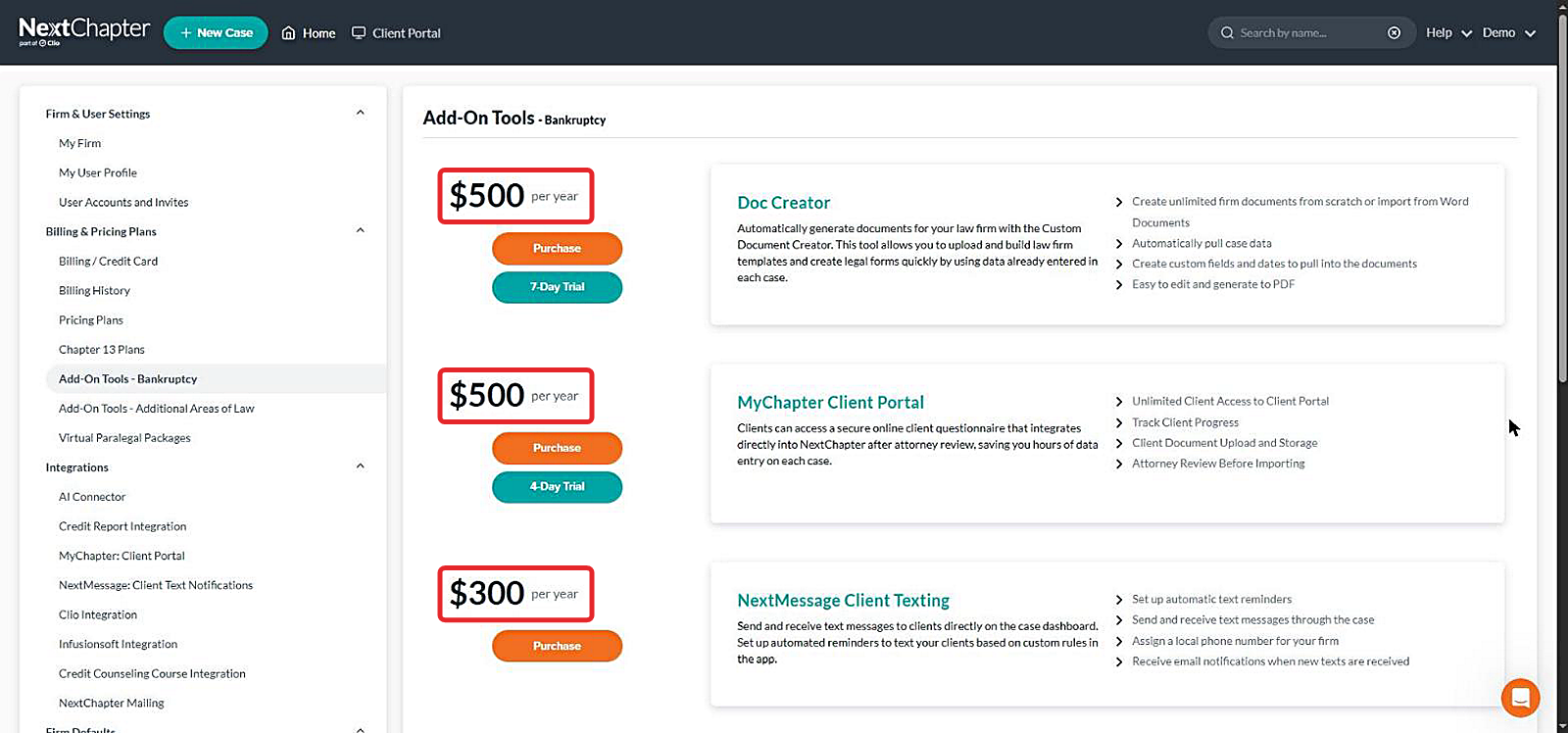
In our Pro Plus trial, the Add-On Tools screen sold the client tools separately, last reviewed October 24, 2026. It priced Doc Creator at $500 a year, MyChapter at $500, and NextMessage at $300.
One default task needs a new label. The task "File post petition counseling course (Form 23)" names a form the U.S. Courts lists as "abrogated effective December 1, 2024". NextChapter's pricing page still lists "B 423" among its supported forms.
The current rule, Fed. R. Bankr. P. 1007(b)(7), asks the debtor to file a certificate of course completion issued by the provider, so have your staff rename the task.
How do we stop retyping client data that's already sitting in our documents?
Someone on your team still types each fact in once. NextChapter then carries that fact into every form, so nobody retypes it schedule by schedule. The entry comes from your staff, the client's MyChapter answers, a credit report, or a CSV. For pay stubs, it comes from the AI Connector.
Where Is NextChapter Strong for a Bankruptcy Firm?
NextChapter is strong inside the petition: your staff type a fact once, see where it lands, and catch gaps before filing.
- Fewer retyping errors. Your staff check each fact once instead of schedule by schedule. Capterra reviewers rate NextChapter 4.8 from 138 reviews (read October 24, 2026), and one writes that it "populates the necessary fields on the bankruptcy petition."
- Faster corrections. Your staff jump straight to the screen behind a wrong-looking figure instead of hunting through the case menu.
- Quicker onboarding. Each case opens with the 14-item checklist and 13 default tasks preloaded, so your staff start work without setting them up.
- Quicker repeat creditors. A saved common creditor comes up by name on the next case, so your staff stop retyping its address. A Capterra reviewer notes you can "save common creditors to avoid retyping for each case."
- Reachable support. Reviewers rate customer support 4.9 out of 5 on Capterra (read October 24, 2026) and on Software Advice (read October 30, 2026).
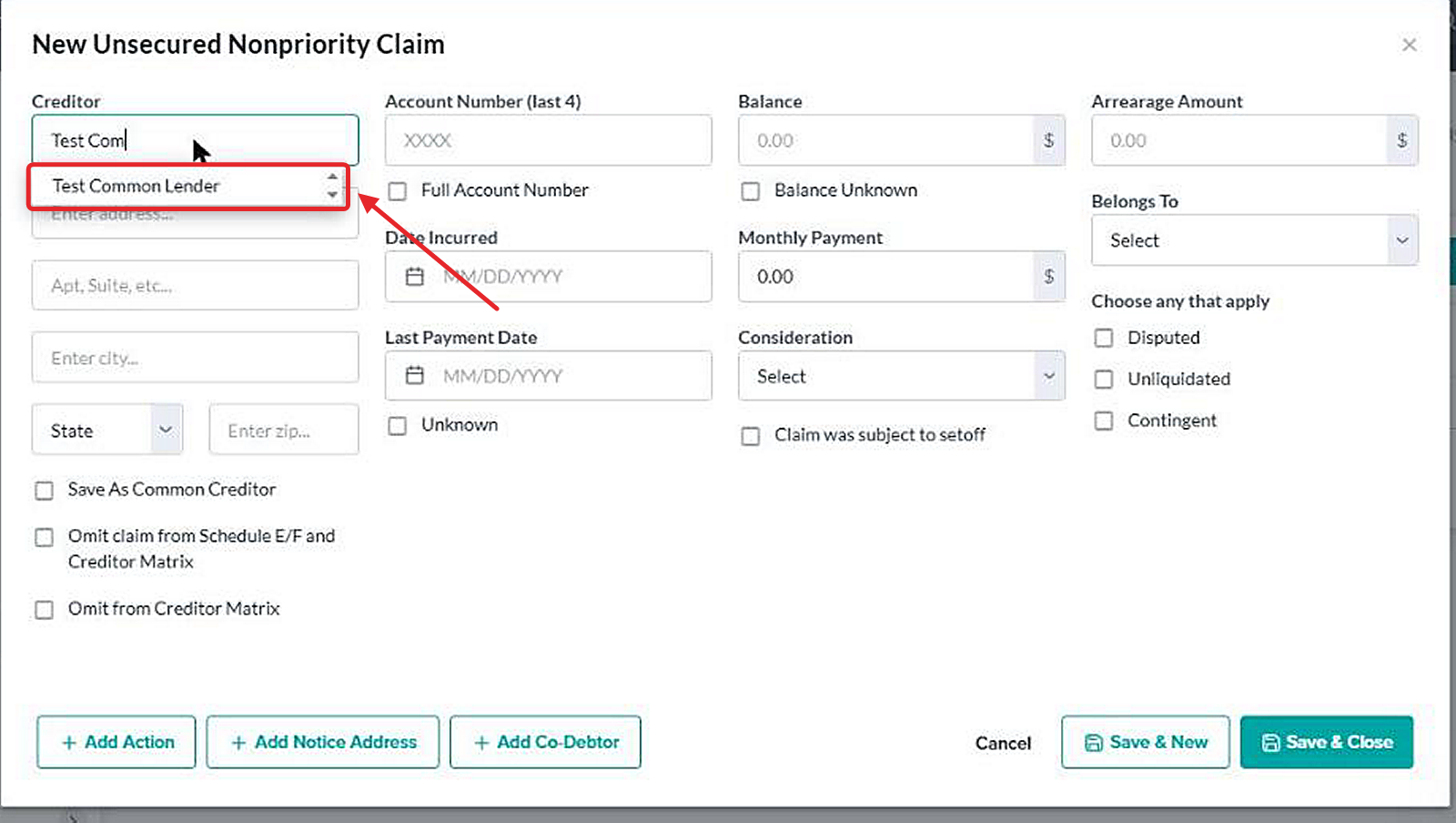
The common-creditor suggestion appears as soon as your staff type the first letters of a saved creditor's name. In our trial, we typed "Test Com" on a Chapter 7 case, and NextChapter offered the "Test Common Lender" saved on a Chapter 13 case.
NextChapter Pricing: What Do Its Plans and Add-Ons Cost a Bankruptcy Firm (October 2026)?
NextChapter's plans cost $89 for Pro Basic, $129 for Pro Plus, and $179 for Whoa, per user, per month, on a 12-month contract.
Those are $979, $1,399, and $1,949 per user per year. We last reviewed the prices on October 30, 2026, on NextChapter's pricing page.
The plans and add-ons price as follows:
| Plan or add-on | Basis | Price | Last reviewed | Notes |
|---|---|---|---|---|
| Pro Basic | Per user | $89 per month, or $979 per year | October 30, 2026 | Chapter 7, 12, and 13 filings, ECF integration, unlimited client storage, case management tools, local forms, and Clio integration. The pricing page also lists MyChapter and NextMessage here, while NextChapter's plans article lists them under Pro Plus. |
| Pro Plus | Per user | $129 per month, or $1,399 per year | October 30, 2026 | Adds MyChapter, NextMessage, Notices, the attorney fee report, calendar integration, the quick means test tool, the hearing scheduler, and custom fields. |
| Whoa | Per user | $179 per month, or $1,949 per year | October 30, 2026 | Adds business Chapter 11 and Subchapter V filing tools to everything in Pro Plus. |
| MyChapter client portal | Per firm | Included in Pro Plus and Whoa. Sold to Pro Basic as an add-on. | October 30, 2026 | The MyChapter sign-up article is dated September 23, 2026. The Add-On Tools screen in our trial priced it at $500 a year on October 24, 2026. |
| NextMessage client texting | Per firm | Included in Pro Plus and Whoa. $300 per year on the trial's Add-On Tools screen. | October 24, 2026 | We saw it in our trial. |
| Notices (PACER notices) | Per firm | Included in Pro Plus and Whoa. $200 per year on the trial's Add-On Tools screen. | October 24, 2026 | We saw it locked in our trial. |
| Doc Creator | Per firm | $500 per year on the trial's Add-On Tools screen. | October 24, 2026 | The pricing page lists no standalone price. |
| Chapter 13 Package | Per district | $250 per year, auto-renewing | October 30, 2026 | The plans article calls it an optional add-on, and the Chapter 13 plan pricing article prices it per district. On the pricing page, an "Included in Pro Plus and Whoa" label follows its card. |
| Credit reports | Per pull | Individual: $18.50 NextChapter plus $22.00 Xactus. Joint: $23.75 plus $41.75. | October 30, 2026 | Prices effective January 6, 2026, and Xactus adds a 3.5% fee and state taxes. Failed pulls retry at no cost, per the credit report pricing article. |
| Credit report inspection | One time | $75, or $150 for residential offices | October 30, 2026 | The onsite visit article and the residential office article state the fees. |
| Shell Case Import | Per 100 cases | $50 on Pro Basic. The first 100 cases are free on Pro Plus and Whoa. | October 30, 2026 | The Shell Case Import article lists the terms. |
| Concierge setup | One time | $200 | October 24, 2026 | We saw it on the Add-On Tools screen in our trial. |
| Virtual Paralegal | Per year | Packages start at $1,500. | October 30, 2026 | We saw 5, 10, and 15 case packages at $1,500, $2,850, and $4,050 in our trial on October 24, 2026. |
Every plan requires a 12-month contract, whether billed monthly or annually. NextChapter's FAQ page says it offers no refunds or discounts, and the pricing page offers a 7-day Pro Plus trial with no payment required.
NextChapter's 2026 plans article states there is no per-case option and that every plan is a 12-month contract.
The Pricing Plans screen in our trial shows the Pro Plus card beside the Pro Basic price of $89 per user, per month. We last reviewed that screen on October 24, 2026.
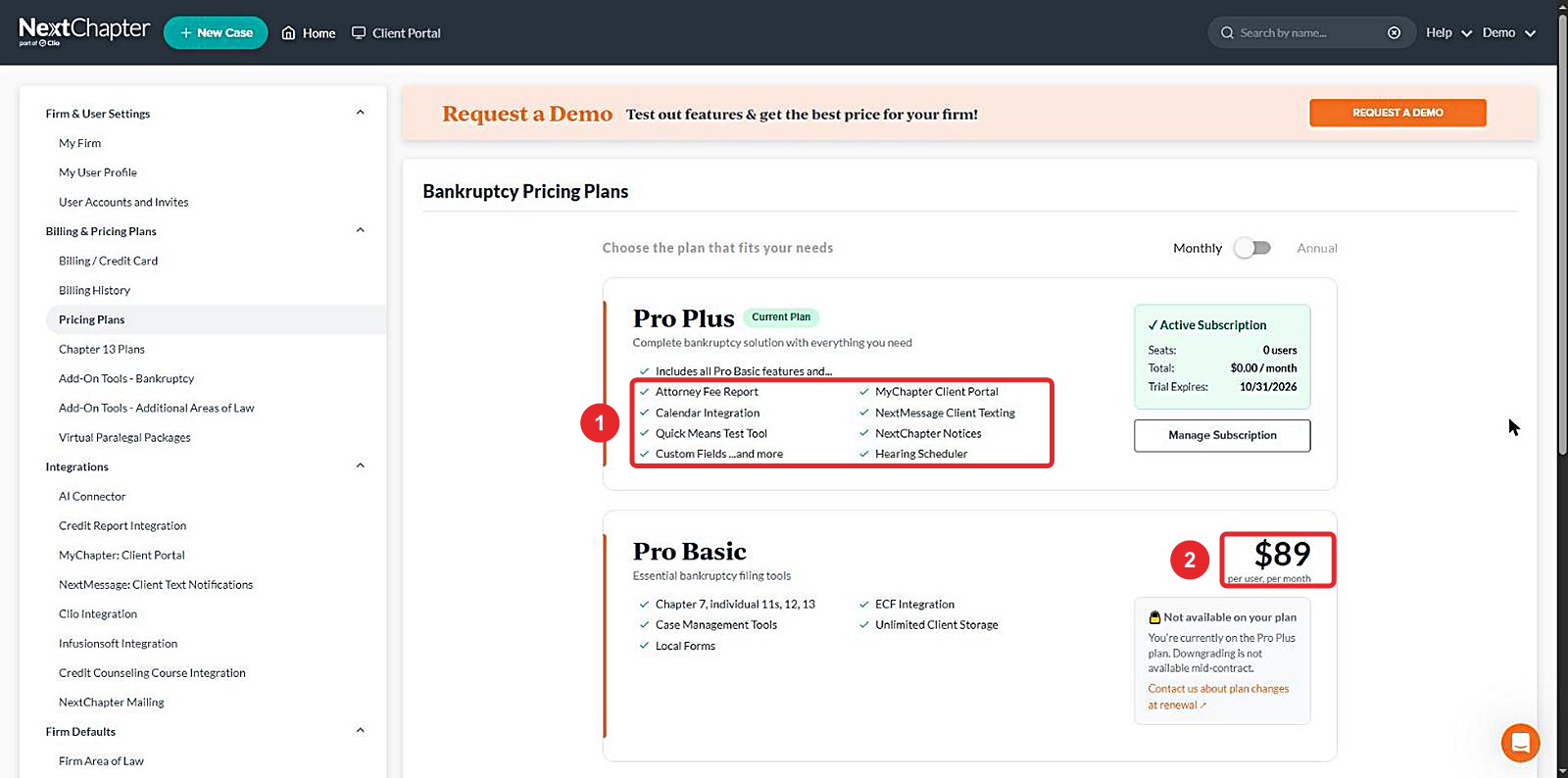
Seats scale your cost. At the prices we last reviewed on October 30, 2026, each Pro Plus user is $1,399 a year, so three users cost $4,197. The price fits you if the petition is your bottleneck. However, it grows when Doc Creator, the Chapter 13 Package, and credit reports join your bill.
How Does NextChapter Connect to the Rest of Your Stack?
NextChapter connects to Clio, Xactus credit reports, an Infusionsoft lead import, and a credit counseling course provider. It moves claims and pay advices by CSV and documents no public API.
The connections break down as follows:
- Clio syncs matters, contacts, tasks, and events once a day
- A Zapier settings page issues an API key for a connection the release notes still list as coming next
- Infusionsoft imports leads tagged by chapter
- Xactus pulls tri-merge credit reports into the claims sections after setup
- CSV files move claims and pay advices in and out of a case
- Calendar sync, Key Dynamics mailing, Usio payments, and DebtorCC credit counseling are listed on NextChapter's integrations page
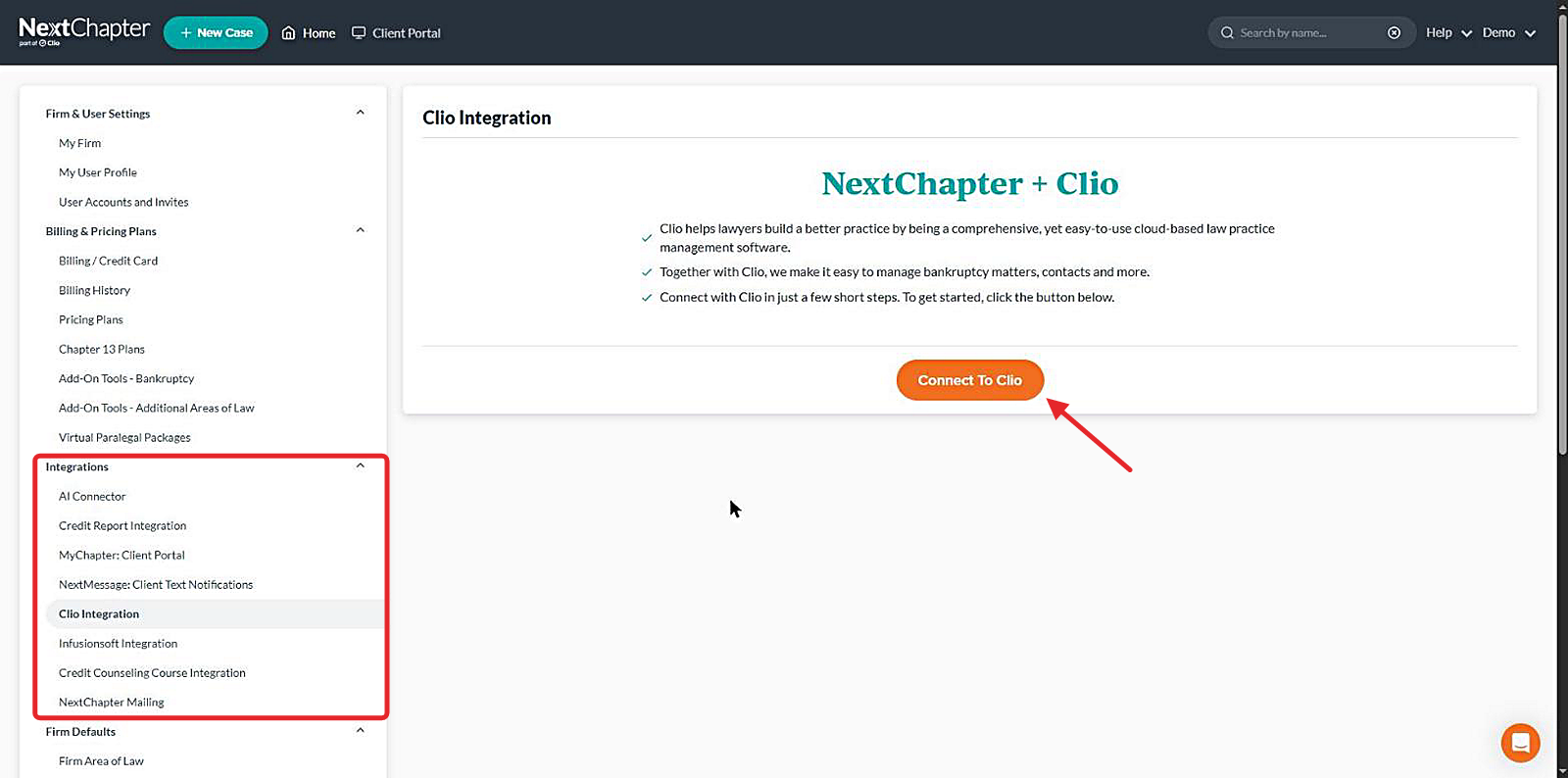
In our trial, the Integrations menu lists each connection, with Clio behind a Connect To Clio button.
Does NextChapter Integrate With Clio?
Yes. NextChapter syncs open Clio bankruptcy matters, contacts, tasks, and events "each day at around 2am EST," and it states no document sync.
Is NextChapter's Clio integration as smooth as they make it out to be?
Not quite, because the sync runs as a daily batch. It is not a live link, and some synced fields can need manual correction afterward. A Clio matter syncs only while it is open and its practice area contains "Bankruptcy". Closed matters are excluded, and the sync creates duplicates unless you link matching cases first.
A case created from Clio takes your primary district and Chapter 7 by default, so have your staff check both. NextChapter's Clio logic article adds three rules. A changed matter name does not sync, closing a matter stops its sync, and deleting a NextChapter case deletes the Clio matter.
The vendor calls the result a two-way sync, and its help article dated September 25, 2026 sets the sync at once a day.
Does NextChapter Have an API?
No. NextChapter documents no public API for its bankruptcy software, as of October 30, 2026.
Searches for "nextchapter api" return an unrelated product-information company's API documentation, which is a different business.
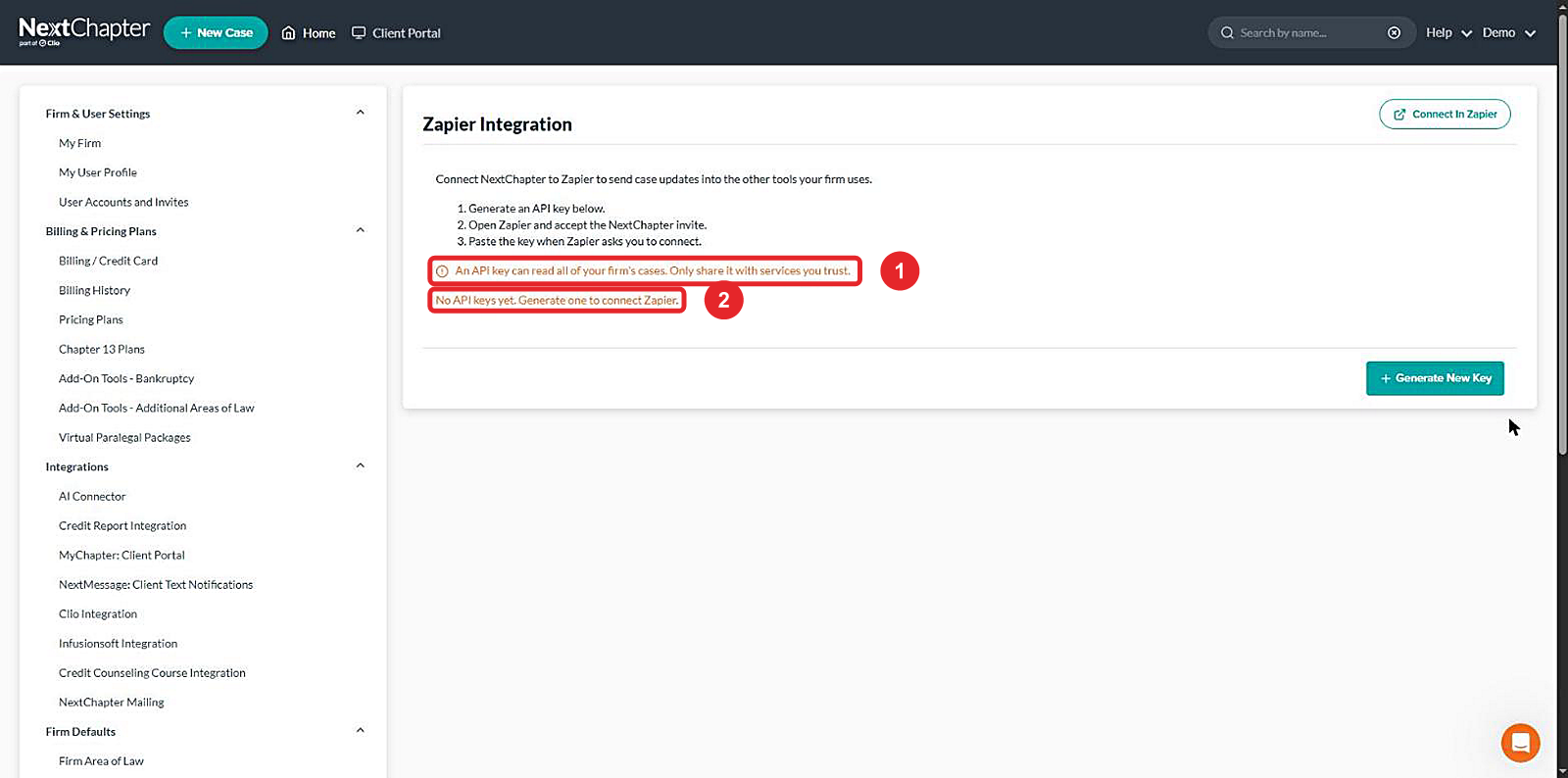
The Zapier settings page issues a key that "can read all of your firm's cases". NextChapter's release notes list the Zapier integration as coming next. The AI Connector exists for pay-stub import only.
Work around the petition software if you need data to flow in without an API. See how that works for petition software without an open API.
What AI Features and Attorney Review Controls Does NextChapter Have?
NextChapter's main AI feature is the AI Connector, which lets your firm's own paid Claude or ChatGPT account read pay stubs into pay advices. Every value is "shown for review before anything is saved".
In our trial, the locked Notices module also says it uses artificial intelligence to schedule hearings to the calendar.
Three controls keep an attorney or staff member in the loop:
- The AI Connector imports new pay advices only, and the assistant cannot edit, overwrite, or delete saved data, per NextChapter's AI for Pay Advices article
- The Review & File gate keeps Assemble and File inactive until the case passes its checks
- MyChapter lets your staff review and edit the client's answers before importing them, per NextChapter's documentation
The pay stubs go to your firm's own AI account, not to NextChapter. NextChapter's article warns that pay advices contain Social Security numbers and wage detail. So it tells you to review the AI provider's data retention policy and redact anything you do not want transmitted.
Lawyers should "read and understand the Terms of Use, privacy policy, and related contractual terms" of any generative AI tool they use. That duty comes from ABA Formal Opinion 512 (July 29, 2024). For this feature, those are the terms of your firm's own AI account.
We saw the connector page in our trial but did not connect an assistant, so we did not run the import itself.

Who Owns the Data in NextChapter, and How Does a Firm Export It and Leave?
Your firm owns its data: NextChapter's Terms say "we will not lay claim to or hold your data hostage". Export runs per case or through support, and leaving runs on the contract's end date.
Your staff export one case at a time: they open the three dots on a case, choose Export Case Data, and get a zip. NextChapter's Export Case Data article describes those steps. Its FAQ page adds a second route, where support compiles the client files and sends a CSV of the client information.
We also saw Export CSV on the claims list, Export Pay Advices, and Batch Download in client document storage. We ran none of them in our trial.
Leaving takes planning. The plan screen in our trial says downgrading is not available mid-contract, and the Terms issue no refunds for unused periods. The Terms also say you end your account by discontinuing use of the Service.
Clause (j) of the Terms covers unpaid use. It bars using the Service "for the purpose of preparing and then transposing data to other software" without payment. The Terms state two more data rules. NextChapter may use anonymized, aggregate data for benchmarks and statistics, and it excludes Social Security numbers from the data it can access.
Retention periods are not stated in the Terms, which point to a separate retention policy document. The Terms contain no model-training statement and no data processing agreement.
Security facts sit elsewhere. NextChapter's security page describes encryption and daily backups, and it requires two-factor sign-in. It publishes no SOC 2 report or current subprocessor list. Its privacy policy, last updated March 26, 2018, names some third-party services.
A Software Advice reviewer in February 2026 asked for more CSV fields. Expanding CSV import and export "to include more detailed case information fields would be extremely beneficial". We could not check the CSV fields without downloading the import template.
Before you leave, plan the export and the contract end date; the steps for switching bankruptcy petition software cover both.
NextChapter Said It Would Migrate Our Old Data. What Actually Comes Over?
Shell Case Import brings over five fields:
- Debtor contact details
- Debtor type and filing type
- Hearing information
- Case number
- Payment details
It costs $50 per 100 cases on Pro Basic, last reviewed October 30, 2026. The first 100 cases are free on Pro Plus and Whoa.
Concierge setup is a $200 one-time service on the trial's Add-On Tools screen, last reviewed October 24, 2026.
One practitioner reported in an r/Bankruptcy thread in July 2026 that NextChapter's migration offer covered "just contact info, debtor type and hearing info". In comparison, the Shell Case Import article also lists the case number and payment details.
The add-on card in our trial lists Chapters 7, 11, and 13, the full case list, and common creditors. We did not buy the import in our trial.
Should Your Firm Keep NextChapter?
Keep NextChapter when most of your pain sits inside the petition. Look elsewhere when your pain is the client side of the file or a tool that does not talk to the rest of your systems.
Keep NextChapter when:
- You want one place to prepare, review, and e-file Chapter 7 and Chapter 13 petitions
- Your staff value tracing every form line to its source screen
- You already run Clio, and a next-day sync is enough
- You can budget the add-ons you need
Look elsewhere when:
- You need client document requests and reminders built into the base plan, which is the comparison in NextChapter alternatives for bankruptcy firms
- You need an open API
- You need an audit trail of who changed what
Practitioners split on NextChapter. In an April 2026 r/Lawyertalk thread, one commenter wrote "NextChapter but I hate it". Another wrote that the firm is "very happy with it".
Should We Change Our Case Management System or Fix the Workflow Around the Software We Have?
Fix the workflow when the gaps sit around the petition, which is where most of NextChapter's limitations sit. Change the system when the petition work itself is your bottleneck.
Can Your Firm Keep NextChapter and Add an Automation Layer for Petition Prep?
Yes. You keep NextChapter for the petition and add a bankruptcy petition prep automation build around it.
We build it in three layers, in this order:
- The data layer, one source of truth across your tools
- AI agents that read and sort what arrives
- Automated workflows that move each file forward
The layer takes the document chase, intake capture, and first drafts off your staff.
As a result, you handle more cases and increase revenue without adding headcount.
An attorney reviews everything, and the system never files, signs, or decides anything legal. We scope each build after the workflow mapping session, and there are no subscriptions.
One Clean Client Record Before Anything Reaches NextChapter
Our petition software doesn't have an open API. Can we still get our client data organized before it goes in?
Yes, by working upstream of the petition software, which keeps its job. One system of record that you choose holds every client's documents and facts. Your staff stop keeping the same file in email, a shared drive, and the petition software.
The system lives in your firm's own cloud account, and the AI work calls hosted model providers. Read how the automation handles client data for the full data path. The data layer connects to your practice-management, CRM, and storage tools through each vendor's API, and it works around any tool that offers none.
AI That Reads and Names Every Client Upload
AI agents read every incoming client upload, identify the document, name it to your firm's own convention, and file it.
Anything the system is unsure about, an unreadable file, or an unknown type goes to a person in a Review queue. Every rename can be reverted. The agents follow instructions you wrote.
Why Do We Still Chase Clients for Pay Stubs and Bank Statements When the Software Has a Checklist?
You still chase clients because NextChapter's checklist is a staff tick list with no client request, so the chase has to run outside it.
The chase does five things:
- Guides each client through upload against a matter-specific checklist
- Follows up by text and email until each item arrives
- Names each upload to your firm's own convention
- Flags missing, wrong, unreadable, and out-of-date documents with an AI first pass
- Lets your staff change the requirements, wording, timing, and frequency without a developer
Where Your Attorney Reviews
Your staff review each document set before your attorney does, and an attorney reviews everything.
Nothing goes to a court or trustee from the system. A human gate holds anything uncertain, and a propose-only pilot comes before any automatic action.
The same layer runs across intake, the document chase, and first drafts. See how automation for bankruptcy law firms covers the whole workflow.
FAQs
Is NextChapter Worth It for a Small Bankruptcy Firm Now That It Bills Per User, Per Month, With a One-Year Contract?
Yes, NextChapter is worth it for your small firm when the petition is your bottleneck and the add-ons you need fit your budget. Each Pro Plus user costs $1,399 a year on a 12-month contract, at prices we last reviewed October 30, 2026. An r/Lawyertalk thread from September 2026 records one practitioner unhappy with repeated rate changes.
How Much Does Next Chapter Cost, and What Does Its Pricing Include?
NextChapter costs $89, $129, or $179 per user per month on a 12-month contract, last reviewed October 30, 2026. Pro Plus and Whoa include the client portal, texting, and notices, while Doc Creator, the Chapter 13 Package, and credit reports cost extra.
I Need a Client Portal. Does NextChapter Have One?
Yes, NextChapter's client portal is MyChapter. NextChapter's documentation says Pro Plus and Whoa include it, and Pro Basic can buy it as an add-on. The Add-On Tools screen in our trial priced that add-on at $500 a year, last reviewed October 24, 2026. It stayed locked in our Pro Plus trial, and NextChapter's documentation says your staff review the client's answers before importing them.
Does NextChapter Pull Credit Reports Into the Schedules?
Yes, through Xactus once your firm's application and the on-site inspection are done. NextChapter's documentation says creditors import into the claims sections, with an option for Schedules D and E/F, and each pull is billed. We stopped our trial before setup, so we did not run the import.
How Good Is NextChapter's Customer Support, and What Hours Does Next Chapter Support Cover?
NextChapter's customer support rates 4.9 out of 5 with reviewers on Capterra (read October 24, 2026) and Software Advice (read October 30, 2026). Its support hours article lists weekday chat and email from 8:30 AM to 7:30 PM EST. The same article says standard support covers two chats or calls a month. Its FAQ page lists standard support from 9 AM to 5 PM ET.
Is NextChapter a Good Fit for a Firm Filing a Lot of Chapter 7s and 13s?
Yes, if you prepare and file at volume: the one-entry flow, common creditors, and PDF packets suit repeat Chapter 7 and Chapter 13 filings. Your client document chase still needs the MyChapter module or a process around it.
What Are the Alternatives to NextChapter?
The alternatives to NextChapter are other bankruptcy petition tools, such as Best Case and Jubilee, which NextChapter's own competitor comparison page sets itself against. For your boutique firm, the choice turns on client document requests, API access, and price.
What Is the Next Step for a Firm That Keeps NextChapter?
Your next step is to keep NextChapter for the petition and automate the client chase, the reminders, and the re-keying around it. Those jobs sit outside the petition, where NextChapter leaves them to your staff or add-ons.
In the workflow mapping session, we map your slowest hand-offs around NextChapter. Start with Get My Free Workflow Map.
Free. The map is yours, even if you never hire us.