Best Case by Stretto is a strong petition engine for your bankruptcy firm if you file Chapter 7 and Chapter 13 at volume. It scores 3.4 out of 5, with full marks for practice depth. However, it connects to no CRM or practice-management system, and its AI document tool costs extra. Plan for that gap before you commit if your intake lives in a CRM.
We worked through Best Case Cloud's free trial on October 24, 2026, with synthetic debtors. You get our scorecard, our trial findings, current pricing, and the license terms.
Aretech builds automation that works around the software it reviews; here is how we score software.
TL;DR
- Best Case fits your firm if you file Chapter 7 and Chapter 13 at volume: it scored 3.4 out of 5 on our rubric.
- Its decisive strength is practice depth, the only 5 on its scorecard, with district plan forms and exemption citations built in.
- It connects to no CRM or practice-management system, which breaks it for you if your intake lives in a CRM.
- Keep Best Case for the petition, and plan intake and the document chase around it before you renew.
Best Case Bankruptcy Software Scorecard
Best Case scores 3.4 out of 5 overall on our nine-dimension rubric for software.
| Dimension | Weight | Score (1 to 5) | Basis |
|---|---|---|---|
| Core job performance | 20% | 4 | Client data carried into Form 101, and a paycheck fed the means test. The Chapter 13 plan screen opened with its duration, trustee fee, and scenario controls. Schedule I stayed at zero, creditors are keyed one at a time, and no error check showed outside filing. |
| Interoperability with your stack | 18% | 2 | No CRM, practice-management, or storage connection appears in any menu, and Best Case documents no public API. Imports come only from Stretto's own services. |
| Ease of use and setup | 12% | 4 | We reached every area in one to four clicks without documentation. A trial account cannot start a case until an attorney user exists. |
| Practice-specific depth | 10% | 5 | Separate Chapter 7 and Chapter 13 form sets, district plan forms, state exemption statutes with citations, and a default checklist with bankruptcy look-back periods. |
| Attorney review and AI controls | 10% | 3 | An attorney is required on every case, and client-submitted documents wait for review by default. The portal invite is pre-checked, we found no activity log, and no administrator control is stated for the AI tool. |
| Pricing and cost structure | 10% | 3 | Cloud is $99 per user per month (last reviewed October 27, 2026) and Document Flow $59 per case (last reviewed October 29, 2026). Desktop shows two price sets on one page, Advanced Integrations carry no price, and fees can change at renewal. |
| Data ownership and portability | 8% | 3 | Your firm owns its data, and Best Case holds a perpetual license to use it. Export runs for 365 days after the term as static data, and a lapsed desktop license drops to read-only. |
| Support and reliability | 7% | 4 | Live training, tutorials, and remote support sit inside the product, every save worked, and release notes run through October 29, 2026. Pages took 6 to 8 seconds to load, and support hours are not stated. |
| Security and Opinion 512 posture | 5% | 3 | Cloud logins use multi-factor authentication, and both agreements promise commercially reasonable security. No independent attestation is named, and no data path is documented for Document Flow. |
How Does Best Case Bankruptcy Software Score for a Bankruptcy Firm?
Verdict: Best Case is the right petition tool if your firm files at volume, and everything before the petition needs a plan around it.
We ran Best Case Cloud's free trial on October 24, 2026, with synthetic debtors and the vendor's sample cases. We built new Chapter 7 and Chapter 13 cases and worked the intake, means test, exemptions, letter templates, and filing hub.
We read Best Case's documentation only after the AI search and the error check failed. Our facts on locked modules come from Best Case's own pages, and we last reviewed prices on October 27 and 29, 2026.
What Does Best Case Do for a Bankruptcy Firm?
Best Case by Stretto is petition preparation and e-filing software for consumer bankruptcy firms, sold as a Windows desktop program and a browser-based cloud product.
Your team enters the debtor's data in Best Case to prepare the petition, schedules, means test, and district plan forms. Your team then files through the court's CM/ECF system.
- Forms and schedules: the petition forms, schedules, and statement of financial affairs for each chapter, on the 2025-04 forms set in the trial.
- Means test: Form 122A for Chapter 7 and Form 122C for Chapter 13, computed from the income entries.
- Chapter 13 plan screen: plan duration, trustee fee, and a scenarios control, beside the district's plan form.
- Exemption picker: exemption laws chosen by property, with the statute citation in view.
- Intake questionnaire and client portal: your client answers questions and exchanges documents through the portal.
- Document checklists and letter templates: request lists with look-back periods, and merge-field letters.
- ECF Manager: one place to prepare petitions, amendments, motions, notices, and fees for filing.
- Court notices and calendar sync: court notices land in a Court Notices inbox, and a calendar sync control sits in settings.
- Credit reports and courses: credit counseling and debtor education courses and credit reports, ordered through Stretto Due Diligence Solutions.
- Chapter coverage: Chapters 7, 9, 11, 12, and 13 on both editions and Chapter 15 on desktop, per Best Case's comparison guide. The cloud trial's chapter list offered 7, 11, 12, and 13.
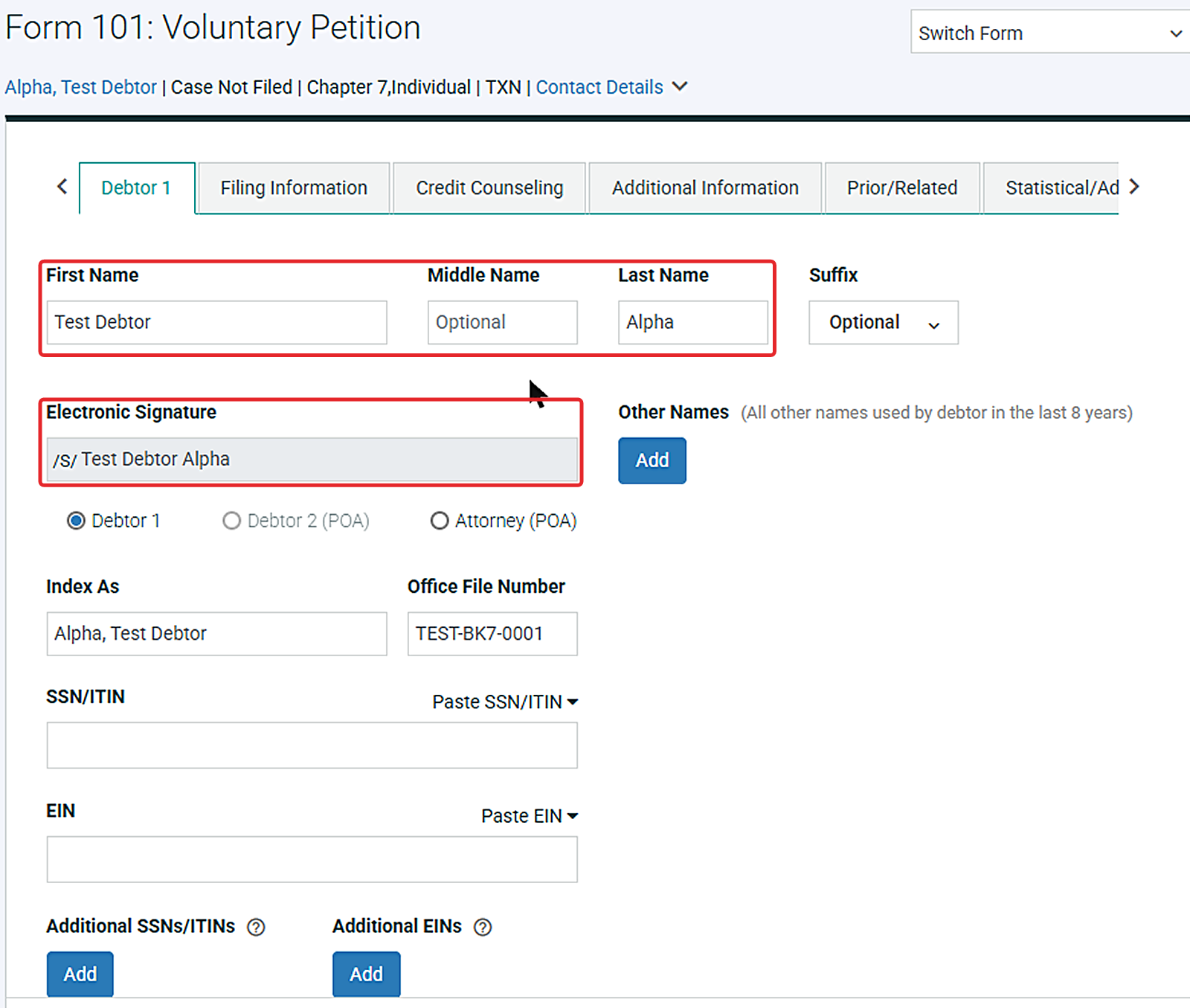
In our trial, the debtor details we typed once on the new-client form carried into Form 101. The name fields and the electronic signature field opened filled. We built a Chapter 7 case in about 28 actions and 9 minutes, once the account had the attorney user that every case requires.
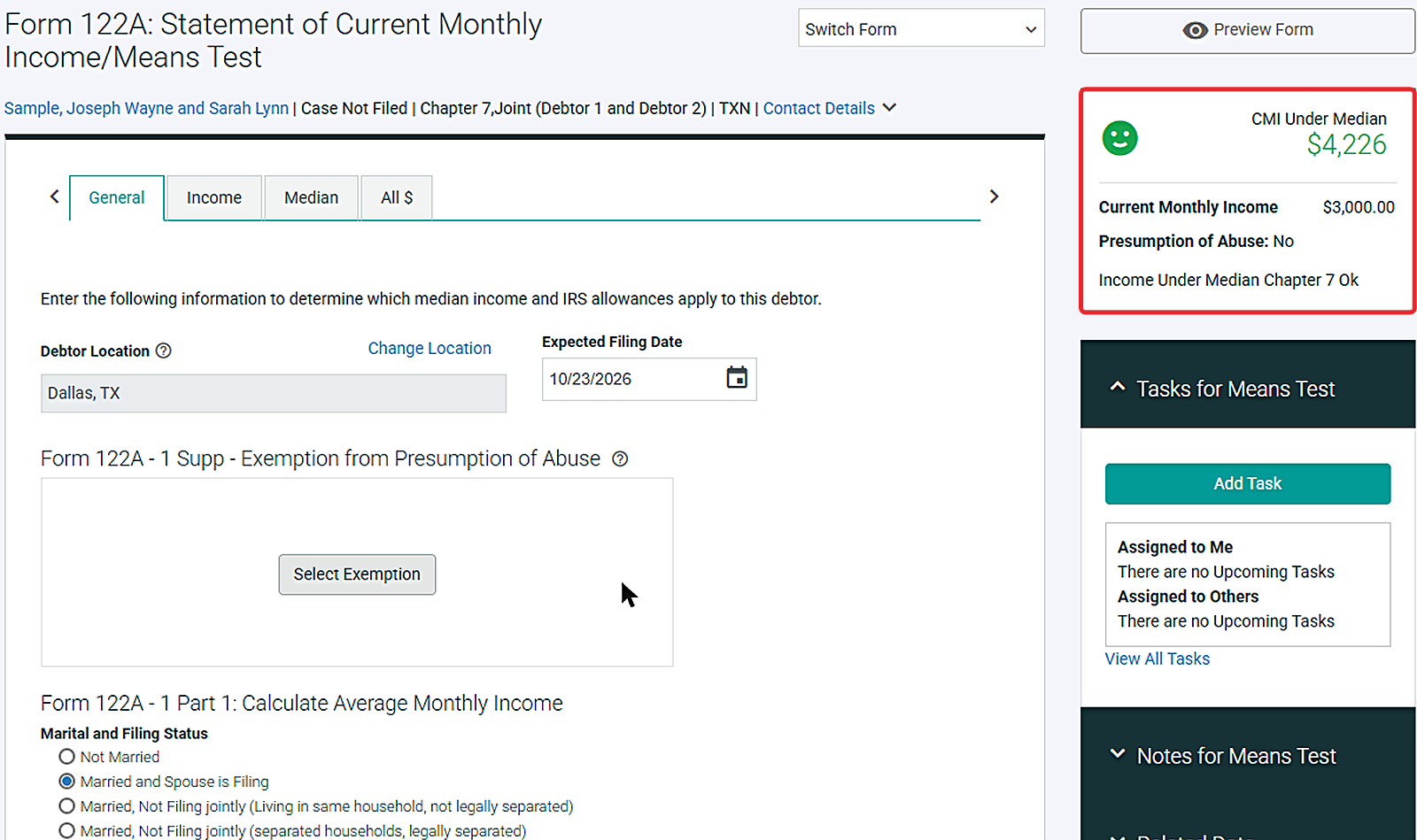
On the vendor's sample Chapter 7 case, we entered one synthetic paycheck with its identical-paycheck count, and it filled Form 122A. It showed current monthly income of 3,000 against a median of 4,226, both in dollars, and no presumption of abuse. Schedule I takes its income only from the paycheck screen, and it still showed zero in that session.
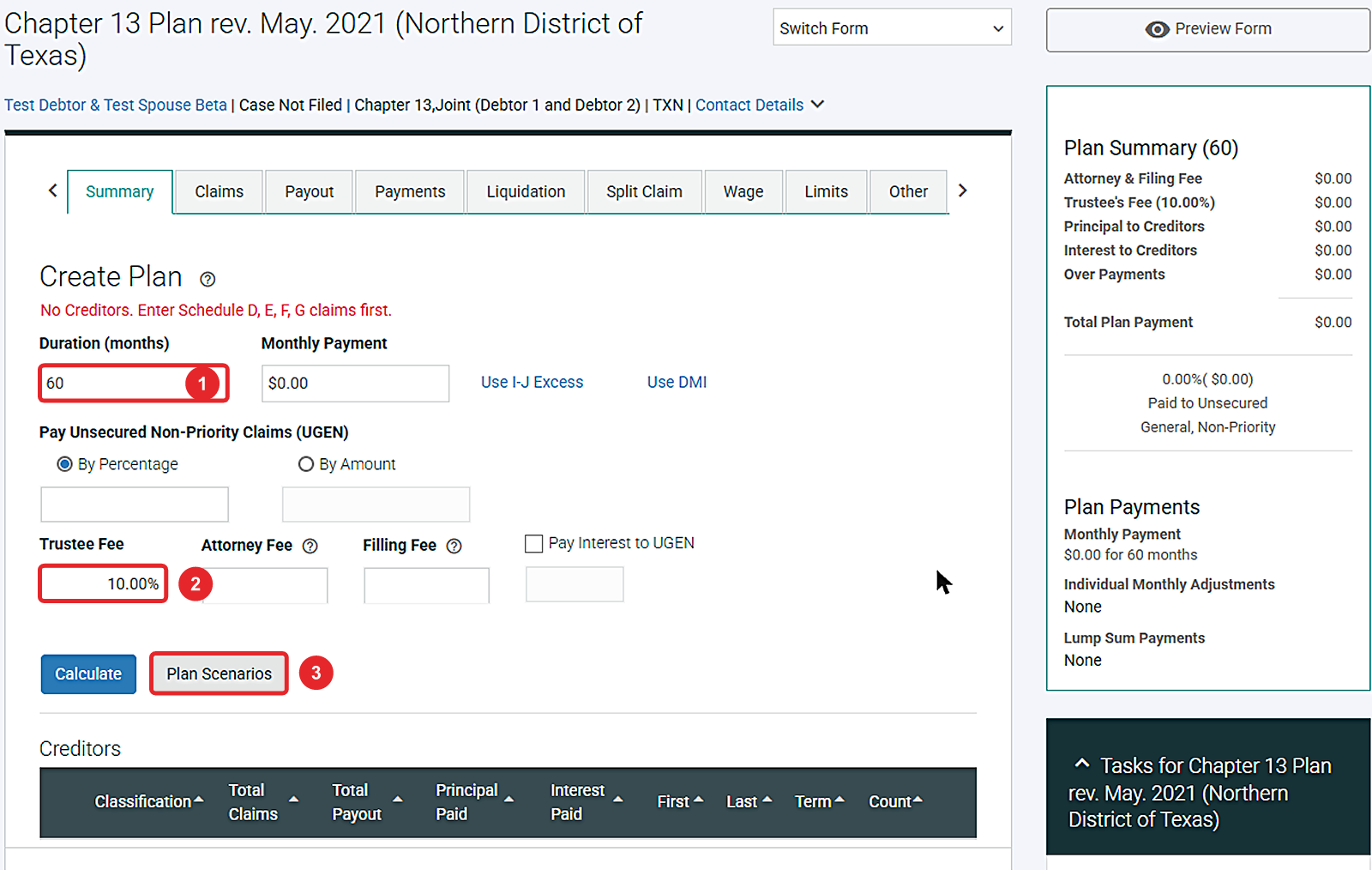
The Chapter 13 plan screen opens on a 60-month duration, a 10.00% trustee fee, and a Plan Scenarios button. It asks for the Schedule D, E, F, and G claims before it calculates, so we saw the controls, not a calculated plan. Compared to Chapter 7, the forms list swaps Form 122A for Form 122C and adds the district's plan form.
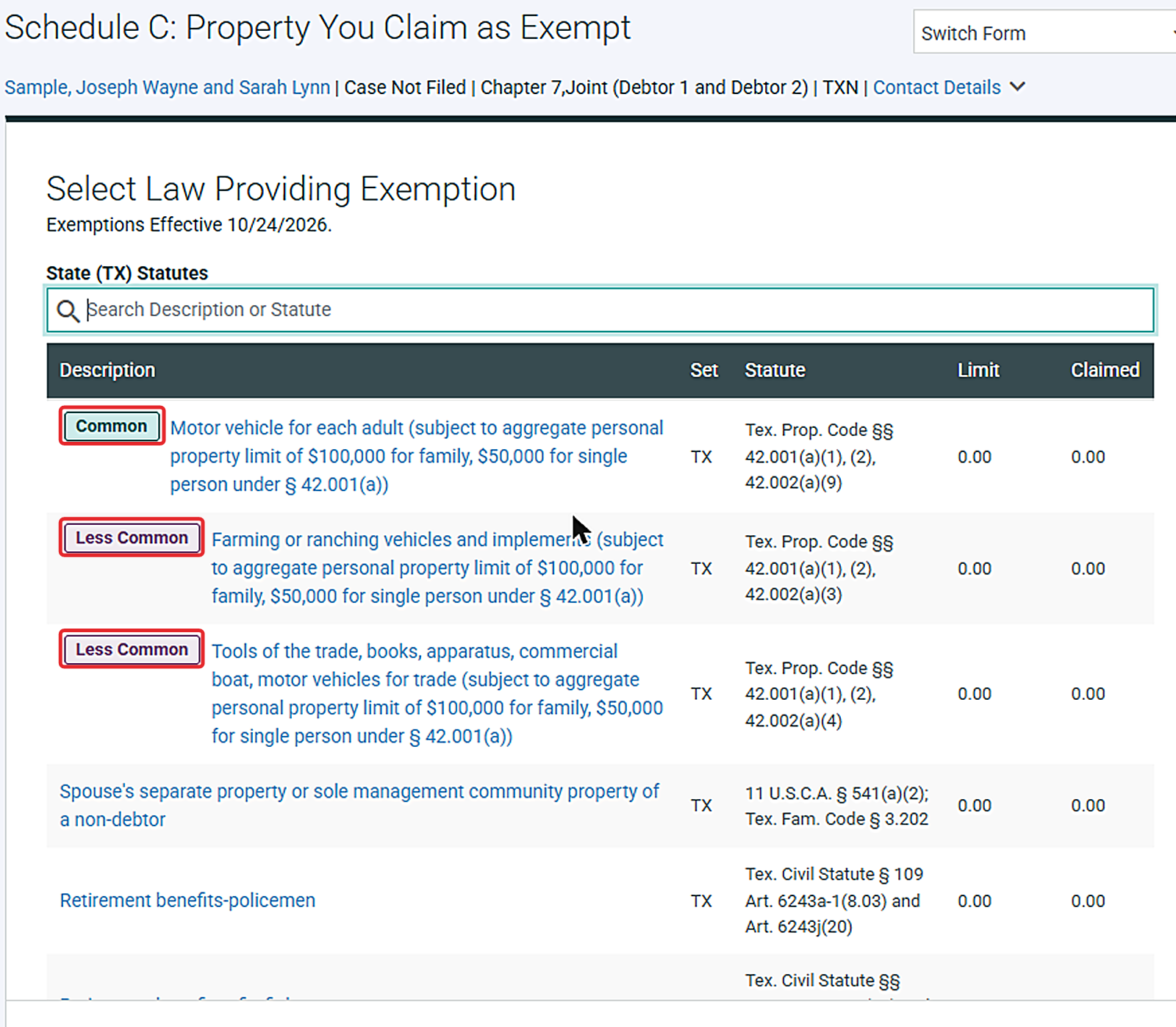
Schedule C asks for a property first, then the exemption law that covers it. Each state statute shows its citation, and some carry a Common or Less Common tag. Vehicle values come from links to Edmunds, Kelley Blue Book, and J.D. Power, so Best Case shows no value itself.
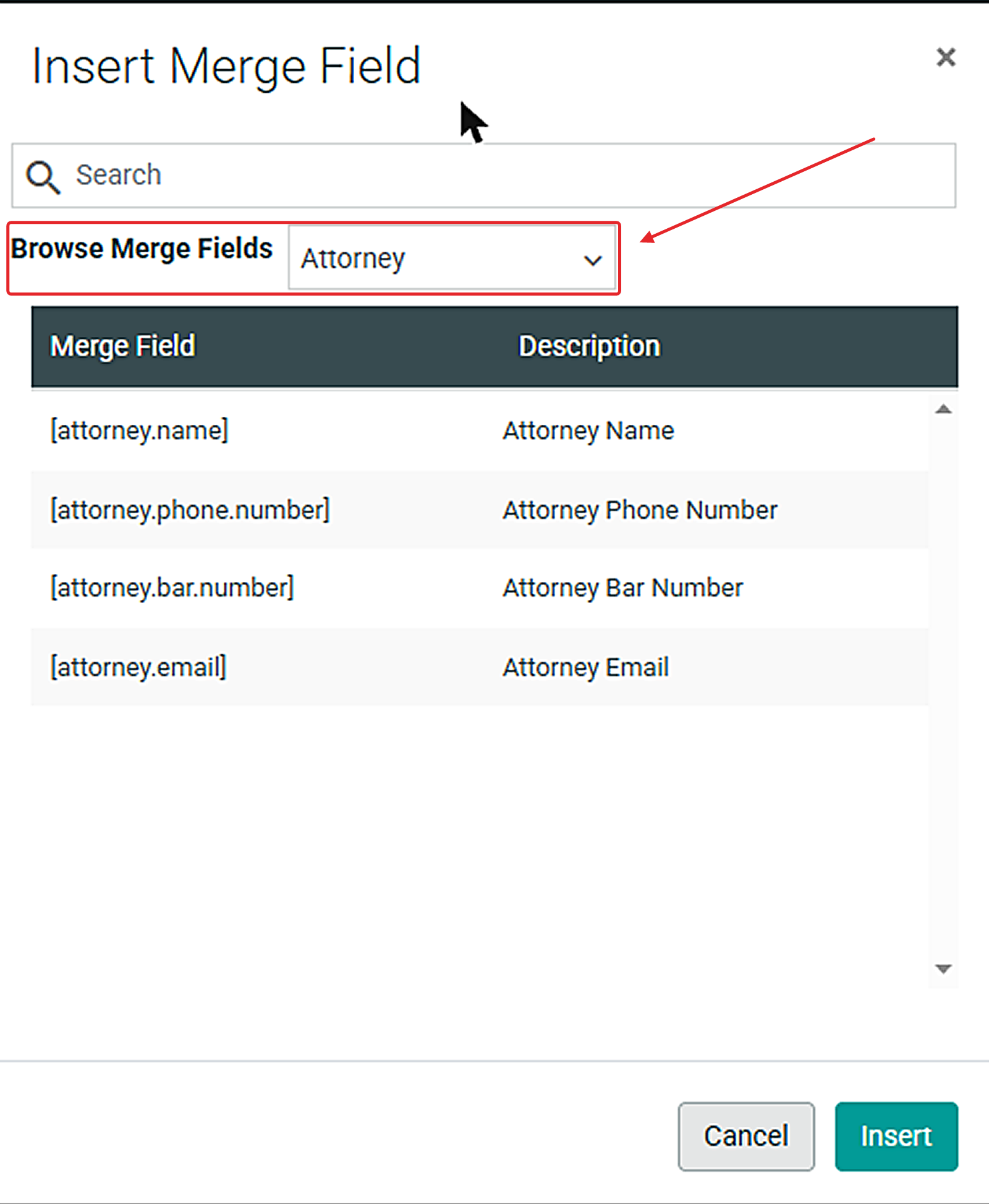
You build firm letters in an editor inside the browser. Its merge-field picker offers 15 categories, including Attorney, Trustee, Judge, and Fee Disclosure, and the picker is an unlabeled toolbar icon.
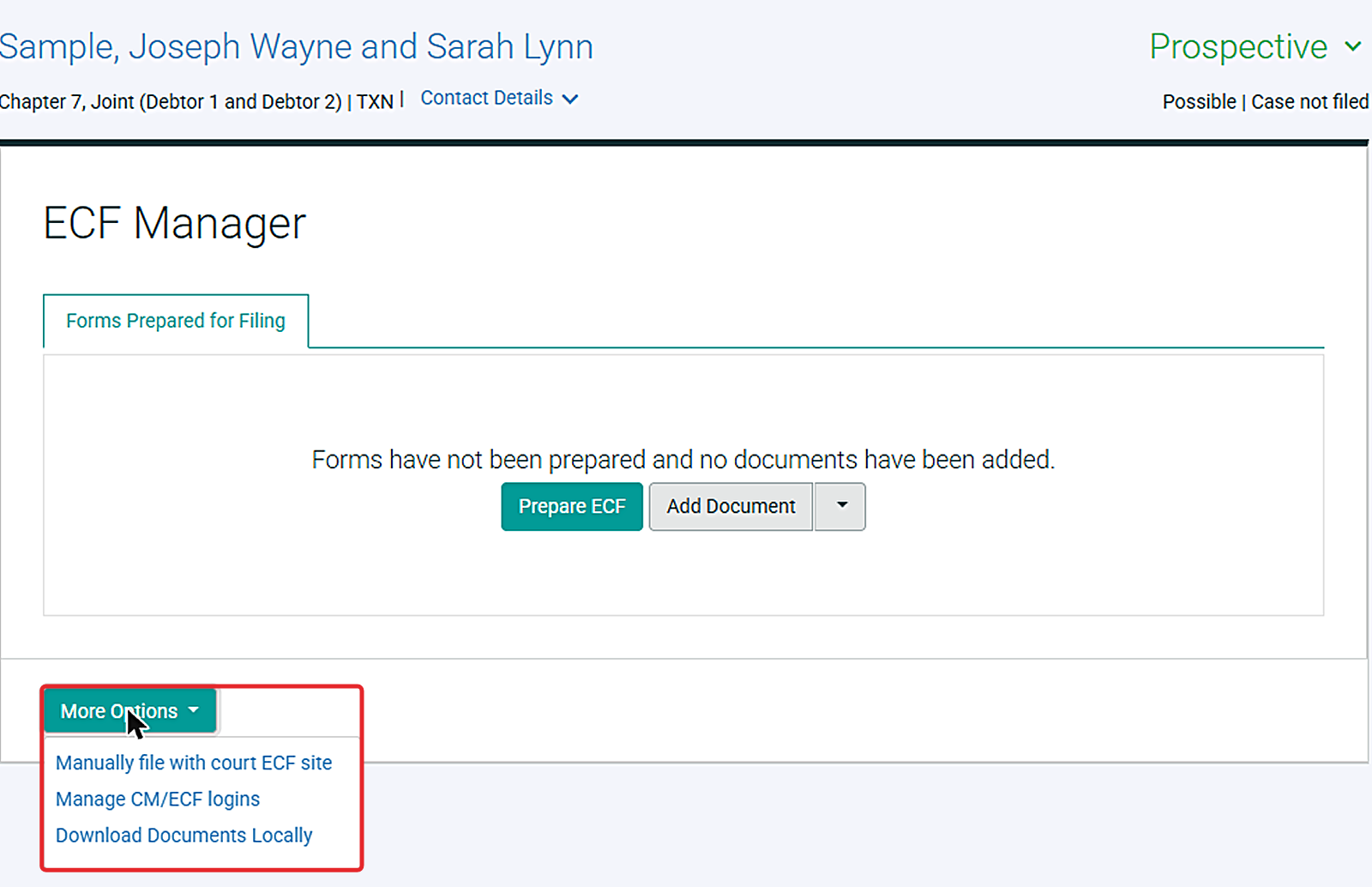
Filing runs through ECF Manager. Its More Options menu offers manual filing on the court's site, CM/ECF login management, and a local download of the documents. CM/ECF logins are a paid feature in the trial, so we stopped before any filing.
Our trial account locked court notices, CM/ECF logins, and credit report ordering. So the next four paragraphs report what Best Case's and Stretto's own pages say, not what we saw in the trial.
Court Notices identifies, parses, and saves your firm's notices from CM/ECF, per Best Case's Why Best Case page. OneTouch navigates the court's website and uploads the documents, per Best Case's cloud platform page.
OneTouch also automates post-petition Form 423 and Chapter 13 plan filing, per Stretto's Best Case page. Your attorneys can also submit documents directly to Chapter 7 trustees, per the same page.
Three-bureau liability data imports into schedules D, E, F, and G, per Best Case's Due Diligence Reports page. A one-click tag maps every imported creditor to Schedule F, per Best Case's release notes.
Best Case desktop's current release is Version 29. It adds a firm-wide asset search and includes the Chapter 13 Plan Tracker at no additional cost, per Stretto's Version 29 page.
Who This Review Is For (and Not For)
This review is for owner-attorneys and operations leads at boutique consumer bankruptcy firms. Read it if you run Best Case or are choosing petition software.
- For: boutique consumer bankruptcy firms that file Chapter 7 and Chapter 13 cases and run Best Case or are weighing it.
- Not for: consumers and DIY filers, petition preparers, paralegal students learning the software, big law restructuring teams, and firms in other practice areas.
Best Case Cloud vs Desktop: Which One Your Firm Is Buying
Desktop is a Windows program licensed per year by chapter set and seat count. Cloud runs in the browser on an annual per-user subscription with 10GB of storage.
Both editions carry the same forms, means test, and Chapter 13 plan calculator, per the comparison guide.
| Attribute | Best Case Cloud | Best Case desktop |
|---|---|---|
| Where it runs | Browser, from anywhere | Windows 10 or 11 program, with the data on your firm's machines and a server for multi-user use |
| Price model | $99 per user per month (last reviewed October 27, 2026), an annual subscription paid at once or in 12 monthly installments | Annual license by chapter set and seat count, plus annual maintenance after year one |
| Client portal and questionnaire | Firm-side settings we checked in the trial; client view not tested | Listed in the comparison guide; not tested |
| Document Flow | $59 per case (last reviewed October 29, 2026); locked in the trial | Not named on the desktop pages read |
| Custom Chapter 13 plans | Included, per Best Case's custom plans page | $170 to $370 extra on the pricing page (last reviewed October 27, 2026) |
| Chapters | 7, 9, 11, 12, and 13 per the guide; the trial's list showed 7, 11, 12, and 13 | 7, 9, 11, 12, 13, and 15 per the guide |
| Invoices and payments, case templates, mail templates | Shown as upcoming features | Available |
| Version 29 features | Not applicable | Firm-wide asset search and the Chapter 13 Plan Tracker |
Why the desktop version of bestcase?
Desktop keeps your data on your own machines and is licensed by chapter set and seat count. Cloud runs in any browser and is the edition Document Flow is documented for. A practitioner asked this in a Reddit thread on r/LawFirm.
We ran only Best Case Cloud in the trial, so every first-hand finding on this page is from cloud. The desktop facts come from Best Case's own pages.
What Limitations Do Bankruptcy Firms Run Into With Best Case?
Best Case's two biggest limits sit outside the petition: it connects to no CRM or practice-management system, and its AI extraction costs extra.
| Limitation | Who it hurts | Evidence | Workaround |
|---|---|---|---|
| No connection to a CRM, practice-management system, or cloud storage in any menu | Firms whose intake lives in a CRM | First-hand: we found none in the settings and case menus | Your staff re-key the data, or automation outside Best Case prepares the inputs |
| No public developer API documented | Firms with a developer or an automation vendor | Best Case's own site search for API returned no developer documentation on October 24, 2026 | Work around the petition software, never through it |
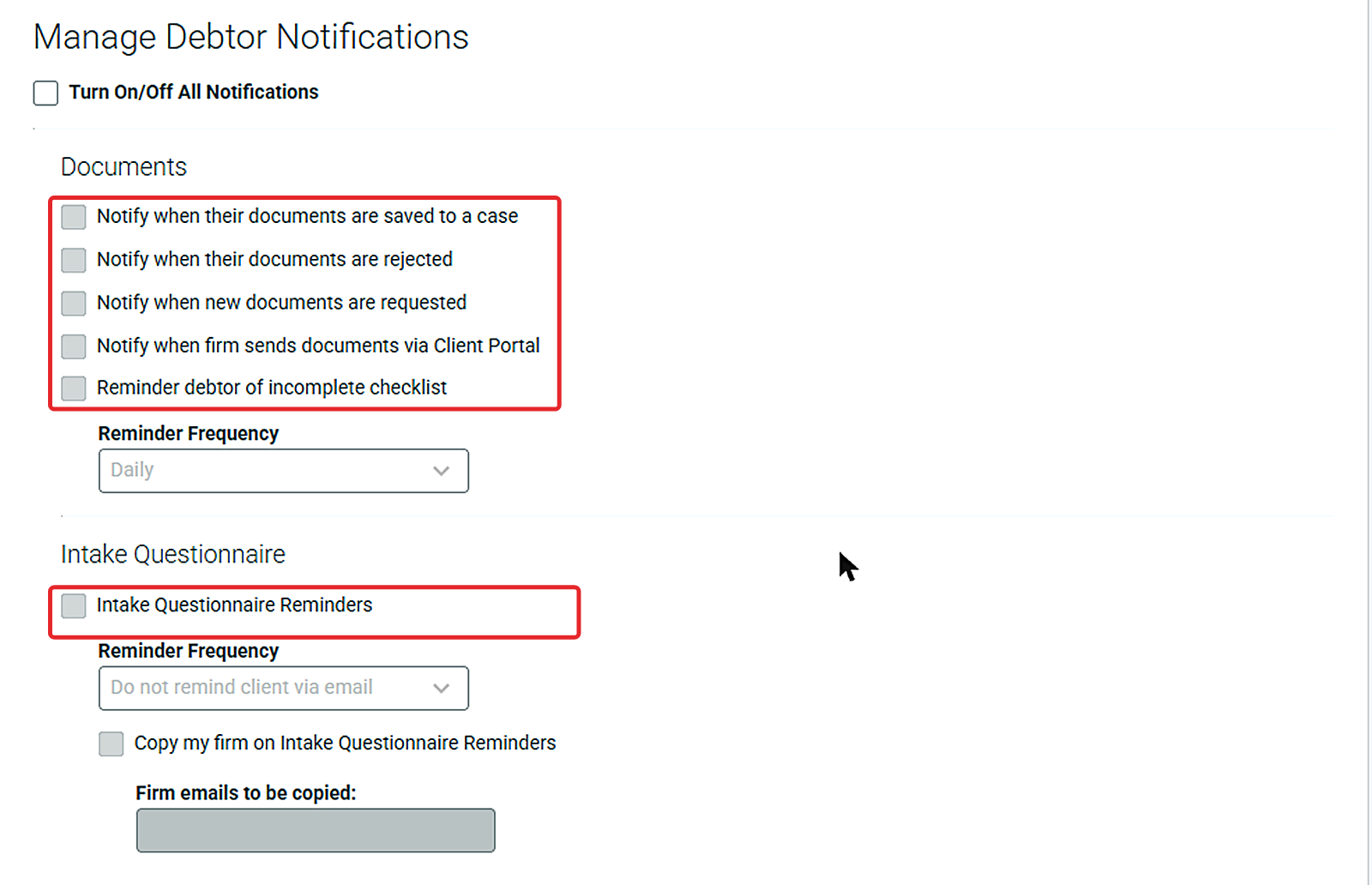
| Document requests and debtor reminders are fixed checkboxes with no rule builder, and the reminders sit in a locked module in the trial | Firms with a heavy document chase | First-hand: the debtor notification options were greyed out, with one frequency setting. Best Case's pages describe automated course reminders, not document reminders | A separate chase workflow |
| No missing or outdated status on a case's document folders in the standard portal | Pre-filers tracking what is still owed | First-hand: the case's 26 document folders show a count and a grey circle, and nothing else | Manual tracking, or a chase workflow outside Best Case |
| Creditors are entered one at a time on Schedule F unless you pay for credit report import | High-volume Chapter 7 teams | First-hand: Schedule F offers Add, Delete, ClaimTracker, and the Common Creditor List, with no import control | The credit report import add-on |
| AI document extraction is a separate module, Document Flow, locked in the trial. It costs $59 per case on Best Case's Document Flow page, last reviewed October 29, 2026 | Firms that want AI intake | First-hand: no AI feature ran in any menu. A practitioner in a Reddit thread says Best Case now charges extra for AI document upload | Buy the module, or extract outside Best Case |
| You cannot add your own questions to the client questionnaire | Firms with practice-specific intake questions | First-hand: the questionnaire offers show, hide, and edit-instructions controls only | A separate intake form |
| The client-portal invite is pre-checked on every new client | Firms that onboard prospects before engagement | First-hand: the box was checked on every new client, once per joint debtor | Change the default under Settings, then Client Portal |
| No bulk email, select-all, or export on the cloud Clients list, and the Filing Forecast report is a placeholder | Operations leads | First-hand: the cloud Clients list offered search and filters only, and the Filing Forecast page reads as a placeholder component | The CSV client list report that Best Case's help library lists, edition not stated |
| No activity or audit log found | Firms that must show who changed a case and when | First-hand: the Firm Activity menu item opened Settings, and we reached no activity page | A separate change log kept by your staff |
| Support quality is mixed and its hours are not stated | Firms that need fast fixes | Attributed: a Reddit thread of September 2026 says the account rep's service is poor. The pages we read state no support hours | The in-product help bubble and live training |
We could not find an error-check control outside the filing step. Best Case's Form Prep and Filing page names an error diagnostic tool, which we did not locate in the trial before filing.
The review pools are thin and dated. Capterra rates Best Case 3.9 from 39 reviews, read October 24, 2026. Its newest dated review is from May 2024, so we lean on our own trial.
In the trial, a subscribe-now tooltip sits on the help icons of Document Flow, notifications, court notices, credit reports, and data migration. Locked pages stayed on a Loading screen instead of showing a lock message.
Best Case's agreements describe a conversion service from Best Case desktop to cloud (desktop license section 9(g); cloud agreement section 1.6). The cloud agreement also sets conversion terms for customers of Stretto's CINcompass (sections 1.7 and 1.8). Neither states a conversion from other vendors' petition software.

The debtor notification options are the clearest case: every box was greyed out, so we could not switch on the automatic reminders.
Where Is Best Case Strong for Bankruptcy Firms?
Best Case is strongest where the petition itself is hardest: practice depth, current forms, and Chapter 13 setup.
- Fewer re-typed fields for your team, because client details typed once carry into Form 101 and a paycheck feeds the means test.
- Less Chapter 13 setup, because the plan screen opens with a 60-month duration, the trustee fee, and the district's plan form in place.
- Court-current forms without your staff tracking rule changes: the release notes show new local forms through October 29, 2026.
- Less statute hunting, because exemptions are chosen by property with the citation in view.
- A short learning curve, because we reached every area in one to four clicks.
Stretto's Best Case page says Best Case prepares more than 80% of the bankruptcy cases filed nationwide, which is the vendor's own claim. A practitioner in a September 2026 r/Lawyertalk thread calls Best Case the gold standard for bankruptcy, especially for volume filings.
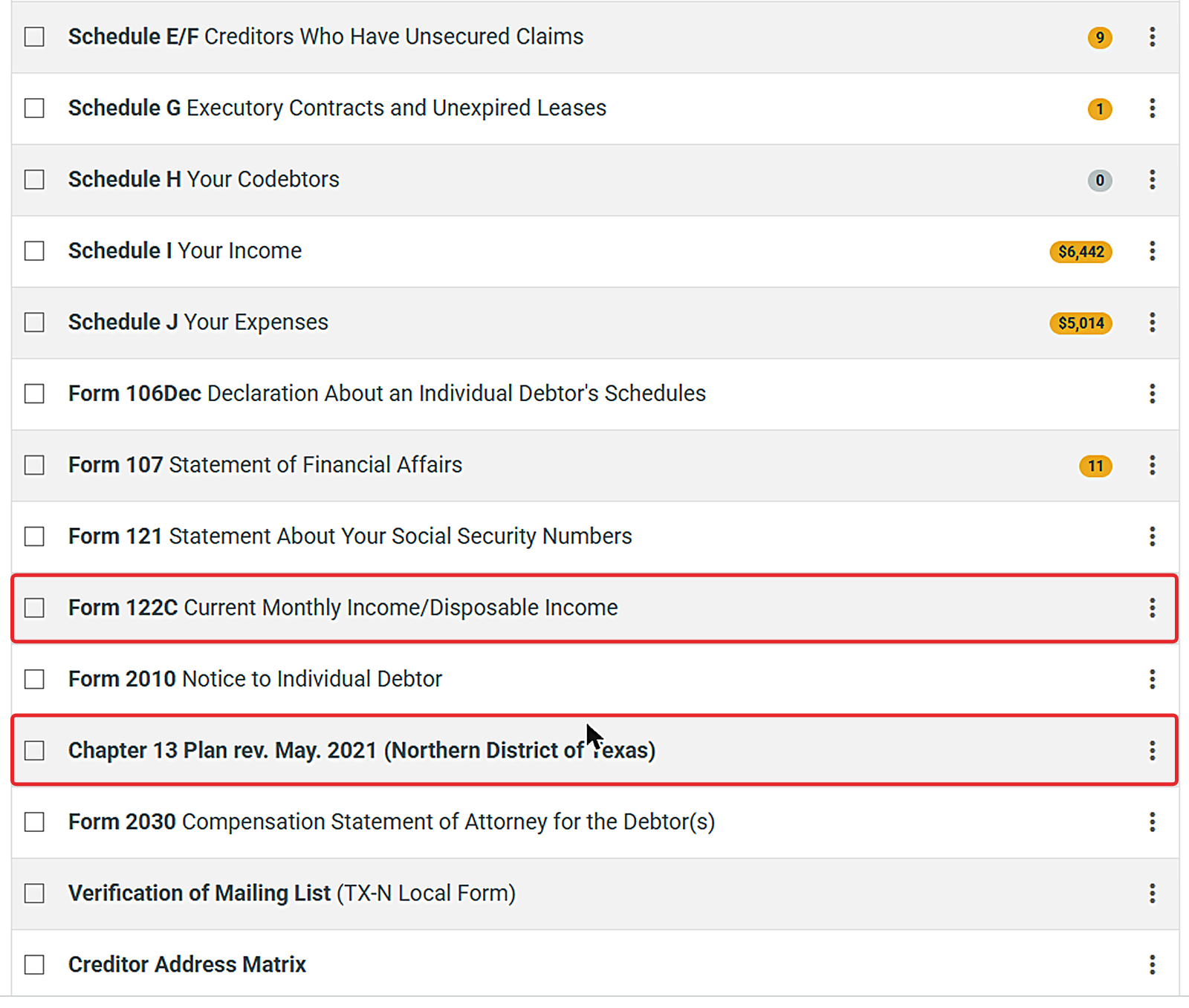
In our trial, the vendor's sample Chapter 13 case listed Form 122C and the Northern District of Texas plan form beside the schedules.
What Is Best Case Pricing in October 2026 for Cloud, Desktop, and Add-Ons?
Best Case software cost in the cloud is $99 per user per month, last reviewed October 27, 2026. It is an annual subscription with 10GB of storage.
Desktop is a yearly license by chapter set and seat count, plus maintenance after year one. Best Case's pricing page lists $1,750 for a single-user Chapter 7 license, last reviewed October 27, 2026. A second set on the same page reads $1,500 with $750 maintenance, last reviewed the same day. The page does not say which set applies, so ask Best Case for the figure in writing.
| Plan or add-on | Price (last reviewed October 27, 2026) | Basis and what triggers add-ons |
|---|---|---|
| Best Case Cloud | $99 per user per month, with a free 30-day trial | An annual per-user subscription with 10GB of storage |
| Desktop, Chapter 7 | $1,750 single-user; $3,500 multi-user for 3 simultaneous users; $600 per added user | Annual license by chapter set; maintenance after year one is $800 single-user and $1,750 multi-user |
| Desktop, Chapters 7 and 13 | $2,250 single-user; $3,750 multi-user; $600 per added user | Annual license; maintenance after year one is $1,150 single-user and $2,050 multi-user |
| Desktop, all chapters | $2,500 single-user; $4,500 multi-user; $600 per added user | Annual license; maintenance after year one is $1,650 single-user and $2,700 multi-user |
| Custom Chapter 13 plans, desktop | $170 to $370 extra | An added fee on the Chapters 7 and 13 or all-chapters license |
| Advanced Integrations: credit and financial reports, courses, legal noticing, and others | Additional cost, no price stated | Add-ons that sit on top of either edition |
| Document Flow, cloud | $59 per case, with 10 free cases to start, on its own page (last reviewed October 29, 2026) | A per-case add-on to the cloud client portal |
The pricing page itself names no Document Flow price: the per-case figure sits on Document Flow's own page. Review sites print Best Case prices that differ from the vendor's pages. Bing's generated answer even lists plan tiers Best Case does not publish.
The monthly cloud figure is an installment, not a month-to-month plan. The cloud fee is an annual per-user charge, paid at once or in 12 monthly installments, per Best Case Cloud's subscription agreement.
- Term: the first 12-month term renews automatically for further 12-month terms, and it cannot be cancelled after the first 30 days (section 1.3).
- Refunds and price changes: no refunds are given, and the fee can change at each renewal (section 1.5(a)).
- Seats: a user added mid-term is billed at once, and a removed user brings no credit (section 3.1).
- Exit: cancelling a renewal takes written notice at least 30 days before the term ends (section 5.1(a)).
The desktop license renews yearly and charges the card on file. Best Case may change its fees at each renewal, per sections 1(a) and 1(d) of Best Case's desktop license agreement.
Best Case is priced as a base license plus add-ons, so your real cost depends on which add-ons you turn on.
How Does Best Case Connect to the Rest of Your Stack?
Best Case connects to Stretto's own services, the court's filing system, and calendar sync. We found no link to a CRM, practice-management system, or cloud storage.
- Stretto services: credit reports, courses, and legal noticing, each through a Stretto Due Diligence Solutions account.
- CM/ECF and PACER: court notices and filing, a paid feature in the trial.
- Calendar sync: a Set Up Sync control under the calendar settings, which we did not run in the trial.
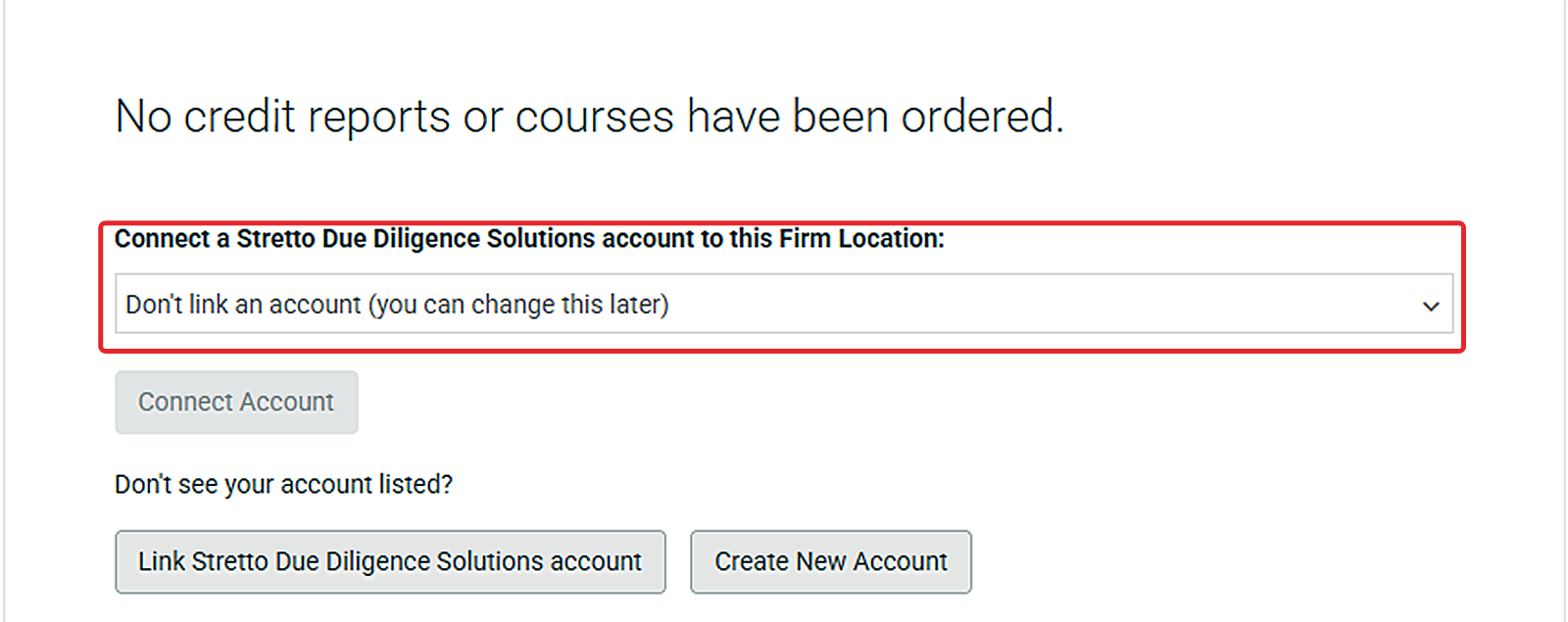
The credit report page asks you to connect a Stretto Due Diligence Solutions account before you order anything.
The version we have doesn't have an open API. Does Best Case have one?
No: Best Case documents no public developer API. Data moves by hand or around the software. Bing's generated answer claims Best Case offers a REST API and webhooks, and neither Best Case nor Stretto documents one. Anything held in your CRM gets typed again, which is the cost of re-keying debtor data into petition software.
Can Best Case Connect to Your CRM or Practice Management Software?
No: Best Case has no native connection to a CRM or practice-management system.
Its site search shows no Clio integration, and its pricing page names no practice-management connector.
Lawmatics says its CRM "fits alongside bankruptcy filing tools like Best Case" on its bankruptcy page. That is a listing, not a data path.
So you enter the data by hand, collect it through the portal questionnaire, or automate the preparation outside Best Case. That last route starts from knowing whether petition software exposes an API, and Best Case does not.
What AI Features and Attorney Review Controls Does Best Case Have?
No AI feature ran in our Best Case Cloud trial. Best Case's AI tool is Document Flow, a paid upgrade to the cloud client portal, and its settings section carried a subscribe-now tooltip.
Best Case's release notes say it sends portal uploads to "the intelligent document processor" for data extraction.
We searched every menu for an AI or extraction feature before reading any documentation, then read Best Case's homepage, which names none. Document Flow's own page lists six document types it reads.
- Paystubs
- Bank statements
- Federal tax returns
- Credit counseling certificates
- Social Security cards
- Government IDs
That page claims up to 60 minutes saved per case and 99% data extraction accuracy. It credits "the same AI technology trusted by organizations like H&R Block and SoFi" and names no model provider. These are the vendor's claims, and we could not test them because Document Flow is locked in the trial.
The Document Flow page states no review step for extracted data, and Best Case's release notes describe one. A June 17, 2026 note alerts users to unassigned paystub deductions found during review. A July 19, 2026 note adds an Open in New Tab option for reviewing uploads.
A practitioner in a Facebook group post says "both have issues with the AI extracting accurate information", comparing Best Case Cloud with Glade.
The review controls we saw first-hand sit around the data, not the AI tool.
- An attorney is required on every case before it saves.
- The setting "Review client-submitted documents before importing into Best Case" is on by default.
- The intake questionnaire stays editable by the attorney during review.
- Filing runs only through ECF Manager.

Document Flow is Stretto's AI tool for document uploads and data extraction, per Stretto's privacy policy, version 2025.3. The policy says Stretto contracts with a third-party service provider to extract data from financial documents, without naming it. It uses aggregated and deidentified data to train its AI tools and adds "You cannot limit this sharing and use".
The same policy says it does not apply where Stretto acts as a service provider or data processor to its customers. Neither Best Case license agreement mentions AI training.
Lawyers "should read and understand the Terms of Use, privacy policy, and related contractual terms and policies of any GAI tool they use". That is how ABA Formal Opinion 512 states your duty, on page 7.
Does Best Case Have a Client Portal for Document Uploads?
Yes: Best Case Cloud has a client portal with an intake questionnaire and document exchange, which you set up firm-wide under Settings, then Client Portal.
I need a client portal and an easy way for clients to upload documents. Does Best Case have one?
The portal answers that need on your side. Best Case's comparison guide lists the portal and questionnaire for desktop too. Each questionnaire question is tagged with the form or schedule it feeds, and the Property tab alone holds 39 questions. Per-chapter phase texts tell your client what to expect before filing, after filing, and at the end.
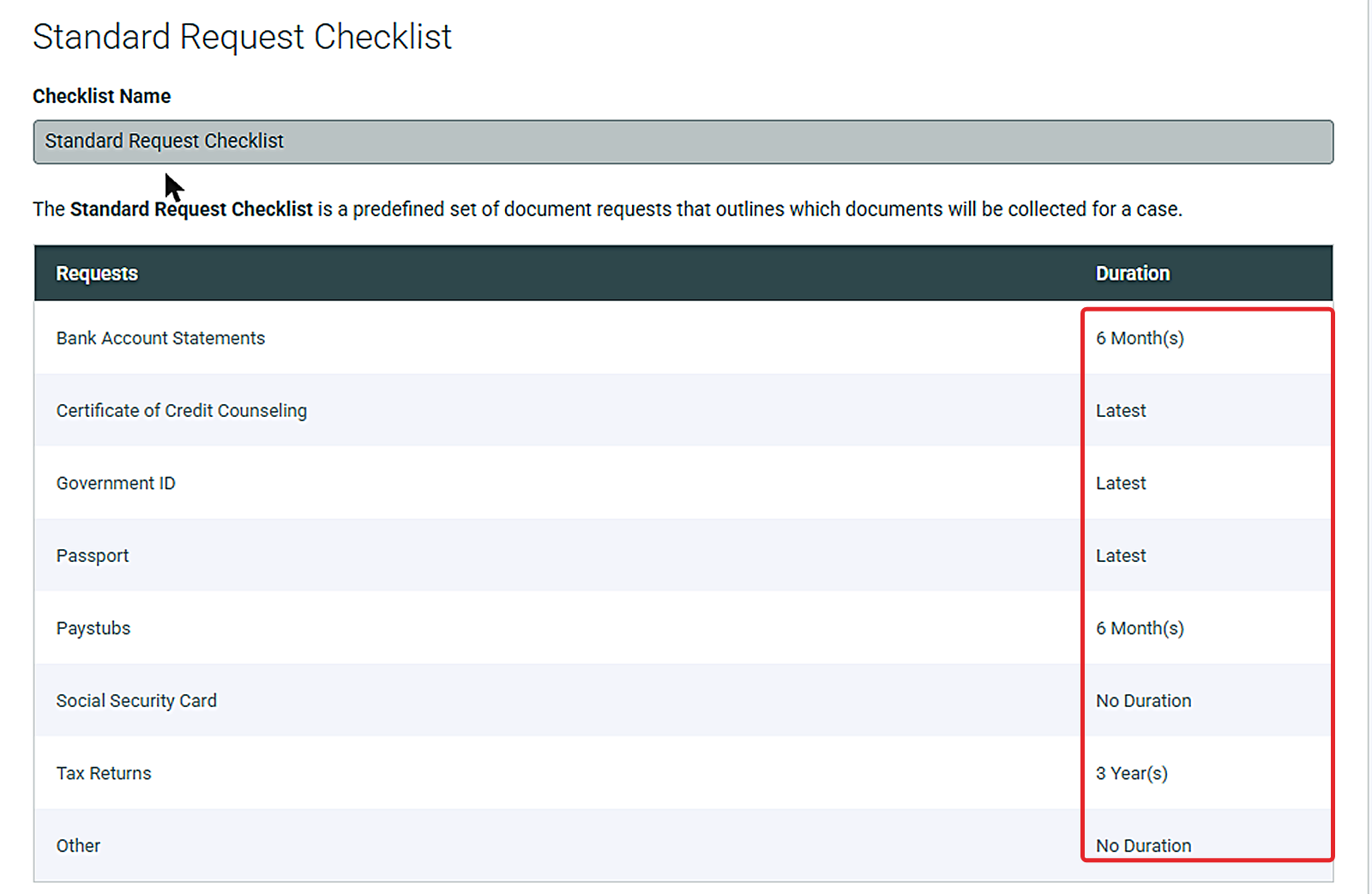
The default checklist requests these documents and look-back periods.
| Document | Duration |
|---|---|
| Bank statements | 6 months |
| Pay stubs | 6 months |
| Tax returns | 3 years |
| Government ID, passport, and credit counseling certificate | Latest copy |
| Social Security card | No duration |
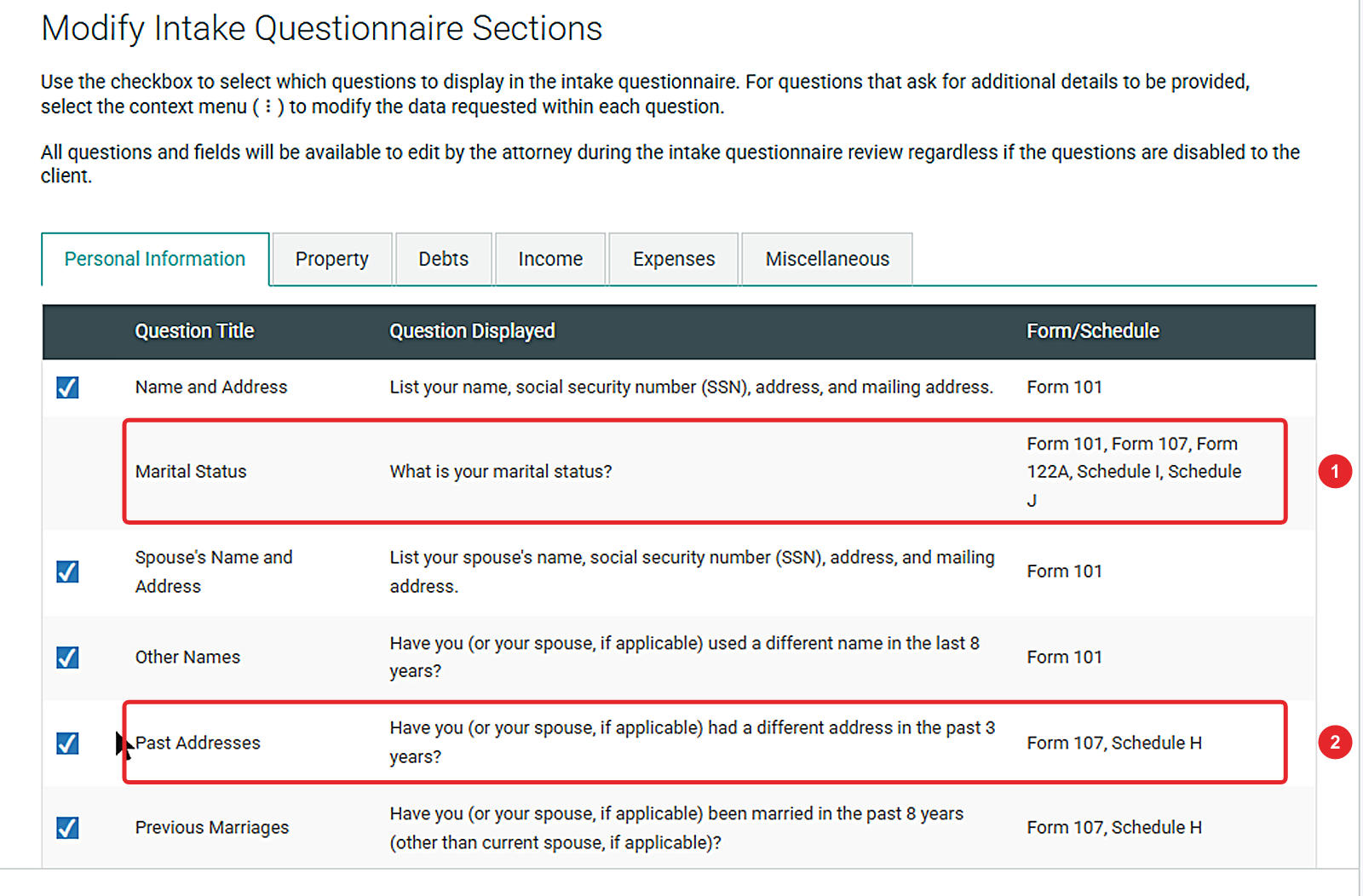
The standard portal shows no missing or outdated status on a case's document folders, and it extracts no data without the Document Flow upgrade. Document Flow's page says your firm gets updates on checklist progress, and an April 22, 2026 release note adds file-level status to its request list. We tested only the firm-side settings and sent no invitation, so we did not test the client-side view.
What Do Best Case's License Terms Say About Data Ownership, Export, and Exit?
Your firm owns its client and case data, templates included. Best Case and its affiliates still hold a perpetual, royalty-free license to use it, "everyday business and marketing purposes" included.
The terms come from Best Case's desktop license agreement and its cloud subscription agreement.
- Export: during the term and for 365 days after it ends. The export is static data with no accuracy guarantee (desktop license section 3(e); cloud agreement section 2.7).
- Lapse: a lapsed desktop license drops to Read-Only Status, where you can view and export existing data but cannot add new data. Reinstating maintenance carries an "increased reinstatement fee" (desktop license section 11).
- Retention: cloud data is stored for one year after the account closes (cloud agreement section 1.12).
- Technical Providers: a third party that takes credit or financial data from the software needs Best Case's prior written approval. That approval comes with an Agency Addendum (desktop license section 12(e); cloud agreement section 4.5).
- Security program: your firm must run "a comprehensive information security program" with the elements of 16 C.F.R. § 314.4. Those include a Qualified Individual, a written risk assessment, and encryption in transit and at rest (desktop license section 12(c); cloud agreement section 4.3).
- Safeguards: both agreements promise commercially reasonable security measures, and cloud logins use multi-factor authentication (cloud agreement section 3.1(c)).
- Data processing terms: your firm gets a data processing agreement after you notify Best Case in writing of its status under state privacy laws. A GDPR Addendum applies when you give notice of GDPR data (desktop license sections 13(b) and 20; cloud agreement sections 14.2 and 13).
The export window matters most when moving a bankruptcy practice to new petition software. A static export is a copy of the data, not a live feed.
Should Your Firm Keep Best Case?
Keep Best Case for the petition if your firm already files in it.
Its forms, means test, and plan setup earned the scorecard's only 5, so the real question is what happens before the petition.
Non-business filings rose 12% to 581,570 in the year ending June 30, 2026, per U.S. Courts. Chapter 7 filings were 382,161 and Chapter 13 filings were 215,490 in that year. With filing volume rising, the gap that matters to you is the work before the petition.
Keep Best Case If
Keep Best Case when these describe your firm.
- You file at volume in Chapter 7 and Chapter 13. A practitioner in a September 2026 r/Lawyertalk thread says their firm is moving to Best Case after trying NextChapter, Glade, and Jubilee.
- Your staff already know it.
- You rely on district plan forms, the plan screen, and one filing hub.
- You want to compare it with the rest of the field before renewing, in best bankruptcy software for attorneys.
Look Elsewhere If
Look elsewhere when these describe your firm.
- You need a document chase with your own rules and reminder wording.
- You need a native CRM or practice-management connection.
- You want AI extraction without a separate module.
- Price per user is the deciding factor.
A practitioner in a Reddit thread whose firm now uses Jubilee says they prefer it over Best Case. Compare NextChapter, Jubilee, and Glade in alternatives to Best Case for bankruptcy firms if you need a different petition tool.
How Do You Keep Best Case and Add an Automation Layer for Petition Prep?
You keep Best Case for the petition, and the automation works around it by handling the gathering before the case opens.
It's not the filing. It's the Gathering. So what does the automation take on?
The gathering happens before Best Case. We often find the same client facts typed into each system by hand when we map a bankruptcy firm's workflow.
Your client's documents and facts are chased, checked, named, and prepared as reviewed petition-prep inputs before your team opens the case. That is our bankruptcy petition prep automation build.
The build runs in three layers, in this order.
- Data layer: one record across your CRM, petition software, storage, and phones.
- AI agents: a first pass that flags missing, incorrect, low-quality, or wrongly dated documents.
- Automated workflows: the document chase and intake capture.
In the bankruptcy builds we run, a reviewer gate sits before the attorney, and anything unreadable or uncertain goes to a person, never a guess. Nothing changes automatically until you approve a propose-only pilot. Every rename is ledgered and revertible, nothing is overwritten or deleted, and Social Security numbers are never stored.
We build connections to Lawmatics, Clio, and Microsoft SharePoint, and we build around the petition software rather than through it. The system runs in your firm's own cloud account, and hosted frontier models do the AI work.
Your firm owns the code, data, workflows, and documentation, with no subscriptions.
Your attorney reviews everything and prepares and files the petition in Best Case. Nothing the system does signs, files, submits, or decides anything legal.
The engagement runs in five steps.
- The workflow mapping session
- Scoping
- A 4 to 8 week build with QA
- Handover
- Up to 60 days of maintenance
You keep Best Case and the automation works around it, so your firm handles more cases and increases revenue without adding headcount.
FAQs
Expensive? Sure. But Is Best Case Worth It for a Small Bankruptcy Firm?
Yes for the petition, if you file enough Chapter 7 and Chapter 13 cases to use its forms and plan tools. The cost is an annual per-user cloud subscription or a yearly desktop license with maintenance. A solo who bought Best Case when starting a practice answers "Yes, worth every penny" in a Reddit thread on r/Bankruptcy.
How Much Does Best Case Bankruptcy Software Cost?
Best Case Cloud costs $99 per user per month as an annual subscription, last reviewed October 27, 2026. Desktop's single-user Chapter 7 license lists at $1,750, or $1,500 in a second set on the same page, both last reviewed October 27, 2026. Document Flow is a separate $59 per case, last reviewed October 29, 2026.
Why Won't My Best Case Software Open Unless I Add My Credit Card Info?
Best Case's desktop license requires a valid, non-expired credit card on file. Its section 1(e) says a lapse "may result in suspension or non-renewal" of the license. One practitioner hit this right after renewing, per a Reddit thread. Version 29 lets you renew inside the software and save a card for next year's renewal.
How Does Best Case Renewal Work?
Both editions renew automatically: the desktop license every year, and the cloud subscription in 12-month terms. Both require a valid credit card on file, and Best Case can change its fees at each renewal. To decline a renewal, give written notice at least 30 days before the term ends, on either edition.
Is Best Case Cloud or Best Case Desktop Better?
The choice turns on where you want your data and how you pay. Desktop keeps data on your machines and is licensed by chapter set, and cloud runs in the browser on an annual per-user subscription. Document Flow is documented for cloud, and the client portal for both editions.
What Are the Best Alternatives to Best Case?
NextChapter, Jubilee, and Glade are the petition tools that bankruptcy practitioners name when they compare Best Case. The right one for you depends on your volume, your district, and what you want built in before the petition.
Does Best Case Have AI Document Extraction?
Yes, as Document Flow, a paid upgrade to the cloud client portal that Best Case's release notes describe. It was locked in our trial, so we could not test it. Best Case's Document Flow page lists it at $59 per case, last reviewed October 29, 2026.
What Is the Next Step for a Bankruptcy Firm on Best Case?
Keep Best Case for the petition, and run the document chase and intake in a layer around it.
The workflow mapping session shows where that layer fits your Best Case setup, your CRM, and your staff. Book it with Get My Free Workflow Map.
Free. The map is yours, even if you never hire us.