Keep Clio as your matter record, task lists, templates, and billing. Then add an automation layer around it for lead follow-up, intake, the client document chase, hand-offs between your systems, and petition-prep inputs. Clio scores 3.2 out of 5 on our rubric for bankruptcy firms.
We tested Clio Manage in an Advanced trial on synthetic Chapter 7 matters on October 16, 2026. We rechecked Clio's public pages on November 14. This page shows what Clio runs alone and what a layer adds.
Aretech builds automation that works around the software it reviews; here is how we score software.
Last reviewed: November 14, 2026
TL;DR
- Keep Clio as your matter record; add a layer only around the jobs it does not run.
- Clio scores 3.2 out of 5 for bankruptcy firms, and Clio Manage showed us no document request or missing-items view.
- Clio alone fits if your staff clear the chase without a backlog and your petition-software sync covers the hand-off.
- Next, count the hours your staff spend chasing documents and re-typing intake facts.
Which Setup Fits Your Bankruptcy Firm?
Your setup follows where your staff lose hours. Match your firm to one of these situations.
- If your firm's bottleneck is matter organization, Clio alone fits, because Clio runs matters, tasks, templates, and billing in one record.
- If your firm's staff still chase documents and re-type intake facts, Clio plus a layer fits.
- If your firm already runs Clio Grow intake and a NextChapter sync, test those before you build.
- If your firm needs matter types Clio cannot model, a different system fits.
Who This Comparison Is For (and Not For)
This comparison serves the people who choose the software your firm runs on.
For:
- Owner-attorneys and managing partners of boutique Chapter 7 and Chapter 13 firms already on Clio or choosing it
- Operations leads who run intake and the document chase
- In-house developers at high-volume firms who weigh a build around Clio
Not for:
- People filing their own bankruptcy
- Petition preparers
- Big law and firms in other practice areas
What Clio Does Well for Bankruptcy Firms
Clio is a general practice-management system with a deep App Directory, so it earns its place as your matter record.
Its matter, task, and template tools worked in our test, and the gaps start where the work leaves the matter record.
Features Bankruptcy Firms Use in Clio
Your bankruptcy matters in Clio run on these features.
- Matter templates apply a task list, custom fields, folders, and a billing method for each matter type, per Clio's bankruptcy page.
- Document templates with merge fields generate documents from matter data, which is Clio's document automation.
- Custom fields hold your bankruptcy data, such as the chapter, in picklist, checkbox, date, and money types.
- A joint filing puts two clients on one matter, and Clio holds both on the same record.
- A client portal per matter, called Clio for Clients, shares documents and messages.
- The App Directory lists over 300 apps.
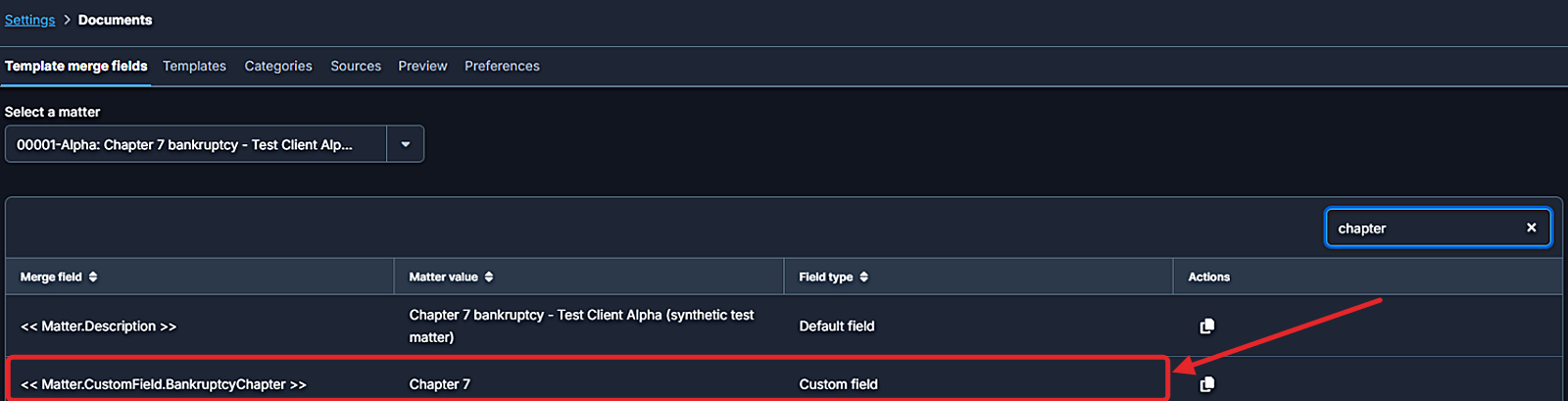
Custom fields reach your document templates the moment you save them. Our custom Bankruptcy Chapter field appeared as a merge field with the value Chapter 7.
What Your Firm Gains From Clio
You gain three things from Clio before you add anything around it.
- Speed to a working matter: we created a first matter in about 3 minutes. We found every core feature without the documentation.
- A repeatable pre-filing setup: the fields, checklists, and template took about 21 minutes and about 100 actions. Every later Chapter 7 matter then starts from that template.
- One record: your matter, billing, and calendar sit together, so your staff stop hunting across systems for a matter's status.
Where Clio's Automation Stops
Clio automates inside a matter once your staff create it. It does not ask clients for documents or chase them on its own, and it does not carry intake facts across your systems.
Can Clio Chase Missing Client Documents?
Not on its own. In our test, Clio Manage had no document request and no missing-items view.
Are clients asking over and over again what they are missing, even on Clio?
Clio Manage gives your staff no list to send back. It tracks the gap with a staff checkbox and staff tasks, and neither one contacts the client.
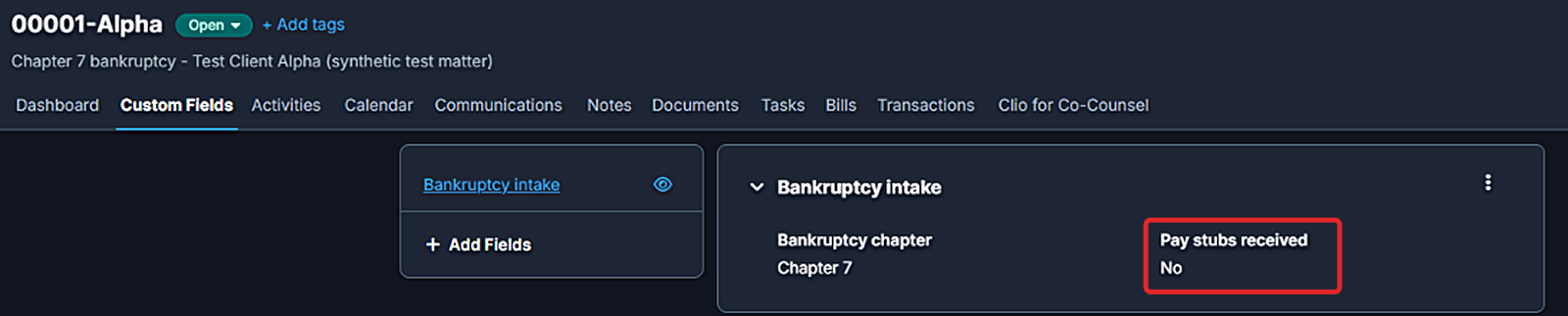
We tracked a missing pay stub with a custom field set to No, and the matter showed no list of missing documents.
Clio tracks the chase in three ways.
- A checkbox or custom field that your staff set by hand, like our Pay stubs received field.
- Staff tasks from a task list, which all fall due on the trigger date when you use one.
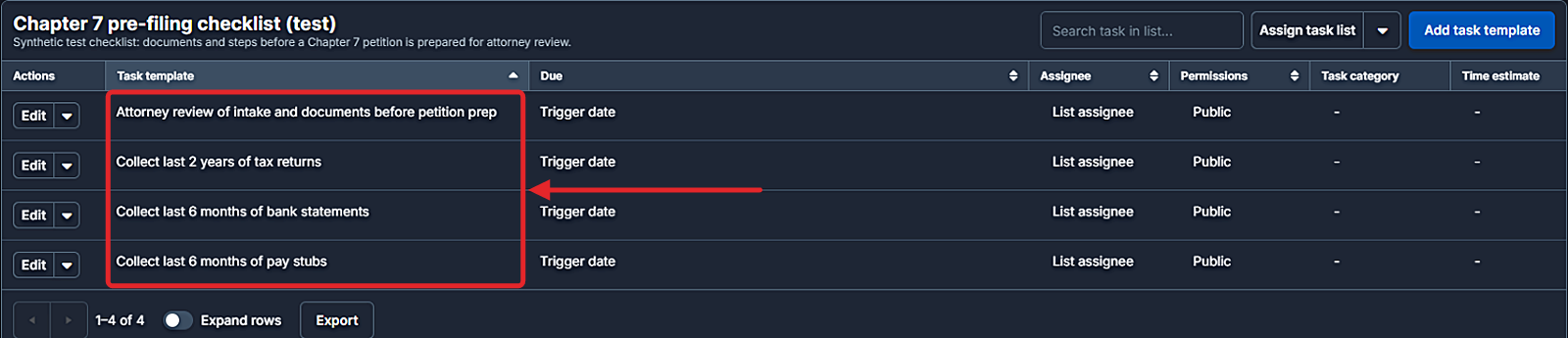
- A task list whose order follows the task names, because Clio's Task Lists article says tasks in a list cannot be reordered.
A template matter in our trial held four pre-filing tasks, and all four fell due on the trigger date.
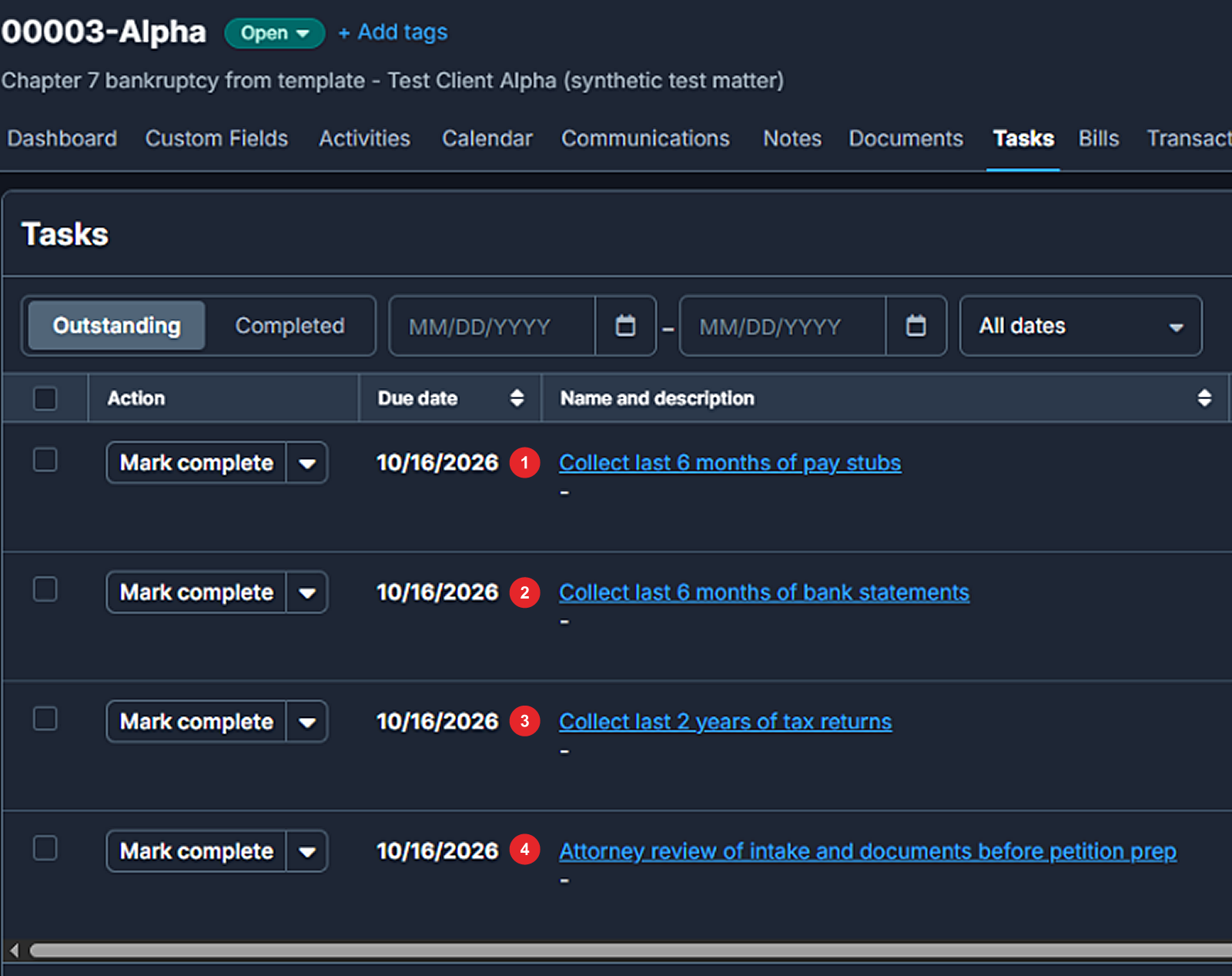
Our task list sorted by name on the list screen, so the order of your pre-filing steps follows the wording of each task.
Clio's documentation adds two limits. A task list assigns only to your firm's users. Clio's Task Notifications and Reminders article says you cannot set automatic reminders for tasks. A single task assigned to a portal client can still carry a reminder you add by hand.
The client portal shares documents and messages for each matter. Clio's bankruptcy page says you can "Request what's missing" through it. That request is a single task your staff assign to one client, on select plans, per Clio's help center on client tasks. Clio builds no list of what a client still owes, so that answer stays with your staff.
What Clio Automated Workflows Can and Cannot Trigger
Clio's help center lists three ready-made types of automated workflow: assign a task list, generate a document, and apply a matter template.
The first two start when a matter is created or changes stage. The third runs when a matter converts from Clio Grow to Clio Manage.
| Can trigger | Cannot trigger |
|---|---|
| A task list when a matter is created in a practice area | A request for a missing or overdue document |
| A task list when a matter moves to another stage | A message to the client |
| A document generated from your template at either point | A time-based reminder or follow-up |
| A matter template when a Grow matter converts | A task list assigned to a client contact |
The trigger list is short, so plan your Clio automations around matter events. In Clio Manage, an automation starts from a matter event, never from what is missing on the matter.
We built our test automation on a Trusts practice area. Clio's help article requires a practice area on the When card, so a bankruptcy firm picks Bankruptcy there. Its Then card assigns a task list to the Responsible attorney role.
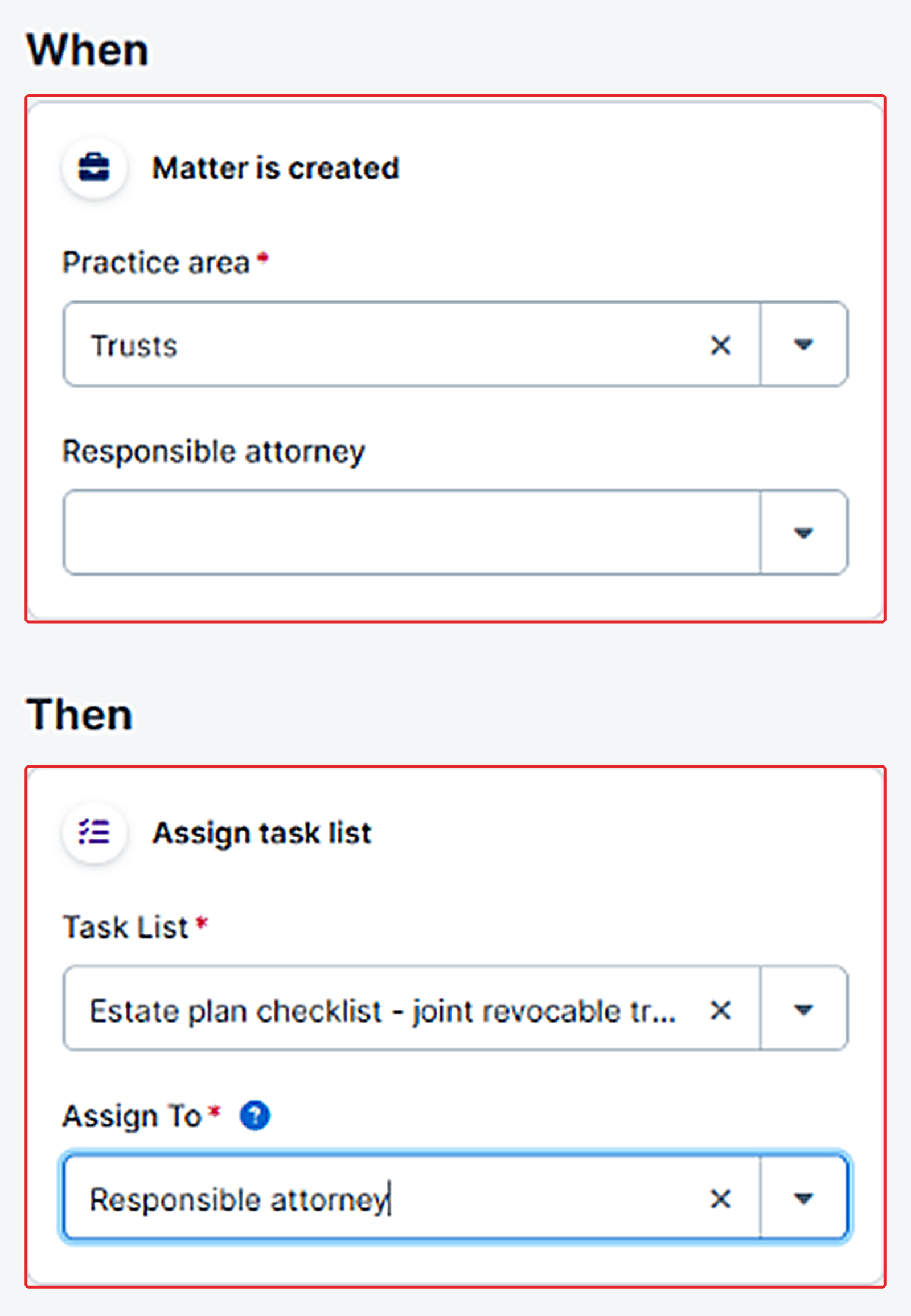
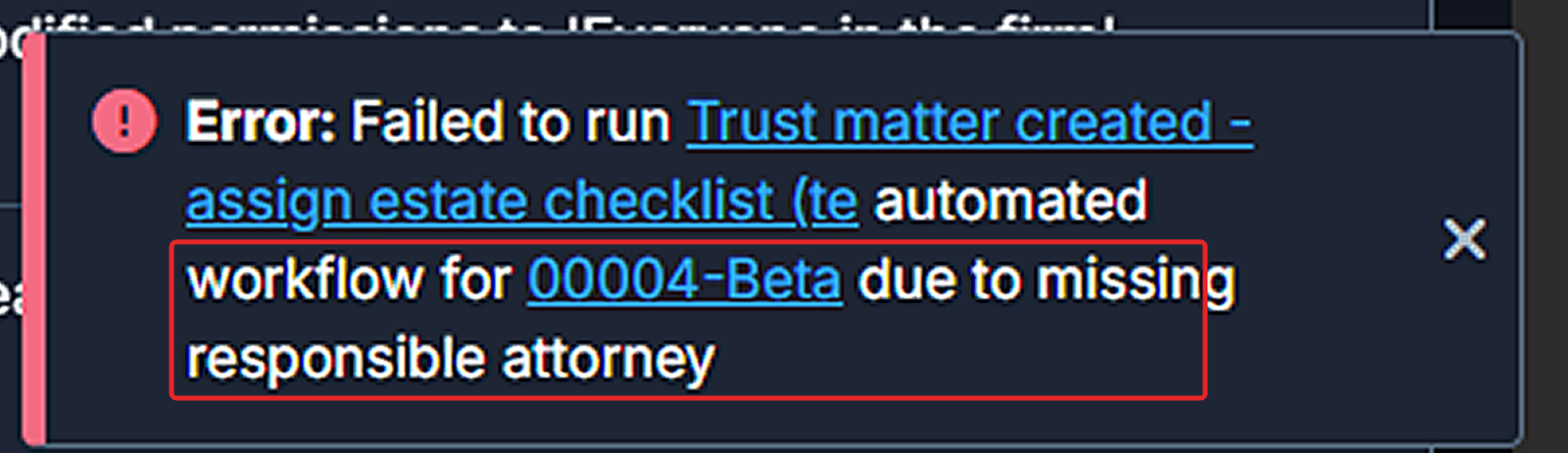
Tasks went to roles in our builder, and Clio's help article says they go to specified roles or individuals. We then created a matter without a responsible attorney, a field the matter form does not require. The run failed "due to missing responsible attorney" and created no tasks.
Clio's Clio Manage Automated Workflows article caps the feature at up to 1,000 automations per firm account. Its pricing page, which we reread on November 14, lists automated workflows from the Signature plan up and omits them from Starter and Core.
Where Does Bankruptcy Intake Live in Clio?
Bankruptcy intake lives in Clio Grow, not Clio Manage.
Manage holds custom fields for the facts your staff type in, and we found no intake form there.
Clio's documentation shows what Grow adds.
- Intake form templates ask every prospective client the same questions before the consultation, per Clio's Grow intake form article.
- Grow automated workflows are built from five kinds of step, per Clio's Grow workflows article. They request a form, change a status, schedule an appointment, send an email, and assign a task. None watches for a missing document.
- Grow AI, per Clio's August 20, 2026 release, answers leads, captures case information, books consultations, and chases intake forms, unsigned agreements, and unscheduled consultations. Clio bills it when a lead becomes a hired client. We did not test it.
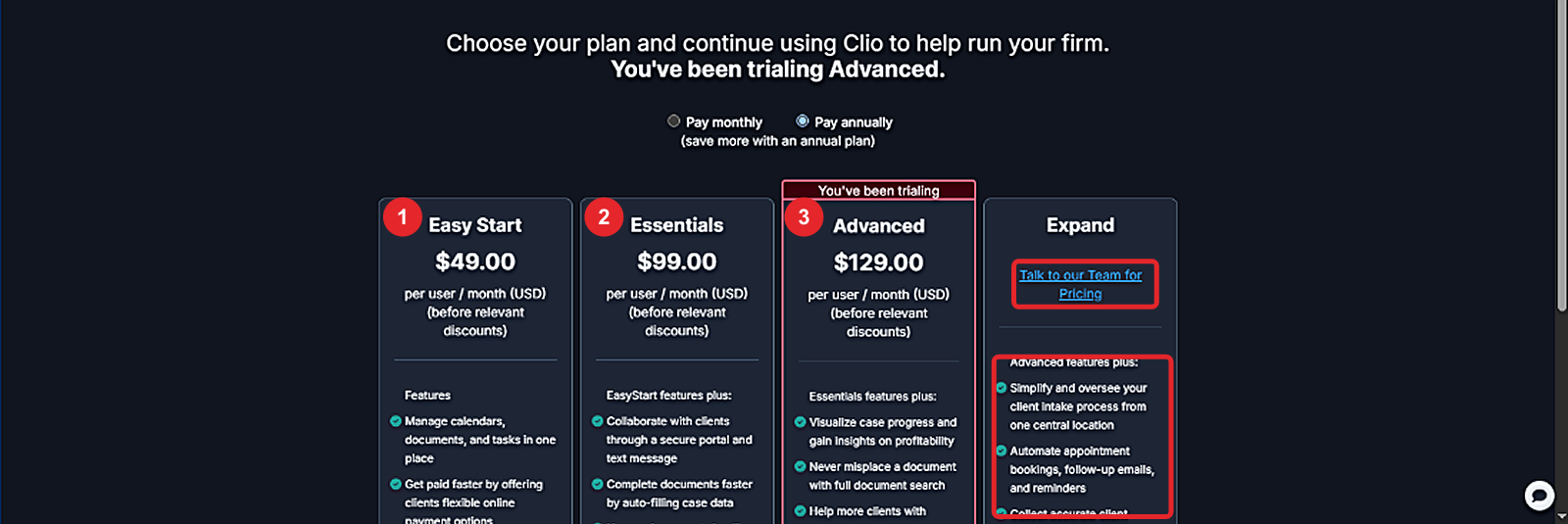
Grow comes with a plan decision. Clio's pricing page lists online intake forms under Elite and Clio Grow as an add-on for Core and Signature. Our trial's plan screen on October 16 listed intake under a quote-only tier called Expand. Its plan names differ from the ones on Clio's page today.
Does Clio Send Client Data to Your Petition Software?
Partly. Clio syncs matter basics to NextChapter, and the rest needs a system that carries each fact once.
NextChapter's Clio integration article says data syncs once a day, around 2 a.m. EST, for open matters whose Practice Area includes the word Bankruptcy. The district defaults to your firm's primary district and the chapter to Chapter 7, so your staff correct both after a sync. NextChapter now describes itself as part of Clio.
Do you have three systems that don't talk to each other?
Many owners we talk to describe their setup the same way. Your practice-management system, your petition software, and your storage each hold their own copy of the client's facts. Clio's bankruptcy page says Jubilee syncs client and matter details, tasks, and calendar events. It also says federal petitions file through specialized software such as Jubilee or NextChapter, so Clio is not where you file.
Clio Bankruptcy Software Scorecard
Clio scores 3.2 out of 5 overall on our nine-dimension rubric for software.
| Dimension | Weight | Score (1 to 5) | Basis |
|---|---|---|---|
| Core job performance | 20% | 3 | Matter, task, and template tools worked in our test. We found no document request or missing-items view, and online intake forms sit in the Elite plan. |
| Interoperability with your stack | 18% | 4 | Over 300 apps in the App Directory, a documented API v4, and a daily NextChapter sync. |
| Ease of use and setup | 12% | 4 | We found every core feature without the documentation, and the first matter took about 3 minutes. A permission error showed only after our first Save. |
| Practice-specific depth | 10% | 2 | Clio's bankruptcy page says each matter type carries its own template, but our trial held nothing preloaded for bankruptcy. Clio does not calculate the means test, exemptions, or plan figures. |
| Attorney review and AI controls | 10% | 3 | No approval step held a client message in our test. Clio's AI page says you can review, edit, or reject AI suggestions, and Clio's documentation shows a firm-level setting for AI access. |
| Pricing and cost structure | 10% | 2 | Only Starter shows a figure, $49 per user per month, last reviewed November 14, 2026. Core, Signature, and Elite say Get pricing. |
| Data ownership and portability | 8% | 3 | Clio's terms of service keep content the subscriber's property and give 90 days to retrieve it after cancellation. We saw Export on the Matters and Tasks lists. |
| Support and reliability | 7% | 4 | Help sits on every screen, and the AI chat answers first. Clio lists live support 24 hours a day, 5 days a week. |
| Security and Opinion 512 posture | 5% | 4 | Clio's pricing FAQ states SOC 2 Type II certification and that firm data is never used for AI training. |
That makes 3.2 out of 5: a sound matter record with gaps in the document chase and intake.
Clio Alone vs Clio With an Automation Layer: Side-by-Side
The difference is who chases, who re-types, and who owns the rules.
| What matters | Clio alone | Clio with an automation layer |
|---|---|---|
| Document chase | A staff checkbox and staff tasks; no client request or missing-items view in our test | A missing, wrong, or out-of-date list for each client, reminders in your wording, an AI first pass, and your reviewer's approval |
| Intake | No intake form in Clio Manage; Clio Grow carries intake forms and workflows | Facts captured once and carried where you need them, with your staff reviewing each submission |
| Cross-system data | A daily NextChapter sync for open Bankruptcy matters | One record per client across Clio, your petition software, your storage, and your phones |
| Automation rules | Matter-event workflows that assign tasks to roles | Rules your staff change: document requirements, reminder wording, timing, frequency, and the switch to a human call |
| Review before a client sees anything | No approval step before a client send in our test | Your reviewer approves every set before the attorney sees it; nothing files, signs, or decides |
| Cost structure | Per-user monthly plans, vendor-priced add-ons, and Grow AI billed per hired matter | One fixed price, set after a scoping project, with no subscription |
| Ownership | Your content stays yours, with 90 days to retrieve it after cancellation | You own the code, data, workflows, and documentation |
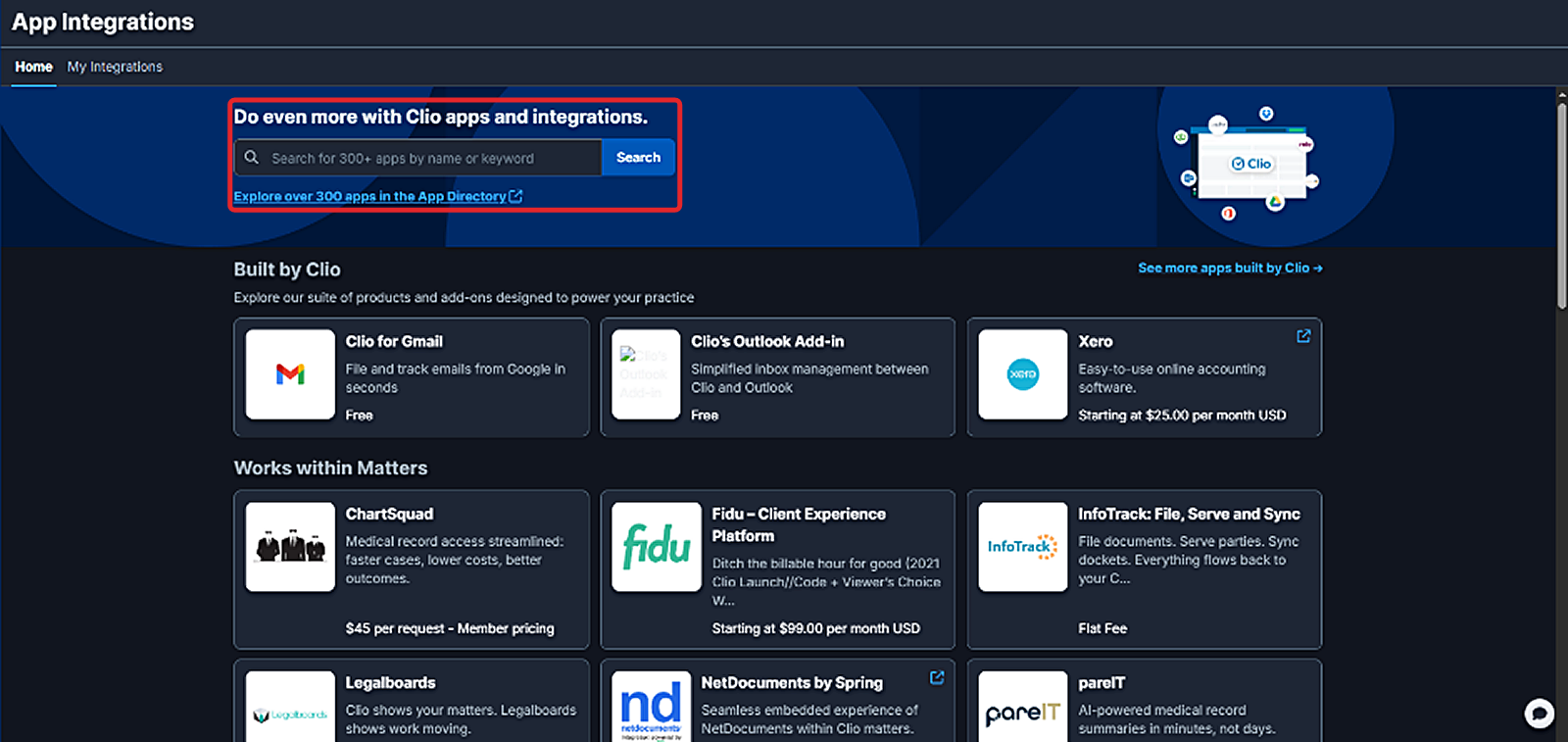
The best Clio integrations for your firm sit in its App Directory, and many add-ons there carry their own vendor price. A layer connects to Clio through its API instead, so your software stays in place while you increase revenue without adding headcount.
What Each Option Costs to Run
Clio is a per-user monthly subscription, and a layer is a one-time build with no subscription.
Clio's costs grow by the piece.
- Starter costs $49 per user per month on Clio's pricing page, last reviewed November 14, 2026.
- Core, Signature, and Elite are quoted through Get pricing or Book a demo, with automated workflows from Signature and intake forms with Elite.
- Grow AI is billed per hired matter, and you can set a monthly spending target.
- Paid App Directory add-ons carry their own vendor price: Xero showed a starting price of $25.00 per month on our trial screen on October 16, 2026.
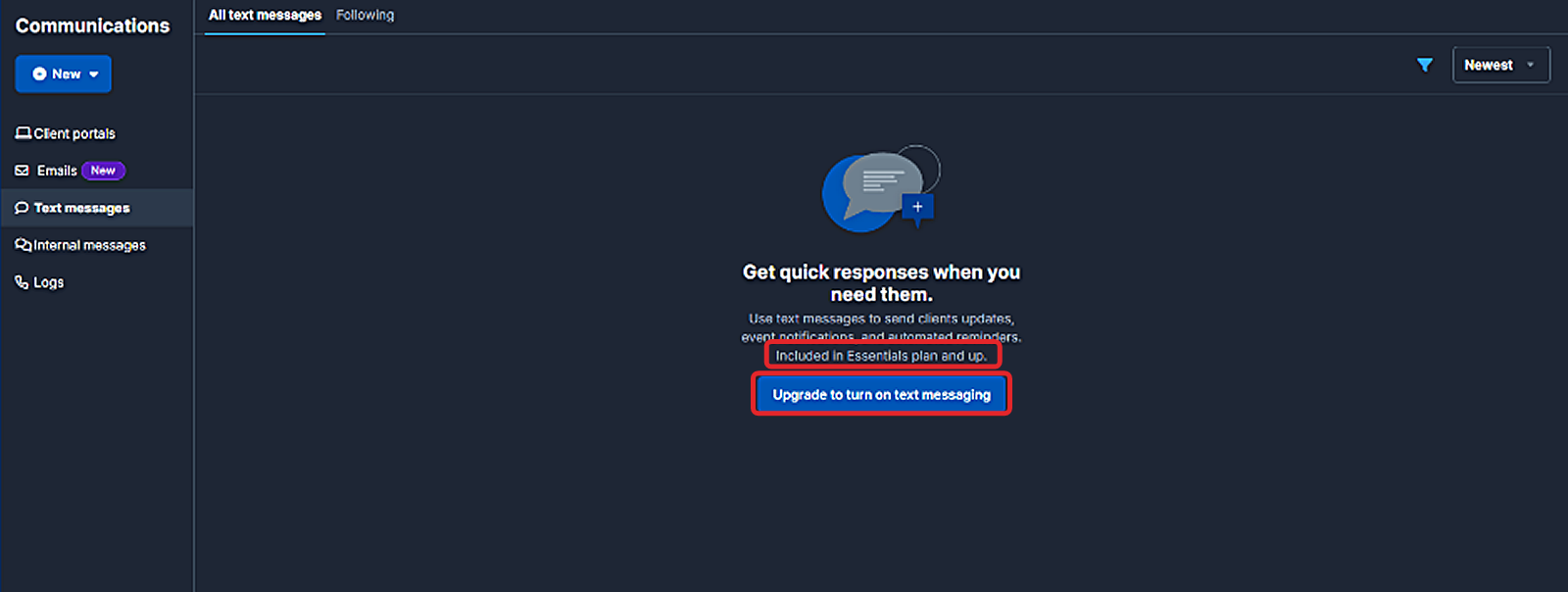
- Text messaging is listed from Core up on the pricing page, but our Advanced trial put it behind an upgrade prompt.
The layer's cost is one fixed price, set after scoping.
- The build is one fixed price, set after a scoping project, and paid once.
- You pay your AI model provider directly, with no subscription to Aretech.
- A fix period of up to 60 days, set in your agreement, covers any defect in what we built. After that, a change on the software's side is hourly work.
Who Owns the Data and the Workflows
In both cases you own your data, and with a layer you also own the workflows and code.
- Clio: your content remains your property, and you have 90 days to retrieve it after cancellation. Clio's pricing FAQ says you can retrieve contacts, matters, and financial records in open formats during that window.
- Layer: you own the code, data, workflows, and documentation. The system lives in your own cloud account, and any developer you trust can extend it.
Use Clio Alone If...
Clio alone is enough when your bottleneck is matter organization, not the chase.
It fits these firms best.
- Low volume: your staff chase documents without a backlog.
- Grow intake: you already run Clio Grow intake and accept its scope.
- Petition-software sync: your NextChapter or Jubilee sync covers your hand-off.
- A built-out Clio: you set up custom fields, templates, and automations, and they run your matters.
Our full Clio review for bankruptcy firms breaks down Clio's pricing, integrations, and limitations.
Add an Automation Layer Around Clio If...
Add a layer when your staff re-touch the same file because documents arrive incomplete or facts are typed twice.
Is it a build versus buy conversation you've got to have?
On Clio, you keep the software and build the layer around it.
A layer fits when any of these is true.
- Clients call repeatedly about missing documents.
- Your staff type intake facts into Clio and again into your petition software.
- A rule needs a time-based follow-up.
- A reviewer must approve before anything reaches the attorney.
The build in bankruptcy law firm workflow automation runs on the software you already use.
It keeps one record per client, checks instead of guesses, and runs workflows that wait for your OK.
Is Custom Automation the Same as Building Your Own Clio?
No. You keep Clio, and the layer reads it through Clio's API and works around it.
Rebuilding a practice-management system is a different project.
Keep your software, automate around it. One record per client sits under every job the build runs.
Clio Plus an Automation Layer for Bankruptcy Intake
Aretech builds the extra automation layer around Clio for Chapter 7 and Chapter 13 firms.
It follows up with new leads, runs automated intake for bankruptcy attorneys, chases documents, keeps data in sync, and prepares petition-prep inputs. You handle more matters and increase revenue without adding headcount. Every build is custom.
What the Layer Does Around Clio
Aretech builds each of these around the Clio account you keep.
- Lead follow-up gives every web, text, and email lead a reply right away, with your intake link and a time to book.
- Intake capture takes the client's facts once and carries them where you need them, and your staff review each submission.
- The document chase lists what is missing, wrong, or out of date for each client and reminds the client in your firm's wording. An AI first pass flags those documents.
- Data between systems puts client details and documents in the right Clio matter, so nothing is typed twice.
- Petition-prep inputs are drafted from your firm's own templates and attorney-authored rules. Nothing is generated before the attorney and the client approve the locked record.
- The layer reads Clio through Clio's own API, using OAuth on a scheduled pull of matter documents and metadata.
Where the Layer Lives and Who Reviews Its Work
Your reviewer approves every set before the attorney sees it, and the attorney reviews after that.
- Nothing the system does files, signs, takes a payment, contacts a court or trustee, or decides anything legal.
- Anything the system is unsure about goes to a person for review.
- The system lives in your own cloud account, and its AI steps call hosted frontier models.
Our page on how the automation layer handles client data lays out that data path.
Page 7 of ABA Formal Opinion 512 (July 29, 2024) tells lawyers to read the terms of any generative AI tool they use (opinion). Read Clio's terms with the same care.
Book the workflow mapping session with Get My Free Workflow Map.
Free. The map is yours, even if you never hire us.
FAQs
Is Clio Enough for a Bankruptcy Law Firm?
Yes for the matter record; no for the document chase and cross-system intake. Clio Manage runs your matters, tasks, templates, and billing. It has no document request or missing-items view, and its intake forms sit in a higher tier.
Is Clio Worth It for a Small Bankruptcy Firm, and Why Are People Still Paying for Clio?
Yes, when Clio already runs your matters and you add the chase around it. Firms keep paying for the matter record, the templates, and the App Directory. The document chase is what you add around it.
Is Clio Expensive, and What Is the Clio Software Cost for a Bankruptcy Practice?
Clio starts at $49 per user per month on Starter, and higher plans are quoted. The software cost grows with add-ons: intake forms with Elite, Clio Grow as an add-on for Core and Signature, and vendor-priced apps. We last reviewed these prices on November 14, 2026.
A layer around Clio is one fixed price, set after a scoping project, and paid once. Our page on how the build is scoped and delivered walks through each step.
Does Clio E-File Bankruptcy Petitions?
No. Clio's bankruptcy page says federal petitions file through specialized software such as Jubilee or NextChapter. Clio's pricing page lists court e-filing in Texas and Georgia, pay per filing, which is a separate feature.
Does Clio Grow Automation Work, or Is Clio Grow Useless If You Actually Want to Automate Things?
Partly. One lawyer on Reddit called Grow useless for automation in July 2026, and Clio's documentation shows where the line sits. Grow workflows request a form, change a matter status, schedule an appointment, send an email, and assign a task. A bankruptcy document chase sits outside those steps, and Grow was outside our trial.
Is the Clio Zapier Integration Enough Instead of a Custom Build?
Yes for simple triggers between apps. Clio's App Directory lists Zapier for triggers and actions between Clio and other web tools. Read Zapier versus custom automation for bankruptcy firms to see when no-code triggers are enough and when a build earns its place.
Does Clio Fill in Our Petition Software for Us?
Only through NextChapter's sync of matter basics, with Jubilee syncing client and matter details, tasks, and calendar events. Your staff still enter the rest, which is where petition prep automation around your filing software fits. Your attorney reviews and files the petition.
Should We Leave Clio for a Different Practice-Management System?
Only when Clio cannot model your matters. A different system leaves the document chase in place. Keep Clio and build around it for that gap. Read alternatives to Clio for bankruptcy attorneys when you need to leave.
How Many Automations Can Clio Manage Run?
Up to 1,000 per firm account, per Clio's help center. Your Firm Administrators and Primary Subscribers create and manage them.
Can Custom Automation Use Clio API Access?
Yes. The layer reads Clio through its API with OAuth. Our Clio builds read matter documents on a scheduled pull. Clio's webhooks guide caps each webhook at 31 days, so any webhook must be renewed.
Clio's terms govern every API connection, App Directory apps included. They let Clio suspend excessive use or change API access with or without notice.