NextChapter is the best AI for bankruptcy attorneys who want AI inside their petition tool, with the top score of seven tools, 3.6/5. Its AI Connector reads pay stubs through your own Claude or ChatGPT account.
Best Case (3.4/5) follows for volume filers who add its paid Document Flow module. ChatGPT and Claude drafted fast in our tests but tracked nothing per client. Whichever you pick, your document chase and intake still set how many cases you file.
Aretech builds automation that works around the software it reviews; here is how we score software. We score every product here on the same published rubric, and we never score ourselves.
Last reviewed: November 14, 2026.
TL;DR
- Pick NextChapter (3.6/5) for AI pay stub entry inside your petition tool, running on your own Claude or ChatGPT account.
- Add Document Flow if you run Best Case: $59 per case after 10 free cases, last reviewed October 29, 2026.
- Buy ChatGPT Business or Claude Team seats at $20 each per month, billed annually with a two-seat minimum, for drafts only (last reviewed November 13, 2026).
- Check the plan's training setting and where your attorney approves before client files go in.
The Ranking at a Glance
The best AI software for bankruptcy attorneys ranks in this order on unrounded totals, with each product's type beside its score.
- NextChapter (3.6/5, petition software): best for AI pay stub entry inside a cloud petition tool
- Best Case (3.4/5, petition software): best for volume filers that want AI document extraction
- Clio (3.2/5, practice management): best for AI inside the matter record you already keep
- Glade AI (3.2/5, petition software): best for one AI workspace from intake to filing
- ChatGPT (3.1/5, general AI assistant): best for drafting client letters and checklists under a firm AI policy
- Bankruptcy.AI (3.0/5, bankruptcy AI platform): best for Best Case firms that want supervised document collection
- Claude (2.9/5, general AI assistant): best for drafts that state what they did not check
Clio and Glade AI both round to 3.2/5, and Clio ranks higher on the unrounded total, 3.22 against 3.19. Each score reads a product against its own type's job. Compare within a type, and use the firm-situation table to compare across types.
What AI Software Has to Do in a Bankruptcy Firm
AI software in a bankruptcy firm has four jobs, and each one ends with a person checking the result.
- Read client documents into the case: pay stubs, bank statements, tax returns, and credit counseling certificates.
- Capture intake facts once, so petition prep starts from a single entry instead of retyped notes.
- Draft checklists, client follow-ups, and the inputs your pre-filing and post-filing staff key into petition software.
- Show your reviewer the source or log behind each value before anything reaches a client, trustee, or court.
Drafting needs the least setup. ChatGPT and Claude each wrote a Chapter 7 checklist and reminder email from plain requests in our tests.
The load behind all four jobs keeps growing. Nonbusiness bankruptcy filings rose 11.4 percent to 594,057 in the 12 months ending September 30, 2026, per U.S. Courts.
Of those filings, 375,784 were Chapter 7 cases and 217,740 were Chapter 13 cases, per the courts' Table F-2.
Is there a specific AI your firm is using? Does it show its sources?
Every tool here shows your reviewer something, but only some show the source behind each value. NextChapter's AI Connector shows each pay advice value for review before it saves. Clio's documentation says its AI highlights the matter fields it filled and keeps a 90-day AI event log.
Bankruptcy.AI's documentation shows client-facing drafts waiting for approval. ChatGPT and Claude show only the draft, so your reviewer checks it against the client file.
Does Anyone Know of Any AI Platform Designed Specifically for Bankruptcy Attorneys?
Yes, four of the seven tools here are built for bankruptcy firms, and the rest add AI to tools you may already run.
The market falls into four types.
- AI inside petition software: NextChapter, Best Case, and Glade AI.
- AI on the practice-management record: Clio.
- AI-native collection platforms: Bankruptcy.AI.
- General assistants your firm sets up itself: ChatGPT and Claude.
Practitioners still disagree on whether a true LLM-style bankruptcy platform exists yet. A member of the Facebook group "Bankruptcy Attorneys" put it bluntly: "if you are looking for an LLM-style bankruptcy platform, no".
What AI are other bankruptcy firms using?
Bankruptcy firms report using general assistants and practice-management AI, with a person checking the output. On Reddit, staff at a smaller bankruptcy firm use Claude for tasks. A bankruptcy attorney's firm uses Clio's AI, which "has access to client documents".
Who This Ranking Is For (and Not For)
This ranking is for the people who choose the AI a boutique Chapter 7 and 13 firm runs.
- Owner-attorneys and managing partners
- Operations leads who run pre-filing and post-filing staff
- In-house developers at high-volume firms
Your paralegals and pre-filers use these tools daily, since AI for paralegals runs inside them, so their workflow shows up in each entry.
It is not written for the readers below.
- Consumers and people filing their own bankruptcy
- Petition preparers
- Big law and other large firms
- Practices whose main work is business Chapter 11
- Other practice areas, and readers after general legal research AI
How We Scored AI Software for Bankruptcy Firms
We scored each product on Aretech's nine weighted criteria, read against the AI job of extraction, drafts, and correspondence a reviewer can check.
We tested five products with synthetic client data in trial accounts or desktop apps, reading vendor documentation only after a task failed or stayed locked.
We had no firm trial for Glade AI or Bankruptcy.AI, so we scored them from their documentation. A product that publishes no price and no fee terms scores 1 as "Not stated".
Bankruptcy AI Software Scorecard
NextChapter leads the seven at 3.6/5 because it scores 4 on core job performance, the heaviest criterion, and no lower than 3 anywhere.
| Dimension | Weight | NextChapter | Best Case | Clio | Glade AI | ChatGPT | Bankruptcy.AI | Claude |
|---|---|---|---|---|---|---|---|---|
| Core job performance | 20% | 4 | 4 | 3 | 4 | 3 | 3 | 3 |
| Interoperability | 18% | 3 | 2 | 4 | 3 | 3 | 3 | 2 |
| Ease of use and setup | 12% | 4 | 4 | 4 | 3 | 5 | 3 | 5 |
| Practice-specific depth | 10% | 4 | 5 | 2 | 4 | 2 | 4 | 2 |
| Attorney review and AI controls | 10% | 3 | 3 | 3 | 3 | 2 | 4 | 2 |
| Pricing and cost structure | 10% | 4 | 3 | 2 | 2 | 4 | 1 (Not stated) | 4 |
| Data ownership and portability | 8% | 3 | 3 | 3 | 2 | 3 | 3 | 2 |
| Support and reliability | 7% | 4 | 4 | 4 | 4 | 2 | 3 | 2 |
| Security and Opinion 512 posture | 5% | 3 | 3 | 4 | 3 | 4 | 3 | 4 |
| Overall | 100% | 3.6 | 3.4 | 3.2 | 3.2 | 3.1 | 3.0 | 2.9 |
Best Case's strength is practice depth, where its 5 tops the table, and Bankruptcy.AI's is attorney review controls, where its 4 tops the table. Clio tops interoperability with a 4, while neither general assistant ships a petition-software connector of its own.
1. NextChapter (3.6/5, Petition Software): Best for AI Pay Stub Entry Inside a Cloud Petition Tool
Overview
NextChapter is cloud petition software from NextChapter BK, which its footer calls "a Clio company", built for consumer bankruptcy firms.
Its AI Connector reads pay stubs into pay advices through your firm's own paid Claude or ChatGPT account. One entry then flows into the petition, the means test, and the schedules.
It ranks first at 3.6/5 as petition software, best for AI pay stub entry inside a cloud petition tool. We ran our Pro Plus trial on October 24, 2026. The full scorecard sits in our NextChapter review for bankruptcy firms.
NextChapter Bankruptcy AI Scorecard
NextChapter's score comes from our full review, read here against the AI job.
| Dimension | Weight | Score | Evidence |
|---|---|---|---|
| Core job performance | 20% | 4 | AI Connector imports pay stubs as pay advices; one entry feeds the forms |
| Interoperability | 18% | 3 | Clio sync once a day; no public API documented |
| Ease of use and setup | 12% | 4 | Connector set up from a settings page; each import authorized by a single-use code |
| Practice-specific depth | 10% | 4 | Chapter 7 and 13 forms, means test, Chapter 13 plans by district |
| Attorney review and AI controls | 10% | 3 | Values shown for review before saving; Review & File gates filing |
| Pricing and cost structure | 10% | 4 | Three published per-user plans |
| Data ownership and portability | 8% | 3 | Case data held in NextChapter's cloud; AI runs on your own account |
| Support and reliability | 7% | 4 | Help articles document each AI step |
| Security and Opinion 512 posture | 5% | 3 | AI data path runs under your own assistant's terms |
Features
NextChapter AI's data-entry job runs through one feature, the AI Connector, which carries the pay stubs.
- The connector imports new pay advices only, shows every value for review before saving, and cannot edit, overwrite, or delete existing ones, per NextChapter's AI for Pay Advices article.
- You connect your own paid Claude or ChatGPT plan in settings, and each import is authorized by a single-use code that expires after 30 minutes.
- Review & File holds the Assemble and File steps until its review cards clear.
- Notices, an add-on NextChapter says uses AI to route court notices and schedule hearings, was locked on our Pro Plus trial.
- The AI Connector page showed Not connected on our Pro Plus trial, so we did not run an import.

Pros
NextChapter's AI saves typing without moving client data to a new AI vendor.
- Your staff stop retyping pay figures for the means test.
- Your AI data terms stay under your own assistant account, not a new vendor's.
- Your firm cannot file a case with missing profile, fee, or ECF details, because assembly stays locked until those checks pass.
Cons
NextChapter's gaps sit around its AI rather than in the pay stub step.
- The document checklist is a staff tick list with no client request or due date, as our Pro Plus trial showed.
- The client tools MyChapter, NextMessage, and Notices stayed locked on our Pro Plus trial, although the plan card lists them under Pro Plus.
- The Clio sync runs once a day, and no public API is documented.
- The only AI data entry is pay stubs, so intake, the document chase, and drafting get no AI help.
Pricing
NextChapter publishes three per-user plans on a 12-month contract on its pricing page, last reviewed October 30, 2026.
| Plan | Price per user per month, last reviewed October 30, 2026 |
|---|---|
| Pro Basic | $89 |
| Pro Plus | $129 |
| Whoa | $179 |
The AI Connector also needs your own paid Claude or ChatGPT plan, billed by that vendor.
2. Best Case (3.4/5, Petition Software): Best for Volume Filers That Want AI Document Extraction
Overview
Best Case by Stretto is petition software sold in a desktop version and a cloud version, with the deepest consumer forms on this list.
Its AI lives in Document Flow, a paid cloud module that extracts data from client uploads before import.
It ranks second at 3.4/5 as petition software, best for volume filers that want AI document extraction. We ran a Best Case Cloud trial on October 24, 2026. The full scorecard sits in our Best Case review for bankruptcy firms.
Best Case Bankruptcy AI Scorecard
Best Case's score comes from our full review, read here against the AI job.
| Dimension | Weight | Score | Evidence |
|---|---|---|---|
| Core job performance | 20% | 4 | Forms, schedules, and means test from paycheck entries; Document Flow extraction as a paid module |
| Interoperability | 18% | 2 | No CRM, practice-management, or storage connection; no public API |
| Ease of use and setup | 12% | 4 | Every area reached in 1 to 4 clicks during the trial we ran, once an attorney user existed |
| Practice-specific depth | 10% | 5 | Chapters 7, 11, 12, and 13; district plans; property-first exemption picker |
| Attorney review and AI controls | 10% | 3 | Review gate on by default; an attorney required on every case |
| Pricing and cost structure | 10% | 3 | Cloud price published; credit report and course prices not stated |
| Data ownership and portability | 8% | 3 | Firm owns its data; export open for one year after the term |
| Support and reliability | 7% | 4 | Phone, email, remote support, and live training included |
| Security and Opinion 512 posture | 5% | 3 | Multi-factor sign-in on cloud; no attestation published |
Features
Best Case keeps its AI in one module and puts a review step in front of it by default.
- Document Flow reads six document types: pay stubs, bank statements, federal tax returns, credit counseling certificates, Social Security cards, and government IDs, per its Document Flow page.
- Client uploads pass a review gate, "Review client-submitted documents before importing into Best Case", which was checked by default when we ran the trial.
- Every case needs an attorney assigned before it saves.
- We found no AI feature in any menu of the cloud version, and we read Best Case's own pages only after that search failed.

Pros
Best Case's AI lands inside the petition engine volume filers already run.
- Your staff get extracted data inside the petition engine they already know.
- Your review gate holds a bad extraction before it reaches the schedules.
- Your firm keeps one vendor for forms, filing, and AI extraction.
Cons
Best Case's limits sit in connections and data terms.
- Connections stop at the product: no CRM, practice-management, or storage link appears, and no public API is documented.
- Document Flow sat locked when we ran the trial, so its accuracy and time-saving claims are the vendor's, untested by us.
- Stretto's privacy policy says it trains AI tools such as its Conductor docket chatbot on aggregated and deidentified data, adding "You cannot limit this sharing and use", and it does not say whether Best Case data trains Document Flow.
- Extraction accuracy draws doubt: a member of the Facebook group "Bankruptcy Attorneys" reported that Best Case Cloud and Glade both "have issues with the AI extracting accurate information".
Pricing
Best Case Cloud costs $99 per user per month on an annual subscription, per its pricing page, last reviewed October 27, 2026.
Document Flow costs $59 per case after 10 free cases, last reviewed October 29, 2026.
Document Flow, like Data Migration below, sat behind a "Subscribe now" lock when we ran the trial. A practitioner on Reddit reports that Best Case now charges extra for AI document upload. Best Case's own $59 per case price, last reviewed October 29, 2026, confirms it.

3. Clio (3.2/5, Practice Management): Best for AI Inside the Matter Record You Already Keep
Overview
Clio is practice-management software, so it scores on the matter record rather than petition work.
Its Manage AI, formerly Clio Duo, fills matter fields from uploaded documents and drafts deadlines and client updates. It has no means test and builds no schedules.
It ranks third at 3.2/5 as practice management, best for AI inside the matter record you already keep. We tested Clio Manage on October 16, 2026, and our Clio review for bankruptcy firms holds the full scorecard.
Clio Bankruptcy AI Scorecard
Clio's score comes from our full review, read here against the AI job.
| Dimension | Weight | Score | Evidence |
|---|---|---|---|
| Core job performance | 20% | 3 | AI fills matter fields from documents; no request or missing-item view |
| Interoperability | 18% | 4 | Documented public API; an app directory Clio says holds over 300 apps |
| Ease of use and setup | 12% | 4 | First client and Chapter 7 matter in about 3 minutes in our trial |
| Practice-specific depth | 10% | 2 | No bankruptcy forms, means test, or templates preloaded |
| Attorney review and AI controls | 10% | 3 | Firm-wide AI switch and a 90-day AI event log |
| Pricing and cost structure | 10% | 2 | Only the Starter price is published |
| Data ownership and portability | 8% | 3 | Firm owns its content; CSV export; 90 days to retrieve after cancellation |
| Support and reliability | 7% | 4 | 24/5 support; an AI support agent answers first |
| Security and Opinion 512 posture | 5% | 4 | SOC 2 Type II stated by Clio; AI subprocessors named |
Features
Clio Manage AI features run on the matter record, behind an administrator switch.
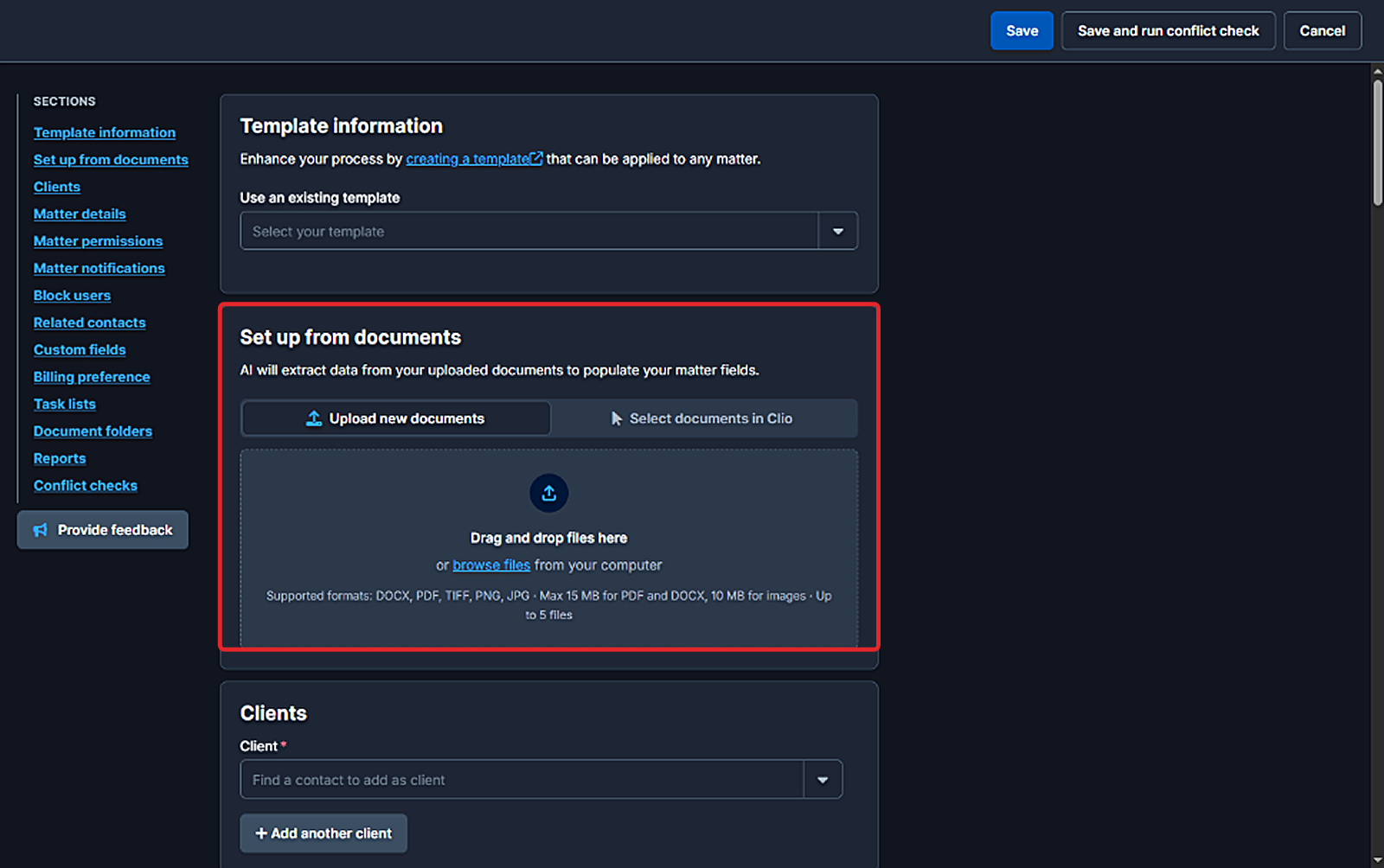
- Set up from documents sat on the new matter form in our trial, taking up to five uploaded files; we did not upload one.
- Clio's Create Matters article says it fills only empty matter fields and highlights them for review.
- Manage AI drafts client updates, extracts deadlines from court documents, and drafts invoices on Core and higher plans.
- Administrators can switch AI off firm-wide and read a 90-day AI event log, per Clio's AI features article.
- A bankruptcy attorney on Reddit says the firm's Clio AI turns 6 months of bank statements into a transaction spreadsheet "in about 10 minutes"; we did not test that task.
Pros
Clio's AI stays on the record your team already works in.
- Your client file stays in one system, because the AI works inside your matters.
- Your staff stop keying matter details from intake documents by hand.
- Your firm answers a client or auditor about AI use from a record, not memory.
Cons
Clio leaves the bankruptcy-specific work to other tools.
- Document chase stays staff work: our trial found no document request or missing-item view in a matter.
- Bankruptcy math is missing: no means test, exemptions math, or bankruptcy templates come preloaded.
- Clio Work, the separate research and drafting product, stays outside the firm-wide AI switch because it is AI-only.
Pricing
Clio Manage AI pricing starts with Starter at $49 per user per month, per Clio's pricing page, last reviewed October 29, 2026.
Core, Signature, and Elite are quoted, and AI features begin at Core.
4. Glade AI (3.2/5, Petition Software): Best for One AI Workspace From Intake to Filing
Overview
Glade AI is an AI-native bankruptcy case platform that reads, names, and routes client uploads, builds the schedules, and handles PACER filing.
It serves consumer bankruptcy firms willing to move their case work into one workspace.
It ranks fourth at 3.2/5 as petition software, best for one AI workspace from intake to filing. Glade AI and Clio both round to 3.2, and Glade sits lower on the unrounded total. We scored it from Glade's documentation and published screenshots, and our Glade AI review for bankruptcy firms holds the full scorecard.
Glade AI Bankruptcy AI Scorecard
Glade AI's score comes from our full review, read here against the AI job.
| Dimension | Weight | Score | Evidence |
|---|---|---|---|
| Core job performance | 20% | 4 | Documented upload reading, schedules, and PACER filing |
| Interoperability | 18% | 3 | MCP server in early release; Zapier inbound only; no public API |
| Ease of use and setup | 12% | 3 | Guided workflow; signature merge on per firm, Chapter 13 calculator by district |
| Practice-specific depth | 10% | 4 | Chapter 7 and 13 workflows, exemptions agent, means test lines |
| Attorney review and AI controls | 10% | 3 | Pre-filing review with attorney override; follow-ups without per-message approval |
| Pricing and cost structure | 10% | 2 | No published law-firm price |
| Data ownership and portability | 8% | 2 | Records returned on request; no case-data export format described |
| Support and reliability | 7% | 4 | In-app assistant hands off to a person; a large help center |
| Security and Opinion 512 posture | 5% | 3 | No attestation stated; OpenAI and Anthropic named as AI providers |
Features
Glade's documentation describes AI at almost every step of the case.
- Document Intelligence reads listed document types and rejects blurry or expired uploads with a plain-language note to the client.
- AI renaming suggests file names that staff approve, and triage leaves unclear files for a person.
- The Exemptions Agent proposes a statute and amount per asset for attorney edit.
- AI follow-ups text and email clients on a cadence the firm sets, per Glade's follow-ups article.
- An MCP server lets outside assistants such as ChatGPT and Claude work over your Glade data, labeled "an early release" in its MCP article.
- Glade's help center puts review on your firm: "You are required to review 100% of what Glade produces".

Screenshot: Glade product page, glade.ai/bankruptcy.
Pros
Glade AI gives your firm one place for the whole case.
- Your clients get one login and your staff one case record, from intake to PACER filing.
- Your staff see fewer bad scans, because Glade says blurry or expired uploads go back to the client with a reason.
- Your attorney sees a failed pre-filing check stop submission until someone fixes it or overrides it.
Cons
Glade AI asks you to move your case work and trust a quote.
- Glade documents no connection to Best Case, NextChapter, Jubilee, or Clio, and no public API.
- Glade describes no per-message approval for AI follow-ups, which send on the firm's cadence.
- Glade's Terms let it end your access "at any time or without notice", and you end the agreement only by deleting your account.
Pricing
Glade publishes no law-firm price.
Its Terms set fees per workflow or case, negotiated with each firm by volume, last reviewed October 21, 2026.
Client payments through Glade carry processing fees, per its payment fees article.
| Payment type | Processing fee, last reviewed October 21, 2026 |
|---|---|
| ACH | 1%, capped at $10 |
| Credit card | 3% plus $0.30 per transaction |
| Debit card | 2.5% plus $0.30 per transaction |
5. ChatGPT (3.1/5, General AI Assistant): Best for Drafting Client Letters and Checklists Under a Firm AI Policy
Overview
ChatGPT is OpenAI's general AI assistant, sold to firms as a Business workspace with a two-seat minimum.
It has no bankruptcy module, so ChatGPT for attorneys means drafting your staff set up themselves. It is the best AI chatbot for lawyers on our list by score, ahead of Claude.
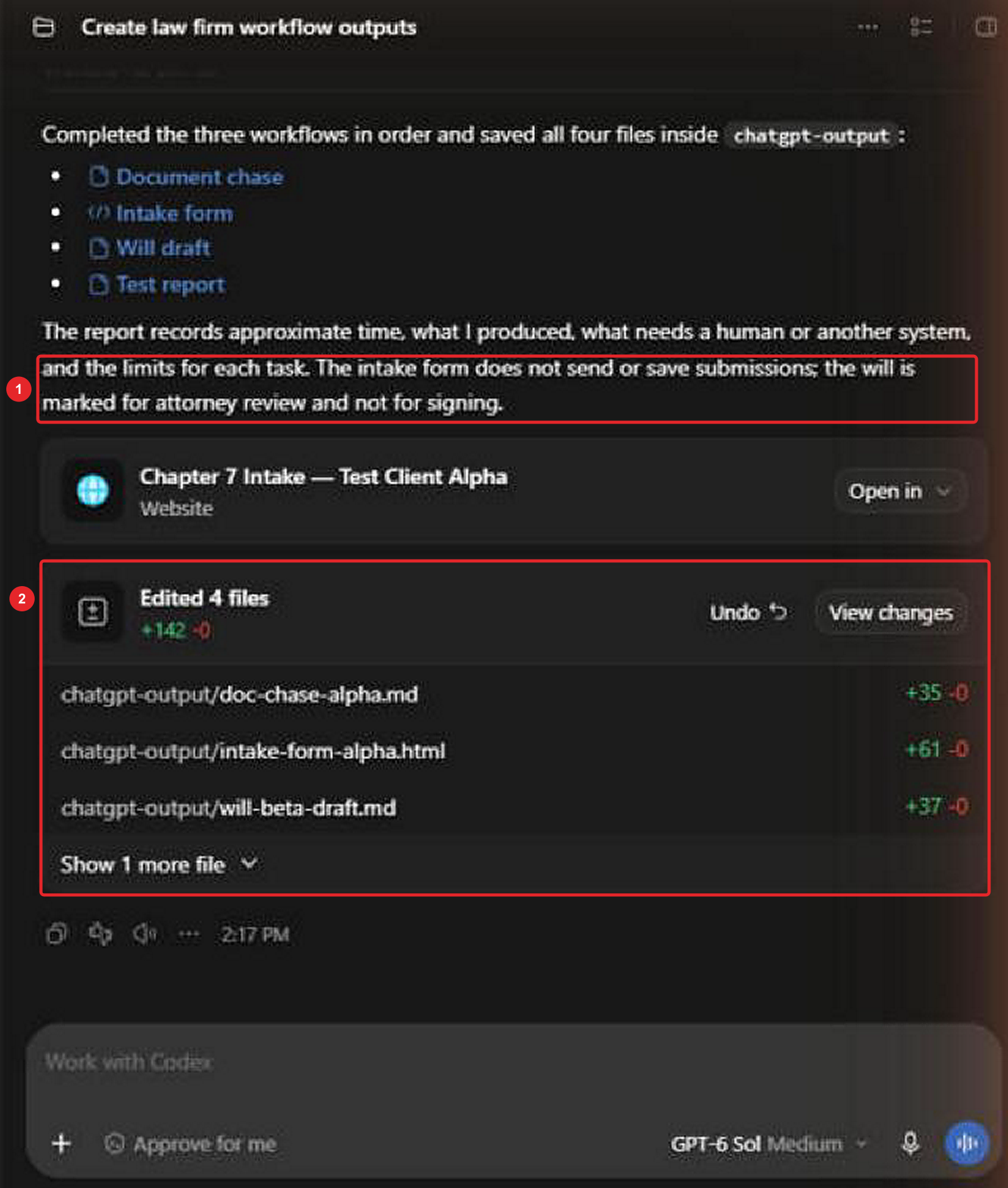
We tested its Windows app in Codex mode on November 13, 2026, with one synthetic Chapter 7 prompt. It wrote the checklist, reminder email, and intake form in about 55 seconds by its own count. It ranks fifth at 3.1/5 as a general AI assistant, best for drafting client letters and checklists under a firm AI policy.
ChatGPT Bankruptcy AI Scorecard
We scored ChatGPT for the first time here, on the Business plan as OpenAI's own pages describe it.
Our app test did not record the account's plan.
| Dimension | Weight | Score | Evidence |
|---|---|---|---|
| Core job performance | 20% | 3 | Checklist, reminder email, and intake form with no refusal; staff still track and send |
| Interoperability | 18% | 3 | Connected apps and a documented API; no petition or practice-management connector named by OpenAI |
| Ease of use and setup | 12% | 5 | Every task done with no documentation and no setup |
| Practice-specific depth | 10% | 2 | No bankruptcy module; staff supply the practice rules in the prompt |
| Attorney review and AI controls | 10% | 2 | Terms place review on the user; review labels are text, not an approval step |
| Pricing and cost structure | 10% | 4 | Every tier but Enterprise priced in USD with monthly and annual bases; Enterprise quoted |
| Data ownership and portability | 8% | 3 | You own inputs and outputs; self-service export not available on Business |
| Support and reliability | 7% | 2 | Self-service help center; support channels and SLA not stated where we read |
| Security and Opinion 512 posture | 5% | 4 | SOC 2 Type 2, AES-256, TLS 1.2+, no training on business data by default, a DPA |
Features
We saw what ChatGPT produces for a bankruptcy firm, and OpenAI's pages cover the rest.
- The 16-item document checklist carried the practice-convention label our prompt asked for, "not a statement of legal requirements".
- The reminder email used bracketed fields and warned the client against sending sensitive information by ordinary email.
- The intake form had six fields and a preview button, with nothing transmitted or saved.
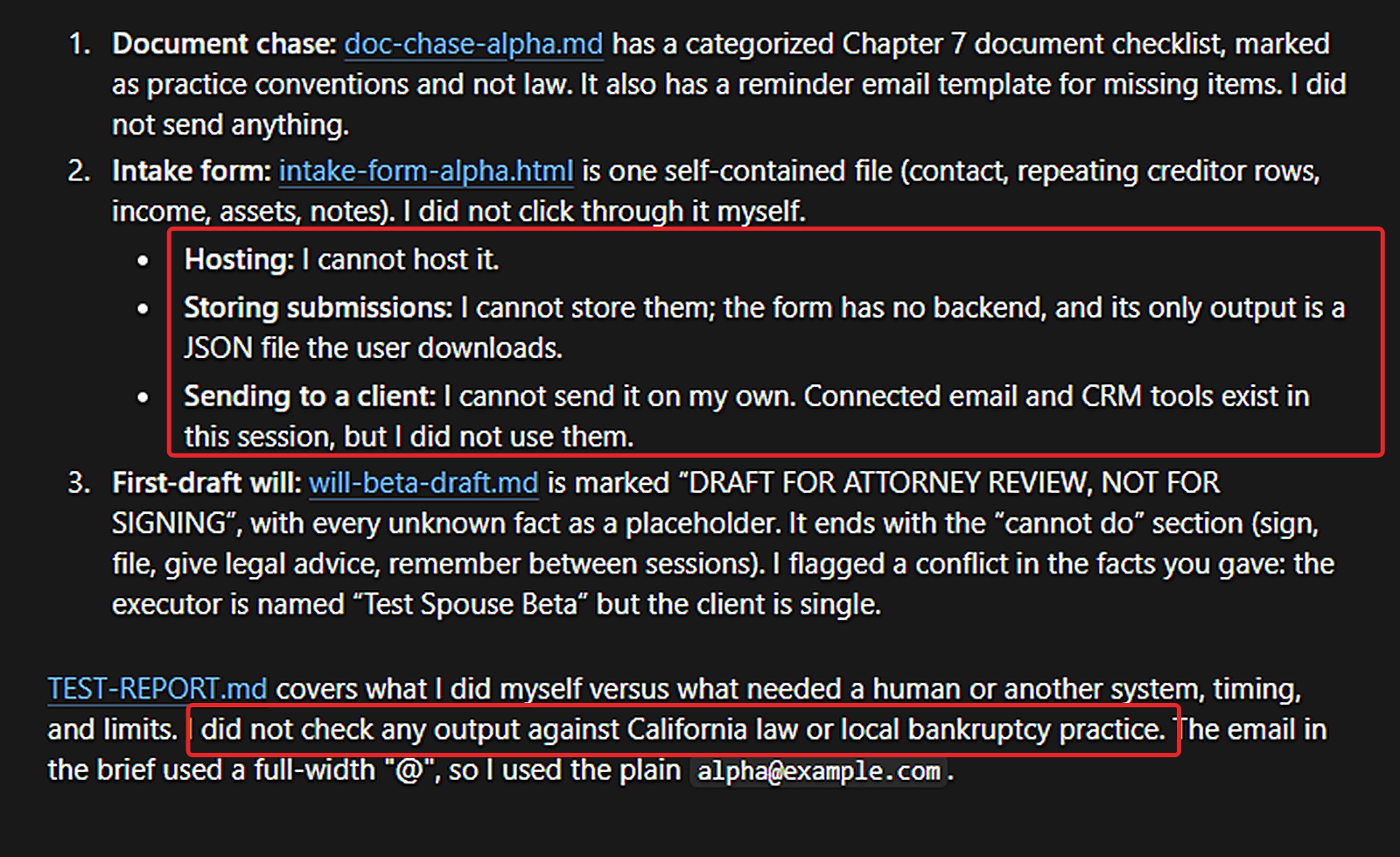
- Asked by our prompt to list its limits, the app said it cannot host the form, store submissions, or send it to a client.
- The whole session wrote four files, a will draft and a report included, in about two minutes, refusing nothing; we had no draft legally reviewed.
- We tested letters and checklists, not litigation drafting such as a ChatGPT attorney brief.
- Memory "does not retain every detail from every conversation", per OpenAI's Memory article.
- Personal plans share content for model improvement by default, and you can switch that off, per OpenAI's data controls page.
- Business states "No training on your business data by default", per OpenAI's enterprise privacy page.

Pros
ChatGPT gives your staff fast first drafts at a low seat cost.
- Your staff get first drafts of letters and checklists in seconds, with no setup.
- Your staff paste the reminder email and fill its bracketed fields instead of writing from scratch.
- Your seat cost stays low next to bankruptcy software.
Cons
ChatGPT drafts, but it runs none of the workflow around the draft.
- Client tracking is absent: our trial showed no record of what arrived, what is stale, or when to remind.
- OpenAI names no petition or practice-management connector, and its Terms of Use say "Output may not always be accurate".
- Paralegals on Reddit report hallucinated citations and no guarantee of confidentiality.
Pricing
ChatGPT for lawyers costs $20 to $125 a seat per month on Business, per OpenAI's pricing page, last reviewed November 13, 2026.
Personal plans start at $0, and Pro starts at $100 a month.
| Plan | Price, last reviewed November 13, 2026 |
|---|---|
| Free | $0 |
| Go | $8 per month |
| Plus | $20 per month |
| Pro | From $100 per month |
| Business | $20 per user per month billed annually, or $25 monthly, with a 2-seat minimum |
| Business Premium seats | $100 billed annually, or $125 monthly |
| Enterprise | By quote |
6. Bankruptcy.AI (3.0/5, Bankruptcy AI Platform): Best for Best Case Firms That Want Supervised Document Collection
Overview
Bankruptcy.AI is a platform from Majors.AI, LLC for consumer Chapter 7 and 13 firms, built around supervised AI agents.
Its documentation describes a mobile client questionnaire and document collection through read-only bank and payroll connections. It also describes reminders for missing items only, a 341 trustee package, and an export to Best Case.
The vendor labels it beta and in pilot, and its only named firm was founded by its own founder. It ranks sixth at 3.0/5 as a bankruptcy AI platform, best for Best Case firms that want supervised document collection. We scored it from its documentation and published screenshots, not a trial.
Bankruptcy.AI Bankruptcy AI Scorecard
We scored Bankruptcy.AI for the first time here, from its documentation only.
| Dimension | Weight | Score | Evidence |
|---|---|---|---|
| Core job performance | 20% | 3 | Document type detection, bank and payroll pulls, and a received, pending, and missing checklist; drafting stated inconsistently |
| Interoperability | 18% | 3 | One-way Best Case import with no documented mechanism; no public API |
| Ease of use and setup | 12% | 3 | A case opens with 10 fields; magic-link client portal; staff guides still being written |
| Practice-specific depth | 10% | 4 | Questionnaire mapped to the schedules; 341 checklist; Chapter 13 plan tracking |
| Attorney review and AI controls | 10% | 4 | Client-facing actions wait for approval; roles gate exports; an audit log |
| Pricing and cost structure | 10% | 1 | Not stated |
| Data ownership and portability | 8% | 3 | Full export on request; deletion within 30 days of offboarding |
| Support and reliability | 7% | 3 | Email support with a one-business-day reply; no phone or SLA |
| Security and Opinion 512 posture | 5% | 3 | AES-256, TLS 1.2+, US storage; no attestation, DPA, or subprocessor list |
Features
Bankruptcy.AI's documentation describes supervised collection from intake to the 341.
- A case opens with 10 fields, and the client completes a 17-section questionnaire on a phone through a magic link, per its product page.
- Bank statements and pay stubs arrive through read-only bank and payroll connections, with manual upload as a fallback.
- A received, pending, and missing checklist drives reminders for outstanding items only.
- The 341 trustee package downloads as a ZIP with a manifest.
- The vendor dates a Best Case import to August 2026 and states it is "not affiliated with or endorsed by Best Case or Stretto".
- Its documentation states that "Client-facing actions always require your approval".
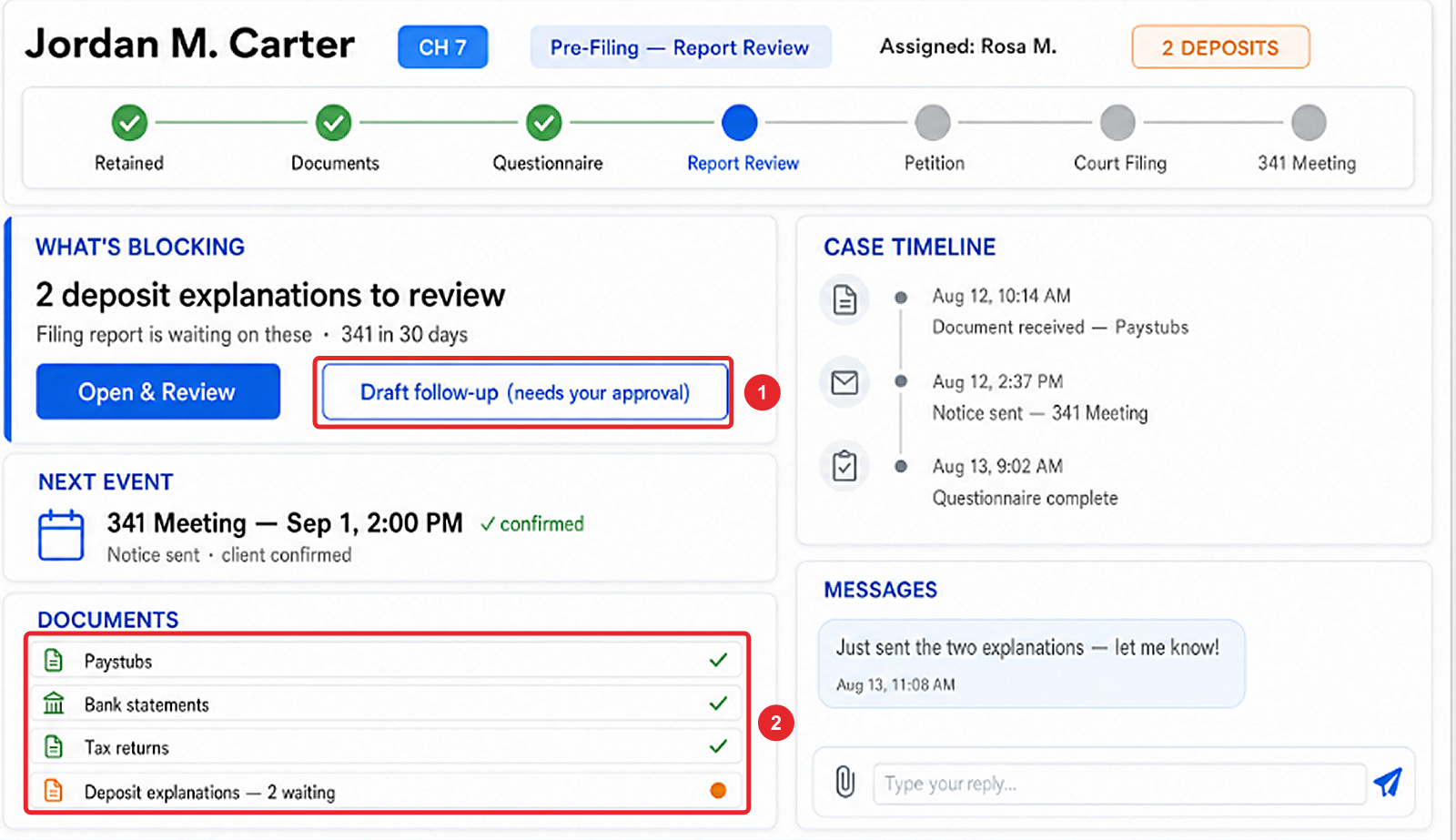
Screenshot: Bankruptcy.AI documentation, bankruptcy.ai/for-attorneys.
Pros
Bankruptcy.AI aims at the chase that slows every consumer case.
- Your staff stop re-requesting documents that already arrived.
- Your staff stop retyping into Best Case, where the import works as the vendor states.
- Your firm lowers the risk of a wrong message reaching a client or trustee.
- Your trustee package is ready before the 341.
Cons
Bankruptcy.AI is early, and its own pages disagree with each other.
- Its pages conflict on whether schedule drafting and e-filing are live; its why page says "Drafting and filing are on the roadmap, not in V1".
- Its only named import target is Best Case, with no documented mechanism and no public API.
- Its security, privacy, and terms pages showed only their titles in two browsers, and we found no published DPA, subprocessor list, or cancellation terms.
- Its reach is narrow: a firm-side reply in a Facebook group said "it seems its only in two states". The vendor's platform page lists district rules live in three districts in Arizona and Washington, with "Give us a week" for others.
Pricing
Bankruptcy.AI publishes no price, so we score its pricing as Not stated.
Its pricing page says "Pricing is not set yet" and offers early access through a demo request, with no trial, last reviewed November 4, 2026.
7. Claude (2.9/5, General AI Assistant): Best for Drafts That State What They Did Not Check
Overview
Claude is Anthropic's general AI assistant, sold to firms as a Team workspace, with no bankruptcy module.
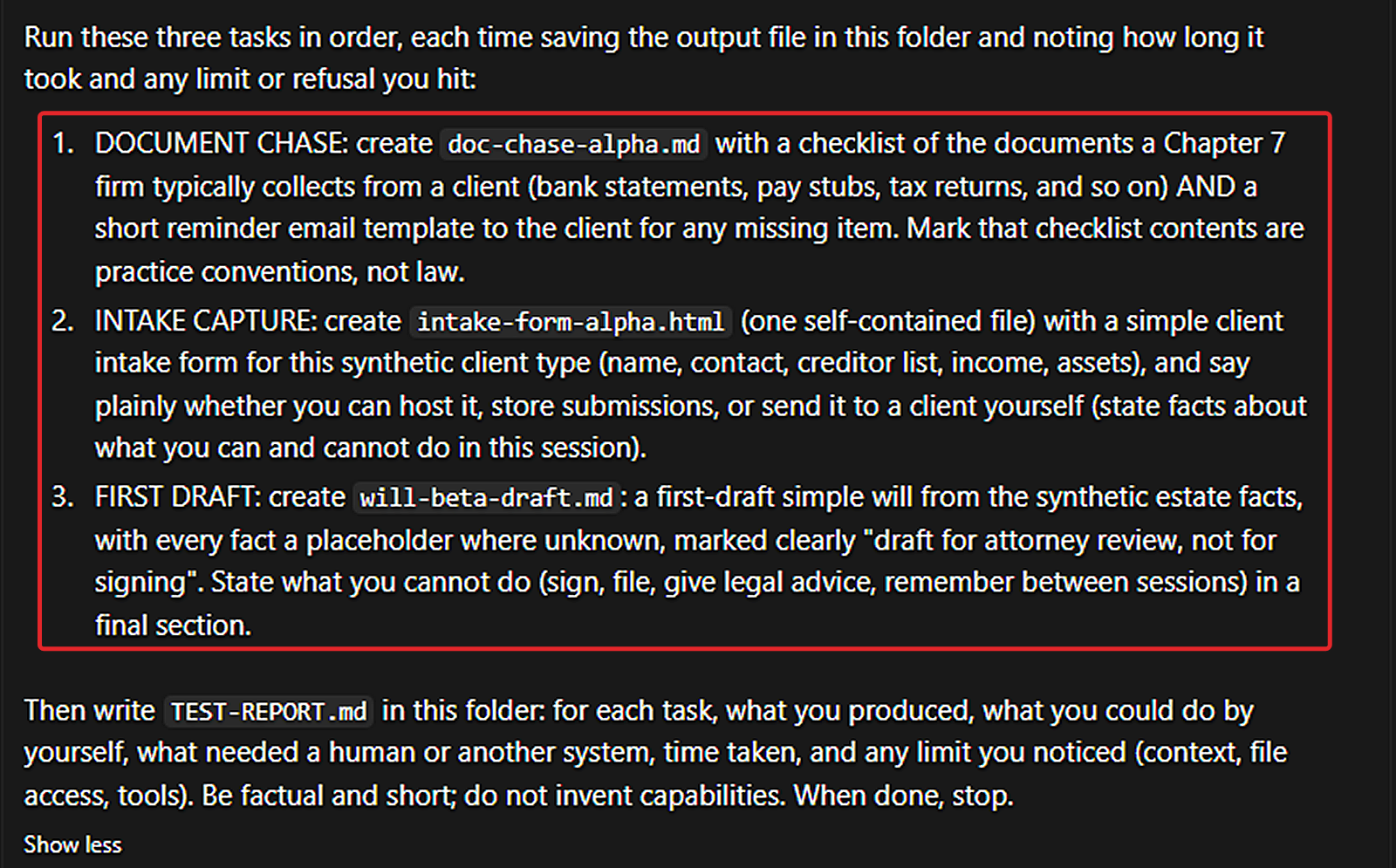
We tested the desktop app's Code tab on November 13, 2026, with three plain-language tasks on synthetic Chapter 7 facts. It wrote an eight-group checklist, an email template, and an intake form in about 31 seconds by its own count.
It ranks seventh at 2.9/5 as a general AI assistant, best for drafts that state what they did not check. Lawyers do use Claude AI in this role: one firm's staff on Reddit use Claude "for almost everything", with the attorney's final touches.
General users rate it 4.7 on G2 from 1,859 reviews and 4.6 on Capterra from 640, read November 13, 2026. No law-firm reviewer appeared on G2's first page.
Claude Bankruptcy AI Scorecard
We scored Claude for the first time here, on the Team plan as Anthropic's own pages describe it.
Our app test did not record the account's plan.
| Dimension | Weight | Score | Evidence |
|---|---|---|---|
| Core job performance | 20% | 3 | Checklist with a status key, email template, and intake form; outputs called "unverified drafts" |
| Interoperability | 18% | 2 | Connections only through connectors the firm sets up; no connector of its own for bankruptcy software |
| Ease of use and setup | 12% | 5 | All tasks done in plain language with no setup or documentation |
| Practice-specific depth | 10% | 2 | No bankruptcy module; staff supply the practice rules in the prompt |
| Attorney review and AI controls | 10% | 2 | Commercial Terms put evaluating outputs on you; review labels are text the session wrote |
| Pricing and cost structure | 10% | 4 | Every tier priced in USD with a monthly option; Enterprise adds usage at API rates |
| Data ownership and portability | 8% | 2 | You own outputs; deletion within 30 days; no export path stated where we read |
| Support and reliability | 7% | 2 | Self-service help center; channels and SLA not stated where we read |
| Security and Opinion 512 posture | 5% | 4 | SOC 2 Type 2 and ISO 27001 for Team, per Anthropic's trust center |
Features
We saw what Claude produces for a bankruptcy firm, and Anthropic's pages cover the rest.
- The checklist grouped items in eight sections with a status key, labeled as practice conventions as our prompt asked.
- The reminder email used merge placeholders for the missing items and the due date.
- The intake form had a repeatable creditor table and a download button, with no upload field.
- Asked by our prompt to list its limits, the session said it cannot host the form, store submissions, or send it to a client on its own.
- Beyond what we asked, the session said it did not check any output against California law or local bankruptcy practice.
- The whole session wrote four files, a will draft and a report included, in about 2.5 minutes.
- Anthropic's Usage Policy treats legal work that prepares documents for a person to sign or file as high-risk, and says "A qualified person must meaningfully review" the output.
- Custom connectors link Claude to other tools, per its connectors article, but Anthropic names none for bankruptcy software; NextChapter and Glade AI document the connection from their side.
- An attorney on Reddit reports Claude produced "a perfectly formatted, ready to review document in Microsoft Word in a couple of minutes"; we did not test Word.
Pros
Claude gives your attorney drafts that point at their own weak spots.
- Your staff get drafts in seconds with no setup.
- Your attorney knows where to look first, because the session said on its own that it checked nothing against state law or local practice.
- Your seat cost stays low next to bankruptcy software.
Cons
Claude drafts well, but it leaves every review and workflow step to you.
- Client tracking is absent: our trial showed nothing recording what a client sent.
- Client sends get no approval hold: Claude asks before running connector tools, but nothing holds a draft for review before it reaches a client, and Anthropic's Commercial Terms put evaluating outputs on you.
- Legal accuracy draws doubt: a Reddit user reports Claude's wrong legal advice is "pretty good at disguising it so that it looks legit".
Pricing
Claude for lawyers costs $20 to $125 a seat per month on Team, per Claude's pricing page, last reviewed November 13, 2026.
Personal plans run from $0 to $200 a month.
| Plan | Price, last reviewed November 13, 2026 |
|---|---|
| Free | $0 |
| Pro | $17 per month billed annually, or $20 monthly |
| Max | $100 per month |
| Ultra | $200 per month |
| Team Standard | $20 per seat per month billed annually, or $25 monthly |
| Team Premium | $100 billed annually, or $125 monthly |
| Enterprise | $20 per seat per month billed annually, 20-seat minimum, plus usage at API rates |
AI Software Bankruptcy Firms Ask About That We Have Not Reviewed Yet
One more tool comes up in bankruptcy AI searches, and we have not scored it.
CounselPro
We have not reviewed this software yet.
CounselPro, Inc. says its software analyzes financial statements across a case's accounts and links each figure to its source page. Its homepage says it shows "What moved in the 90 days before the petition, and whether the schedules match the accounts" for bankruptcy work.
Its pricing page lists Core at $100, Plus at $250, and Premier at $500 per month, last reviewed November 14, 2026. It also lists a Single Project at $499 per case.
Can Your Firm Use ChatGPT or Claude Instead of Bankruptcy AI Software?
Yes for drafting and client correspondence on a business plan under a firm AI policy, and no as your petition engine or case tracker.
In our tests, neither assistant tracked what a client sent. Neither ships its own petition-software connector, so any link runs through the petition tool's side (NextChapter's AI Connector, Glade's MCP server).
Can our firm automate bankruptcy work using Claude instead of buying bankruptcy software?
No, Claude drafts but automates none of the case work. Our test produced drafts in seconds, and your staff would still track every document and send every message.
The plan's training default decides whether client files belong there at all.
- ChatGPT: personal plans share content for model improvement until you switch it off, and Business does not train on business data by default.
- Claude: personal plans show model training as "Opt-out", and Team states no model training on your content by default.
Whether lawyers should use ChatGPT with client files turns on that setting. The same plan check applies to Claude, including whether Claude trains on your files. ABA Formal Opinion 512 sets a baseline that lawyers "should read and understand the Terms of Use, privacy policy" of any AI tool they use.
We haven't obtained consent from clients to input their sensitive data. What now?
Opinion 512 says informed client consent is required before you put representation information into many of today's self-learning AI tools. The opinion ties that conclusion to the tools as they stood in July 2024, and a boilerplate engagement-letter clause is not enough. Our guide to client data confidentiality when your firm uses AI walks through consent, retention, and plan terms.
Firms answer this in different ways. One paralegal on Reddit says ChatGPT "isn't allowed/accessible at my firm for security reasons". Another user puts in only pleadings already on the public record. A member of a bankruptcy attorneys' Facebook group suggested that with Claude "you could probably do your own" platform.
A middle route exists inside petition software. With NextChapter's AI Connector, your staff upload the pay stub to your own paid Claude or ChatGPT account. Only the values the assistant reads go into NextChapter, which says it "never stores or sends your documents to an AI provider".
Before client files go into either assistant, settle these four points.
- Buy the business plan, not a personal one.
- Confirm the model-training setting is off.
- Read the vendor's terms and privacy policy.
- Name the attorney who reviews every output before it leaves the firm.
What Courts and the ABA Expect When AI Drafts Your Firm's Work
Your attorney's signature carries the Rule 9011 certification whatever tool drafted the text, and the six court orders and rules below add AI duties.
Rule 9011(c)(1) adds that a law firm "must be held jointly responsible" for a violation by its partner, associate, or employee, absent exceptional circumstances.
Can attorneys use AI to draft court filings?
Yes, but the attorney who signs answers for every citation and figure in the filing. In re Martin is a ChatGPT attorney sanctions case from the Northern District of Illinois bankruptcy court, decided July 18, 2025. A brief in a Chapter 13 case cited authority that AI had invented.
The court imposed a joint-and-several monetary sanction, paid to the court clerk, and required two attorneys to attend a course on AI dangers. It wrote that "no lawyer should be using ChatGPT or any other generative AI product to perform research without verifying the results. Period."
We know that it makes stuff up, so how can the firm use it?
Use it only where your reviewer can check every output. Every product on this list puts verification on your firm. NextChapter shows values before saving, Best Case holds uploads at a review gate, and Glade requires review of everything it produces.
One bankruptcy attorney on Reddit says the firm still cross-checks every means test figure its AI touches. These bankruptcy court orders and rules address AI in filings.
| Court | Order or rule | Date | What it asks |
|---|---|---|---|
| Northern District of Texas | General Order 2023-03 | June 21, 2023 | Verify content drafted with AI before filing |
| Western District of Oklahoma | General Order 23-01 | 2023 | An attestation about AI use in the filing |
| Tenth Circuit Bankruptcy Appellate Panel | General Order No. 11 | September 30, 2025 | Verify AI content; AI use is no defense |
| Western District of Kentucky | Local Rule 9011-2 | December 1, 2025 | Counsel confirms the accuracy of AI-generated content |
| Southern District of California | General Order 210 with form CSD 5013 | January 1, 2026 | Publishes form CSD 5013 naming the AI program and certifying an accuracy check |
| Middle District of Pennsylvania | General Order 2026-02 | June 17, 2026 | Verify citations; review may stop at the first fabricated one |
This list is not complete, so check your own court's local rules and standing orders. Our guide to AI ethics rules for bankruptcy attorneys covers supervision, fees, and disclosure in depth.
Best AI Software for Bankruptcy Firms by Firm Situation
For a firm filing 7s and 13s, the software you already run decides the pick more than the score does.
We currently use Bestcase and would love to have something integrate with that. What AI software are you using for your bankruptcy practice?
Best Case firms have two AI routes. Document Flow runs inside Best Case, and Bankruptcy.AI states a Best Case import from a pilot-stage platform. The table below matches each situation to a pick.
| Situation | Pick | Why (prices as last reviewed in each entry) |
|---|---|---|
| You run Best Case and want AI extraction | Best Case Document Flow | AI reads six document types inside the petition engine you know, at $59 per case |
| You run Best Case and want supervised collection in front of it | Bankruptcy.AI | Its documentation states a Best Case import; it is in pilot, with district rules live in three districts |
| You want AI inside a cloud petition tool at a published price | NextChapter | The AI Connector runs on your own assistant account; plans start at $89 per user |
| You run your matters in Clio | Clio | AI fills empty matter fields behind a firm-wide switch |
| You want one AI workspace and will move case work into it | Glade AI | Intake to PACER filing in one place; no published price |
| You need drafts and client letters only | ChatGPT Business or Claude Team | $20 a seat per month billed annually; no case tracking |
| You need different petition software altogether | NextChapter, the top-scoring petition tool here | See our ranking of bankruptcy petition software for the full field |
Add an Automation Layer Around Your AI Software for Bankruptcy Document Chase and Intake
You keep your petition software and the AI you chose, and Aretech builds the automation layer around them in three layers.
- The data layer: one record per client across your CRM, petition software, storage, and phones, which ends the double entry between intake and petition prep.
- AI agents that work on that record.
- Automated workflows that run the client document chase, intake capture, and first drafts from your own templates.
The system lives in your firm's own cloud account and runs on your current stack, with hosted frontier models doing the AI work. Each firm's data stays isolated, and no firm's data trains a model, as written policy.
Your firm owns what we build, and there are no subscriptions.
That is how bankruptcy law firm automation helps you increase revenue and handle more cases without adding headcount. It starts with the free workflow mapping session, and the map it produces is yours to keep.
Data Entry Into Your Petition Software, Never Submission
Our automation enters your firm's data into your petition software, and submission stays manual after your attorney's review.
For your petition software, that data entry is a build our team delivers around the tool you keep.
These actions stay with your people, never the system:
- Filing, signing, or submitting anything
- Taking payment
- Contacting a court or trustee
- Deciding anything legal
- Overwriting or deleting your data
Where Your Attorney Reviews
Review happens at three points. Nothing reaches a petition, court, or trustee without your attorney's sign-off.
Client reminders go out only under wording and rules your firm signs off before they go live.
- Anything the system is unsure about goes to a person on your staff before it moves on.
- Your reviewer checks the pre-checked document set before the attorney sees it.
- Your attorney approves every draft and every data entry before submission.
Every file is named from its content, never guessed from its filename. Only text your firm wrote is used as instructions to the model, never text taken from a client's document.
That fits the cross-checking careful bankruptcy firms already do.
Start with NextChapter at 3.6/5 for AI inside your petition tool, and use a ChatGPT or Claude business plan for drafts and letters. The automation layer then works around whichever tool you keep.
Free. The map is yours, even if you never hire us.
FAQs
Is There a ChatGPT for Lawyers?
Yes, ChatGPT serves lawyers through its Business and Enterprise plans, and OpenAI sells a legal offering to firms by contact, per its law page. For a bankruptcy firm, the plan's training setting and your review step matter more than a legal label.
Is Claude or ChatGPT Better for Bankruptcy Attorneys?
ChatGPT scores 3.1/5 and Claude 2.9/5 on our rubric, so ChatGPT edges ahead. Both drafted the same Chapter 7 tasks in under a minute in our tests. ChatGPT documents an API platform and named connected apps, which lifts its interoperability score.
Neither ships its own petition-software connector. NextChapter's AI Connector and Glade AI's MCP server let a paid account connect from the petition side instead.
Can Attorneys Use ChatGPT With Client Documents?
Yes, but only on a plan whose terms you have read, with model training off and client consent where Opinion 512 calls for it. ChatGPT Business does not train on business data by default, while personal plans share content for model improvement until you switch it off.
What AI Tools Do Bankruptcy Lawyers Use?
Bankruptcy lawyers use AI inside petition software, AI on the practice-management record, AI collection platforms, and general assistants. NextChapter, Best Case Document Flow, and Glade AI sit in the first group, Clio in the second, and Bankruptcy.AI in the third. ChatGPT and Claude are the general assistants, and both drafted with no setup in our tests.
How Is Client Data Protected When Our Firm Uses AI?
Client data is protected by each plan's terms, and those terms differ by product. ChatGPT Business and Claude Team state no model training on your content by default. Stretto's privacy policy does not say whether Best Case data trains Document Flow, and Clio lets an administrator switch AI off firm-wide.
Does Best Case Have AI Document Extraction?
Yes, Best Case has AI document extraction through Document Flow, a cloud module. It costs $59 per case after 10 free cases, last reviewed October 29, 2026. Best Case says it reads six document types, and client uploads wait for your review by default. The module sat locked when we ran the trial, so we did not run it.
What Does Clio Manage AI Do for a Bankruptcy Firm?
Clio Manage AI fills empty matter fields from up to five uploaded documents, extracts deadlines, and drafts client updates and invoices. An administrator can switch it off firm-wide. It does no means test and builds no schedules.
How Much Does Glade AI Cost a Law Firm?
Glade AI's law-firm cost is a negotiated quote, because Glade publishes no law-firm price. Its terms set fees per workflow or case, negotiated with each firm by volume. Client payments through Glade also carry processing fees, last reviewed October 21, 2026.
Do Bankruptcy Courts Require You to Disclose AI Use?
Yes, one of the six courts in our table requires it: the Western District of Oklahoma asks for an attestation. The Southern District of California publishes a disclosure and certification form, CSD 5013, under General Order 210. Other courts require verification without a disclosure form, and under Rule 9011 the signature carries the certification.
Who Files the Petition When Your Firm Uses These Tools?
Your attorney's office does, never the tool on its own. Best Case and Glade file only when your staff run the filing step.
Best Case requires an attorney on every case. Glade blocks submission on a failed pre-filing check until it is fixed or an attorney overrides it. NextChapter holds its Assemble and File steps until the review cards clear.