Keep Lawmatics as your estate planning firm's front door. Add a custom automation layer around it when your client record has to travel past it. Lawmatics runs intake forms, follow-up, booking, and e-signature well, and it scores 3.1 out of 5 on our rubric for software.
Your decision turns on whether Lawmatics covers your whole workflow, or your staff retype its facts into your drafting tool and Clio. You get what Lawmatics does well, where its automation stops, how it scores, and when each setup fits your firm.
Aretech builds automation that works around the software it reviews; here is how we score software. Last reviewed November 14, 2026.
TL;DR
- Keep Lawmatics for your estate intake, follow-up, and booking; it scores 3.1 out of 5 on our software rubric.
- Its WealthCounsel sync is no longer available to new Lawmatics customers, so no native sync carries your intake answers into drafting.
- Stay with Lawmatics alone while winning inquiries is your bottleneck and your staff rarely retype facts into drafting.
- Before your next renewal, count the hours your staff spend retyping client facts, then decide.
Which Setup Fits Your Estate Planning Firm?
Keep Lawmatics alone when your bottleneck is winning estate inquiries. Add a layer around it when your staff retype the same client facts into your drafting tool and Clio or MyCase.
Custom automation on this page means a layer built for your firm around Lawmatics and your other systems.
Lawmatics also names its own builder Custom Automations, and that builder works inside Lawmatics. The two are different kinds of estate planning automation, and you can run both.
How much money am I spending on all of these tech subscriptions?
Total three lines before your renewal lands.
- Your Lawmatics seats, quote-only and committed for the term.
- Its add-ons, metered like Merlin and texting or priced per seat like Copilot.
- Each drafting and practice-management subscription beside it.
Owners ask the question in those words, and the total shows whether another tool earns its place.
Three setups cover most boutique estate planning firms.
- Keep Lawmatics alone if your firm wins or loses on inquiries, consult booking, follow-up, and e-signature, and your staff rarely retype facts into drafting.
- Add a layer around Lawmatics if your firm's client record has to reach your drafting tool and practice-management system without retyping.
- Look at a different tool if your firm's drafting tool must receive intake answers natively, or your drafting or practice-management suite already runs its own intake.
Who This Comparison Is For (and Not For)
This comparison is written for the people who run an estate planning firm's operations. You are the reader in one of these roles.
- Owner-attorneys and managing partners at boutique estate planning firms that run or weigh Lawmatics.
- Operations leads who own intake, scheduling, and the hand-off to drafting.
- In-house developers at higher-volume estate firms who judge the Lawmatics API.
The page is not written for these readers.
- Individuals planning their own estate, and their families.
- Financial advisors and accountants.
- Paralegal job seekers.
- Firms in other practice areas, and large firms.
What Lawmatics Does Well for Estate Planning Firms
Lawmatics is a legal CRM and intake platform that runs each estate inquiry from first contact to the hand-off at hire.
CRM use runs higher at small firms than across the profession: 39 percent against 31 percent, in the ABA's 2024 Solo and Small Firm TechReport.
Lawmatics' own estate planning page draws the line itself. Drafting stays in "your drafting tool", and Lawmatics handles intake, consult scheduling, conflict checks, retainer signing, and trust-funding follow-up.
Lawmatics Features for Estate Planning Firms
Lawmatics covers your estate front door with these features, each documented on its own help page.
- Intake forms with conditional logic, so a question appears only when an earlier answer calls for it.
- Relationship blocks that add each spouse or child as a contact on the same matter.
- Collection blocks that repeat entries, such as bank accounts, on a matter form and add a read-only total.
- File requests that ask the client for named documents and show each request as Pending, Submitted (some files), or Completed (all files); reminders run through an automation you build with a delay and an exit condition.
- A client portal where clients answer those requests and upload their files.
- Automations with 12 triggers, 19 actions, and exit conditions that end a sequence once its goal is met.
- Automation actions that move a matter through your pipeline stages and run a conflict check.
- Document templates and e-signature, so your engagement letter goes out from the matter itself.
- Consult booking tied to your synced calendar, plus two-way texting.
- Merlin AI agents: Merlin Qualify scores inquiries from form fields and matter data, and Merlin Engage follows up with leads.
- Matter sync to Clio or MyCase when a lead converts to a client.
Can we run multiple intake forms for multiple people in the same matter?
Yes. Relationship blocks add each spouse or child as a contact on the same matter, so one intake covers the couple.
The conditional logic setting sits on each form field. Lawmatics' help center shows the switch and the rule that controls it.
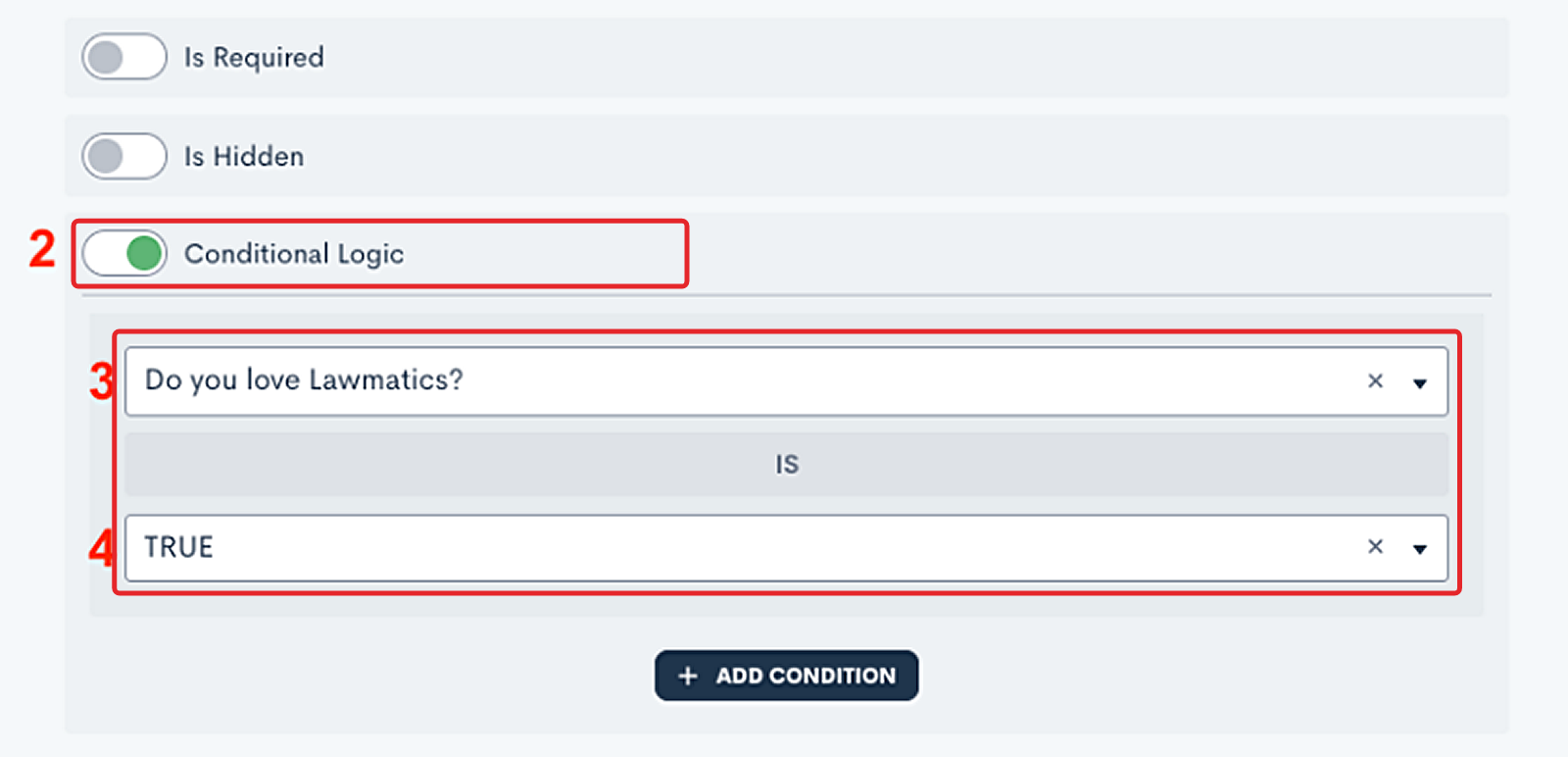
Screenshot: Lawmatics conditional logic help article, captured October 21, 2026.
Engage holds every message for your approval in Manual Review, its default mode. Autopilot sends without review, and the vendor's example shows Autopilot selected.

Screenshot: Lawmatics Merlin Engage help article, captured October 21, 2026.
What Your Firm Gains From Lawmatics
Lawmatics turns those features into these gains for your estate firm.
- A first answer to each estate inquiry without a staff hand-off, because forms, booking, and follow-up run on their own.
- One matter for a couple or a whole family, instead of a separate record per spouse.
- No retyping of the matter into Clio or MyCase at hire.
- Source and referral reporting on the dashboard, so you see which marketing brings signed clients.
- A documented API that a developer can build against.
- Add-on costs you can model before you sign, since Merlin and texting prices are published.
Users rate it well. Lawmatics holds 4.6 from 251 reviews as shown on G2's header, read October 29, 2026, and 4.6 from 50 on Capterra, read November 1, 2026.
Where Lawmatics' Automation Stops
Lawmatics' automation stops at its own walls. Your record reaches Clio or MyCase as a pushed copy, and for a new customer no native sync carries it into your drafting tool.
Each limitation below links to the Lawmatics page that documents it.
| Limitation | What Lawmatics' documentation shows | What it means for your estate firm |
|---|---|---|
| No will or trust drafting | The estate planning page leaves the will, trust, power of attorney, and healthcare directive to your drafting tool | Your drafting tool still needs the client facts from somewhere |
| WealthCounsel sync closed | The WealthCounsel integration is "no longer available to new Lawmatics customers" and runs one way | A new subscriber has no native path into WealthCounsel |
| Collections stay inside | Collections note "Integration field mapping is not currently supported for collections" and "Merge fields are not currently supported for collections" | A couple's accounts and beneficiaries stay inside Lawmatics, exported one collection at a time as a CSV; Lawmatics advises a standard custom field for data that must reach your case-management system |
| Uploads track status, not content | File requests show Pending, Submitted, or Completed, and the form autosave article says uploads are saved only once the client clicks Submit | Your staff open each file to check it is the right document, and an unsubmitted form keeps no uploads |
| One run by default | The entry conditions article says "By default, Lawmatics automations only run once" | A matter that re-enters a stage does not restart its sequence unless you change the setting |
| Quiet failures | The automation statuses article shows a Failed status, and failure alerts are a per-user notification setting | Someone has to check statuses, or turn alerts on, to catch a stalled matter |
| No approval step | None of the 19 actions in the automation actions article is an approval step | Automated forms, emails, and texts go out on their trigger; only draft signature documents can wait for approval under Document Approvals |
| Clio gets a pushed copy | The Clio Manage integration syncs matters at conversion or on a later sync, by the Sync to Clio button or an automation action; it sends back only a closed status, syncs files when document sync is on, and says "Folders are not synced" | Apart from a closed status, edits your staff make in Clio stay in Clio |
The collection block screen shows where those repeating entries live: inside the matter form, with a total the client cannot edit.
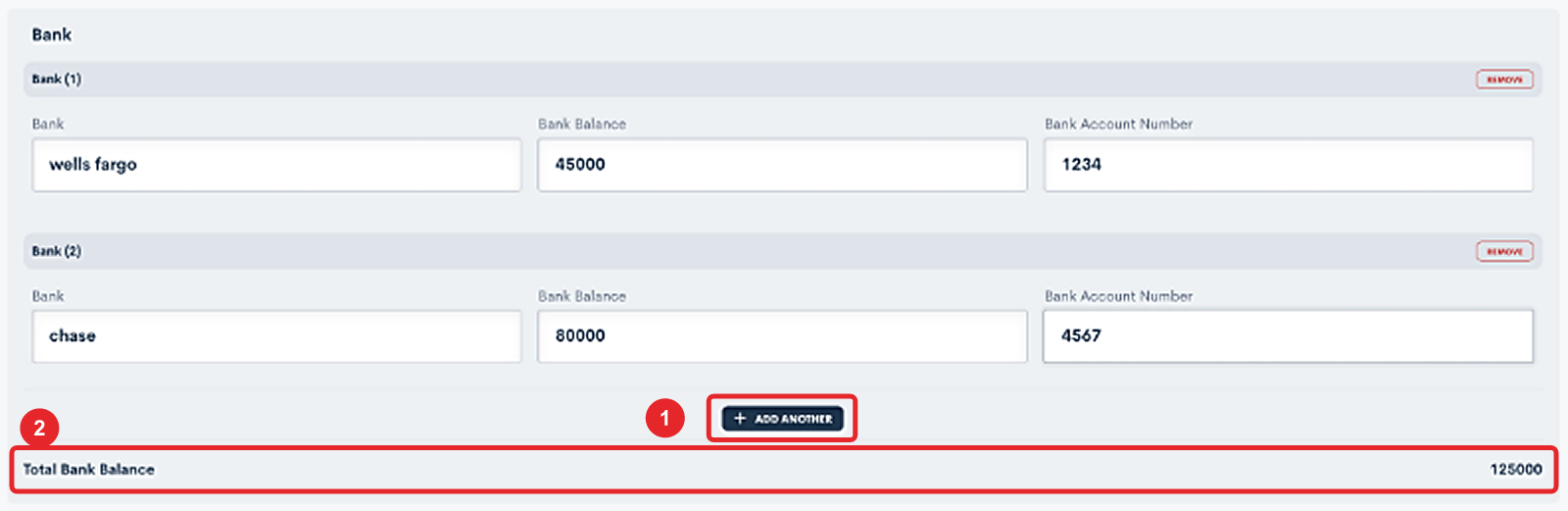
Screenshot: Lawmatics collection blocks help article, captured October 21, 2026.
Can Lawmatics Send Intake Answers to Your Drafting Software?
Not natively, for a new customer. The drafting sync Lawmatics documents, WealthCounsel's, is closed to new customers.
It also runs one way, so data entered in WealthCounsel does not transfer back to Lawmatics.
Three routes remain open to you.
- A third-party intake tool such as DecisionVault, which has a Lawmatics integration page.
- The Zapier connector that lists WealthCounsel and Lawmatics together.
- A build on the Lawmatics REST API, plus its webhooks on Premium plans.
Each route adds a tool or a build to your stack. Firms already using the integration still see two sync switches and a practice-area mapping, shown in the vendor's example as Estate Planning to Estate Planning.
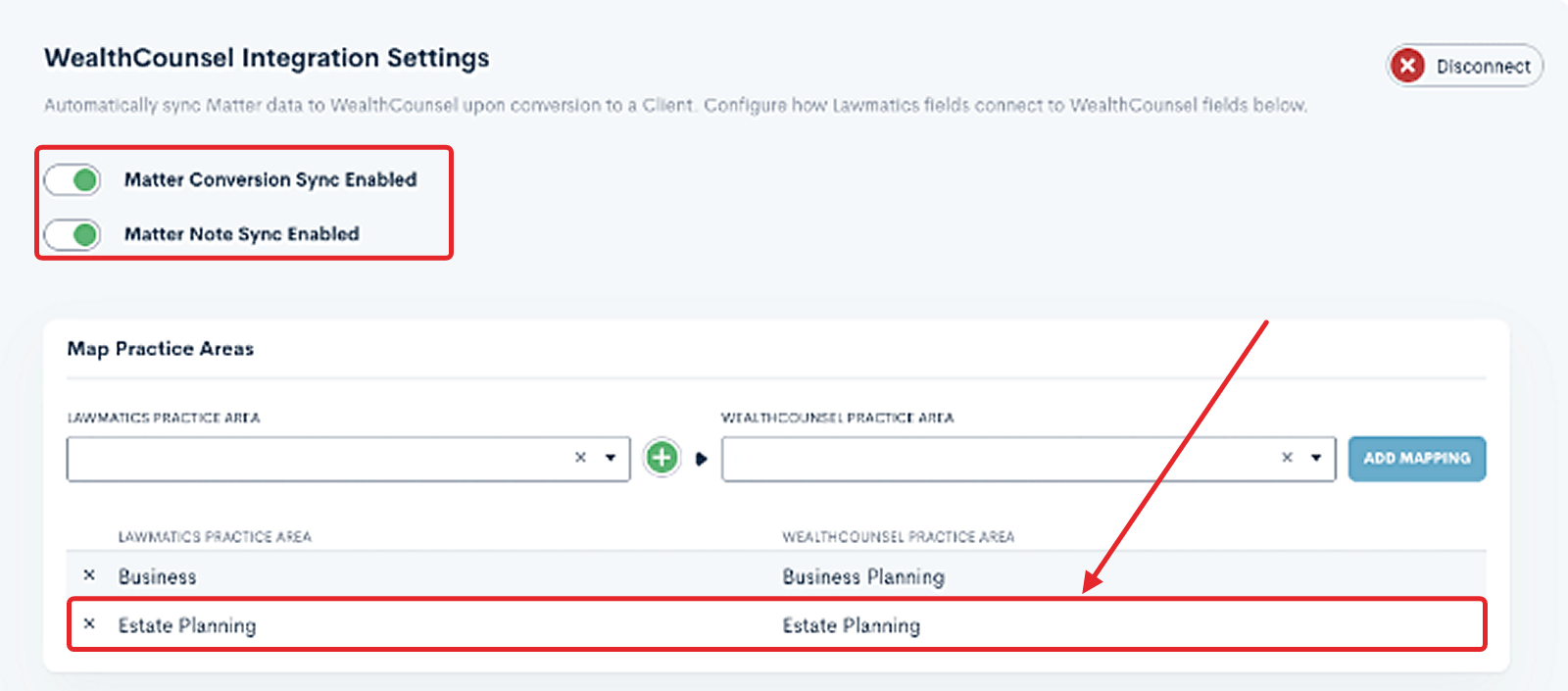
Screenshot: Lawmatics WealthCounsel integration help article, captured October 21, 2026.
Lawmatics Estate Planning Software Scorecard
Lawmatics scores 3.1 out of 5 for your estate planning firm on our nine-dimension rubric for software.
| Dimension | Weight | Score (1 to 5) | Basis |
|---|---|---|---|
| Core job performance | 20% | 4 of 5 | Forms, follow-up, file requests, and automations cover the front door; your staff check file contents by hand. |
| Interoperability with the firm's existing stack | 18% | 3 of 5 | Matters push to Clio, MyCase, and other practice-management tools, only Clio sends a closed status back, the WealthCounsel sync is closed to new customers, and the documented API is enabled on request. |
| Ease of use and setup | 12% | 3 of 5 | Vendor pages describe days to weeks of setup, paid onboarding phases, and Word field codes copied by hand. |
| Practice-specific depth | 10% | 2 of 5 | A general tool: you build your estate stages, forms, and funding follow-up; the documentation shows no will or trust library and no trust-funding checklist. |
| Attorney review and AI controls | 10% | 3 of 5 | Review exists for Engage, Copilot, and draft signature documents; automated forms, emails, and texts send without approval. |
| Pricing and cost structure | 10% | 2 of 5 | Every plan is quote-only, seats are committed for the term, and add-ons are metered or priced per seat. |
| Data ownership and portability | 8% | 3 of 5 | You own your Customer Data and can export CSV; files and documents cannot be bulk exported. |
| Support and reliability | 7% | 4 of 5 | Email support, an account manager, live support calls on Zoom from 9 AM to 10:30 AM PT, Monday to Friday (read November 1, 2026), dated help articles, and quarterly release notes; no support-desk hours or response times are published. |
| Security and ABA Opinion 512 posture | 5% | 4 of 5 | SOC 2 Type 2 on request, mandatory MFA, and a written no-training policy; Merlin sat outside the audited period. |
| Overall (weighted) | 100% | 3.1 of 5 | The weighted sum of the nine scores, rounded to one decimal. |
Verdict: Lawmatics is best for your estate firm when winning inquiries is the bottleneck. Add a layer when your record must reach your drafting tool.
We ran no Lawmatics trial for this score. We scored it from Lawmatics' own documentation, release notes, pricing pages, Terms, and published screenshots, which we read between October 21 and November 14, 2026. Each finding on this page names the page it comes from, and we score software only, so the layer below carries no score.
Lawmatics Alone vs Lawmatics With a Custom Build Around It: Side-by-Side
The table compares what Lawmatics does alone with what a layer adds around it, fact by fact.
| Area | Lawmatics alone | Lawmatics with an automation layer around it |
|---|---|---|
| Client record | Lives in Lawmatics; Clio or MyCase receive a pushed copy, and Clio sends back only a closed status | One client record read from Lawmatics and carried to your drafting inputs and practice-management system, so staff never retype it |
| Couples, children, and assets | Relationship blocks add each person; collections stay inside Lawmatics | The layer's intake capture records each party and asset once and carries them into your drafting inputs |
| Document chase | File requests track Pending, Submitted, or Completed | Each upload is checked against what was asked, and stale items are re-requested |
| Drafting hand-off | No native drafting sync for a new customer | First drafts from your own templates and attorney rules, generated only after your attorney and client approve the record |
| Failed runs | Automations run once by default; a failed step waits as a Failed status | Items the system is unsure about go to a person in a review queue |
| Review before sending | Engage defaults to Manual Review; automated forms, emails, and texts send on their trigger | A propose-only pilot comes first; an attorney reviews every draft; nothing signs, files, submits, or decides anything legal |
| Staff control | Your staff build in the Lawmatics builder, or you hire a consultant | Your staff change reminder wording, timing, and document requirements themselves, without a developer |
| Cost structure | Quote-only plans with user minimums of 3, 3, and 5, plus metered AI add-ons | One build at one fixed price, set after a scoping project; no seats or subscriptions; your firm pays its AI model provider directly |
| Ownership and exit | Under the Terms (updated October 16, 2026) you own your Customer Data, with no termination for convenience; if Lawmatics agrees to release you early, a fee of 50 percent of the fees left in the term applies | Your firm owns the code, data, workflows, and documentation, and the system lives in your own cloud account |
The layer column describes how a custom build is designed to work around the software you keep, and the layer carries no score.
Use Lawmatics Alone If...
Use Lawmatics alone when your bottleneck is getting and converting estate inquiries, not moving the record after hire.
Looking into Lawmatics for client intake and automations for estate planning and trusts: worth the setup and cost?
Yes, when follow-up is your main job. The setup is real work, though.
Lawmatics' Premium Onboarding runs in phases of 7 to 14 days, 3 to 4 weeks, and 1 to 2 weeks. A Capterra reviewer wrote in February 2026 that Lawmatics takes "quite a bit of time to set up and fully customize".
Lawmatics alone fits your firm under these four conditions.
- Your bottleneck is getting and converting inquiries.
- Your staff rarely retype facts from Lawmatics into your drafting tool at your current volume.
- Someone on staff has time to learn and maintain the builder.
- Marketing and referral tracking is your main need.
Our Lawmatics review for estate planning firms covers each limit with its workaround and every published price.
Add an Automation Layer Around Lawmatics If...
Add a layer around Lawmatics when your staff retype the same client facts into your drafting tool and practice-management system. The same holds when they check every upload by hand.
Five signs point to a layer.
- Your staff retype intake answers into your drafting tool for each plan.
- A couple's accounts and beneficiaries get entered twice, once in Lawmatics and once for drafting.
- Someone opens every uploaded file to see whether it is the right document.
- A failed automation step surfaces only when someone checks its status.
- Your renewal review shows seats and add-ons growing faster than your matters.
A layer like the one Aretech builds works around Lawmatics, so your firm handles more estate matters and grows revenue without adding headcount.
How Do We Connect Lawmatics and WealthCounsel so Client Data Is Entered Once and Flows Across All Our Systems?
Make one record the source and stop retyping it, because a new Lawmatics customer cannot switch on the native WealthCounsel sync.
The routes into WealthCounsel itself are a third-party intake tool, the Zapier connector, or a build on the Lawmatics API.
A custom layer reads the Lawmatics record through its API and keeps one client record for your other systems. First drafts from your own estate templates and your attorney's rules then reach the facts without retyping. Nothing is generated before your attorney and client approve the record.
Do We Need a Lawmatics Consultant or a Custom Build?
A Lawmatics consultant or expert helps you configure its builder inside Lawmatics, which your staff can also do themselves. A custom build connects Lawmatics to the systems around it.
Independent Lawmatics implementation consultants sell the first kind of work.
Before you choose either, start with an audit of your estate planning tech stack that lists what each tool holds. The tool that holds the facts your drafting needs is the one a build has to reach.
Lawmatics Plus an Automation Layer for Estate Planning Intake
Aretech builds the automation layer around the Lawmatics account you keep. It carries one client record from intake to drafting, and an attorney reviews every draft.
Is your intake data not captured as fully and completely as you would like?
A layer around Lawmatics closes that gap. It carries one record from intake to drafting. Owners describe the gap to us in those words.
The same hand-offs break each time we map an estate firm's process with its owner. The intake form, the drafting tool, and the practice-management system each hold part of the client.
You keep Lawmatics. We build the system on the software you already use, working with your Lawmatics through its API, and it does five jobs.
- Lead follow-up: every web, text, and email lead gets a reply right away, beside the follow-up you already run in Lawmatics.
- Intake: clients answer once, on their phone, with staff-only intake sections and forms your staff change without a developer.
- Documents: uploads and intake answers are checked against what was asked, and clients are reminded until what is missing is in.
- Data between systems: one client record across Lawmatics, your drafting inputs, and your practice-management system.
- First drafts: drafts from your own templates, for your attorney to review.
Every new automation starts as a propose-only pilot and runs as drafts beside your live automations until the go-live swap. Items the system is unsure about go to a person, and an attorney reviews every draft. Nothing the system does signs, files, submits, or decides anything legal.
The engagement starts with the free workflow mapping session, then a scoping project and one fixed price. Then comes a 4 to 8 week build plus testing, with a fix period of up to 60 days. The layer starts at intake, so the next step is automating new estate planning client intake around the Lawmatics forms you already run.
Your firm keeps Lawmatics, handles more estate matters, and increases revenue without adding headcount. You own what is built.
Free. The map is yours, even if you never hire us.
FAQs
Is Lawmatics a CRM, and How Does Lawmatics Work?
Lawmatics is a legal CRM and intake platform, not a practice-management system. It captures each inquiry, follows up, and pushes the matter to tools like Clio and MyCase when a lead converts, as its integrations page shows. A separate Sync to Clio option also pushes a matter before hire.
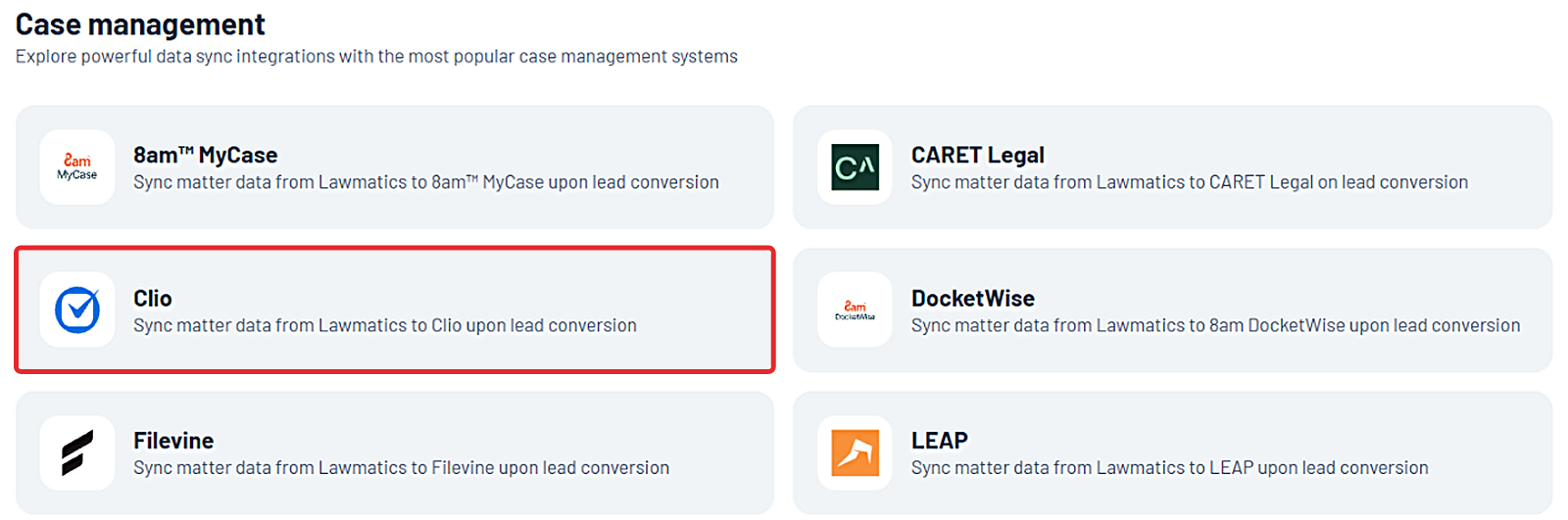
Screenshot: Lawmatics integrations page, captured October 21, 2026.
Does Lawmatics Have Custom Automations?
Yes. Its builder is called Custom Automations, and it chains triggers and actions inside Lawmatics. A custom automation layer is different: it is built for your firm around Lawmatics and your other systems.
Can Lawmatics Document Automation Draft Wills and Trusts?
No. Its estate planning page leaves the will, trust, power of attorney, and healthcare directive to your drafting tool. Lawmatics' document automation merges mapped fields into PDF or Word files, such as your engagement letter.
We Use Lawmatics for Prospects and Clio for Clients. How Do We Stop Manually Entering Scheduling Information Across Platforms?
Book every consult through a Lawmatics booking link tied to your synced calendar, so the appointment lands on your calendar without retyping. The booking article notes that the form appointment option is "ONLY available in internal forms" because it does not limit booking by availability. The matter itself reaches Clio at conversion, through the Sync to Clio button, or by an automation action.
Will a Lawmatics Custom Field Map to the Same Custom Field in Clio?
Yes, when the field types match, such as date to date or currency to currency. Any Lawmatics field can also map to a Clio open-text field, per the Clio integration article. The mapping is a one-time setup, and later changes reach Clio when you sync the matter again.
Does Lawmatics Have an API Key, API Documentation, a Developer Portal, and Webhooks?
Yes. Lawmatics publishes API documentation for a REST API that uses OAuth 2.0, and support turns on Developer Settings for your account on request. Its outbound webhooks are available on Premium plans. The webhook article says setup "requires a developer or technical resource", and a delivery that fails 7 times is marked Failed with no manual replay.
How Much Does Lawmatics Cost?
Lawmatics publishes no plan prices, and every plan on its pricing page is quote-only with user minimums of 3, 3, and 5 seats. Merlin AI Outcomes run from $149 a month for 50 to $1,999 a month for 2,000, last reviewed November 14, 2026. Merlin Copilot costs $29 (Lite) or $49 (Pro) a seat a month, last reviewed November 1, 2026.
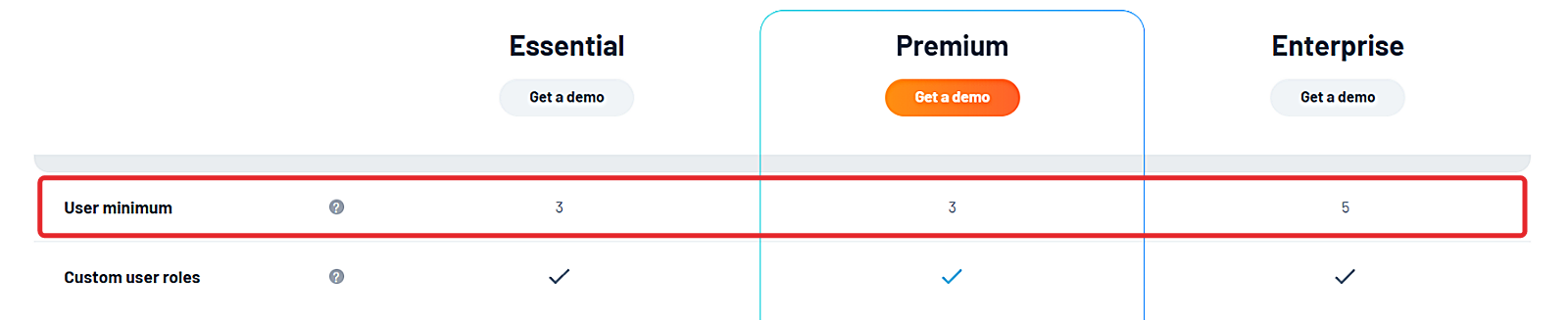
Screenshot: Lawmatics pricing page, captured October 21, 2026.
Texting costs extra. SMS and MMS plans run from $0 to $2,249 a month, last reviewed October 21, 2026. All figures are in USD.
Add-on pricing reaches beyond Lawmatics. The ABA's 2024 Practice Management TechReport found practice-management software availability at 53 percent, down from 63 percent in 2022. It names a la carte add-ons as one cause.
Does an Automation Layer Send Anything to Clients Without Review?
Not before you approve the automation at go-live. Every new automation starts as a propose-only pilot and runs as drafts beside your live automations until your go-live swap. An attorney reviews every draft document, and items the system is unsure about go to a person.
Page 4 of ABA Formal Opinion 512 ties a lawyer's duty of competence to "an appropriate degree of independent verification or review of its output". The attorney review step in the layer is where your attorney does that review.
Should We Leave Lawmatics for One of Its Competitors or an Alternative?
Usually not, when Lawmatics already runs your intake and follow-up well. Compare other tools only when your drafting tool must receive intake answers natively, or your drafting or practice-management suite already runs its own intake. Our guide to alternatives to Lawmatics for estate planning firms weighs each competitor against Lawmatics.
Who Owns the Automation Built Around Lawmatics?
Your firm owns the code, data, workflows, and documentation. The system lives in your firm's own cloud account, and hosted frontier models do the AI work on a provider account your firm pays directly. Lawmatics' Terms leave your Customer Data yours too, but its Exporting Data article says "You cannot bulk export files or documents saved on your matters".