Lawmatics is a strong intake and follow-up CRM for your estate planning firm, and it scored 3.1 out of 5 on our rubric. However, a new customer gets no built-in sync into WealthCounsel, so your intake answers stop at the drafting hand-off. Plan for that retyping before you commit if you draft in WealthCounsel, Vanilla, or InterActive Legal.
We ran no Lawmatics trial, so every finding below comes from Lawmatics' own pages, read between October 21 and November 1, 2026. You get our score first, then each limit with its workaround.
Aretech builds automation that works around the software it reviews; here is how we score software.
TL;DR
- Lawmatics fits your estate firm when you market actively, and it scored 3.1 out of 5 on our rubric.
- Its WealthCounsel sync is closed to new customers, and its Clio sync pushes matters one way at hire.
- That gap breaks it for you if your drafting tool must receive intake answers without retyping.
- Every plan is quote-only, with a 3-user minimum committed for the term.
- Price the seats and add-ons, then plan the drafting hand-off around Lawmatics before you sign.
Lawmatics Estate Planning Software Scorecard
Lawmatics scores 3.1 out of 5 for your estate planning firm on our nine-dimension rubric for software.
Each row in the scorecard names a weight, a score, and its basis.
| Dimension | Weight | Score (1 to 5) | Basis |
|---|---|---|---|
| Core job performance | 20% | 4 of 5 | Forms, follow-up, file requests, and automations cover the front door; your staff check file contents by hand. |
| Interoperability with the firm's existing stack | 18% | 3 of 5 | Matters push one way to practice-management tools, the WealthCounsel sync is closed to new customers, and the API is open. |
| Ease of use and setup | 12% | 3 of 5 | Vendor pages describe days to weeks of setup, paid onboarding phases, and Word field codes copied by hand. |
| Practice-specific depth | 10% | 2 of 5 | A general tool: you build your estate stages, forms, and funding follow-up; no will or trust library or funding checklist ships. |
| Attorney review and AI controls | 10% | 3 of 5 | Review exists for Engage, Copilot, and draft signature documents; automated forms, emails, and texts send without approval. |
| Pricing and cost structure | 10% | 2 of 5 | Every plan is quote-only, seats are committed for the term, and add-ons are priced by use. |
| Data ownership and portability | 8% | 3 of 5 | You own your Customer Data and can export CSV; files and documents cannot be bulk exported. |
| Support and reliability | 7% | 4 of 5 | Email support, an account manager, weekday live office hours, dated help articles, and quarterly release notes. |
| Security and ABA Opinion 512 posture | 5% | 4 of 5 | SOC 2 Type 2 on request, mandatory MFA, and a written no-training policy; Merlin sat outside the audited period. |
| Overall (weighted) | 100% | 3.1 of 5 | The weighted sum of the nine scores, rounded to one decimal. |
How Does Lawmatics Score for Estate Planning Firms?
Verdict: best for your estate firm when you market actively and want fast follow-up. Look elsewhere if your drafting tool must receive intake answers without retyping.
We ran no Lawmatics trial for this review. Our product findings come from Lawmatics' own documentation, release notes, pricing pages, Terms, and Clio App Directory listing. We read them between October 21 and November 1, 2026. Each finding names its source, and user statements name the platform they come from.
What Does Lawmatics Do for an Estate Planning Firm?
Lawmatics does the front-door work of your estate planning firm. It is a legal CRM and intake platform that runs each matter from the first inquiry to the hand-off at hire.
How Lawmatics works is a pipeline: each inquiry becomes a matter that moves through stages your firm defines. The vendor's estate planning page tracks each estate stage by client or family, trust funding included.
The same page names drafting tools that generate the estate documents, among them:
Lawmatics' documentation ties each matter stage to a feature:
- Intake: custom forms with conditional questions, relationship blocks, and collection blocks
- Follow-up: automations that start from a trigger, plus email marketing campaigns
- Automation actions: 19 actions, such as Send SMS, Add Task, Request Signature, and Convert Matter, per the automation actions article
- Texting: two-way SMS, with the Send SMS action switched on by support on request
- Tasks: an Add Task action that assigns work to a user or shares it with a client
- Consult booking: booking links and appointment requests
- Engagement: document templates with e-signature
- Document collection: file requests and the client portal
- Hand-off at hire: a one-way matter push to your practice-management system
Can Lawmatics Handle Multiple Intake Forms for Multiple People in the Same Matter?
Yes. Lawmatics handles multiple people in the same matter through relationship blocks, which create each spouse or child as a separate contact on the matter.
A spouse fills a non-repeatable role, so a matter holds one spouse. A child fills a repeatable role with any number of contacts. Each related contact can receive emails, join audience lists, and sign documents, per Lawmatics' matter relationships article.
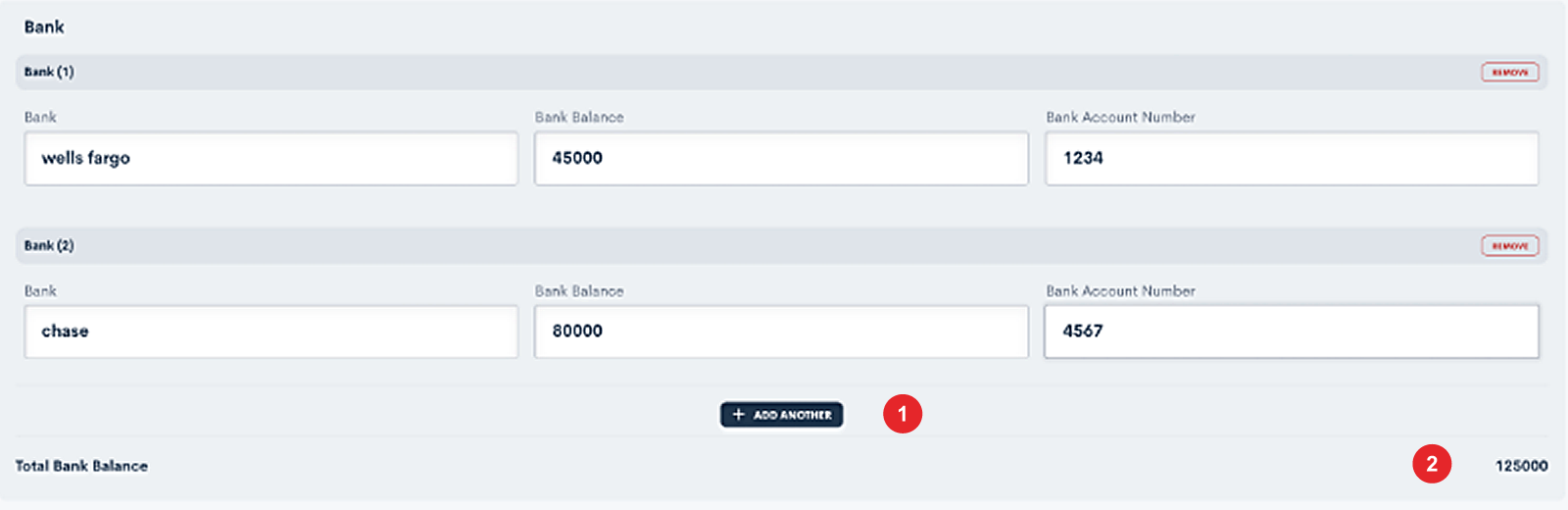
Collection blocks handle repeated items, such as each bank account your client holds, on matter forms only. The client clicks Add Another for each item and sees a total they cannot edit, per the collection blocks article (June 5, 2026).
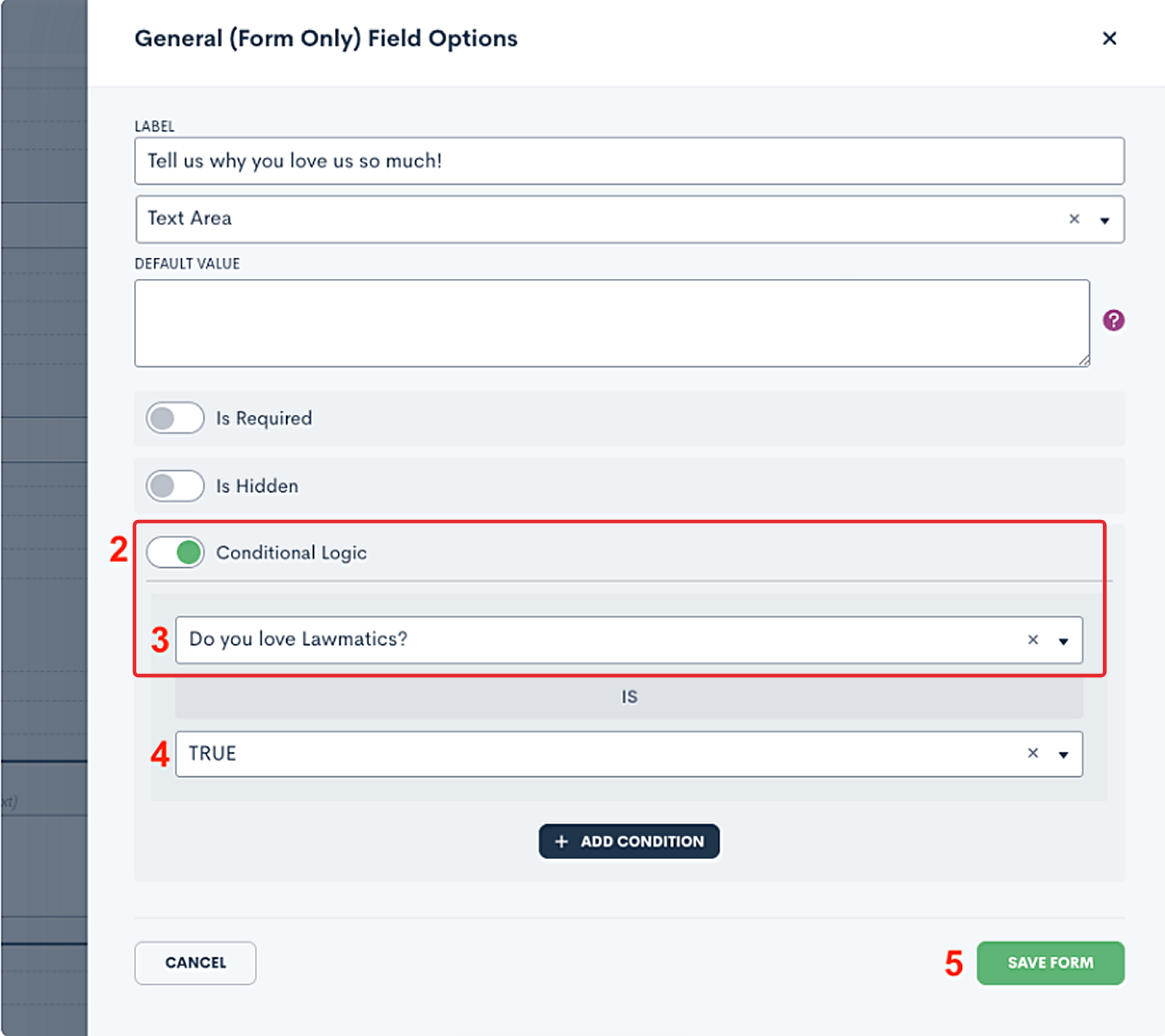
Questions can show or hide based on earlier answers. However, an open text field cannot set a condition, per the conditional logic article (July 21, 2025).
Only three field types can:
- True/false fields
- Picklist fields
- Multi-picklist fields
Screenshot: Lawmatics documentation.
Screenshot: Lawmatics documentation.
File Requests, Reminders, and the Client Portal
A file request in Lawmatics lists named files with an accepted type for each.
Its status moves from Pending to Submitted to Completed as files arrive.
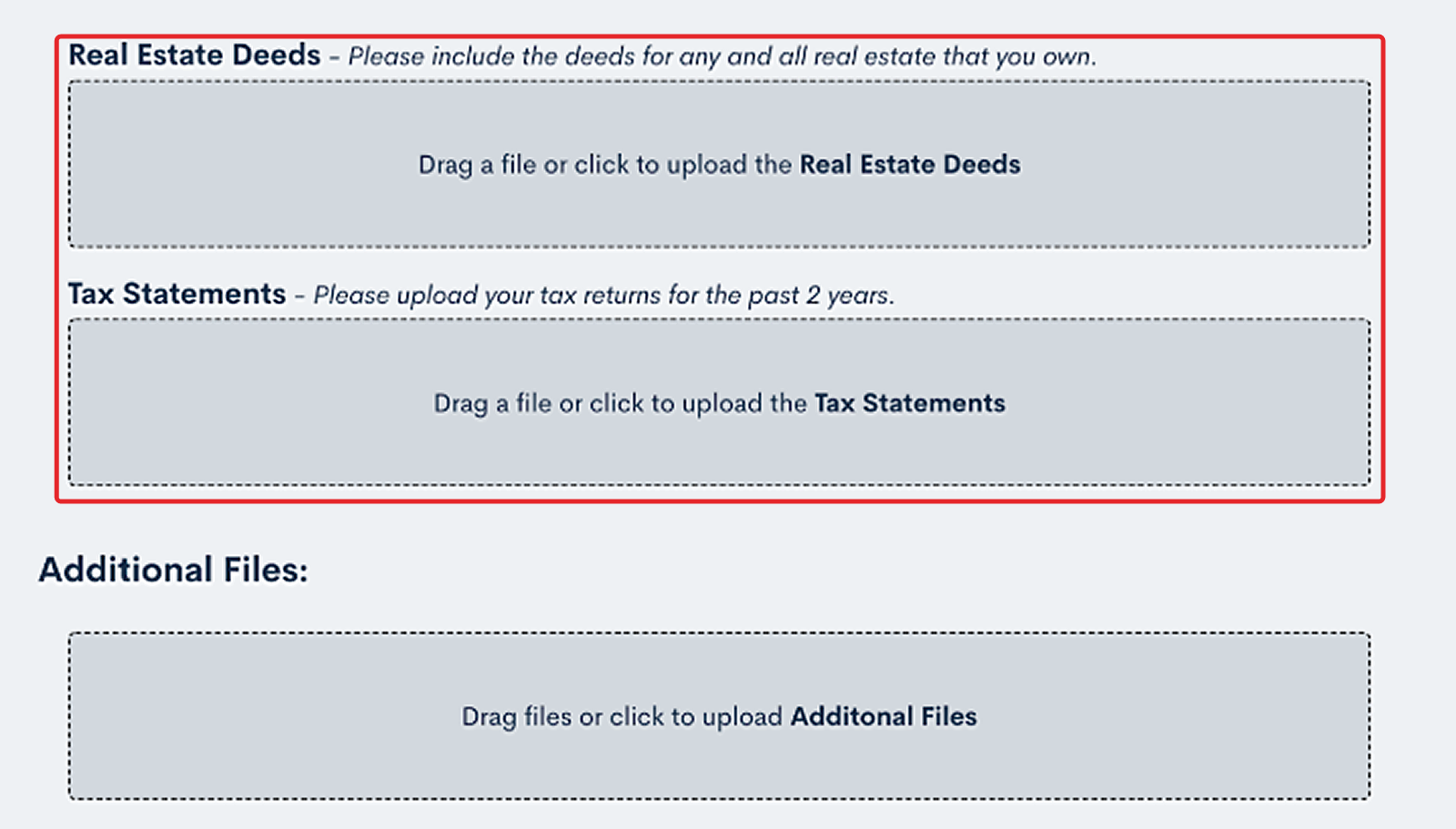
Submitted means some of the required files have arrived, and Completed means all of them, per the file request templates article (March 16, 2026). The client's upload page lists each named file as its own drop zone.
Reminders are an automation you build from four steps, as Lawmatics' exit conditions article shows. The steps run in this order.
- A send
- A delay
- A resend
- An exit condition that skips a client who already finished
The client portal gives each client one place for your firm's requests, per the client portal article (January 8, 2026). Each contact on a joint matter has a separate login, which suits a couple's matter.
The portal holds these sections:
- Tasks
- Signature Documents
- File Requests
- Forms
- Files
- Calendar
- Invoices
- Messages
- Firm Info
Screenshot: Lawmatics documentation.
Engagement Letters, E-Signature, and Document Templates
Lawmatics fills your engagement letters from document templates with e-signature. It does not generate wills or trusts.
Three template types each carry their own limits, per the document types article (July 28, 2025):
- Start Fresh: conditional logic and merge fields, with PDF-only download
- PDF Upload: merge fields, with no option for conditional logic
- Word DOCX: conditional logic, with field codes copied by hand from Lawmatics into Word
Every type carries e-signature. On Premium, you can set the signer order, per the e-signature article (August 21, 2026).
Who This Review Is For (and Not For)
This review is for you if you lead a boutique estate planning firm that runs Lawmatics or is weighing it.
In scope:
- Firms that pair Lawmatics with a drafting tool
- Firms that pair Lawmatics with Clio or another practice-management system
- Firms that market actively and answer new inquiries by email and text
Out of scope:
- Consumers and DIY filers who plan their own estate
- Non-attorney document preparers
- Financial advisors choosing an advisor platform
- Paralegal job seekers
- Big law and firms in other practice areas
What Lawmatics does matters less to you than where it stops.
Which Lawmatics Limitations Do Estate Planning Firms Run Into?
The Lawmatics limitations estate planning firms run into most are the drafting hand-off and the document check.
The table lists six limitations, each with who it hurts, its evidence, and a workaround.
| Limitation | Who it hurts | Evidence | Workaround |
|---|---|---|---|
| None of the drafting tools the estate page names appears on the integrations page; the one drafting integration listed is Statular. | Firms that draft in WealthCounsel, Vanilla, or InterActive Legal; the hand-off runs by hand or through a bridge. | The integrations page, read October 29, 2026, lists one drafting integration. | Use a third-party bridge, or keep Lawmatics and automate the hand-off around it. |
| Collections cannot be mapped to integrations or used as merge fields, and each exports on its own. | Firms that capture asset schedules or account lists. | The Collections article (June 5, 2026): a Premium feature; field mapping and merge fields are "not currently supported." | Capture the items you need downstream as standard custom fields, as the vendor advises. |
| File requests track status, not content, and files on an abandoned form are lost. | Staff who check deeds, prior plans, and beneficiary designations. | The file request article shows status by files received. The autosave article (March 19, 2026): uploaded files save only on Submit. | Add a staff review step, or validate documents in an automation layer. |
| The vendor's pages show no trust-funding checklist, asset-titling record, or deed tracker. | Firms that fund trusts after signing. | The estate planning page lists trust funding stage tracking and reminders, and shows no checklist, titling record, or deed tracker. | Track funding with custom fields and tasks, or in a tool outside Lawmatics. |
| A completed e-signature request cannot be cancelled, and PDF templates have no conditional logic. | Firms that send engagement letters at volume. | The e-signature article states that a completed request cannot be cancelled. The document types article names the missing logic in PDF templates. | Use draft approval on Custom templates (July 11, 2026 release), or cancel a pending request and send a corrected one. |
| Seats are committed for the term and bill whether or not they are used. | Solo estate firms and the smallest practices. | The pricing page (October 29, 2026) sets the user minimums, and the Terms (updated October 16, 2026) bill committed seats. | Confirm the seat count and term length before you sign. |
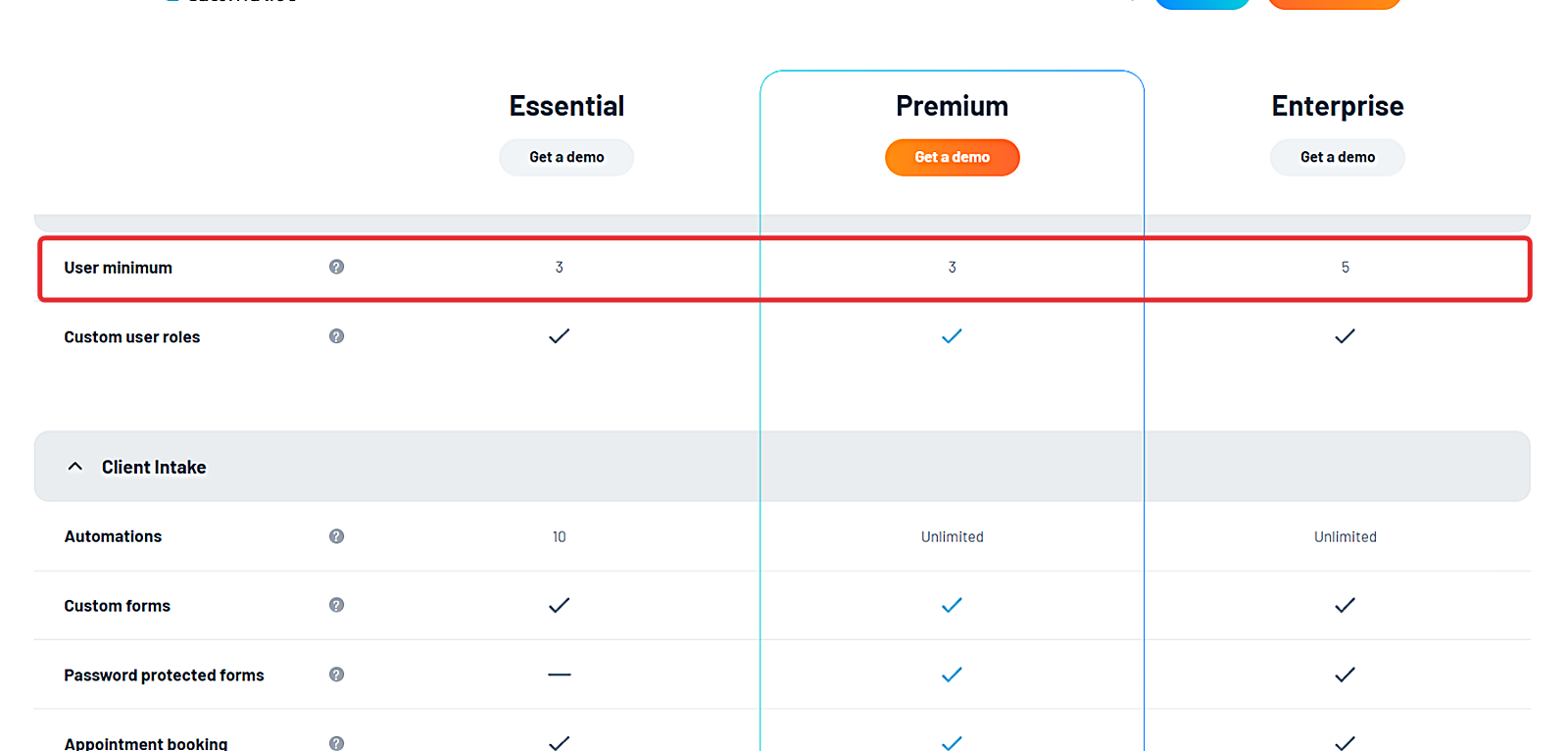
The seat terms weigh most on a solo estate practice. The plan table sets a user minimum of 3 on Essential and Premium and 5 on Enterprise. The Terms then bill each committed seat "whether or not each seat is used," so you still pay for three seats with fewer users. However, those limits sit beside clear strengths.
Screenshot: Lawmatics documentation.
Where Is Lawmatics Strong?
Lawmatics is strong where your estate firm's work starts: new inquiries, family records, and the hand-off to Clio.
Its rating is 4.6 on G2, from 251 reviews read October 29, 2026. Its rating is also 4.6 on Capterra, from 50 reviews read November 1, 2026.
Small firms use a CRM more often than the average firm: 39 percent against 31 percent across all firm sizes. The ABA's 2024 Solo and Small Firm TechReport (Abigail Peterson, April 21, 2025) reports both figures.
Five gains stand out for your estate firm, each with its source.
- Faster response: new estate inquiries get a reply after hours with no staff member at the desk, per Lawmatics' automation triggers article
- One record per family: your staff enter each spouse once instead of duplicating records, per Lawmatics' matter relationships article
- No retyping at hire: on Clio, you skip re-entering the client when the matter converts, per the Clio App Directory listing
- Marketing that follows results: you see which sources bring signed will and trust matters, per the estate planning page
- Room to grow: your developer can automate around Lawmatics without leaving it, per its API documentation
Those gains come at a price that starts with a sales quote.
What Does Lawmatics Cost an Estate Planning Firm? (October 2026, Public Prices)
What Lawmatics costs your estate planning firm starts with a sales quote, because the pricing page prints no plan price.
Sales quotes Essential, Premium, and Enterprise after a demo.
The plans include 500, 10,000, and 10,000 contacts, with more sold separately, and 10, unlimited, and unlimited automations.
Add-on pricing has a measured cost for firms. Practice-management software availability at firms fell to 53 percent from 63 percent in 2022. A la carte add-on pricing is one cause, per the ABA's 2024 Practice Management TechReport (Alan Klevan, April 18, 2025).
The table lists the prices shown on the Lawmatics pages we read, each with its last reviewed date. All figures are in USD.
| Item | Public price | Basis | Last reviewed |
|---|---|---|---|
| Essential, Premium, Enterprise plans | Quoted by sales only | Contacts and automations per plan, on the pricing page | October 29, 2026 |
| SMS plans | $0 for 50 messages to $2,249 a month for 200,000 | SMS and MMS pricing; no downgrade after an upgrade | November 1, 2026 |
| MMS add-on | $25 a month | Same page | November 1, 2026 |
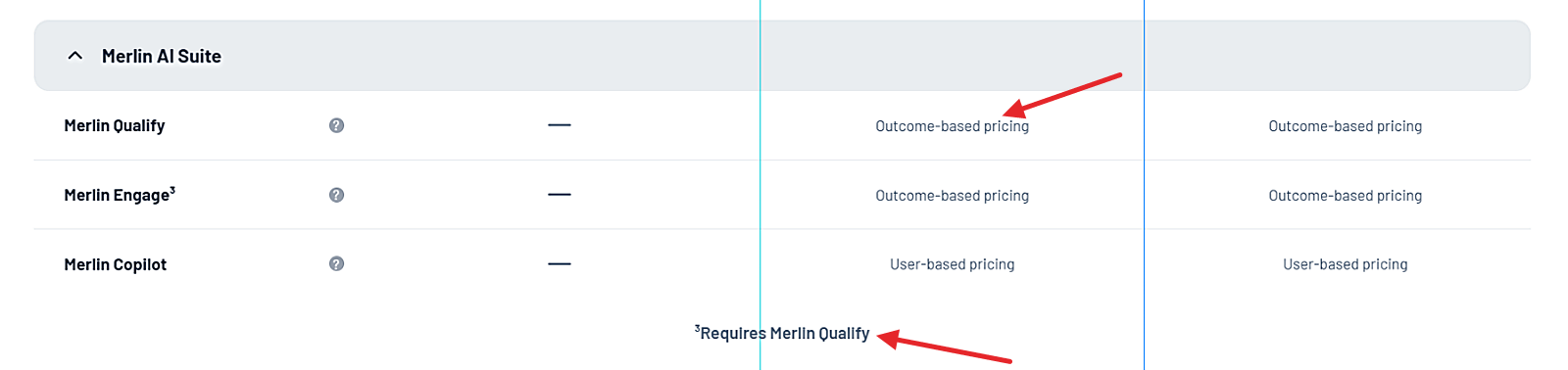
| Merlin AI Outcomes | $149 a month for 50 outcomes to $1,999 for 2,000 | Merlin Pricing (September 9, 2026); unused outcomes do not roll over | November 1, 2026 |
| Merlin Copilot | $29 a seat a month (Lite), $49 (Pro) | Copilot article | November 1, 2026 |
| Time & Billing | Quoted by sales | Add-on | October 29, 2026 |
| LMPay processing | 0.5 percent for ACH; 2.95 or 3.25 percent for cards | LMPay registration article | October 21, 2026 |
| Onboarding packages | Package price not shown | Onboarding page; the package is non-refundable | October 29, 2026 |
| Premium Implementation | $999 one-time | Premium Implementation page, undated | October 29, 2026 |
| Data migration and extra onboarding | $500 for Premium Data Migration; $150 an hour for extra time | Premium Onboarding article | October 29, 2026 |
Screenshot: Lawmatics documentation.
Contract, Renewal, and Onboarding Terms
The contract terms come from the Lawmatics Terms of Use, last updated October 16, 2026. They set these rules for you.
- Fees are committed at signing, and monthly billing is a payment schedule only
- Subscriptions auto-renew unless you give written notice 30 days before the term ends
- The Terms give you no right to end the term early for convenience
- Lawmatics can release you early at its sole discretion for a fee of 50 percent of the remaining fees
Onboarding has its own sources. Premium Onboarding runs in phases of 7 to 14 days, 3 to 4 weeks, and 1 to 2 weeks, per the Premium Onboarding article. Setup and full customization take "quite a bit of time," says a Software Advice reviewer in February 2026.
How Much Will Lawmatics Add to What You Spend on Tech Subscriptions?
What Lawmatics adds to your tech subscriptions starts with a quote you cannot see before a demo, because every plan is quote-only. The published add-ons are the part you can price today.
Look at Premium when your referral-driven firm wants texting and email marketing, since the plan cards list both. Merlin Qualify and Engage are priced per outcome and Copilot per seat, so your AI cost grows with lead volume and users.
For your firm, the value turns on one question: does faster follow-up win more signed plans than the committed seats cost?
What you pay for also depends on how far your Lawmatics data travels to the rest of the stack.
How Does Lawmatics Connect to the Rest of Your Estate Planning Stack?
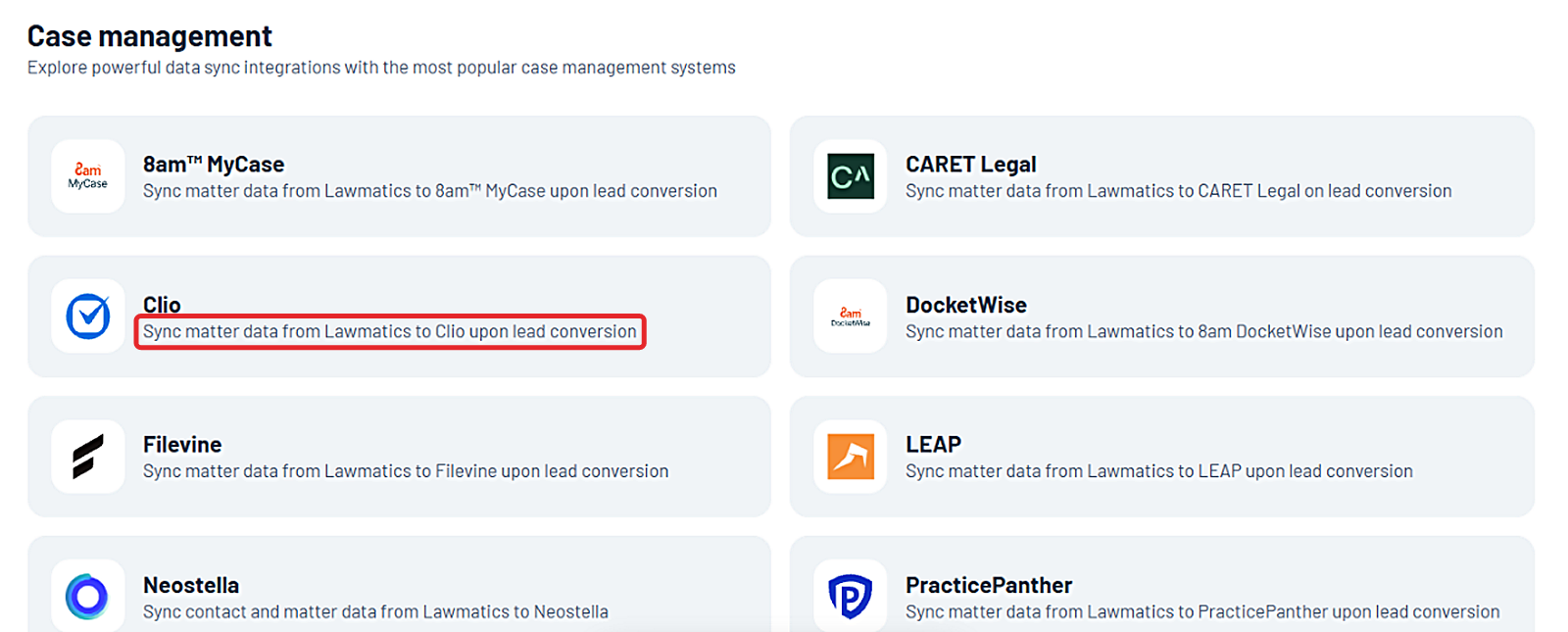
Lawmatics connects to the rest of your estate planning stack in one direction. On conversion it pushes the matter to your practice-management system, and its open API and webhooks let a developer move the rest.
Lawmatics is the CRM and intake layer of a three-part estate stack, beside a drafting tool and a practice-management system. The estate planning practice technology stack guide lays out how the three fit. Lawmatics lists 57 integrations in 9 categories on its integrations page, among them case management, calendaring, billing, and drafting. The page words most case-management syncs as sending matter data when a lead converts.
Screenshot: Lawmatics documentation.
Can Lawmatics Send Client Intake Data to WealthCounsel?
Lawmatics can send client intake data to WealthCounsel only for firms that already had the sync.
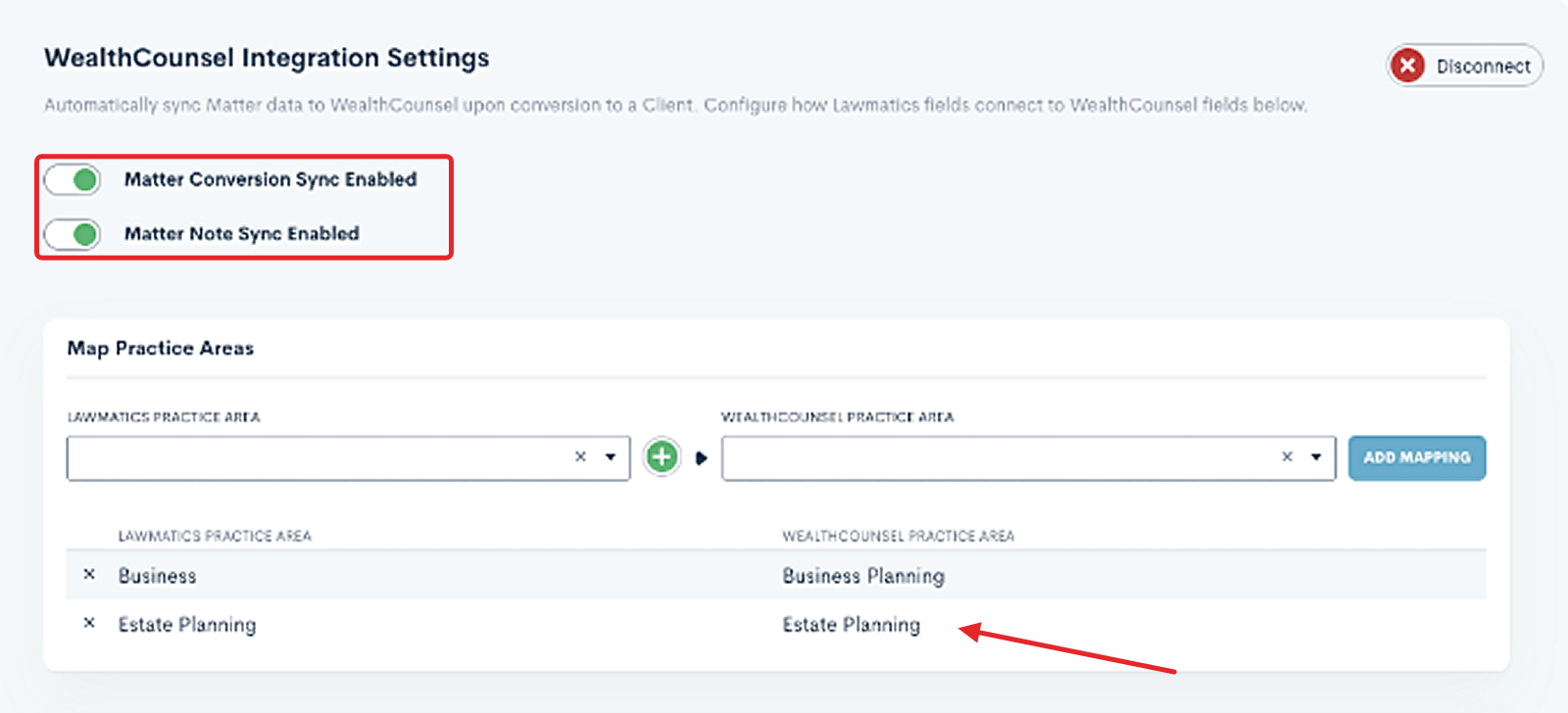
The sync is "no longer available to new Lawmatics customers," per Lawmatics' WealthCounsel article (March 17, 2026).
Where it runs, the sync is one way from Lawmatics to WealthCounsel, and data entered in WealthCounsel does not transfer back. Matter conversion sync is on by default, and you map practice areas and contact fields. The estate planning page still names WealthCounsel as a drafting tool Lawmatics works alongside. So as a new customer, you read about a pairing the sync no longer offers.
Two public bridges exist. Zapier lists a WealthCounsel and Lawmatics connector, and DecisionVault says it collects client information once and sends it into both systems. Each bridge is another tool with its own setup. The DecisionVault for estate planning firms review covers the intake side.
Screenshot: Lawmatics documentation.
Will a Lawmatics Custom Field Map to the Same Field in Clio?
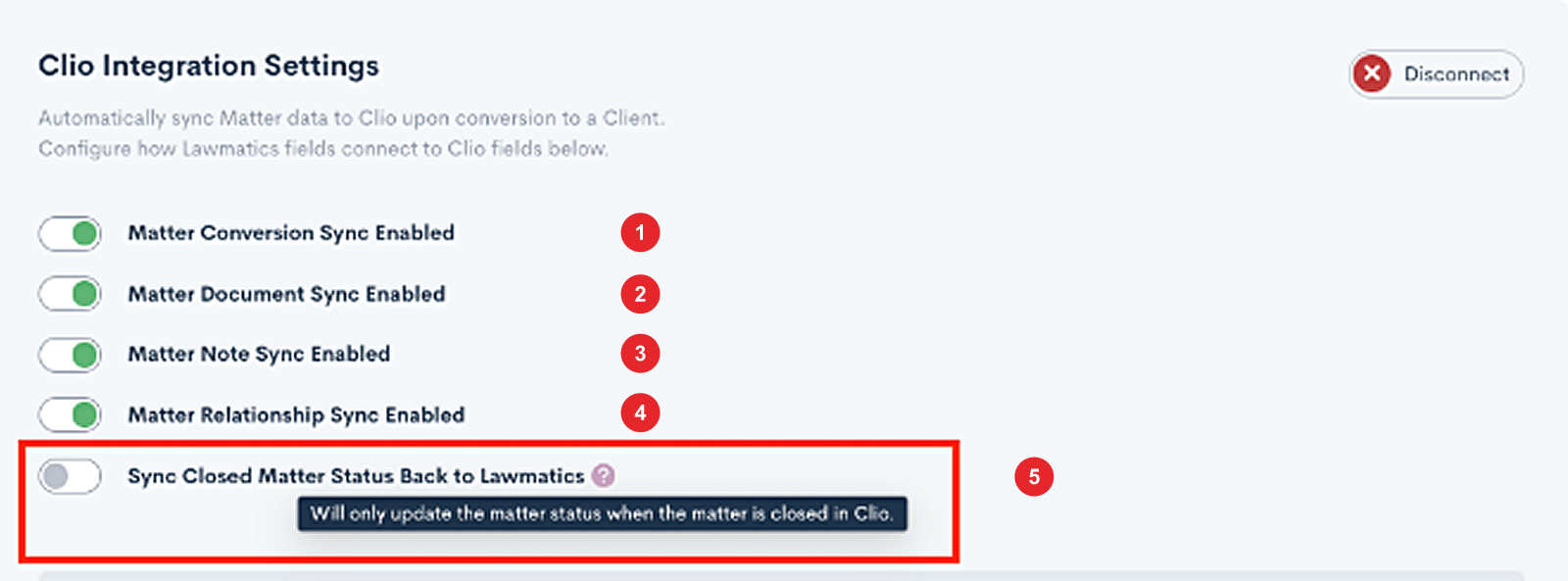
Yes, a Lawmatics custom field maps to the same field in Clio when the field types match. Standard fields map automatically, and any field type can map into a Clio open-text field.
The sync runs one way on conversion, with optional documents, notes, and relationships, per Lawmatics' Clio article (August 13, 2026). Folders do not sync. An optional setting sends a closed Clio status back to Lawmatics.
Screenshot: Lawmatics documentation.
The Lawmatics API and Webhooks
The Lawmatics API is a documented REST API with OAuth 2.0, per the OAuth setup guide.
Its tokens do not expire. The API has no scopes, and support must switch on Developer Settings before you build on it.
Signed outbound webhooks come with Premium plans, per the webhooks article (September 24, 2026). They cover 22 events, such as matter.created, matter.stage_changed, form.submitted, and document.signed. You can hold up to 2 subscriptions per event type.
Lawmatics' own pages disagree on two numbers. The rate limit is 150 requests a minute in the rate limits article (July 15, 2026) and 500 in the API documentation's changelog. The API documentation also names only matter.converted as a delivered webhook event.
The same records also feed Lawmatics' AI products.
What AI Features and Attorney Review Controls Does Lawmatics Have?
Lawmatics' AI features come in three Merlin products, each with its own attorney review control.
The table compares them.
| Product | What it does | Review control |
|---|---|---|
| Merlin Qualify | Scores a lead against criteria your firm writes and returns a category, confidence, and reasoning; it does not evaluate file uploads, per the Qualify overview | Recommends a next step; your staff decide |
| Merlin Engage | Collects and qualifies leads by SMS, email, or both | Manual Review holds every message for a supervisor; Autopilot sends with no human review, per the Engage article |
| Merlin Copilot | Builds workflows, reports, and answers from firm data | Matter updates save only when you click Apply; new automations start inactive |
Manual Review is Engage's stated default. However, the vendor's own example screen shows Autopilot selected.
Merlin runs on OpenAI models, and Lawmatics says it does not train AI models on your data, per its Merlin AI Suite overview. The overview says Engage does not announce that it is AI before its first message and discloses it when a lead asks.
The same overview says Merlin was still pre-release during Lawmatics' most recent audit period, so that audit did not cover Merlin. The estate planning page's navigation still labels Copilot an upcoming release, while the help center prices Copilot seats.
Lawyers should read a generative AI tool's terms before they use it. ABA Formal Opinion 512 (July 29, 2024) says lawyers "should read and understand the Terms of Use" of such a tool (page 7). For Engage, read Lawmatics' Terms of Use and its Merlin AI Suite overview before you turn it on.

Screenshot: Lawmatics documentation.
Who Owns Your Data in Lawmatics, and How Do You Get It Out?
Your firm owns your data in Lawmatics: the Terms say the Customer Data belongs to you.
Getting it out runs on these terms.
- Records: an administrator exports contacts and matters as CSV from Settings, then Export, per the Exporting Data article (July 1, 2025)
- Files: the article rules out a bulk export of the files and documents saved on matters, so you download files one matter at a time
- Retrieval: Customer Data stays available for 60 days after a subscription ends, and Lawmatics can delete it within 30 days after that
- Your configuration: ownership of the forms, automations, and templates you build is not stated
- Compliance papers: the security page names SOC 2 Type 2 and HIPAA, verified by AssuranceLab, with the report on request
- A second auditor: the Merlin AI Suite overview names Sensiba as its auditor
- Missing papers: no data processing agreement or full subprocessor list appears for the core platform
- Trust center: the address the Terms name returned "Trust Center Unavailable" on October 21, 2026
- Hosting: Amazon Web Services in the United States
Those exit terms shape whether you keep Lawmatics at all.
Should Your Firm Keep Lawmatics?
Keep Lawmatics when you market actively and need fast follow-up. The keep-or-leave line runs through your drafting tool.
Keep Lawmatics when these facts describe your firm.
- You run paid or seminar marketing and lose inquiries to slow follow-up
- You already run Clio or another listed practice-management system for matters
- You have staff time or a consultant to build forms and automations
- You want texting and a client portal in the same tool
Look elsewhere when any of these facts describes your firm.
- Your drafting tool must receive intake answers without retyping
- You need a funding tracker and document checks built in
- Your solo practice cannot carry a 3-user minimum under a term you can leave early only for a fee
- You want month-to-month terms; compare the Lawmatics alternatives for estate planning firms first
What If You Are Seriously Considering Changing Your Case Management System?
Changing your case management system means re-mapping Lawmatics' one-way push, not leaving Lawmatics.
Lawmatics sits in front of that system, so the sync settings change and the intake side stays.
Others in Our Firm Who Are Not Tech Savvy Find It Confusing. Will Our Staff Manage Lawmatics?
Lawmatics trains your staff through paid onboarding sessions and weekday live office hours, per its onboarding page.
Its pages state no support hours or response times for email.
The confusion is a reported complaint, not a tested one. A Lawmatics user on Reddit's r/paralegal wrote in November 2025 that coworkers who are not tech savvy find it confusing. Keeping Lawmatics does not mean you accept where it stops.
How Do You Keep Lawmatics and Add an Automation Layer for Estate Planning Intake?
You keep Lawmatics and add an automation layer for estate planning intake by having us build it around your current software. Lawmatics keeps the front door, and the layer lets you handle more estate matters and increase revenue without adding headcount.
What if the data is not captured as fully and completely as you would like?
An automation layer carries each fact once into drafting inputs. We build the system on the software you already use, and we customize every build to your firm.
Our automation works with your Lawmatics and keeps your records in Lawmatics as they are. An attorney reviews every draft, and nothing the system does files, signs, takes a payment, or decides anything legal.
Five jobs run around Lawmatics:
- Lead follow-up: every web, text, and email lead gets a reply right away, beside the follow-up you already run in Lawmatics
- Intake: the facts a prospect gives once, on their phone, reach your records without retyping
- Documents: requests, collection, validation, and reminders until stale or missing items are in
- Data between systems: client details and documents land in the right matter, named to your convention, across Lawmatics, your drafting tool, storage, and phones
- First drafts: drafts assembled only from your firm's templates and your attorneys' rules, with nothing generated until approval locks the record
The system lives in your firm's own cloud account, and hosted frontier models do the AI work. You own the code, data, workflows, and documentation, and you pay no seats or subscriptions. See how automated intake for estate planning attorneys runs around your intake software.
Keep Lawmatics for the front door, own the layer around it, and handle more estate matters without adding headcount.
FAQs
We're Looking Into Lawmatics for Client Intake and Automations for Estate Planning and Trusts. Is It Worth the Setup and Cost?
Lawmatics is worth the setup and cost when you market actively and need fast follow-up. Weigh two costs first when your firm runs on referrals. One is retyping intake answers into your drafting tool, and the other is a term you can leave early only for a fee.
Does Lawmatics Draft Wills and Trusts?
No, Lawmatics does not draft wills and trusts. Its estate planning page says your drafting tool generates the estate documents, and Lawmatics manages the steps around drafting. Lawmatics fills engagement letters and other templates from its own template types.
How Much Does Lawmatics Cost Per Month?
Lawmatics publishes no per-month plan price, so your monthly cost is your quoted seats plus any add-ons you pick. The add-ons with public monthly prices are texting plans, Merlin outcome plans, and Copilot seats.
Is Lawmatics a CRM or Practice Management Software?
Lawmatics is a legal CRM and intake platform, not practice management software. Its own blog (March 19, 2026) advises firms to pair a legal CRM with practice management so each system does its own job.
Is Lawmatics Legit, and Who Owns It?
Yes, Lawmatics is legit. Lawmatics, Inc. is a San Diego company that Matt Spiegel set out to co-found in 2017, per its about page. It closed a Series A round led by Ankona Capital on December 15, 2021. We found no acquisition announcement in a web search on November 1, 2026.
Does Lawmatics Have an App?
Yes, Lawmatics has an app on the Apple App Store and Google Play, per its mobile app article.
We Use Lawmatics for Prospects and Clio for Clients. How Do We Stop Entering the Same Scheduling Information Twice?
Stop entering the same scheduling information twice by entering it once in Lawmatics. The Clio sync carries the matter at hire, not the appointments. Booking links and appointment requests create the appointment, and a host who has synced an external calendar sees it there. The form appointment option ignores calendar availability, so it works only in internal forms, per the booking appointments article.
What Is the Best CRM for an Estate Planning Firm?
The best CRM for your estate planning firm, when you market actively, is one with fast automated follow-up. Pick the CRM that hands intake answers to your drafting tool when your firm runs on referrals. The best CRM for estate planning attorneys comparison scores the options against the same criteria.
Should We Build Custom Automation Instead of Buying Lawmatics?
Build custom automation around Lawmatics, not instead of it. Keep Lawmatics for intake and follow-up, and automate the hand-offs around it. The matchup of Lawmatics vs custom automation for estate planning firms weighs the build decision.
Can Lawmatics Track Trust Funding After Signing?
Lawmatics can track trust funding after signing through stage tracking, reminders, and tasks you build, per its estate planning page. Lawmatics' pages show no trust-funding checklist, asset-titling record, or deed tracker, so funding detail lives in custom fields or a tool outside Lawmatics.
What Should You Do Next With Lawmatics?
What you should do next with Lawmatics is check where your intake answers need to go. Lawmatics fits the front door of your estate planning firm and stops at the drafting hand-off. Decide whether your drafting tool needs intake answers without retyping. Then price the add-ons before you sign a term.
The next step is to map how your intake answers can reach your drafting inputs without retyping. In the workflow mapping session, Aretech maps your firm's slowest intake hand-offs.
Free. The map is yours, even if you never hire us.