Adapt is a fair pick for your estate planning firm if you draft mostly revocable trusts and wills. One interview builds a full joint trust package, and every price is public. However, you proofread every package, cannot edit its will and trust templates, and commit to a one-year term. That breaks it if you draft from your own trust language.
We tested Adapt on October 27, 2026, in a 7-day trial with synthetic clients, from client set-up to a finished joint trust package. You get our 3.4 out of 5 score, the limits and strengths we found, pricing, the Clio question, data ownership, and exit terms.
Aretech builds automation that works around the software it reviews; here is how we score software.
TL;DR
- Adapt suits your firm if you draft mostly revocable trusts and wills: it scored 3.4 out of 5 on our rubric.
- Every price is public, from $79 a month plus a $399 sign-up fee, last reviewed October 27, 2026.
- Our joint trust package printed two output defects, and you cannot edit its will and trust templates.
- That breaks it if you draft from your own trust language or skip the proofread.
- Keep Adapt, proofread every package, and plan the document chase around it.
Adapt Estate Planning Software Scorecard
Each row scores one dimension, read for your estate planning firm.
| Dimension | Weight | Score (1 to 5) | Basis |
|---|---|---|---|
| Core job performance | 20% | 3 | A full joint trust package from one interview, with two output defects to fix by hand and fixed will and trust templates. |
| Interoperability with your stack | 18% | 3 | A Clio exchange stated by the vendor only: we found no integration screen in the trial, and no API. |
| Ease of use and setup | 12% | 4 | Matter set-up and the interview worked without documentation, and users come through support. |
| Practice-specific depth | 10% | 4 | An estate-only, state-aware interview in 49 states and DC, with joint and reciprocal trusts. |
| Attorney review and AI controls | 10% | 4 | No AI, and completed documents are held from clients by default, but review happens outside the product. |
| Pricing and cost structure | 10% | 4 | Every tier and sign-up fee is public, on a one-year term; extra users are priced on request. |
| Data ownership and portability | 8% | 2 | Client data stays yours, but export format and ownership of your edits are not stated, and we found no list export in the trial. |
| Support and reliability | 7% | 4 | Chat, email, and phone on weekdays per its set-up support page; the interview loaded in about 15 seconds. |
| Security and ABA Opinion 512 posture | 5% | 3 | General security statements, and a SOC 2 Type II audit that covers its data-center providers only. |
| Overall (weighted) | 100% | 3.4 | Weighted sum of 341, divided by 100. |
Verdict: keep Adapt if you draft mostly revocable trust and will plans from its library and proofread every package. Look elsewhere if you need your own language or clean output without review.
Aretech tested Adapt on October 27, 2026, in a 7-day trial account with synthetic test clients only. We ran the full path from client set-up to a finished joint trust package, then the questionnaire, templates, workflow, users, signing, and help.
We read the in-product FAQ and guide list only after the product showed nothing for document requests, draft editing, AI, integrations, users, and e-signature. We last reviewed prices on October 27, 2026.
What Does Adapt Do for an Estate Planning Firm?
Adapt software is cloud document-assembly software that turns one drafter interview into a state-specific will or trust package for your estate planning firm.
Its documents page says it uses the same document templates as Fore! Trust, and its trust package page lists 49 states and DC, not Louisiana.
It belongs to the estate drafting software class, which assembles wills, trusts, and ancillary documents from an interview. Google's search suggestions show firms also look for it as adapt estate software, adapt estate plan, or adapt software estate planning.
In our trial, we saw the drafting interview load as a HotDocs interview on a separate host. That makes Adapt HotDocs estate planning software: HotDocs is the document automation engine its interview runs on.
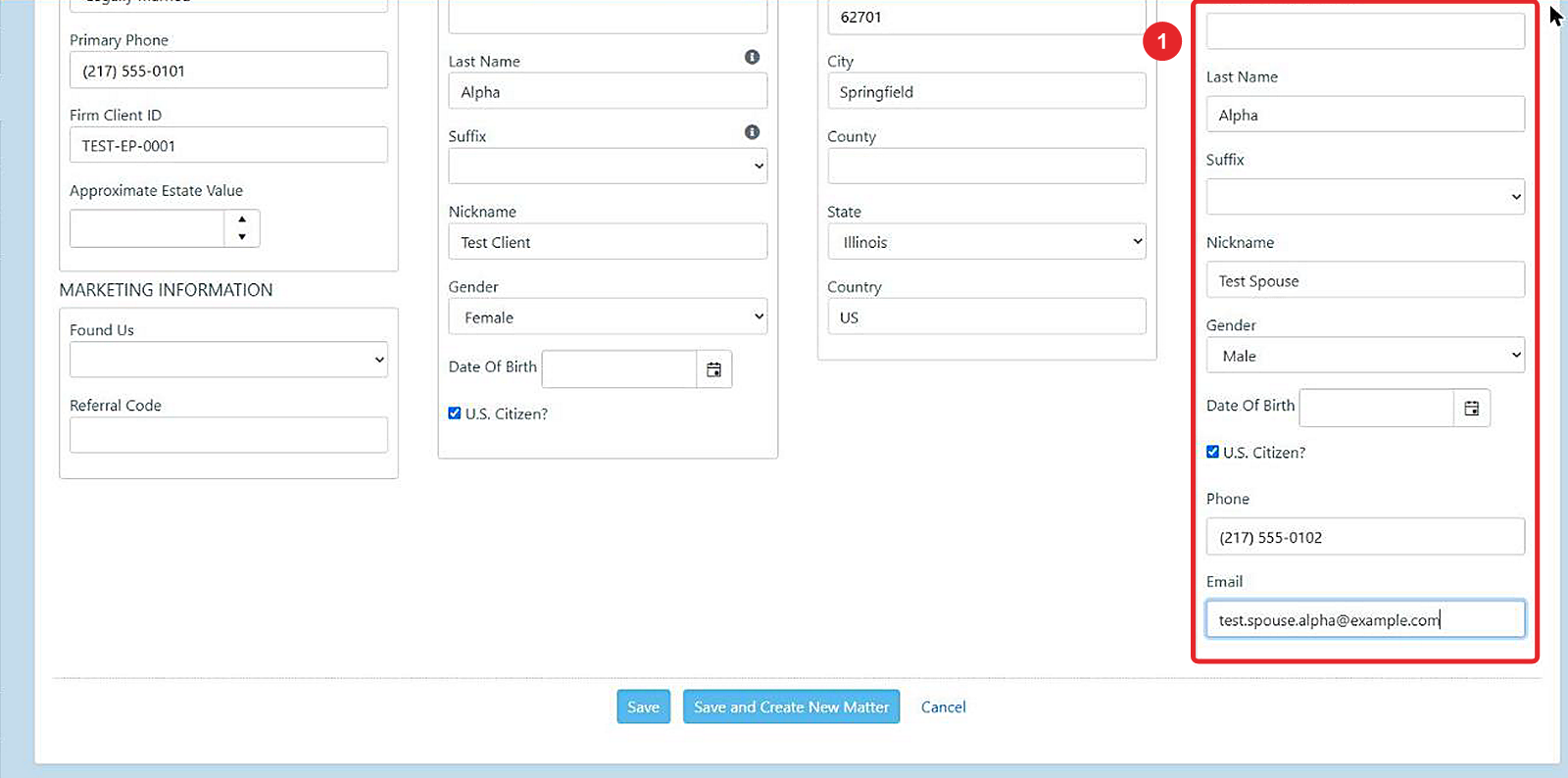
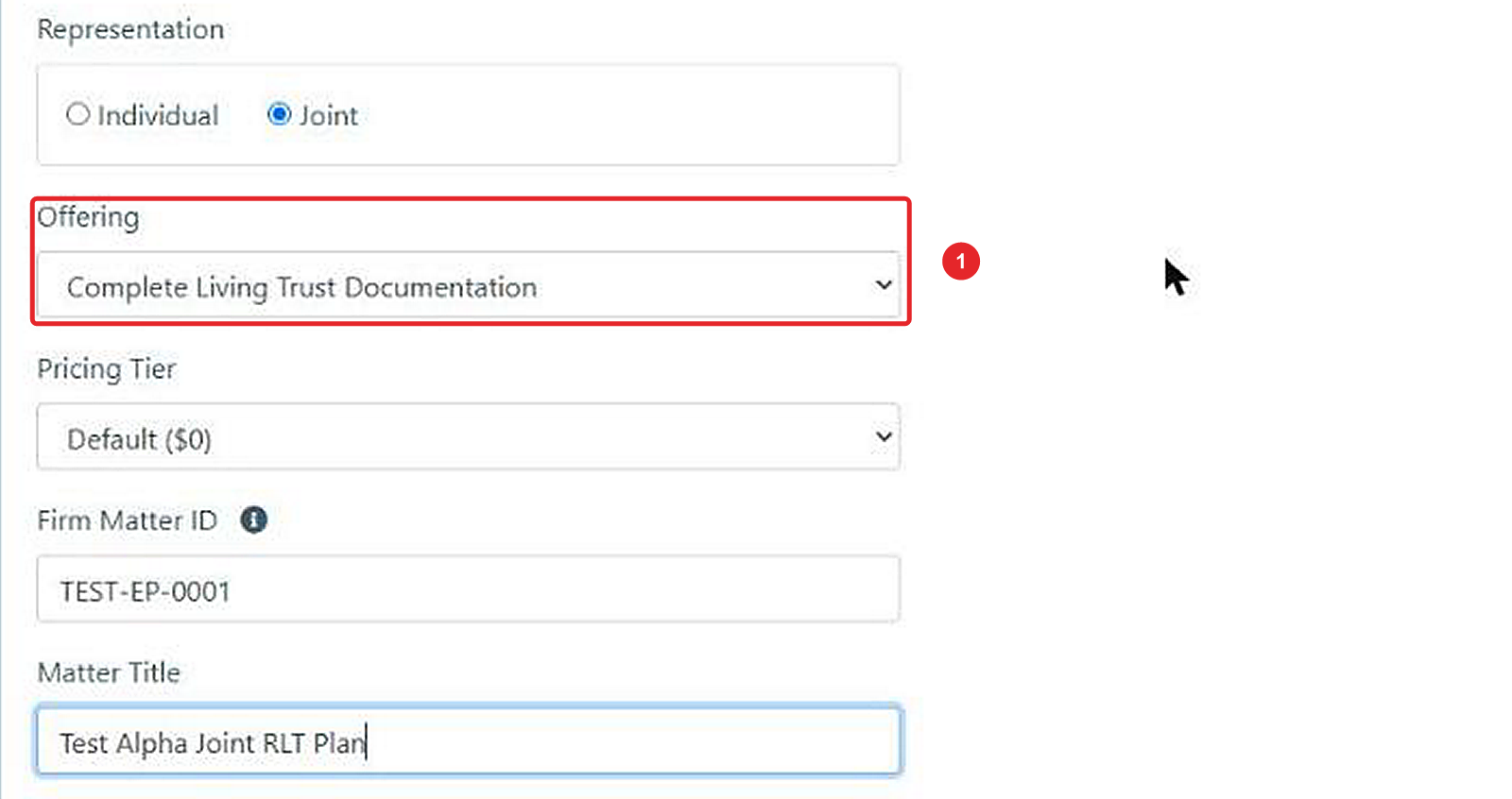
You start set-up on a client record. Choosing Legally Married on the client form adds a Spouse/Partner column, and the matter form lists 47 offerings.
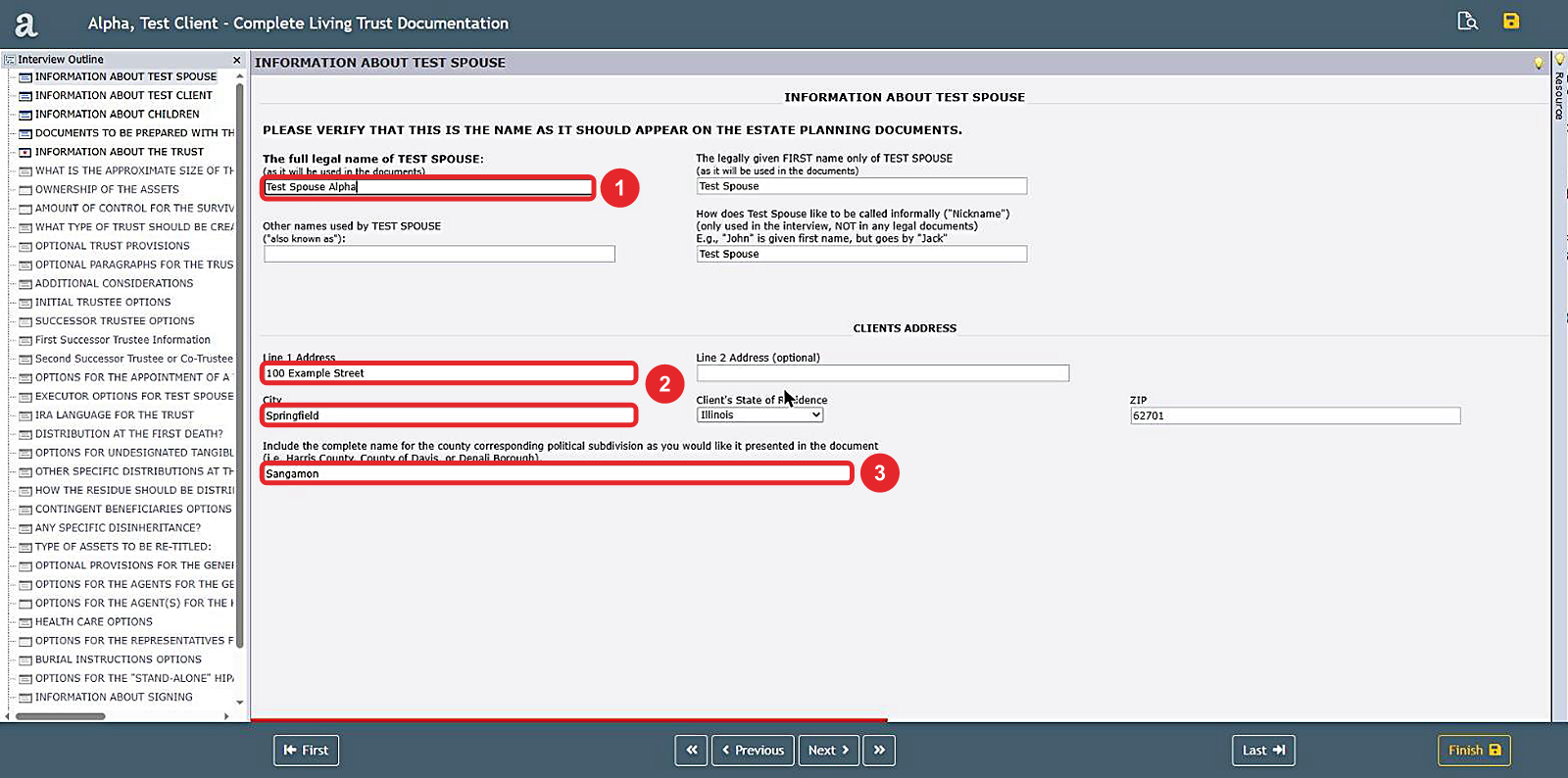
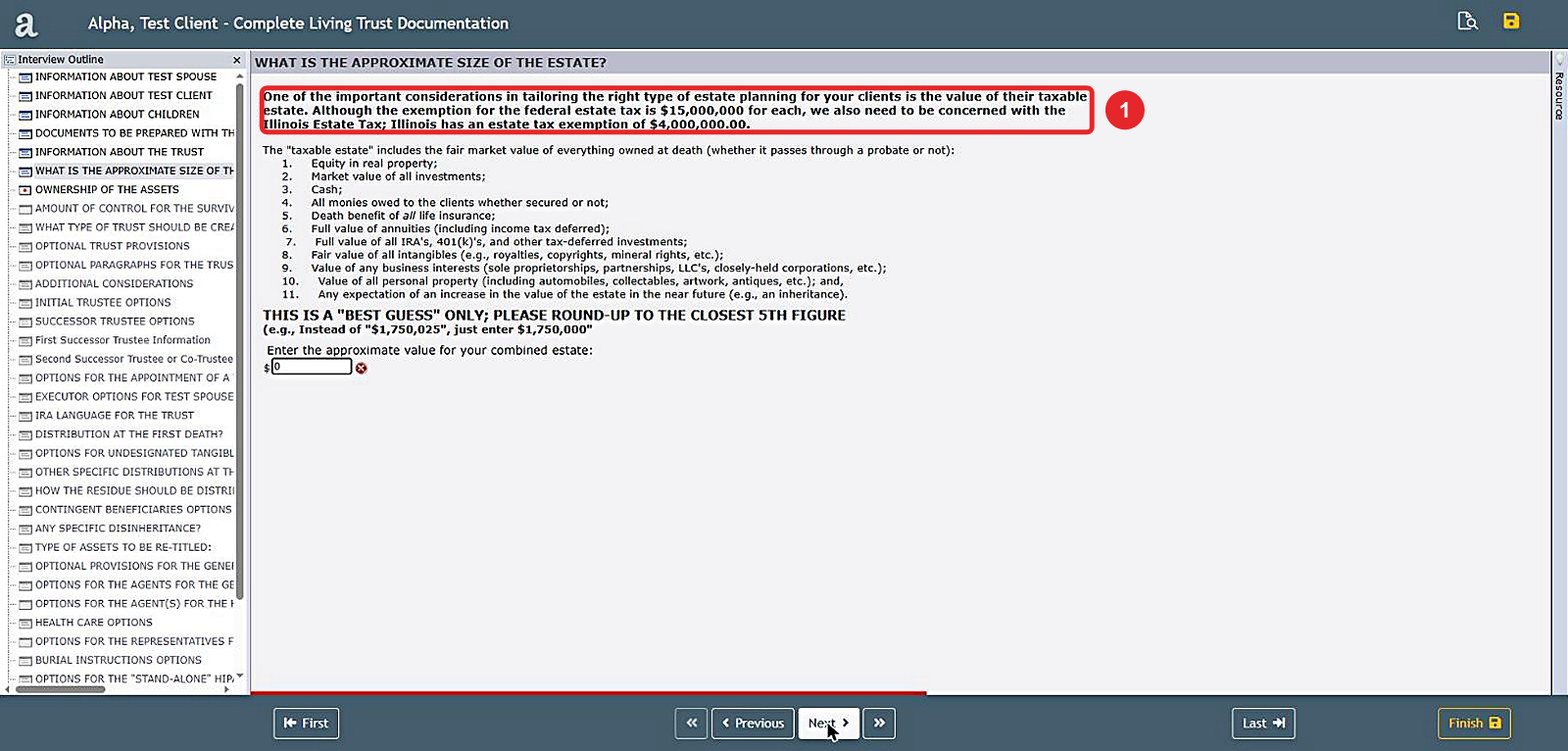
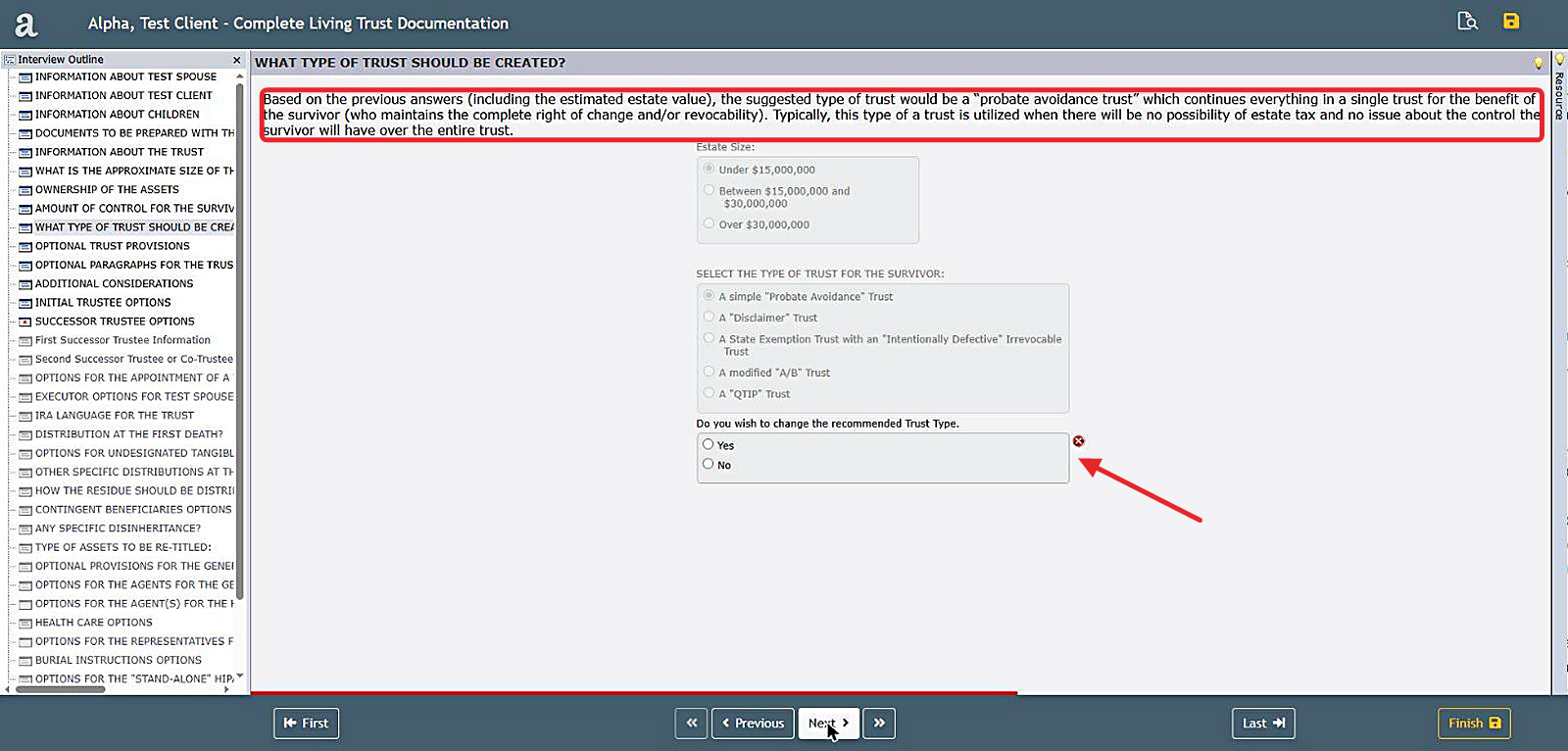
The interview opens with the client's names, address, and county already filled from the client record. It shows the federal and Illinois estate tax exemptions for the client's state, then recommends a trust type and lets you change it.
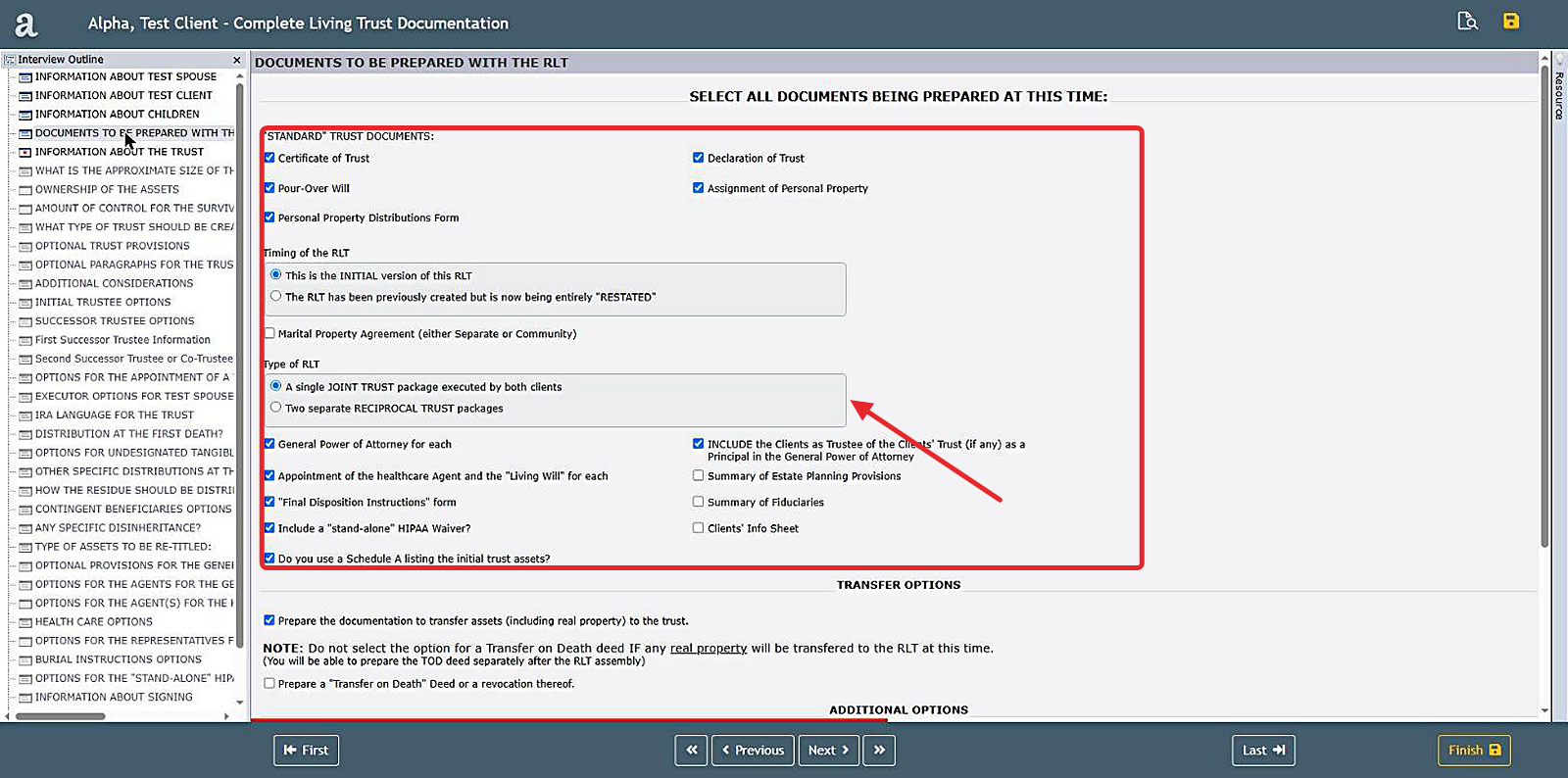
You choose the whole package on one checkbox page near the start of the interview. It offers four groups of documents.
- A trust, as an initial or restated trust, in one joint trust or two reciprocal trusts.
- A Certificate of Trust, a Declaration of Trust, and a Pour-Over Will.
- A General Power of Attorney, a health care agent appointment, and a Living Will for each client.
- Final Disposition Instructions, a stand-alone HIPAA waiver, Schedule A, and transfer documentation.
Around the interview sit six tools for your side of the work.
- Optional provisions as checkboxes, such as a no-contest clause, vesting age, bond, and arbitration.
- Document Preferences, with toggles for the cover page, page initials, Schedule A funding, trustee powers as an exhibit, and reciprocal trusts.
- A state-filtered Clause Library with favorites and search.
- My Templates, where you copy letters from the Available ADAPT Templates list and edit them with merge variables such as the client's first and last name.
- An 11-page client questionnaire you can edit, switched off by default.
- A milestone workflow with due dates, plus a History log on every matter.
Who This Review Is For (and Not For)
This review is for you if you lead a boutique estate planning firm, or run its operations, and use Adapt or face renewal.
Only 37% of solo respondents have document assembly software available, and 37% use it. That figure comes from the ABA Law Practice Division's 2024 Solo and Small Firm TechReport, published April 21, 2025. The other 63% do not report having it. So this review also serves you if you run a solo practice with staff and choose your first assembly tool.
It fits you in three cases.
- You are an owner-attorney who runs Adapt today and faces a renewal.
- You are an operations lead comparing Adapt before buying a first or second drafting tool.
- Your firm drafts mostly revocable trusts and wills.
It does not fit three other cases.
- Consumers and DIY filers drafting their own estate plan, because Adapt serves firms that draft for clients.
- Petition preparers, big law departments, and firms in other practice areas, because Adapt drafts estate documents only.
- Firms in Louisiana, because Adapt does not list the state.
The limits that matter most to you sit in the assembled package and in the work around it.
What Limitations Do Estate Planning Firms Run Into With Adapt?
Your estate planning firm runs into two costly Adapt limits: proofreading every assembled package and will and trust templates you cannot edit.
The table adds five more, with who each one hurts, the evidence, and a workaround.
| Limitation | Who it hurts | Evidence | Workaround |
|---|---|---|---|
| The assembled package needs hand fixes before signing | Firms that send drafts straight to signing review | Two output defects in one joint trust package, listed below | A proofreading checklist run in Word on every package |
| Will and trust templates cannot be edited by the firm | Firms with their own trust language | We edited firm letters with merge variables in My Templates but found no edit path for the will and trust templates | Document Preferences toggles and the Clause Library |
| No editor or redline inside the product | Attorneys who review on screen | The preview inside the interview is read-only, and edits happen in the downloaded Word file or by relaunching the interview. Only after finding no editor did we read the in-product FAQ, which says a document marked signed locks and must be copied to change | Review in Word, and mark a document signed only after review |
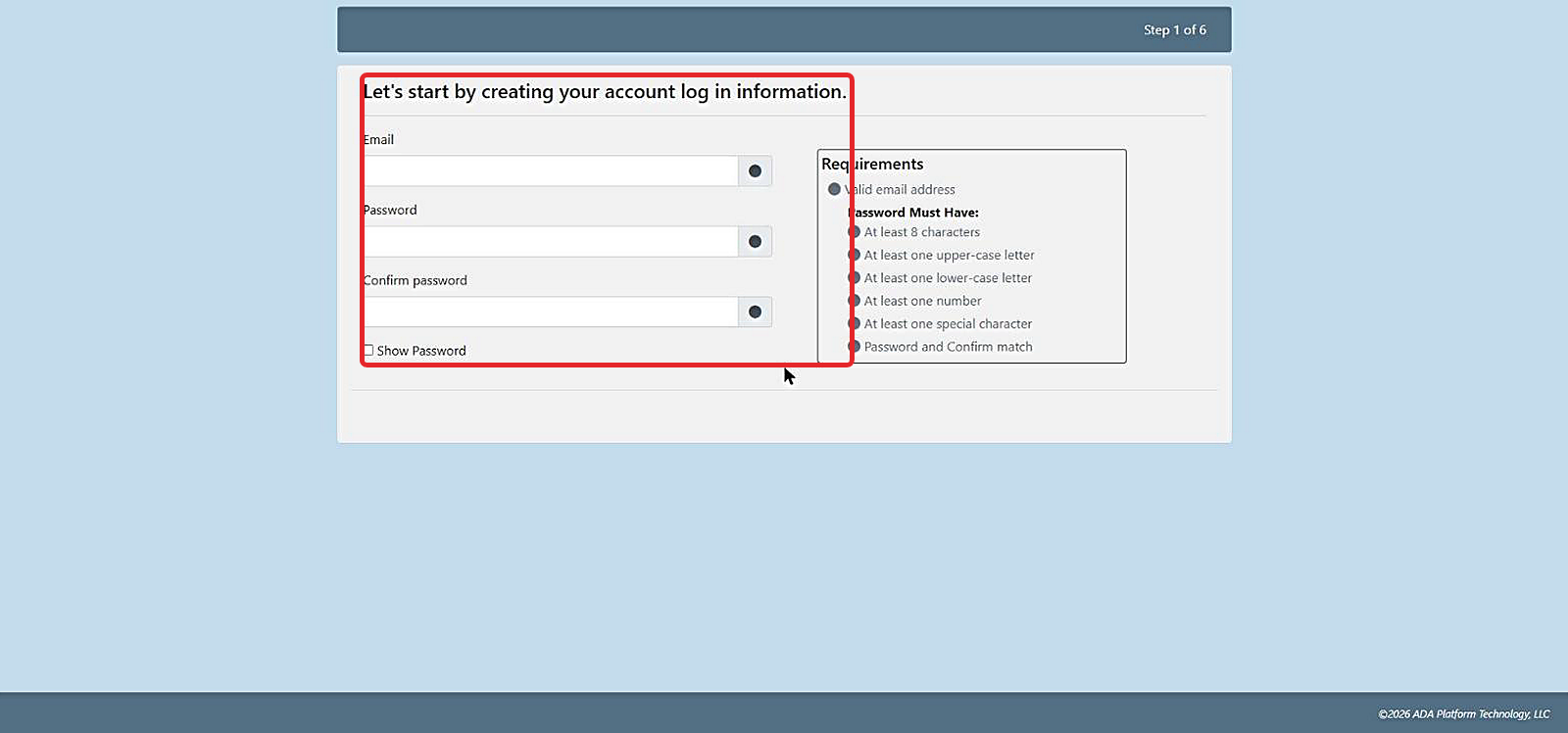
| The questionnaire ships switched off, and the client must create a password account on a separate domain first | Firms that want clients to start before the design meeting | We found the client questionnaire setting at No by default, and the client's first screen asked for an email and a password before any question | Your staff enter the facts in the design meeting |
| No document request or arrival tracking | Firms chasing deeds and beneficiary forms | We found no request, upload, or missing-item screen, and the questionnaire has no file-upload question type. Only then did we read the in-product FAQ and guide list, which name none either | A manual workflow step with a due date |
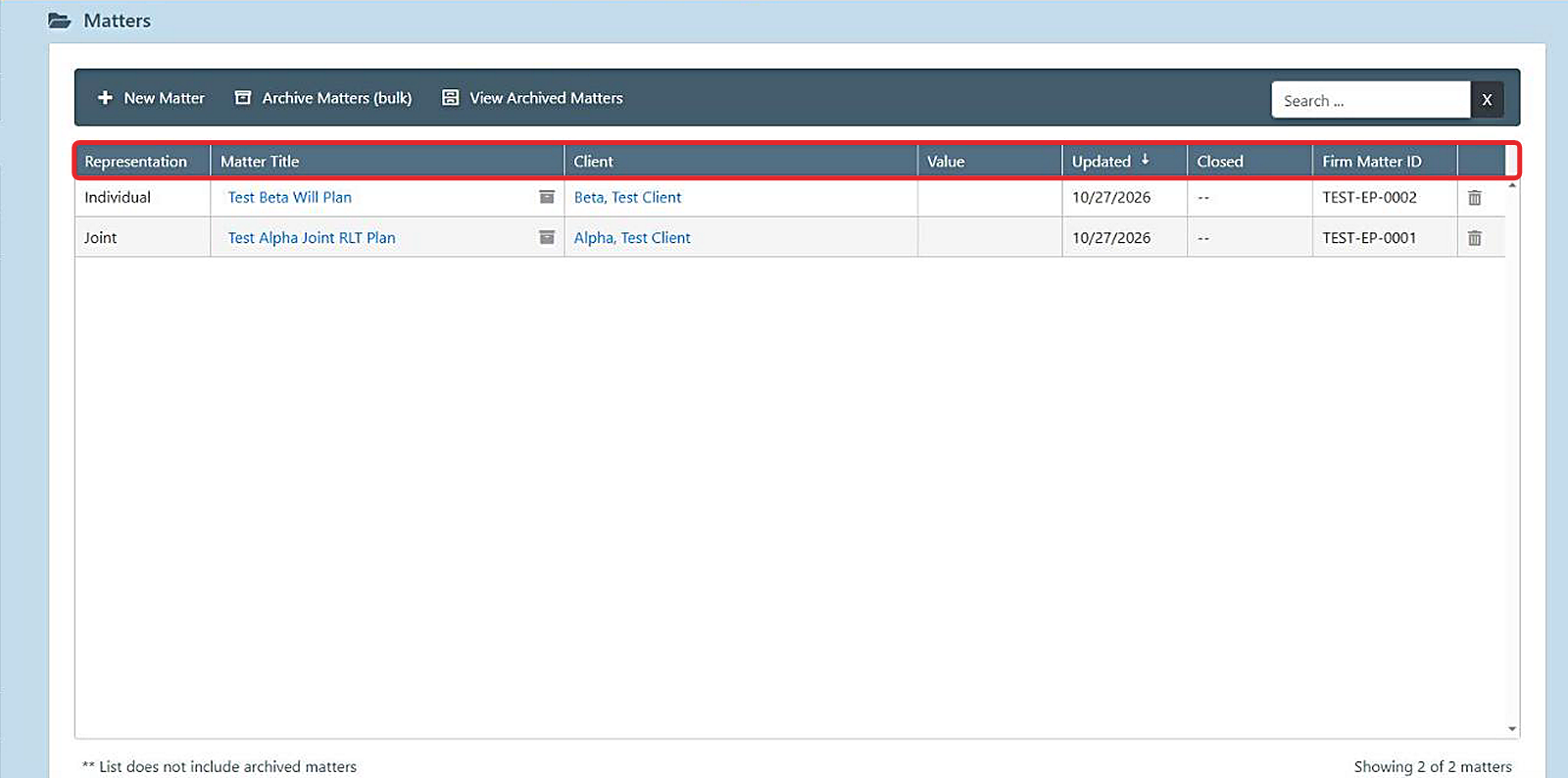
| Workflow is milestones with due dates only | Firms that track each open matter's stage and reminders | We found no reminder sends and no stage or status column in the Matters list | Due dates on each matter's workflow rail |
| No integration screen in the product | Firms on a practice-management system | We searched menus and settings and found none. Only then did we read the in-product guide list, which names a guide titled "Integrate with CLIO" | Ask the vendor about Clio set-up during the trial |
The questionnaire settings sit in three Client Experience tabs, one for registration and one for each questionnaire.

Your client's first screen asks for an email and a password before any question.
The Matters list has no stage or status column.
I spend more time fixing formatting errors in Adapt than anything else. Is that the product?
Partly, because the package Adapt assembled for us printed two output defects that only a proofread catches. The time share is one practitioner's own report. A reply in an r/LawFirm thread about Adapt's output said so in December 2025: "we spend more time formatting and fix clauses than anything".
We found these two defects in our test.
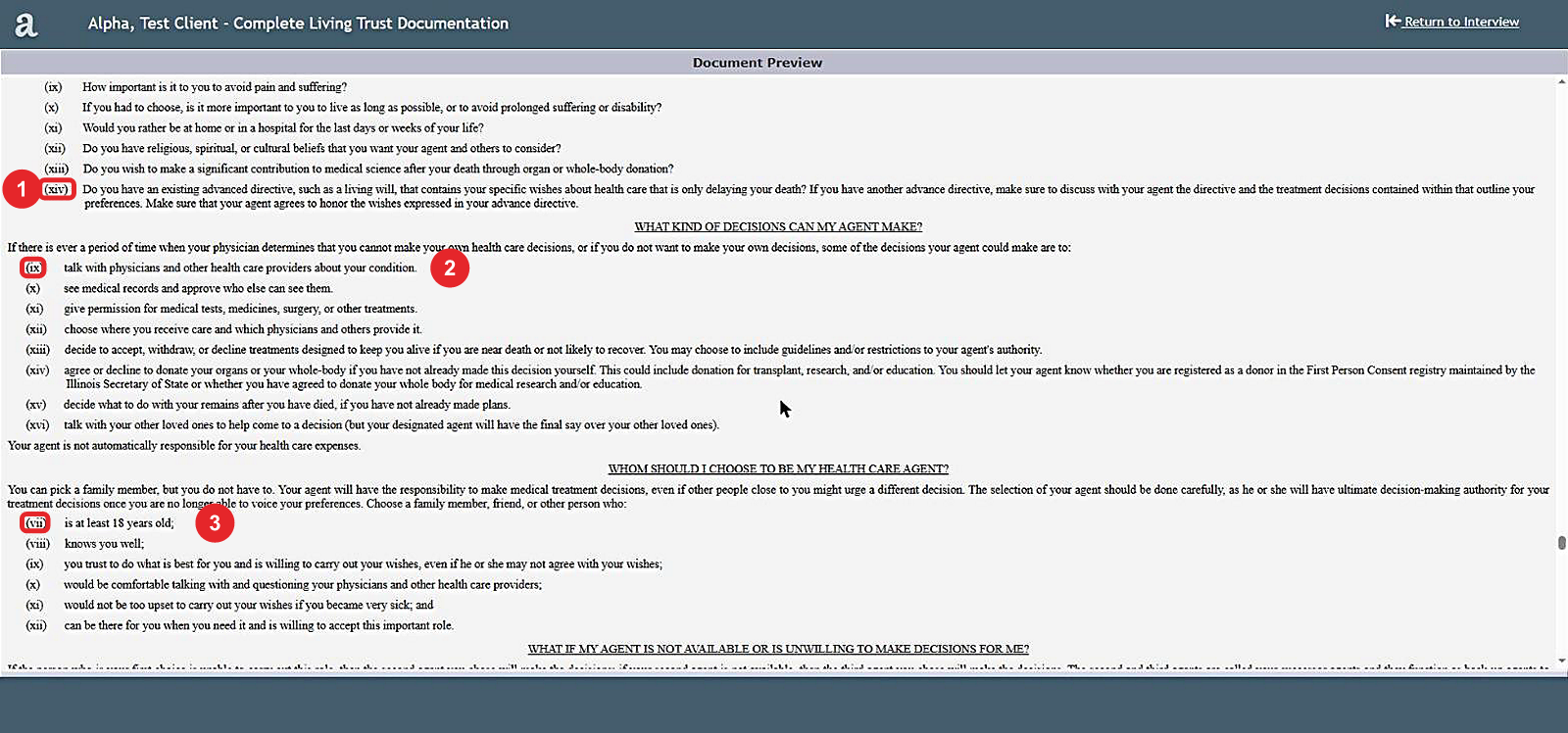
- The lettered lists in the health care power of attorney notice start at stray numbers instead of (i). One list ends at (xiv), the next starts at (ix), and the next at (vii).
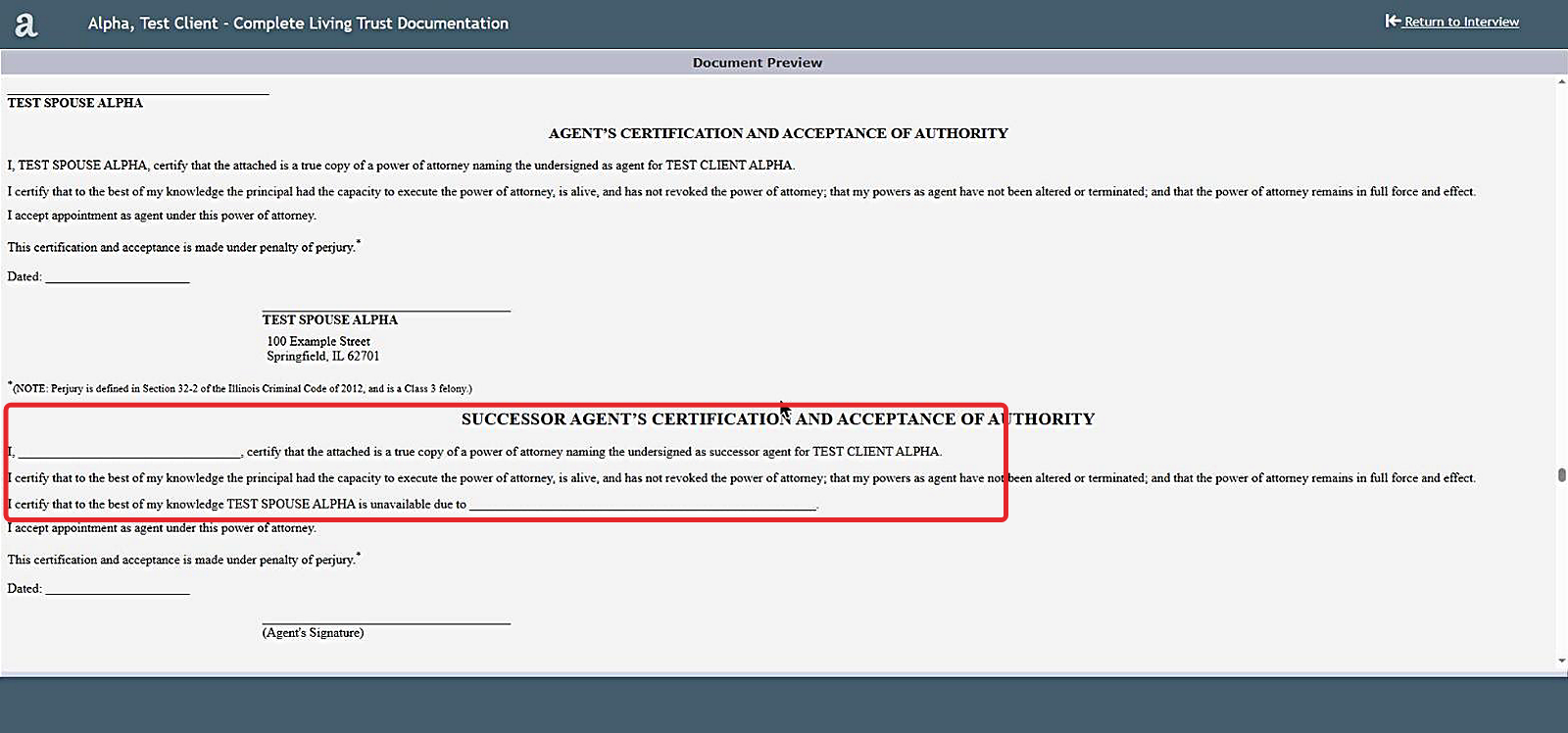
- A blank Successor Agent's Certification prints for each spouse, although we chose no successor agents.
The county and the drafter's address print exactly as entered in the client record and your profile. So complete both before you run your first package.
Where Is Adapt Strong for Estate Planning Firms?
Beside those limits, Adapt is strongest for your estate planning firm on set-up speed and on guidance at every drafting choice.
Five gains stand out.
- Time: we had a married couple's matter ready in about 6 minutes with no training, because the Spouse/Partner column sits on the client form.
- Accuracy: you type names, addresses, and counties once on the client record, so you have fewer retyped facts to get wrong.
- Guidance: your less-experienced drafter sees the exact clause an option inserts. We clicked the lightbulb beside the investment manager option, and it opened a Resource box with when to use it and the full clause text.
- Completeness: the full package arrives together as one portfolio, so you miss no document in the plan between separate runs.
- Budget: every tier's price is published, so you know the cost before you buy.


What Do Adapt Estate Planning Software Reviews Say?
Adapt estate planning software reviews are thin, and practitioner threads carry most of them. They report formatting and clause errors against good intake, a fair price, and a one-file package.
Adapt trust software reviews and fore trust software reviews are just as scarce. Adapt's Capterra listing shows 0 reviews as of November 2, 2026.
Its G2 page holds two reviews, dated 2019 and 2023, of the earlier desktop product. The table shows which practitioner claims we confirmed in our test.
| Claim | Source and date | What our test showed |
|---|---|---|
| Formatting issues in the output | r/LawFirm, December 6, 2025 | Confirmed. See the two output defects under limitations. |
| Clauses "either not showing up or showing up regardless of the selection made" | r/LawFirm, March 5, 2026 | Confirmed for one form. A blank Successor Agent's Certification printed although we chose no successor agents. The no-contest and will-affidavit choices were honored. |
| Page breaks and language errors in the output | r/LawFirm, December 5, 2025 | Not testable. The preview is one continuous page, and we never downloaded the Word file. Attributed to the commenter. |
| Language inconsistent with California law | r/LawFirm, December 5, 2025 | Not testable. We drafted our package for Illinois, and legal sufficiency is the attorney's call. Attributed to the commenter. |
| "It's not perfect but I've been happy with it for the price" | r/LawFirm, December 5, 2025 | Not testable. Value for money is the buyer's judgment. Attributed to the commenter. |
| Their "intake and substance is the best" | r/LawFirm, December 6, 2025 | Intake: we saw an 11-page questionnaire the firm can edit. Substance is a legal judgment, so it stays attributed. |
| One big file with all the documents | r/LawFirm, January 2, 2025 | Confirmed in the preview. One Estate Planning Portfolio holds the trust, both wills, and the powers of attorney. |
| It is online, with nothing to install | r/LawFirm, March 4, 2024 | Confirmed for browser-only use. We ran our whole test in the browser. |
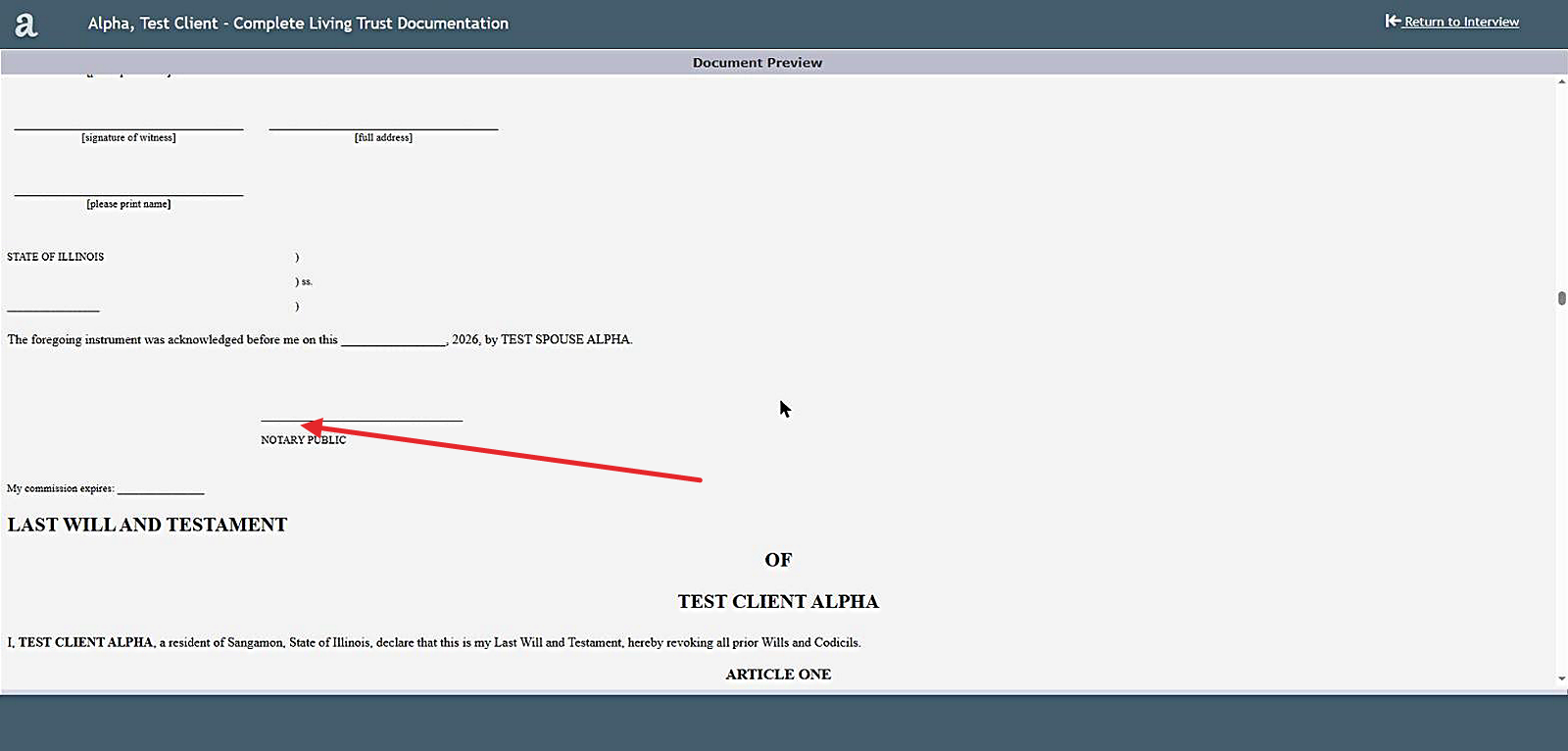
The notary acknowledgment below shows one honored choice: no will affidavit printed after we chose none.
How Much Does Estate Planning Software Like Adapt Cost in October 2026?
Adapt costs $79 to $134 a month plus a one-time $399 to $899 sign-up fee, depending on the tier, and every plan runs one year.
Those figures come from Adapt's pricing page, which we last reviewed on October 27, 2026.
| Tier | Monthly plus sign-up | Paid annually: first year, then each year | What it adds | Last reviewed |
|---|---|---|---|---|
| EP Drafter | $79 plus $399 | $1,189, then $790 | Drafting only | October 27, 2026 |
| EP Planner | $115 plus $699 | $1,849, then $1,150 | Client intake, questionnaire editor, firm templates, white label | October 27, 2026 |
| EP Professional | $134 plus $899 | $2,239, then $1,340 | Adds irrevocable trust templates | October 27, 2026 |
What does Adapt drafting software cost a solo estate practice per year?
Paid annually, Adapt costs your solo practice $1,189 to $2,239 in year one. Each later year costs $790 to $1,340. Paid monthly, year one runs $1,347 to $2,507, at the prices we last reviewed on October 27, 2026.
How much money am I spending on all of these tech subscriptions?
Adapt adds a sign-up fee plus a year of fees to your bill. Both land in year one, on a one-year term with no refund. Paid monthly, EP Planner adds up to $2,079 in year one. That is $699 plus 12 payments of $115, at the prices we last reviewed on October 27, 2026.
These terms shape what you pay.
- Term: Adapt's license agreement sets a one-year initial term "regardless of what payment plan is selected" (section 5). It then renews automatically, annually or monthly, by the prior term's payment frequency.
- Refunds: the pricing page states a "STRICT NO REFUND POLICY".
- Fee changes: not during the initial term, with 30 days' notice (section 26).
- Late charge: two percent a month, compounded monthly, on amounts unpaid after 10 days (section 24).
- Extra users: the EP Planner page says multi-user licenses and pricing are also available.
- Trial: Adapt offers a free 7-day trial, which we used from October 27, 2026. Capterra's listing, updated September 29, 2026, still lists the trial as not available.
Adapt suits you if you value a published cost and will trade proofreading and a fixed one-year term for it. That price buys drafting and, on EP Planner and above, a client questionnaire. However, Adapt connects to little else in your stack.
How Does Adapt Connect to the Rest of Your Stack?
Adapt connects to the rest of your stack through links and Word files, not integrations.
It shows no integration screen and publishes no API, and the only connection its vendor names is Clio.
- Client App Links lists the registration and dashboard links you share by website or email. We did not press its Export List (csv) control in our test.
- A completion step can show a pay link, and each firm-created offering has a PayLink field.
- Documents leave through Download Documents, which the in-product FAQ says opens them in Word. We never pressed it.
- Before termination, the license agreement lets you download all client data to a local device or server (section 13).
Does Adapt Estate Planning Software Work With Clio?
Adapt says its estate planning software works with Clio.
Its Q1 2024 newsletter says Clio users can pull client information from Clio "directly into ADAPT". It adds that they can push Adapt client information back into Clio in bulk or case by case.
We found no integration screen in our trial account, and it had no Clio-connected account. The in-product guide list names a guide titled "Integrate with CLIO", whose link did not open a page. Clio's App Directory had no Adapt listing when we checked on October 27, 2026. We did not test the exchange, so confirm the set-up with the vendor during the trial before you rely on it.
What Attorney Review Controls Does Adapt Have, and Does It Use AI?
Adapt has no AI, and its review control is your attorney's own proofread in a read-only preview or in downloaded Word.
Every draft comes from rule-based interview logic. Per its documents page, clients do not have immediate access to their completed documents, and you choose how they are delivered.
We searched every menu, the matter menus, the interview toolbar, and the template editor for an AI feature and found none. Only then did we read the in-product FAQ and guide list, which name none either. Adapt's Q1/Q2 2026 newsletter, dated June 1, 2026, says the vendor plans to introduce "an AI product support feature" in the fall. That is a plan for product support, not a shipped drafting feature.
A lot of times I find errors in the document that is produced. Who checks it?
In Adapt, your attorney's proofread is the check. The product has no review step of its own before download.
- Preview: read-only. To change a draft, you edit the downloaded Word file or relaunch the interview.
- Signed mark: marking a document signed locks it. The in-product FAQ, read after we found no editor, says a signed document must be copied to change.
- History: a History log on each matter records views, interview launches, and completions.
- Liability: the license agreement says the user is "FULLY AND SOLELY LIABLE AND RESPONSIBLE FOR THE CONTENT AND LEGAL EFFECT OF ANY DOCUMENTS" (section 18). Adapt's homepage promises drafting "without having to worry about the legal accuracy of the drafted documents".
Who Owns Your Data in Adapt, and How Do You Export It on Exit?
Your firm owns its client data in Adapt, and you export it by downloading all of it before termination.
The license agreement does not state the export format. Adapt may delete the data after the full calendar year following the year the agreement ends (section 13).
Who owns my clients' data under the Adapt EULA?
Your firm owns its clients' data under the Adapt EULA. Section 13 of the end user license agreement says such client data "shall remain the property of Subscriber", and the download must happen before termination.
- Your edits: ownership of your questionnaire and template edits is Not stated. The platform and its content are owned by Adapt or its licensors, under a revocable, non-exclusive, non-transferable license (section 12).
- Export: a means for downloading all client data to a local device or server of the subscriber, before termination (section 13). We found no export control on the Clients or Matters lists in our trial. Export format: Not stated.
- Retention: deletion after the full calendar year following the year of termination (section 13). Adapt's privacy policy covers deletion on request.
- Training use: Not stated.
- Data processing agreement: Not stated. We found none on the vendor pages.
- Liability cap: the greater of one year's fees and $100.00 (section 17, last reviewed October 27, 2026).
- Renewal notice: section 5 asks for notice "in accordance with the requirements laid out in 27(a)". Section 27 as published has no paragraph (a) that states a notice requirement. The only notice period in the agreement is 30 days in section 28.
- Termination: 30 days' written notice after the initial term, with all amounts owing paid, ends all subscriptions. Adapt may end the agreement on 10 days' notice for a default (section 28).
- Governing law: Texas (section 29).
What Does Adapt Say About Security?
Adapt's security page describes encryption, scanning, and access controls.
Its SOC 2 Type II statement covers its data-center providers, not Adapt itself. It names no providers, locations, or subprocessors, and the page carries a January 13, 2022 date. My Profile offers multi-factor authentication through an authenticator app, and we saw its set-up dialog.
Six vendor-diligence points are fair questions for any vendor that holds your client data. They come from page 11 of ABA Formal Opinion 512, issued July 29, 2024 on generative AI tools.
- Reference checks and vendor credentials.
- The vendor's security policies and protocols.
- The vendor's hiring practices.
- Confidentiality agreements.
- The vendor's conflicts check system.
- A legal forum for relief if the vendor breaks the agreement.
Those answers, with the limits, strengths, and costs above, decide whether you keep Adapt.
Should Your Firm Keep Adapt?
Keep Adapt when its library and price fit your plans and someone proofreads every package. Look elsewhere when your own language, clean output, or intake tools matter more than the price.
The 3.4 out of 5 score reflects both sides of that trade.
Keep Adapt If
Four conditions point toward keeping Adapt.
- Your plans are mostly revocable trusts and wills in a state Adapt lists.
- A drafter proofreads every package in Word before signing.
- A published price suits your budget better than a quote.
- Your clients do not need to answer questions before the design meeting.
Look Elsewhere If
Four needs point away from Adapt.
- You draft from your own will and trust language.
- You review and redline on screen, inside the tool.
- You want clients answering on their own before the meeting, without creating an account.
- You need reminders and a stage view across open matters.
The guide to the best estate planning software for attorneys compares the wider options if intake and document collection decide it for you.
What Does Leaving Adapt at Renewal Take?
Leaving Adapt at renewal takes 30 days' written notice after the first year and every amount owing paid. Download all your client data before termination, and plan the move before the term ends.
I am really disliking Adapt and want to switch to something more reliable. What does leaving take?
Leaving Adapt takes 30 days' notice after year one, a full data download, and a new tool. Section 28 lets you terminate only after the initial term, with every amount owing paid.
- Check the term end date. The initial term is one year, and renewal follows the prior term's payment frequency.
- After the first year, give at least 30 days' prior written notice, with every amount owing paid in full (section 28).
- Download all client data before termination, and keep every drafted package as a Word file.
- Plan the move before the term ends, using the guide to switching drafting software at renewal.
How Do You Keep Adapt and Add an Automation Layer for Estate Planning Documents?
You keep Adapt for what it drafts well, and Aretech builds the automation around it.
That covers intake, the document chase, and estate document first drafts for attorney review built from your firm's own templates.
You keep your software, automate around it, and handle more matters and increase revenue without adding headcount.
An attorney approves everything, and the system never files, signs, submits, or decides anything legal.
The build has three layers, explained in this order.
- The data layer: one record across your CRM or practice-management system, drafting software, storage, and phones. You own it.
- AI agents: hosted frontier models that read and sort what clients send, with an attorney reviewing everything.
- Automated workflows: the steps that carry a matter from intake to attorney review, on the stack you already run.
Intake Captured Once, Before the Drafting Interview
Where Adapt's questionnaire starts with a password account, Aretech builds a custom intake system so your firm can capture estate intake once.
It is built to your firm's own questions, with staff-only sections and a form your staff edit without a developer.
The client's facts land in the intake record and your CRM, ready for your drafter to carry into Adapt's interview. The automation works around Adapt, not inside it.
Client Documents Requested, Chased, and Checked
Where Adapt tracks no document requests, the document chase does that work in three steps.
- It finds what is missing, wrong, unreadable, or outdated.
- It chases the client through your firm's own channels without re-asking for what already arrived.
- It shows staff what is ready for attorney review.
Your staff change the wording, timing, and rules themselves.
First Drafts From Your Own Templates
Adapt's will and trust templates cannot hold your firm's own language. For those documents, the build assembles first drafts from your templates and attorney-authored rules.
The method to automate estate documents from your own templates starts with your language, not a vendor's. There is no AI-written legal language, and nothing is generated until the attorney and client approve and lock the record. The attorney approves every draft. The workflow mapping session shows where all three layers fit around your Adapt set-up, and the map is yours to keep.
FAQs
Is Adapt Estate Planning Software Worth It for a Small Estate Planning Firm?
Yes, if you draft mostly revocable trust and will plans from Adapt's library and proofread every package. We scored it 3.4 out of 5. Its cost is public, starting at $1,189 for the first year on EP Drafter paid annually, as we last reviewed it on October 27, 2026. It is not the right fit if you need your own language or clean output without review.
Is Adapt the Same as Fore! Trust Software?
Effectively yes: Adapt is the cloud product built on the same document templates as Fore! Trust, as Adapt's documents page states. You keep that document set in a browser when you move from the desktop edition, with nothing to install. Foretrust estate planning software and Adapt are one template line, desktop then cloud.
Is There a Fore Trust Software Free Download?
No fore trust software free download is on offer. Capterra's listing, updated September 29, 2026, says desktop sales ended in 2023 and lists no free version.
Adapt's Fore! Trust page calls the desktop edition "being sunset", and the cloud product offers a 7-day free trial instead.
How Long Does the Adapt Drafting Interview Take?
The Adapt drafting interview took us about 17 minutes in our test. We ran roughly 70 clicks and typed answers across about 30 pages for a joint trust. A user on r/LawFirm reported about 30 minutes in April 2025, which we could not test across a practice.
Can I Keep Adapt for Really Small Trusts and Deeds and Use Something Else for Bigger Plans?
Yes, and at least one estate practitioner does. One wrote on r/LawFirm in April 2025 that they were "keeping ADAPT for really small trusts, deeds, and other documents". Adapt's documents page and pricing grid put irrevocable trust templates in EP Professional only. Its EP Planner page also lists a Medicaid trust, so confirm the tier with the vendor before you split work.
Does Adapt Have E-Signature?
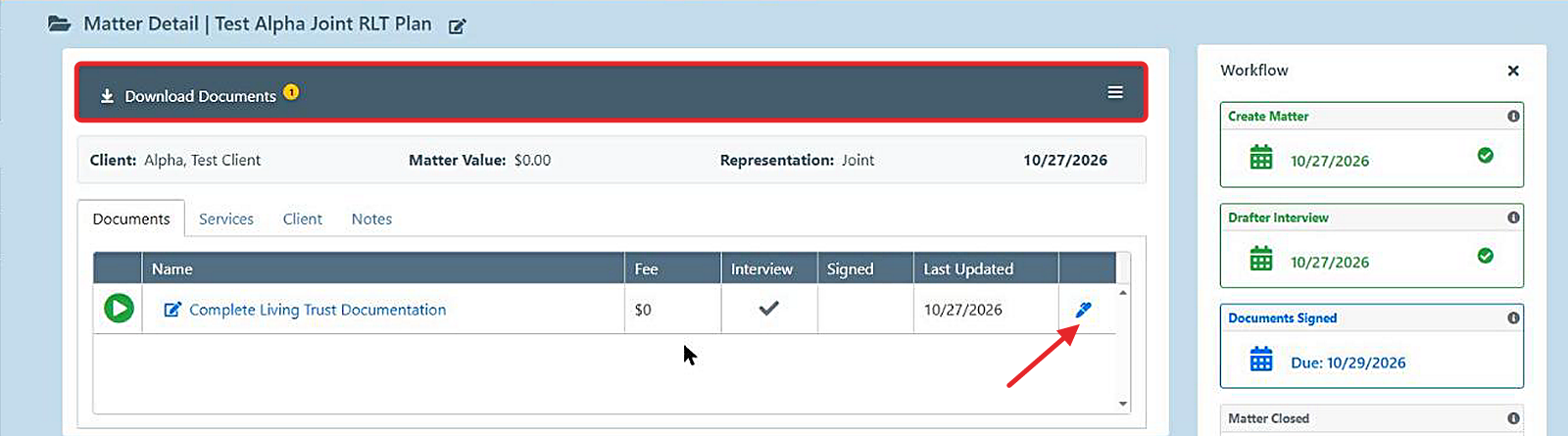
Adapt does not have e-signature. It tracks signing as a status, and execution happens outside the product. We found no e-signature control, and the in-product FAQ we read afterward says a drafter marks a document signed with the blue pen icon. Notary and witness pickers and a Documents Signed milestone are the signing tools it shows.
How Does Adapt Compare With WealthCounsel?
Adapt compares with WealthCounsel at 3.4 out of 5 against 3.0 on the same nine-dimension software rubric. Adapt publishes every tier's price, while WealthCounsel sells its drafting software inside a membership priced by quote, as last reviewed October 21, 2026. The WealthCounsel review for estate planning firms holds its score and evidence.
What Are the Best Alternatives to Adapt?
The alternatives to Adapt that estate practitioners name in r/LawFirm and r/Lawyertalk threads from October 2025 to March 2026 are these four.
- Statular, which one Adapt user was trialing in March 2026.
- InterActive Legal, recommended over Adapt in an October 2025 thread.
- Lawgic, which one practitioner moved to after Fore! and Adapt and then said was not working for them.
- Your firm's own templates, updated each year.
To compare the drafting tools estate firms choose between, see the best estate planning drafting software for attorneys.
Can More Than Two People Use One Adapt Subscription?
Yes, more than two people can use one Adapt subscription, because Adapt says new subscriptions include two user licenses and more can be bought. Its trade show page and the same Q1/Q2 2026 newsletter state the two licenses. The newsletter says Firm Admins add or buy more users under Firm Settings, then Firm Users.
We found no users screen in our trial account. Only then did we read the in-product FAQ, which says extra users come through Adapt support. Its set-up support page lists chat, email, and phone help on weekdays. Each user needs a separate login.
What Is the Next Step for an Estate Planning Firm on Adapt?
Keep Adapt for the drafting it does well, and run intake and the client document chase in a layer around it.
The workflow mapping session shows where that layer fits your Adapt set-up, your CRM, and your staff. Book it with Get My Free Workflow Map.
Free. The map is yours, even if you never hire us.