DecisionVault is the best-scoring estate planning software for attorneys in this ranking, at 3.5 out of 5. Pick it if your firm drafts in separate software and needs deep intake. 8am MyCase (3.4, practice management software) fits if you want intake, a portal, and billing in one system.
Adapt (3.4, estate drafting software) leads the drafting tools at a published price. Read the two types together if you run one drafting tool beside one practice management or intake tool. This ranking scores both on one rubric and prints each product's type beside its score.
Aretech builds automation that works around the software it reviews; here is how we score software. We score every product here on the same published rubric, and we never score ourselves.
Page last reviewed November 14, 2026; each Pricing section dates its own figures.
TL;DR
- Pick DecisionVault (3.5; Solo $99 a month, last reviewed November 2, 2026) beside separate drafting software.
- Pick 8am MyCase (3.4; Pro $120 per user monthly, last reviewed November 14, 2026) for one system.
- Pick Adapt (3.4; $79 a month plus $399 to sign up, last reviewed October 27, 2026) for drafting alone.
- Pick LEAP (3.2) for WealthCounsel inside your matters, or Gavel (3.0) for your own Word templates.
- Ask each vendor which way your fields move, because DecisionVault and Lawmatics push client data one way.
The Ranking at a Glance
The ranking at a glance orders the scored products by weighted score, with each product's type beside its score.
- DecisionVault (estate planning intake software), 3.5: best for firms that draft in separate software and need deep estate intake.
- 8am MyCase (practice management software), 3.4: best for intake, a portal, and billing in one published tier.
- Adapt (estate drafting software), 3.4: best for estate-only drafting at a published price.
- Smokeball (practice management with document automation), 3.2: best for Windows firms that keep their own will and trust language.
- LEAP (practice management with WealthCounsel drafting), 3.2: best for WealthCounsel drafting from inside your matters.
- Clio (practice management software), 3.1: best for one client record and your pick of drafting apps.
- Lawmatics (intake and CRM software), 3.1: best for firms that market actively and need fast follow-up.
- Gavel (document automation software), 3.0: best for turning your own Word templates into automated interviews.
- WealthCounsel (estate drafting software), 3.0: best for complex and taxable trust drafting from a maintained library.
- InterActive Legal (estate drafting software), 2.8: best for clause-level control in wealth transfer planning.
Westlaw Form Builder (estate planning forms software) ranks eleventh at 2.5, best for a maintained estate forms library inside Westlaw.
What Estate Planning Software Has to Do in Your Firm
Your estate planning software has to carry one client from first facts to a signed plan.
Whether you call it estate planning software for law firms or estate planning management software, the job runs in five steps. Each step falls to one type of tool.
- Capture the client's facts once, in intake software or your practice management system.
- Assemble wills, trusts, and powers of attorney from templates, with logic for joint clients and blended families. This is the drafting software's job.
- Carry intake answers into the answer file without retyping. The integration between your tools does this, or your staff do.
- Run the matter from consult to design meeting to signing, in your practice management system.
- Check every draft before signing. Your attorney does this, whatever the software.
Is the data not captured as fully and completely as you would like?
Deepen intake with conditional questions and a staff-only part. DecisionVault, 8am MyCase, and Lawmatics all build conditional intake forms.
Only 37 percent of solo attorneys have document assembly software available, "relatively unchanged from 2023", per the ABA's 2024 Solo and Small Firm TechReport. Estate administration and probate tools sit outside this ranking.
Drafting Software, Practice Management, or Both?
Pair a dedicated drafting tool with a practice management or intake tool, or pick one system that does both.
Estate planning case management software is the second half of that pair. The table shows each route, the products here that fit it, and which way client data moves.
| Approach | What it does | Examples in this ranking | Trade-off |
|---|---|---|---|
| Drafting tool plus intake software | Intake collects the facts; the drafting tool assembles the plan | DecisionVault with WealthCounsel or InterActive Legal | DecisionVault pushes data one way into the drafting tool |
| Drafting tool plus practice management | The matter lives in practice management; drafting runs in a second tool | Clio or 8am MyCase with Adapt, Gavel, or WealthCounsel | WealthCounsel's Clio link pushes contacts and matters one way |
| Practice management with drafting inside | Drafting launches from the matter | LEAP with WealthCounsel; CounselPro 8 on Actionstep, as its vendor states (not reviewed yet) | Drafting still runs under the drafting vendor's own terms: LEAP's contract applies WealthCounsel's Third Party Terms, so confirm it on your Order Form |
| Practice management with your own templates | Your Word templates fill from matter data | Smokeball, Clio, 8am MyCase | You write and maintain every template |
Practice management data passed to the assembly tool "does not need to be reentered", says a Columbus Bar Association and Affinity Consulting whitepaper. That only holds where a connector exists and moves the fields you need.
Who This Ranking Is For (and Not For)
This ranking is for the people who choose and run software at a boutique estate planning firm.
For:
- Owner-attorneys choosing drafting, intake, or practice management software, or auditing what they run.
- Operations leads who set up intake forms, templates, and matter stages.
Not for:
- Consumers planning their own estate, and their families.
- Do-it-yourself will makers and non-attorney document preparers.
- Financial advisors choosing advisor planning tools.
- Probate-only administration shops, large firms, and other practice areas.
The wrong tools "may make tasks take longer", and account-aggregation tools suit broad wealth advisors more than estate attorneys. That point comes from a May/June 2024 Probate & Property technology column published by the ABA for real property and estate lawyers.
How We Scored
Aretech scored each product on the nine weighted dimensions of our published software rubric, judged on its type's job for an estate planning firm.
We tested DecisionVault, 8am MyCase, Adapt, Gavel, and Clio in trial accounts with synthetic clients. We read their documentation only after a task failed without it. The other six products are scored from vendor documentation, labeled on each entry, as is Clio's Grow add-on. We also tried Clio's drafting surface, Clio Work, in a second Clio trial on November 10, 2026.
Estate Planning Software Compared
The table compares all eleven estate planning software products on one rubric, and DecisionVault leads at 3.5.
Each column header carries its dimension's weight.
| Product | Type | Core job 20% | Interoperability 18% | Ease of use 12% | Practice depth 10% | Review and AI 10% | Pricing 10% | Data 8% | Support 7% | Security 5% | Overall | Best for |
|---|---|---|---|---|---|---|---|---|---|---|---|---|
| DecisionVault | Estate planning intake software | 3 | 3 | 4 | 4 | 3 | 4 | 4 | 3 | 4 | 3.5 | Deep intake that feeds separate drafting software |
| 8am MyCase | Practice management software | 3 | 3 | 4 | 3 | 3 | 4 | 3 | 5 | 4 | 3.4 | Intake, portal, and billing in one published tier |
| Adapt | Estate drafting software | 3 | 3 | 4 | 4 | 4 | 4 | 2 | 4 | 3 | 3.4 | Estate-only drafting at a published price |
| Smokeball | Practice management with document automation | 3 | 3 | 3 | 4 | 3 | 2 | 3 | 5 | 4 | 3.2 | Windows firms with their own will and trust language |
| LEAP | Practice management with WealthCounsel drafting | 3 | 4 | 3 | 4 | 2 | 2 | 3 | 4 | 3 | 3.2 | WealthCounsel drafting from inside your matters |
| Clio | Practice management software | 3 | 3 | 4 | 3 | 3 | 2 | 3 | 4 | 4 | 3.1 | One client record and your pick of drafting apps |
| Lawmatics | Intake and CRM software | 4 | 3 | 3 | 2 | 3 | 2 | 3 | 4 | 4 | 3.1 | Active marketing and fast follow-up |
| Gavel | Document automation software | 3 | 3 | 3 | 3 | 2 | 4 | 2 | 4 | 4 | 3.0 | Your own Word templates as interviews |
| WealthCounsel | Estate drafting software | 3 | 3 | 3 | 4 | 2 | 2 | 3 | 3 | 4 | 3.0 | Complex and taxable trust drafting |
| InterActive Legal | Estate drafting software | 3 | 3 | 3 | 5 | 1 | 1 | 2 | 4 | 3 | 2.8 | Clause-level control in wealth transfer planning |
| Westlaw Form Builder | Estate planning forms software | 3 | 1 | 3 | 4 | 2 | 2 | 2 | 3 | 3 | 2.5 | A maintained forms library inside Westlaw |
DecisionVault leads because its estate intake, published plans, and data terms score high, with no dimension below 3. InterActive Legal scores the only 5 on practice depth. 8am MyCase and Smokeball share the top support score of 5.
Equal displayed scores follow the unrounded sums. 8am MyCase and Adapt tie at 341, and 8am MyCase is listed first because more of the ranking pages we read list it. Smokeball (319) ranks above LEAP (315), Clio (314) above Lawmatics (312), and Gavel (304) above WealthCounsel (295). The entries below follow that order, starting with DecisionVault, and each shows its scorecard, features, pros, cons, and pricing.
1. DecisionVault: Best for Deep Intake That Feeds Your Drafting Software
Overview
DecisionVault is estate planning intake and design-meeting software, not a drafting engine.
It serves boutique estate firms that draft in a separate platform such as WealthCounsel or InterActive Legal. Its 11-section client questionnaire fills the attorney's design sheet, and the app pushes the matter one way to your other tools.
It scores 3.5 out of 5 as estate planning intake software, led by intake depth, published pricing, and data terms. Every finding sits in our DecisionVault estate planning review.
Best for: firms that draft in separate software and need deep estate intake.
DecisionVault Estate Planning Software Scorecard
DecisionVault scores 3.5 out of 5 as estate planning intake software, weighted across nine dimensions.
| Dimension | Weight | Score (1 to 5) | Basis |
|---|---|---|---|
| Core job performance | 20% | 3 | Estate intake runs deep for joint clients. Inquiry capture is absent, and staff type document requests one at a time. |
| Interoperability with your stack | 18% | 3 | A long integration list, an API, webhooks, and Zapier. Every listed app integration syncs one way out; Zapier and the API can create a matter from another app. |
| Ease of use and setup | 12% | 4 | We found every area without documentation. Merge templates and connections need admin setup. |
| Practice-specific depth | 10% | 4 | Built for estate planning, with trust design, guardians, funding, and blended families. |
| Attorney review and AI controls | 10% | 3 | No AI runs inside the app. Automatic client emails send on their settings, with no per-message approval. |
| Pricing and cost structure | 10% | 4 | Every plan a boutique firm needs is published. Enterprise is by quote. |
| Data ownership and portability | 8% | 4 | User Data stays your firm's or its client's under the terms. Exports run matter by matter. |
| Support and reliability | 7% | 3 | In-app help, email, a help center, and webinars. No support hours or uptime promise are published. |
| Security and ABA Opinion 512 posture | 5% | 4 | A SOC 2 Type II audit is stated, with the report on request. No subprocessor list is published. |
| Overall | 100% | 3.5 | 60 + 54 + 48 + 40 + 30 + 40 + 32 + 21 + 20 = 345 of 500, or 3.45 before rounding. |
Features
In Aretech's October 27 and 28, 2026 trial, DecisionVault covered intake in depth and handed drafting to other tools.
- Joint-client intake: covered. The questionnaire runs 11 sections, and each child ties to both spouses or to one.
- Document requests: partial. Staff type each request one at a time, and a one-time upload link stays valid for 7 days.
- Design sheet: covered. The client's answers fill the attorney's design sheet before the meeting.
- Drafting hand-off: partial. Document Merge fills Word templates you upload, and integrations push to Clio, 8am MyCase, Lawmatics, Smokeball, WealthCounsel, InterActive Legal, and LEAP.
The Integrations page lists draft platforms beside practice management tools. Its Clio Manage card says you need Clio's Essentials plan or higher, an older plan name. On Clio's current pricing page, custom fields start on Core.

Pros
DecisionVault takes typing and rework off your staff before the design meeting.
- Your staff stop typing intake from paper, because the couple answers one shared questionnaire.
- Your attorney spends the design meeting on decisions instead of collecting facts.
- Your staff correct assets after the client submits, with no new form sent.
- Your whole team works in every plan, because each plan includes unlimited firm users.
Cons
DecisionVault leaves the sync, the drafting, and e-signature to other tools or your staff.
- Every listed app integration pushes one way: the Integrations page says they sync "from DecisionVault to the other tool(s)" for now.
- No drafting engine and no e-signature sit inside the app.
- Your staff run each sync by hand from the matter.
- Clients create an account to answer the questionnaire.
Pricing
Every plan a boutique firm needs appears on DecisionVault's pricing page, last reviewed November 2, 2026.
Prices are per month in USD.
| Plan | Billed monthly | Billed annually (per month) | New matters | Last reviewed |
|---|---|---|---|---|
| Solo | $99 | $83 | up to 10 a month | last reviewed November 2, 2026 |
| Team 30 | $199 | $165 | up to 30 a month | last reviewed November 2, 2026 |
| Team 60 | $299 | $249 | up to 60 a month | last reviewed November 2, 2026 |
| Team 120 | $499 | $415 | up to 120 a month | last reviewed November 2, 2026 |
| Team 250 | $899 | $749 | up to 250 a month | last reviewed November 2, 2026 |
| Enterprise | by quote | by quote | by quote | last reviewed November 2, 2026 |
A 14-day trial runs on the Solo and Team plans. 8am MyCase, second at 3.4, keeps intake inside a full practice management system instead.
2. 8am MyCase: Best for Intake, a Portal, and Billing in One Published Tier
Overview
8am MyCase is all-practice practice management software with intake forms, a lead CRM, workflows, Word-template documents, a client portal, billing, and 8am IQ AI.
It serves solo and small firms. Its own estate planning page says it "isn't specifically designed for estate planning" and points to DecisionVault for estate questionnaires.
In our October 24, 2026 trial, it held both spouses on one Estate Planning case. It scores 3.4 out of 5 as practice management software, led by support and published per-user prices. On Capterra, it rates 4.6 from 807 reviews in a pool shared with Software Advice, as read October 24, 2026.
Best for: firms that want intake, a portal, and billing in one published tier.
8am MyCase Estate Planning Software Scorecard
8am MyCase scores 3.4 out of 5 as practice management software, read for an estate planning firm.
| Dimension | Weight | Score (1 to 5) | Basis |
|---|---|---|---|
| Core job performance | 20% | 3 | Conditional intake forms and both spouses on one case. No document request or missing-items view; we applied each workflow by hand; reminders reach firm users only. |
| Interoperability with your stack | 18% | 3 | An Open API with webhooks on Advanced; listed integrations include DecisionVault, Lawmatics, and Zapier. No estate drafting software card in our trial. |
| Ease of use and setup | 12% | 4 | We found every task without the documentation, and a joint estate case took about 4 minutes. |
| Practice-specific depth | 10% | 3 | One Estate Planning practice label and sample estate templates on Advanced. No estate document set came in our trial. |
| Attorney review and AI controls | 10% | 3 | A firm-wide AI switch and citations, per the vendor's documentation. No approval step before client sends in our trial. |
| Pricing and cost structure | 10% | 4 | Every tier is priced publicly with no setup fee. Fees are final and non-refundable. |
| Data ownership and portability | 8% | 3 | You own your Customer Content. Self-serve CSV export and a full backup kept seven days. |
| Support and reliability | 7% | 5 | Guided implementation on every plan, phone, chat, and email, and free data migration in. |
| Security and ABA Opinion 512 posture | 5% | 4 | SOC 2 Type 2 listed in the trust center, OpenAI named, and a written no-training statement. No subprocessor list. |
| Overall | 100% | 3.4 | 60 + 54 + 48 + 30 + 30 + 40 + 24 + 35 + 20 = 341 of 500, or 3.41 before rounding. |
Features
In Aretech's October 24, 2026 trial on the Advanced plan, 8am MyCase covered intake and the matter, and drafting ran from your own Word files.
- A conditional intake form builder, previewed as the client sees it, from the Pro plan up.
- A joint estate case holding both spouses as clients on one record.
- Checklist workflows with due dates set relative to a trigger date.
- A template merge from case data, using Word templates the firm uploads; our merge ran and saved without an error.
- A DecisionVault partner card for estate intake in the integrations area.

Pros
8am MyCase cuts your vendor count, your exit risk, and your setup effort.
- Your intake, portal, e-signature, and billing sit in one tier, so you pay one vendor.
- Your staff export your records yourself, as CSV files or a full backup built once a day; documents and invoices download separately.
- Your firm gets a person to walk it through implementation at no added cost.
Cons
Our October 24, 2026 trial found four limits for estate work.
- No document request screen or missing-items view exists.
- Task reminders go only to firm users, never to the client.
- You apply each workflow by hand to each case.
- Nothing waits for attorney approval before a share, a portal invite, or a message.
Pricing
The 8am MyCase pricing page, re-read November 14, 2026, prices every tier per user per month in USD.
| Tier | Billed monthly | Billed annually | What it adds | Last reviewed |
|---|---|---|---|---|
| Basic | $60 | $50 | Cases, billing, and the client portal | last reviewed November 14, 2026 |
| Pro | $120 | $100 | Intake forms and workflows | last reviewed November 14, 2026 |
| Advanced | $150 | $130 | The Open API | last reviewed November 14, 2026 |
A 10-day trial needs no credit card. Adapt ties 8am MyCase at 3.4 on a different job: drafting the plan itself.
3. Adapt: Best for Estate-Only Drafting at a Published Price
Overview
Adapt, the product formerly sold as Foretrust, drafts wills, trusts, and ancillaries from a vendor library through one interview.
A search for foretrust software today leads to Adapt. It serves small estate firms in 49 states and DC that want a fixed library at a public price.
In our October 27, 2026 trial, one interview of about 17 minutes produced a full joint trust package. It scores 3.4 out of 5 as estate drafting software, led by published pricing, review controls, and support. The full trial record sits in our Adapt estate planning software review.
Best for: estate-only drafting at a published price.
Adapt Estate Planning Software Scorecard
Adapt scores 3.4 out of 5 as estate drafting software, weighted across nine dimensions.
| Dimension | Weight | Score (1 to 5) | Basis |
|---|---|---|---|
| Core job performance | 20% | 3 | Two output defects to fix by hand, and will and trust templates you cannot edit, hold the drafting score here. |
| Interoperability with your stack | 18% | 3 | A Clio exchange stated by the vendor only; we found no integration screen in the trial, and no API. |
| Ease of use and setup | 12% | 4 | Matter setup and the interview worked without documentation in our trial. |
| Practice-specific depth | 10% | 4 | An estate-only, state-aware interview in 49 states and DC, with joint and reciprocal trusts. |
| Attorney review and AI controls | 10% | 4 | No AI, and completed documents are held from clients by default; review happens outside the product. |
| Pricing and cost structure | 10% | 4 | Every tier and sign-up fee is public, on a one-year term. |
| Data ownership and portability | 8% | 2 | Client data stays yours and the license promises a download means; the format is not stated. |
| Support and reliability | 7% | 4 | Chat, email, and phone on weekdays; the interview loaded in about 15 seconds. |
| Security and ABA Opinion 512 posture | 5% | 3 | General security statements and a SOC 2 Type II audit that covers its data-center providers only. |
| Overall | 100% | 3.4 | 60 + 54 + 48 + 40 + 40 + 40 + 16 + 28 + 15 = 341 of 500, or 3.41 before rounding. |
Features
Adapt runs the whole plan from one interview, and Aretech's October 27, 2026 trial showed how far the product goes.
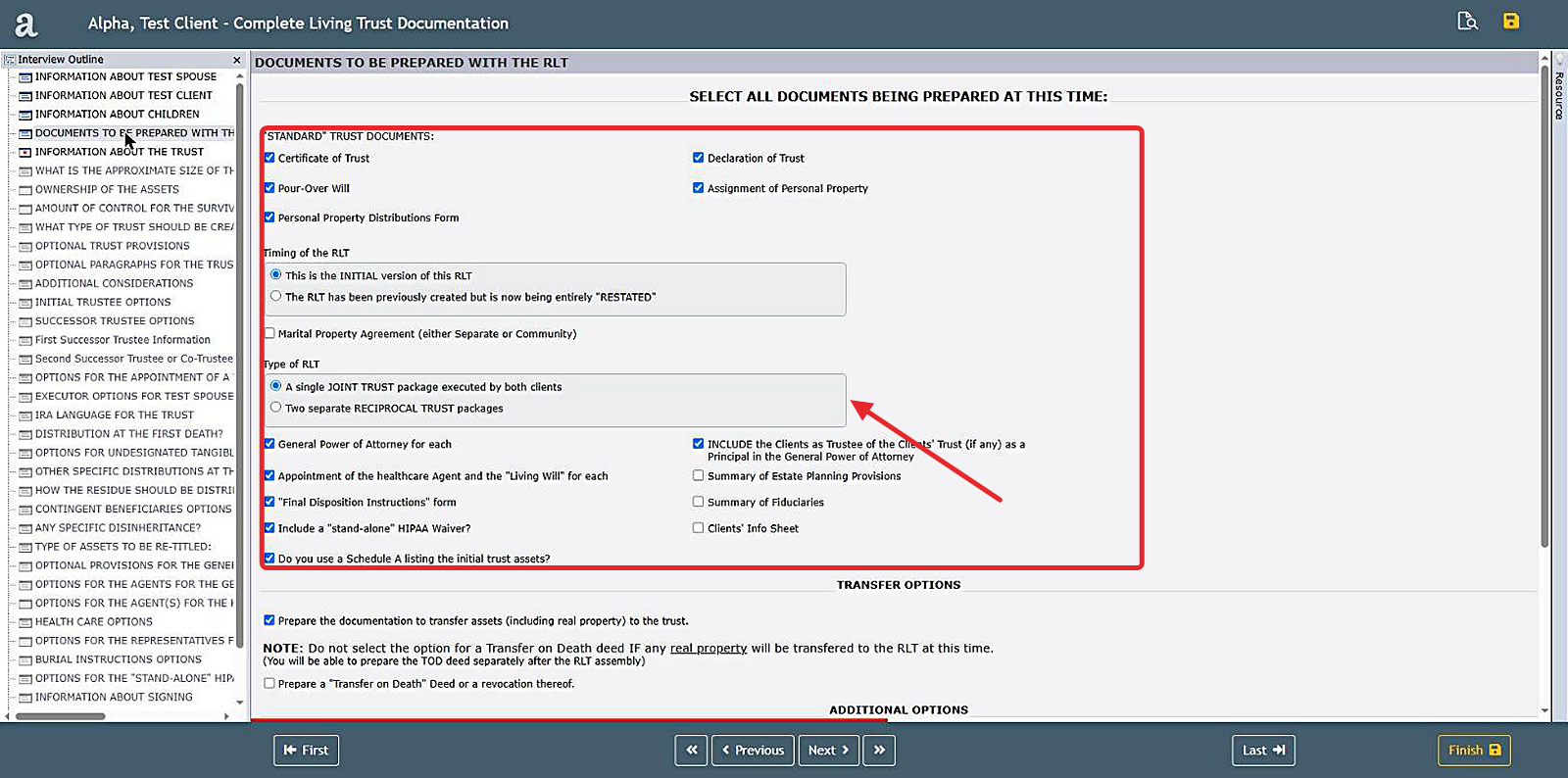
- One page sets the trust type, a single joint trust or two reciprocal trusts, and the documents to draft.
- A lightbulb Resource box explains each interview option and the clause it inserts.
- Firm letters are editable in the product.
- Edits happen in Word after "Download Documents", which we confirmed in the in-product FAQ after we could not find an editor in the product.
Pros
Adapt saves your firm drafting time, budget surprises, and training time.
- Your staff finish a first draft of the plan in one sitting.
- Your firm budgets the cost before any sales call.
- Your new staff learn the clauses from the help inside the interview.
Cons
Adapt still leaves fixes and integration work to your staff.
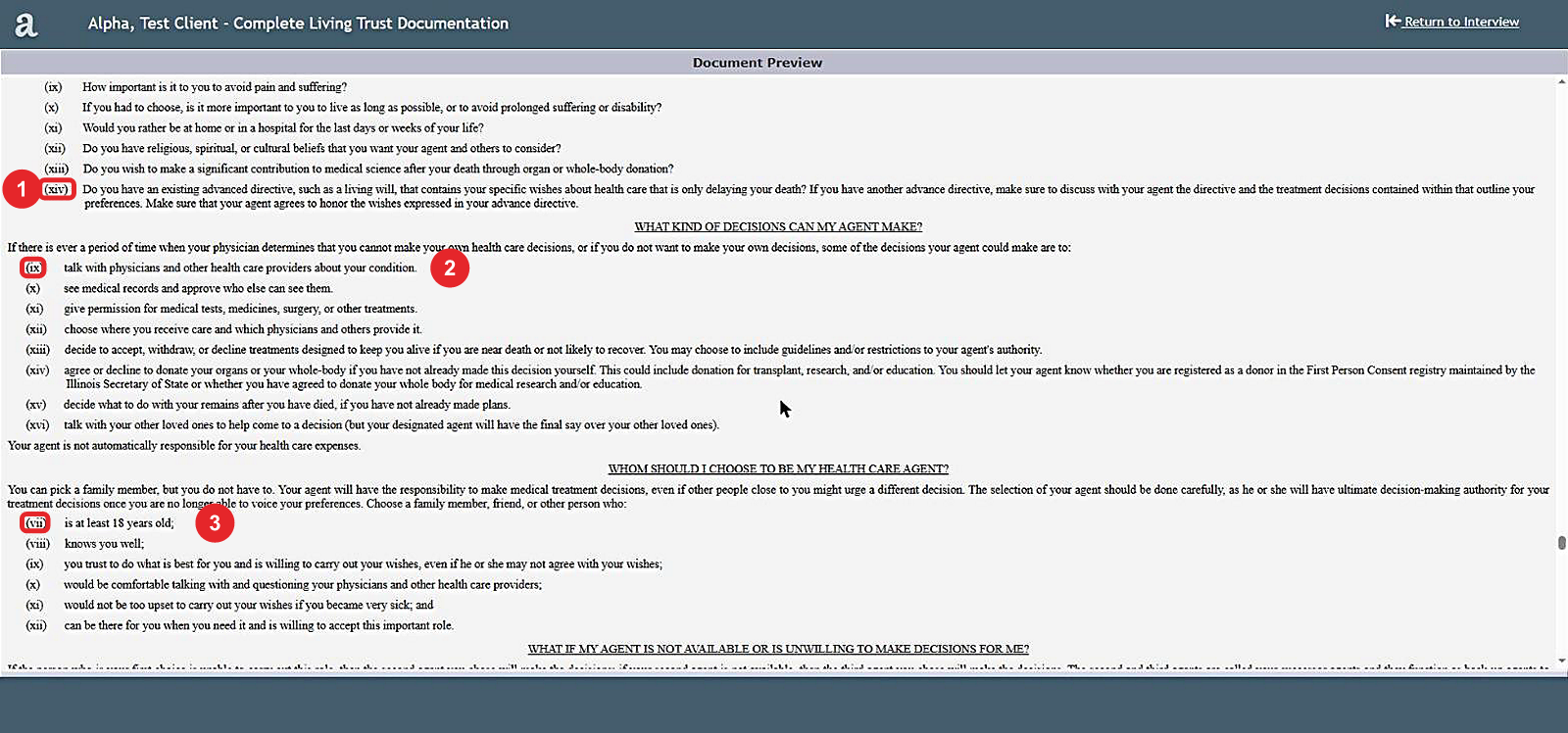
- List numbering ran on in the health care notice of the package we drafted, so it needs a fix by hand.
- A blank successor-agent certification printed although we chose "No successor agents".
- Will and trust templates cannot be edited in the product.
- No integration screen appears in the product. A Clio data pull appears only in the vendor's Q1 2024 newsletter, which we read after the task failed.
Pricing
Every Adapt plan appears on Adapt's pricing page, last reviewed October 27, 2026, in USD.
| Plan | Monthly fee | Sign-up fee | Last reviewed |
|---|---|---|---|
| EP Drafter | $79 | $399 | last reviewed October 27, 2026 |
| EP Planner | $115 | $699 | last reviewed October 27, 2026 |
| EP Professional | $134 | $899 | last reviewed October 27, 2026 |
Every plan runs a one-year term, and the pricing page states a "STRICT NO REFUND POLICY". The Adapt end user license agreement renews the term unless you give notice and asks for 30 days' prior written notice to terminate. A 7-day free trial runs before you pay. Smokeball, next at 3.2, puts drafting from your own templates inside practice management.
4. Smokeball: Best for Estate Matters and Your Own Templates in One Windows System
Overview
Smokeball is practice management software with estate matter types, an Estate Details layout, intake forms, and Word template automation.
It serves estate firms that run Windows and keep their own will and trust language. Every product finding here comes from Smokeball's documentation and published screenshots, since Aretech did not run a Smokeball trial.
It scores 3.2 out of 5 as practice management with document automation, led by onboarding and phone support. On G2, it rates 4.7 from 389 reviews as read November 1, 2026.
Best for: Windows firms that keep their own will and trust language. Each dimension is explained in our Smokeball estate planning review.
Smokeball Estate Planning Software Scorecard
Smokeball scores 3.2 out of 5 as practice management with document automation; the scores rest on Smokeball's documentation.
| Dimension | Weight | Score (1 to 5) | Basis |
|---|---|---|---|
| Core job performance | 20% | 3 | Estate matters, intake forms, workflows, and a client portal cover most steps. Staff still run the document chase and the drafting hand-off by hand. |
| Interoperability with your stack | 18% | 3 | A documented API and partner listings exist. Firm API access needs Prosper+ and developers. |
| Ease of use and setup | 12% | 3 | The Firm Owner builds intake forms, templates are Word files, and Grow and Prosper+ need Windows 11. |
| Practice-specific depth | 10% | 4 | Estate matter types, Estate Details, couples, and a sample estate workflow ship ready. |
| Attorney review and AI controls | 10% | 3 | The Archie AI cites sources and can be switched off per user. No review step for non-AI client messages is documented. |
| Pricing and cost structure | 10% | 2 | Smokeball shows no price, add-ons stack by plan, and fees can rise on 60 days' notice. |
| Data ownership and portability | 8% | 3 | You own your data. Export covers structured records, and documents come through a backup request. |
| Support and reliability | 7% | 5 | Onboarding is included, phone support runs US business hours, and release notes are public. |
| Security and ABA Opinion 512 posture | 5% | 4 | ISO 27001 is stated, with AES-256 encryption and zero data retention for Archie. No SOC 2 report is stated. |
| Overall | 100% | 3.2 | 60 + 54 + 36 + 40 + 30 + 20 + 24 + 35 + 20 = 319 of 500, or 3.19 before rounding. |
Features
Smokeball's documentation shows estate matters and template automation in one installed system.
- Couples sit on one matter as Client 1 and Client 2.
- A sample estate workflow includes a Draft documents task that takes your will and trust templates.
- Intake forms support conditional logic.
- A client portal comes on Boost and higher plans.
- No automatic document chase is documented.

Smokeball's sample estate workflow in the builder. Screenshot: Smokeball documentation.
Pros
Smokeball saves your staff double entry, template rework, and waits for help.
- Your staff work one record from intake to signing.
- Your own estate language gets automated, not a vendor's.
- Your staff get answers the same business day by phone.
Cons
Smokeball asks for a Windows office and a fixed term.
- Grow and Prosper+ need Windows 11 with a locally installed Office 365 for Business, and Mac is not supported, per Smokeball's System Requirements article.
- Pricing comes only from Smokeball's sales team, on subscription terms that renew for 12 months unless you give 30 days' notice.
- Export covers structured records, and documents come out through a backup request.
Pricing
Smokeball shows GET PRICING on every plan on its pricing page, as last reviewed October 29, 2026.
G2's Smokeball pricing listing shows Bill at $49 and Boost at $89 per user per month, "provided by Smokeball", last reviewed November 1, 2026. That listing is a third-party guide, and Smokeball sets your actual price. LEAP also scores 3.2 and launches WealthCounsel drafting from inside its matters.
5. LEAP: Best for WealthCounsel Drafting From Inside Your Matters
Overview
LEAP is cloud practice management for estate planning, elder law, and probate firms.
Its estate planning page says a subscription "includes access to WealthCounsel's premier estate planning drafting and trust administration software, integrated directly into LEAP". In LEAP's framing, LEAP estate planning software means practice management with WealthCounsel drafting built in.
It scores 3.2 out of 5 as practice management with WealthCounsel drafting, led by the WealthCounsel connection and estate depth.
This LEAP Legal Software review rests on LEAP's documentation, contract terms, and published screenshots, since Aretech did not run a LEAP trial.
Best for: firms that want WealthCounsel drafting launched from inside their matters.
LEAP Estate Planning Software Scorecard
LEAP scores 3.2 out of 5 as practice management with WealthCounsel drafting; the scores rest on LEAP's documentation and contract.
| Dimension | Weight | Score (1 to 5) | Basis |
|---|---|---|---|
| Core job performance | 20% | 3 | Intake questionnaires with reminders, a workflow app, and a client portal. No document request list or re-request. |
| Interoperability with your stack | 18% | 4 | A vendor-stated two-way WealthCounsel contact sync, with drafted documents saved back to the matter. US API access is not stated. |
| Ease of use and setup | 12% | 3 | Seven-step guided onboarding; a one-time implementation fee "may apply"; templates are edited in Word. |
| Practice-specific depth | 10% | 4 | WealthCounsel drafting, Wealth Tracx, administration forms, Estate Accounting, deeds, and estate reports. |
| Attorney review and AI controls | 10% | 2 | Review is stated only as the user's responsibility; no approval step before an AI draft or a client message. |
| Pricing and cost structure | 10% | 2 | Every plan sits behind "Request Pricing", with renewal increases on notice and a 36-month default initial term. |
| Data ownership and portability | 8% | 3 | Your firm owns its client data and extracts it itself; a paid license covers access after exit. |
| Support and reliability | 7% | 4 | Live chat on weekdays 9 am to 8 pm ET, online case logging, training, and migration help. No SLA. |
| Security and ABA Opinion 512 posture | 5% | 3 | SOC 2 Type 2 on one page and Type I on another; a written no-training clause. |
| Overall | 100% | 3.2 | 60 + 72 + 36 + 40 + 20 + 20 + 24 + 28 + 15 = 315 of 500, or 3.15 before rounding. |
Features
LEAP's documentation shows drafting, intake, and administration in one estate system.
- WealthCounsel's "Create or Edit Document" button sits in the matter, and drafted documents are saved back to it.
- LEAP's WealthCounsel integration page states a two-way contact sync.
- An estate intake form collects the client's details before the first meeting.
- Administration forms, Estate Accounting, deed preparation, and estate reports sit in the same system.
- DecisionVault and Lawmatics push data into LEAP one way.
- LEAP's AI page says its AI tools are included "at no extra cost".

LEAP's estate matter with the WealthCounsel button. Screenshot: LEAP Legal Software documentation, from LEAP's estate planning and probate software page.
Pros
LEAP removes the second data entry between your matter and your drafting.
- Your staff draft wills and trusts in WealthCounsel without retyping the client into a second system.
- Your matter data, entered once, fills court forms and your own Word templates.
- Your probate and administration work stays in the same system after signing.
Cons
LEAP's documentation and contract show limits to weigh before you sign.
- No document request list or missing-document view is documented.
- LEAP's US General Terms set a 36-month default initial term with automatic 12-month renewals. You exit for convenience only at a term's end and cannot reduce users during a term. LEAP can raise fees on notice, and a firm that objects gets a 30-day exit with a prorated refund.
- The contract lists WealthCounsel as a Companion Product only where your Order Form sets it out, so confirm it on your order.
- No approval step is documented before AI output or a client message goes out.
Pricing
LEAP Legal Software pricing is not public: the LEAP pricing page prices each user on request, as last reviewed November 4, 2026.
A one-time implementation fee "may apply", and DecisionVault needs its own subscription. Clio, at 3.1, leaves the choice of drafting tool to you.
6. Clio: Best for One Client Record and Your Pick of Drafting Apps
Overview
Clio is cloud practice management software: Clio Manage holds the matter, Clio Grow handles intake, and Clio Draft adds drafting logic.
It serves estate firms that want one matter and client record and choose their own drafting tool. In Aretech's October 16, 2026 trial, it held a married couple on one matter.
It scores 3.1 out of 5 as practice management software. On Software Advice, it rates 4.7 from 1,751 ratings as of October 29, 2026.
Best for: one client record and your pick of drafting apps. The full scoring sits in our Clio estate planning review.
Clio Estate Planning Software Scorecard
Clio scores 3.1 out of 5 as practice management software, read for an estate planning firm.
| Dimension | Weight | Score (1 to 5) | Basis |
|---|---|---|---|
| Core job performance | 20% | 3 | We tested two spouses on one matter, checklists, and matter templates. No intake form or document request in Manage. |
| Interoperability with your stack | 18% | 3 | Over 300 apps and an open API. Contacts and matters push one way into some drafting tools. |
| Ease of use and setup | 12% | 4 | Our first matter took about 3 minutes without the documentation. |
| Practice-specific depth | 10% | 3 | Separate trusts and wills practice areas. Nothing estate-specific came preloaded in our trial. |
| Attorney review and AI controls | 10% | 3 | AI extraction highlights what it fills, per Clio's documentation. No approval step before a portal share in our trial. |
| Pricing and cost structure | 10% | 2 | One published price; higher tiers are quoted. |
| Data ownership and portability | 8% | 3 | Your content stays yours. Ten CSV exports, without documents. |
| Support and reliability | 7% | 4 | Live support 24 hours a day on weekdays. |
| Security and ABA Opinion 512 posture | 5% | 4 | SOC 2 Type II stated by Clio; its subprocessor list names its AI providers. |
| Overall | 100% | 3.1 | 60 + 54 + 48 + 30 + 30 + 20 + 24 + 28 + 20 = 314 of 500, or 3.14 before rounding. |
Features
Clio covers the matter well, and drafting depends on the app you add.
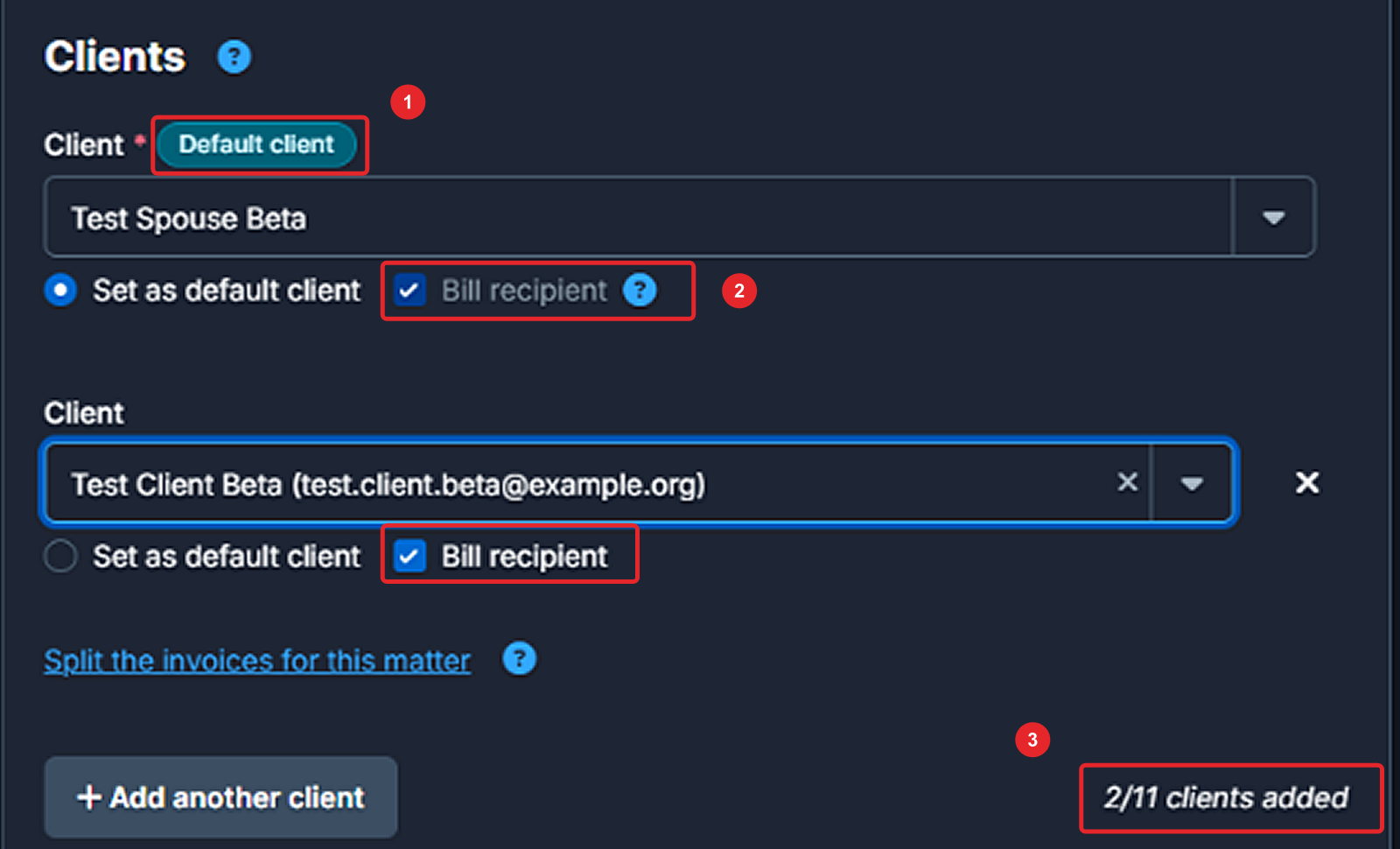
- Joint clients: covered. One matter holds up to 11 clients, and we tested two.
- Templates: Word templates the firm uploads fill from merge fields.
- Automations: three triggers and three actions in our trial.
- Drafting: in our November 10, 2026 Clio Work trial, the Vincent assistant wrote a two-page California will from synthetic facts in about 35 seconds of working time, marked not for signing.
- Apps: over 300 integrations.
Pros
Clio saves your staff duplicate files and leaves your drafting choice open.
- Your staff bill a couple from one matter, with each spouse marked as a bill recipient and the invoice split when you need it.
- You change drafting tools later without moving your matter records.
Cons
Clio leaves intake and document collection to add-ons or your staff.
- Intake forms sit in Clio Grow, sold with the top tier or as an add-on with no published price.
- Manage custom fields offer no conditional field type.
- Manage has no document request or missing-items view.
- Clio's Convert Matters article describes converting Grow leads one matter at a time, and a practitioner on Reddit reports duplicated clients.
Compare Clio alternatives for estate planning attorneys before you renew if these limits matter to you.
Pricing
Starter starts at $49 per user per month on Clio's pricing page, last reviewed October 29, 2026.
Every other tier reads "Get pricing", and Grow and Draft are add-ons with no published price. A 7-day free trial needs no credit card. Lawmatics ties Clio at 3.1 and works the front door instead of the matter.
7. Lawmatics: Best for Intake and Follow-Up When You Market Actively
Overview
Lawmatics is legal intake and CRM software that runs each matter from first inquiry to hire.
It serves estate firms that market actively and need fast follow-up. Its documentation shows relationship blocks for spouses and children, conditional forms, file requests, and automations; Aretech did not run a Lawmatics trial.
It scores 3.1 out of 5 as intake and CRM software, with the highest core-job score in this ranking. On G2, it rates 4.6 from 251 reviews as read October 29, 2026.
Best for: firms that market actively and need fast follow-up. Each finding is detailed in our Lawmatics estate planning review.
Lawmatics Estate Planning Software Scorecard
Lawmatics scores 3.1 out of 5 as intake and CRM software; the scores rest on Lawmatics' documentation and pricing pages.
| Dimension | Weight | Score (1 to 5) | Basis |
|---|---|---|---|
| Core job performance | 20% | 4 | Forms, follow-up, file requests, and automations cover the front door. Staff check file contents by hand. |
| Interoperability with your stack | 18% | 3 | Matters push one way to practice management tools, the WealthCounsel sync is closed to new customers, and the API is open. |
| Ease of use and setup | 12% | 3 | Vendor pages describe days to weeks of setup and paid onboarding phases. |
| Practice-specific depth | 10% | 2 | A general tool: you build your estate stages, forms, and funding follow-up. No will or trust library ships. |
| Attorney review and AI controls | 10% | 3 | Review exists for some AI and signature documents. Automated forms, emails, and texts send without approval. |
| Pricing and cost structure | 10% | 2 | Every plan is quote-only, seats are committed for the term, and add-ons are priced by use. |
| Data ownership and portability | 8% | 3 | You own your Customer Data and can export CSV. Files cannot be bulk exported. |
| Support and reliability | 7% | 4 | Email support, an account manager, weekday live office hours, and quarterly release notes. |
| Security and ABA Opinion 512 posture | 5% | 4 | SOC 2 Type 2 on request, mandatory MFA, and a written no-training policy. |
| Overall | 100% | 3.1 | 80 + 54 + 36 + 20 + 30 + 20 + 24 + 28 + 20 = 312 of 500, or 3.12 before rounding. |
Features
Lawmatics' documentation shows a strong front door and no drafting.
- Inquiry capture with follow-up automations that run on delays and stop on exit conditions.
- Relationship blocks for spouses and children, and conditional forms.
- File requests with a Pending, Submitted, or Completed status.
- A one-way matter push to practice management at conversion.
- No will or trust drafting.

Lawmatics' WealthCounsel sync settings, an integration Lawmatics says is no longer available to new customers. Screenshot: Lawmatics documentation.
Pros
Lawmatics turns more inquiries into signed matters without more staff time.
- Your staff stop chasing by hand, because a follow-up sequence skips any client who already completed the item.
- Your staff add a spouse as a signer on the fee agreement without a second record.
- Your firm sees which marketing sources bring signed matters.
Cons
Lawmatics stops at the hand-off to drafting.
- The Lawmatics WealthCounsel sync is one way and, per Lawmatics' help article, "no longer available to new Lawmatics customers".
- Seats are committed for the term, with a 3-user minimum on Essential and Premium.
- No drafting engine ships, so you need separate drafting software.
Pricing
Every plan on Lawmatics' pricing page is priced by its sales team, as last reviewed October 29, 2026.
Premium Implementation costs $999 one time on Lawmatics' Premium Implementation page, last reviewed October 29, 2026. Premium Data Migration costs $500 per its Premium Onboarding article, last reviewed October 29, 2026. Gavel, at 3.0, picks up where Lawmatics stops: turning your templates into drafts.
8. Gavel: Best for Turning Your Own Templates Into Automated Interviews
Overview
Gavel is document automation software that turns your own Word templates into interviews and workflows.
It serves estate firms with their own language. In Aretech's October 27, 2026 trial, we ran 27 interview pages of its California couple package in about 22 minutes.
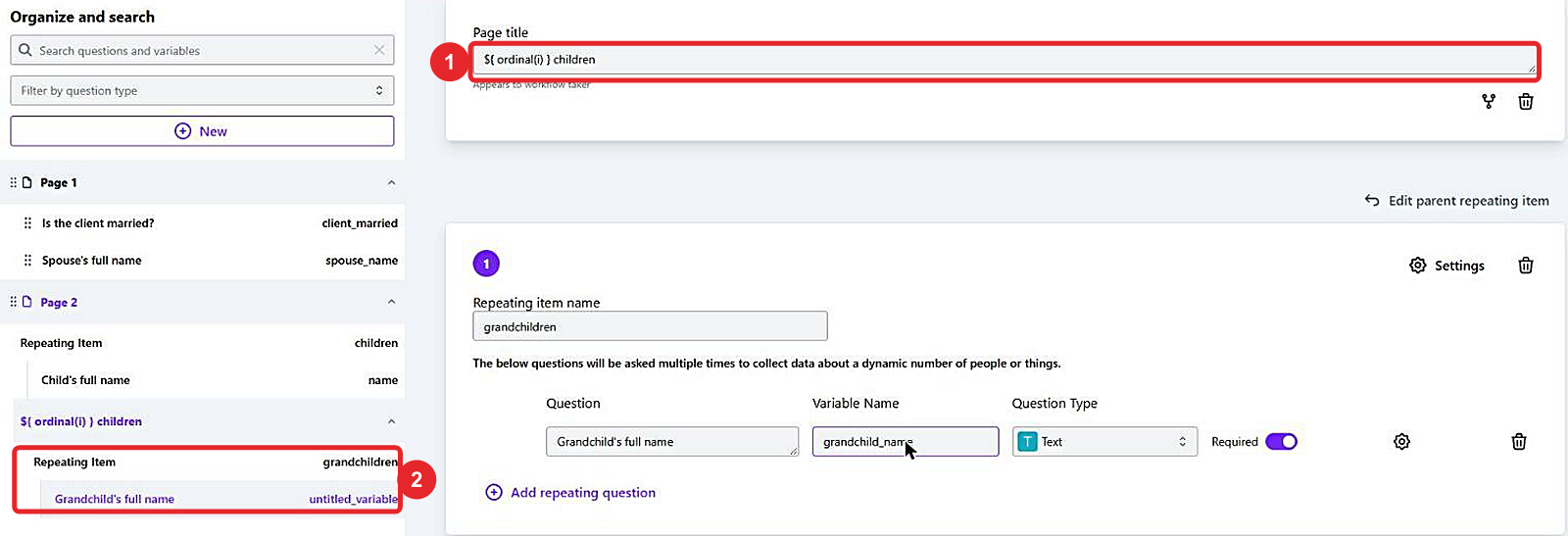
In a second session, we built a 3-page conditional workflow in about 35 minutes without the docs. It scores 3.0 out of 5 as document automation software. Each test sits in our Gavel estate planning review.
Best for: turning your own Word templates into automated interviews.
Gavel Estate Planning Software Scorecard
Gavel scores 3.0 out of 5 as document automation software, weighted across nine dimensions.
| Dimension | Weight | Score (1 to 5) | Basis |
|---|---|---|---|
| Core job performance | 20% | 3 | The library's couple trust interview and the joint-client logic ran as built in our trial; intake re-asks facts. |
| Interoperability with your stack | 18% | 3 | Native links to Clio Manage and DocuSign; other tools through Zapier, webhooks, or an API on Scale. |
| Ease of use and setup | 12% | 3 | A three-page conditional workflow took us about 35 minutes. |
| Practice-specific depth | 10% | 3 | Deep estate packages for California; elsewhere you build your own. |
| Attorney review and AI controls | 10% | 2 | No approval step stands before a finished workflow e-mails its documents, and the final review page can be switched off. |
| Pricing and cost structure | 10% | 4 | Four plans are public. |
| Data ownership and portability | 8% | 2 | No published export procedure; data deleted after cancellation. |
| Support and reliability | 7% | 4 | Phone, email, and screen share support, plus a help center. |
| Security and ABA Opinion 512 posture | 5% | 4 | AWS hosting, encryption, a named model provider, and a no-training statement. |
| Overall | 100% | 3.0 | 60 + 54 + 36 + 30 + 20 + 40 + 16 + 28 + 20 = 304 of 500, or 3.04 before rounding. |
Features
Gavel builds the interview from your documents, and our two trial sessions tested both halves.
- Your Word templates are tagged with Gavel's add-in and become interview questions.
- The workflow builder handles conditional pages and repeating groups nested inside other repeats.
- The pricing page lists Clio Manage from the Lite plan, Zapier from Standard, and DocuSign from Pro.
- The product has no document request or reminder, which we confirmed in Gavel's help center after we could not find one.
Pros
Gavel protects your drafting voice, cuts template upkeep, and shows its price up front.
- Your language stays yours, in every plan you send.
- One template can serve many trust variants; the Columbus Bar whitepaper illustrates one template producing all eight of a firm's trust variants.
- Your firm sees the price before it talks to sales.
Cons
Gavel hands you the template work and the review step.
- Estate packages ship only for California, so elsewhere you build every template.
- No document request or reminder exists in the product.
- No approval step stands before a workflow e-mails finished documents on completion.
- Your data is deleted 7 days after cancellation, per Gavel's terms, and no export procedure is published.
Compare Gavel alternatives for estate planning attorneys when you want a ready library instead.
Pricing
Gavel's annual-billed prices in USD appear on Gavel's pricing page, last reviewed November 14, 2026.
| Plan | Billed annually (per month) | Note | Last reviewed |
|---|---|---|---|
| Lite | $83 | Includes Clio Manage | last reviewed November 14, 2026 |
| Standard | $210 | The page's Compare Plans table shows $165 for the same plan | last reviewed November 14, 2026 |
| Pro | $290 | Adds DocuSign | last reviewed November 14, 2026 |
| Scale | from $417 | Billed annually only | last reviewed November 14, 2026 |
The same page showed monthly billing at $99, $250, and $350 for Lite, Standard, and Pro when last reviewed on November 2, 2026. A 7-day trial needs no credit card. WealthCounsel also scores 3.0 but drafts from its own maintained library.
9. WealthCounsel: Best for Complex and Taxable Trust Drafting From a Maintained Library
Overview
WealthCounsel is estate drafting software sold only inside a membership that also bundles education, a peer community, and support.
Its Wealth Docx and Elder Docx interviews draw on a maintained library of more than 40, 200, or 300 interview-driven templates by tier. It serves estate firms with taxable and complex trust work.
It scores 3.0 out of 5 as estate drafting software.
Aretech could not get a WealthCounsel trial, so every finding comes from its documentation and terms; the detail sits in our WealthCounsel estate planning review.
Best for: complex and taxable trust drafting from a maintained library.
WealthCounsel Estate Planning Software Scorecard
WealthCounsel scores 3.0 out of 5 as estate drafting software; the scores rest on WealthCounsel's documentation.
| Dimension | Weight | Score (1 to 5) | Basis |
|---|---|---|---|
| Core job performance | 20% | 3 | Assembly from a large maintained library is covered; joint-client logic and a quality check before signing are not described. |
| Interoperability with your stack | 18% | 3 | A one-way Clio push, partner syncs, and an API for contacts and matters that needs partner approval. |
| Ease of use and setup | 12% | 3 | Cloud, no install, and monthly live training; no onboarding program or setup timeline is public. |
| Practice-specific depth | 10% | 4 | Estate document systems, state documents, Elder Docx, and trust administration tasks. |
| Attorney review and AI controls | 10% | 2 | The license leaves checking AI output to the user, and LawY lawyer verification is opt-in. |
| Pricing and cost structure | 10% | 2 | Every tier is quote-only on a renewing term. |
| Data ownership and portability | 8% | 3 | Your firm owns its Client Data and can take a copy; templates stay WealthCounsel's. |
| Support and reliability | 7% | 3 | Free unlimited support and monthly training; no stated hours, response times, or status page. |
| Security and ABA Opinion 512 posture | 5% | 4 | A SOC 2 Type 2 attestation and a SOC 3 report; the AI model provider is not named. |
| Overall | 100% | 3.0 | 60 + 54 + 36 + 40 + 20 + 20 + 24 + 21 + 20 = 295 of 500, or 2.95 before rounding. |
Features
WealthCounsel's documentation shows a deep library with intake and integrations around it.
- Client Intake, on the upper tiers, gathers partners, dependents, fiduciaries, and assets and hands contact data to drafting.
- Guided interviews and a Scenarios feature build design templates for frequently encountered fact patterns.
- Automated Updates keep the library's legal language current, per the vendor.
- Listed integrations include LEAP, Clio, DecisionVault, PracticePanther, Eternal Pro, and Zapier.
- AI tools include LawY research with optional lawyer verification, and Flowcharts.

WealthCounsel's Wealth Docx features panel. Screenshot: WealthCounsel documentation.
Pros
WealthCounsel gives your attorneys library upkeep, planning depth, and peers in one membership.
- Your library stays maintained as the law changes, without your staff editing forms.
- Your firm handles tax and elder planning depth without drafting from scratch.
- Your attorneys get a peer community and CLE with the membership.
Cons
WealthCounsel's terms and tiers shape what you pay and keep.
- Every tier is priced by quote.
- Client Intake is missing from the Essential tier.
- The WealthCounsel license agreement auto-renews unless you give 30 days' written notice, and Named Users cannot be reduced during a term.
- A practitioner on Reddit reports that each document downloads as its own Word file before the set is assembled by hand.
Read alternatives to WealthCounsel for estate planning firms when you are weighing a move.
Pricing
WealthCounsel states no price for any tier on its software page, as last reviewed November 1, 2026.
The tiers are Essential, Trusts & Estates Professional, Elder Law Professional, Elite, and WealthCounsel + LEAP, and each bundles different software. InterActive Legal, at 2.8, offers the deepest clause control among the library tools.
10. InterActive Legal: Best for Clause-Level Control in Wealth Transfer Planning
Overview
InterActive Legal sells the InterActive LegalSuite, which drafts estate, elder law, and special needs plans with deep clause control.
It comes in four packages, in a browser edition and a Windows desktop edition. It serves firms doing tax-driven and wealth transfer work.
It scores 2.8 out of 5 as estate drafting software, with the highest practice depth in this ranking. InterActive Legal offers a demo and no trial, so every finding comes from its documentation; the detail sits in our InterActive Legal estate planning review.
Best for: clause-level control in wealth transfer planning.
InterActive Legal Estate Planning Software Scorecard
InterActive Legal scores 2.8 out of 5 as estate drafting software; the scores rest on the vendor's documentation.
| Dimension | Weight | Score (1 to 5) | Basis |
|---|---|---|---|
| Core job performance | 20% | 3 | Interview assembly and a client intake form cover most steps. |
| Interoperability with your stack | 18% | 3 | A one-way Clio Manage import, partner logos with no description, and no public API. |
| Ease of use and setup | 12% | 3 | A guest post on its own blog calls the first month setup. |
| Practice-specific depth | 10% | 5 | 11 revocable and 32 irrevocable trust documents, plus special needs, Medicaid, VA, and firearms trusts. |
| Attorney review and AI controls | 10% | 1 | Not stated: AI features are named, not described, and no review control is described. |
| Pricing and cost structure | 10% | 1 | Not stated: no price for any package. |
| Data ownership and portability | 8% | 2 | Export readable only by its own online system. |
| Support and reliability | 7% | 4 | A weekday phone line, four email departments, a help center, and an Academy. |
| Security and ABA Opinion 512 posture | 5% | 3 | AWS, TLS 1.3, a firewall, optional MFA, and a third-party penetration test. |
| Overall | 100% | 2.8 | 60 + 54 + 36 + 50 + 10 + 10 + 16 + 28 + 15 = 279 of 500, or 2.79 before rounding. |
Features
InterActive Legal's documentation shows a deep library driven by one Client Interview.
- Client Interview pages cover client details, related parties, and children and descendants.
- A client intake form function lets your client enter data in the online edition.
- The library splits by package: Essential Estate Planning, Wealth Transfer Planning, Elder Law Planning, and Firearms Trust Planning.
- Drafting options include state-specific language, GST planning, and charitable trusts.
- A Clio Manage import brings contacts into the interview over OAuth 2.0.

InterActive Legal's Client Interview after a Clio import. Screenshot: InterActive Legal documentation, from its Clio App Directory listing.
Pros
InterActive Legal gives your attorneys clause control and vendor-run training.
- Your attorneys draft tax-driven trusts without writing clauses from scratch.
- Your new attorneys get up to speed on tax planning without your senior attorneys running the training.
Cons
InterActive Legal keeps its prices and your data inside its own walls.
- No price is published for any package.
- Some documents need the Wealth Transfer package, per the vendor's comparison chart.
- The vendor's data retention policy says an export after your subscription ends is "readable only by the ILS online system".
- The homepage names AI-driven summaries, and no review control for them is documented.
Pricing
InterActive Legal pricing is not stated for any package, as last reviewed October 21, 2026.
A community discount page offers 10% off with no base price shown. Westlaw Form Builder closes the scored list at 2.5 with a forms library inside Westlaw.
11. Westlaw Form Builder: Best for a Maintained Estate Forms Library Inside Westlaw
Overview
Westlaw Form Builder is Thomson Reuters' online forms library and document assembly tool.
It is the product behind a search for a Lipman's estate planning form builder or Lipman estate planning software. Lipman's Estate Planning is a content volume inside Westlaw Form Builder.
It scores 2.5 out of 5 as estate planning forms software. Thomson Reuters offers a demo and no trial, so every finding comes from its documentation and published screenshots. A practitioner on Reddit says Lipman's covers "probate, guardianship, business docs", and the vendor's screenshots show those volumes in the same library.
Best for: a maintained estate forms library inside Westlaw.
Westlaw Form Builder Estate Planning Software Scorecard
Westlaw Form Builder scores 2.5 out of 5 as estate planning forms software; the scores rest on Thomson Reuters' documentation.
| Dimension | Weight | Score (1 to 5) | Basis |
|---|---|---|---|
| Core job performance | 20% | 3 | Vendor forms plus Custom Forms from your Word documents; interview answers reused across a case file. |
| Interoperability with your stack | 18% | 1 | Not stated: no public API or practice management connector documented. |
| Ease of use and setup | 12% | 3 | Guided modes, inline help, and training videos; Custom Forms need a Word plug-in. |
| Practice-specific depth | 10% | 4 | Lipman's Estate Planning sits beside probate and guardianship volumes in one library; state coverage is not stated. |
| Attorney review and AI controls | 10% | 2 | No approval step before a form leaves; no AI feature. |
| Pricing and cost structure | 10% | 2 | No public price; demo only; annual renewal. |
| Data ownership and portability | 8% | 2 | Forms come out as Word, WordPerfect, or PDF files; bulk record export is not documented. |
| Support and reliability | 7% | 3 | Support phone lines, a support center, and training videos; hours not stated. |
| Security and ABA Opinion 512 posture | 5% | 3 | A company-wide data security addendum; no Form Builder attestation. |
| Overall | 100% | 2.5 | 60 + 18 + 36 + 40 + 20 + 20 + 16 + 21 + 15 = 246 of 500, or 2.46 before rounding. |
Features
Thomson Reuters' documentation shows a forms library that reuses answers inside one case file.
- A Client Interview Sheet's answers are "reused for all forms assembled in the same case file", and the vendor's example is a probate case profile.
- Lipman's Estate Planning appears in the volume list beside Probate, Guardianships, and Small Estate Wills.
- Quick Text and Default Answers store reusable answers.
- Custom Forms turn your Word documents into forms through a Word plug-in.
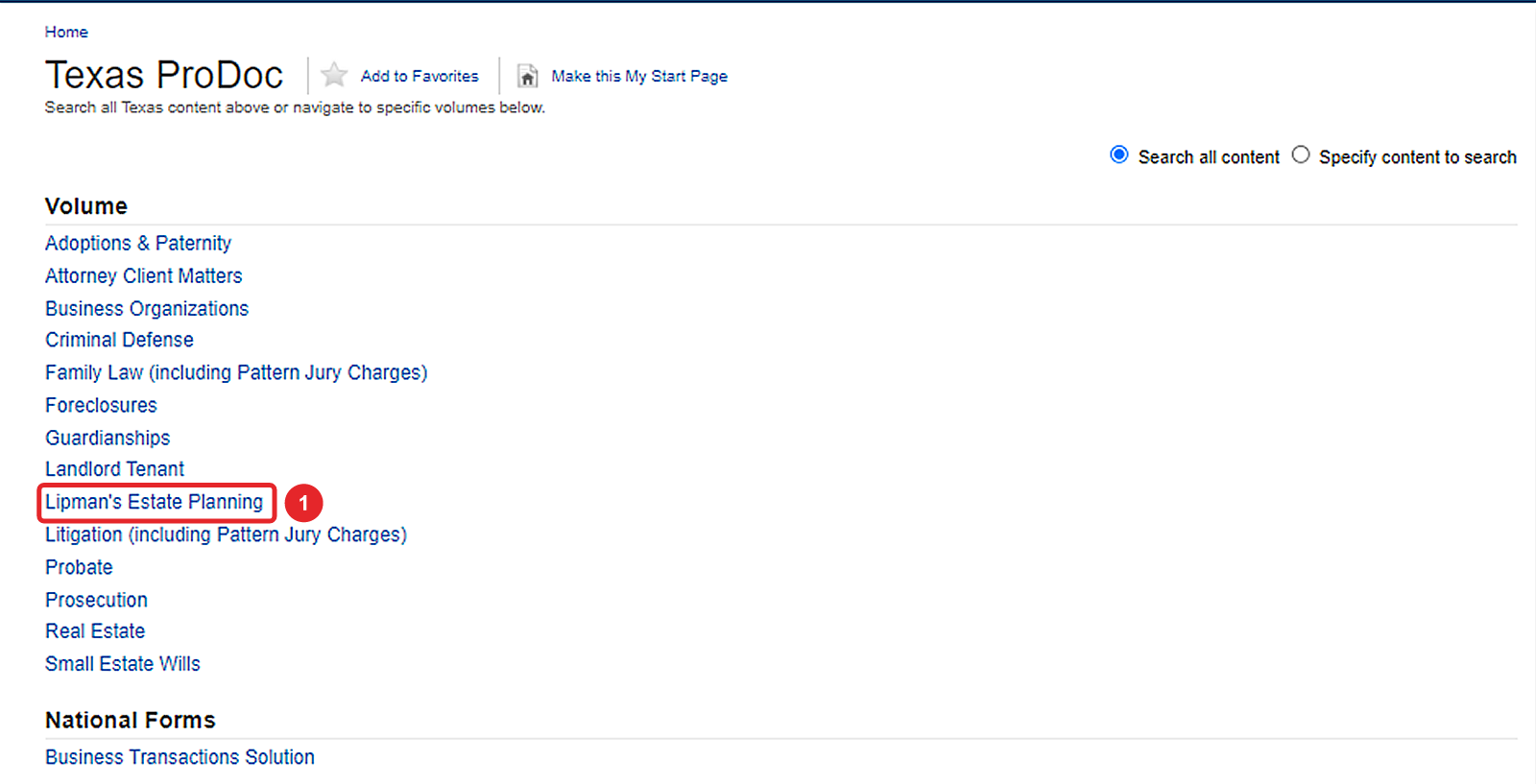
The Westlaw Form Builder volume list from a vendor guide. Screenshot: Thomson Reuters documentation.
Pros
Westlaw Form Builder keeps your forms current and your practice areas in one library.
- Your attorneys spend no time tracking law changes in the forms. The Westlaw Form Builder product page says authors and editors update them "to reflect changes in the law".
- Your probate and guardianship forms sit in the same library as your estate forms.
Cons
Westlaw Form Builder stays a closed forms tool.
- No public API or practice management connector is documented.
- Master Form questions are fixed: you edit a Master Form only by adding or deleting text.
- No approval step comes before a download, and the vendor's guide puts the check on you.
- Lipman's contents and state coverage are not described on the vendor's pages.
Pricing
Westlaw Form Builder pricing is not stated: Thomson Reuters offers a demo request only, as last reviewed November 4, 2026.
The agreement renews annually unless you give 30 days' notice, per our November 4, 2026 record of the Thomson Reuters General Terms. The same terms allow price changes at renewal on 60 days' notice.
Other Estate Planning Software Attorneys Use (We Have Not Reviewed It Yet)
Two more products come up in practitioner searches and Google's AI Overview.
Neither vendor publishes a product image Aretech could check, so we have not scored them.
CounselPro 8
CounselPro 8 is the American Academy of Estate Planning Attorneys' own estate planning software, cloud-based on the Actionstep platform and provided with Academy membership.
The Academy states its practice management tools are "exclusively available to Academy Members". The product page states "more than 300 professionally written templates". Neither page states a price, a trial, or an AI feature for this counselpro software.
We have not reviewed this software yet.
Statular
Statular is browser-based estate planning drafting software with client intake and a client portal, sold only to attorneys in good standing.
The vendor states coverage of 39 states and DC. Statular lists Essentials at $495 and Growth at $895 a month, prices Advanced on contact, and sells per-state add-ons, last reviewed November 13, 2026.
Its pricing page also offers a 7-day trial. A practitioner on Reddit called its documents "clean" in February 2025.
We have not reviewed this software yet.
Best Estate Planning Software by Firm Situation
Your situation picks the product faster than the overall score does.
Best If You Want Template-Based Assembly in Your Own Language
Want a template-based document assembly system, using your own language?
Gavel (3.0) is the fit. It turns your own Word templates into interviews, and Smokeball (3.2) automates your own templates inside practice management. Adapt, WealthCounsel, and InterActive Legal ship vendor libraries instead.
For a deeper look at this one choice, see the estate planning drafting software ranking.
Best If Your Firm Already Runs Clio
Keep Clio as your record and add a drafting tool that reads from it.
WealthCounsel's Clio link pushes contacts and matters into Wealth Docx, and InterActive Legal imports Clio Manage contacts. Gavel lists Clio Manage on every plan, and DecisionVault pushes intake one way into Clio Manage.
Clio Work is Clio's own drafting surface, which we tried on November 10, 2026. See the estate planning CRM ranking when you are choosing the intake side instead.
Best for a Solo Estate Planning Practice on a Tight Budget
Estate planning or probate solo: which platforms do you use?
Pair Adapt EP Drafter with one tool around it. Adapt costs $79 a month plus a $399 sign-up fee, last reviewed October 27, 2026. Add 8am MyCase Pro at $120 per user per month, last reviewed November 14, 2026. DecisionVault Solo at $99 a month, last reviewed November 2, 2026, also fits.
Lawmatics bills at least 3 seats, so a solo attorney pays for three. Seventy-four percent of solos spend under $3,000 a year on legal software, per the ABA's 2024 TechReport, last reviewed November 3, 2026. For the full picture, see planning your estate firm's software stack.
Best If You Are Switching Off WealthCounsel
Switching off WealthCounsel leads to one of four tools.
Pick Adapt for a fixed library at a published price, Gavel for your own templates, or InterActive Legal for deeper clause control. Westlaw Form Builder fits if you want a forms library inside Westlaw.
Check your renewal notice date and how your client data comes out before you sign anything. The steps are in how to switch estate planning drafting software.
Best If You Want WealthCounsel Inside Your Practice Management System
LEAP (3.2) launches WealthCounsel drafting from the matter and states a two-way contact sync.
Confirm WealthCounsel is on your Order Form, because LEAP's contract lists it as a Companion Product only where the Order Form sets it out.
Add an Automation Layer Around Your Estate Planning Software for Document Automation
Keep the tools you pick, and automate around them: capture each client fact once and carry it into every tool.
That is estate planning document automation built around your software, not another app to learn. Your firm handles more estate matters and increases revenue without adding headcount.
The build runs in three layers, in this order.
- The data layer, one source of truth across your CRM, drafting software, storage, and phones.
- AI agents, software that reads what arrives and applies your firm's rules.
- Automated workflows.
Aretech builds that automation around the software your firm already runs, whichever tools in this ranking you keep. Each build is one-time and priced to scope after scoping, with no subscriptions.
Your firm owns what is built and pays its own model provider.
What the Layer Takes Off Your Staff
The layer takes the retyping and chasing that sit between your tools.
- Intake capture: your client answers once, with conditional questions, staff-only sections, and forms your staff edit without a developer.
- First drafts: assembled from your own templates and precedent, with missing details flagged, for your attorney to approve.
- Document chase: what is missing is found and chased through your own channels, in your firm's wording.
- Exceptions: anything the system is unsure about goes to a person.
Where the Attorney Reviews
Your attorney reviews everything, and nothing the system does signs, files, submits, takes a payment, contacts a court, or decides anything legal.
The system lives in your firm's own cloud account. Hosted frontier models do the AI work, and no firm's data trains anything.
Pick by the job you need done and which way your data moves, then automate around the tools you keep.
Estate planning document automation is the next step: one client record that feeds every draft.
Free. The map is yours, even if you never hire us.
FAQs
What Alternatives to WealthCounsel Can You Recommend?
The alternatives to WealthCounsel we recommend are Adapt (3.4), Gavel (3.0), InterActive Legal (2.8), and Westlaw Form Builder (2.5). Pick Adapt for a fixed library at a published price, Gavel for your own templates, or InterActive Legal for clause-level control. LEAP is not an alternative, since LEAP says its subscription includes WealthCounsel drafting.
Is Wealth Counsel Worth It?
WealthCounsel is worth it if you need complex and taxable trust drafting from a maintained library and can accept quote-only membership pricing. It scores 3.0 out of 5 here, held back by price transparency and review controls.
What Do Estate Planning Attorneys on Reddit Recommend for Drafting Software?
Estate planning attorneys on Reddit most often name WealthCounsel, InterActive Legal, Adapt, Gavel, and Lipman's forms in Westlaw Form Builder as their drafting tools. Their scores here are 3.0, 2.8, 3.4, 3.0, and 2.5.
Is There Free Estate Planning Software for Attorneys?
There is no free estate planning software for attorneys among the eleven products here: none publishes a free plan. Trials run 7 days on Gavel, Clio, Adapt, and Statular, 10 days on 8am MyCase, and 14 days on DecisionVault. WealthCounsel gives new New Law Business Model members a 90-day trial of its Core software in their first 60 days of that membership.
What Is the Best Estate Planning Software for Attorneys in California?
The best scored estate planning software for attorneys in California is DecisionVault (3.5) for intake and Adapt (3.4) for drafting. Adapt's library covers every state except Louisiana, plus DC. Gavel (3.0) is the one product here that ships ready California estate packages, and we ran its California couple package in our trial.
Statular states 39 states and DC, California included, and we have not reviewed it. WealthCounsel and InterActive Legal offer state-specific provisions, per their documentation.
Estate Planning Attorney Drafting CA Software Prices: What Do They Cost?
California drafting software prices start at $79 a month for Adapt. Adapt runs $79 to $134 a month plus a $399 to $899 sign-up fee, last reviewed October 27, 2026. Gavel runs $83 to $290 a month for its Lite to Pro plans billed annually, with Scale from $417, last reviewed November 14, 2026.
Statular lists Essentials at $495 and Growth at $895 a month, prices Advanced on contact, and sells per-state add-ons, last reviewed November 13, 2026.
We Type the Same Client Facts Into Our CRM and Our Drafting Software: Is That Time Suck Fixable?
That time suck is partly fixable inside the tools you have. DecisionVault pushes intake one way into drafting tools, WealthCounsel's Client Intake hands contact data to Wealth Docx, and LEAP launches WealthCounsel from the matter.
Gavel offers Clio Contact and Clio Matter questions and sends answers out through Zapier or webhooks. Westlaw Form Builder reuses interview answers only inside its own case file, so facts still move one way at best between most other pairs.
Does Any Estate Planning Software Let AI Write the Will or Trust?
Yes. On November 10, 2026, we asked Clio Work, Clio's AI add-on, for a will for a synthetic California client. A two-page draft marked not for signing appeared in about 35 seconds. We did not judge its law, and your attorney still reviews every draft.
8am MyCase runs 8am IQ, and LEAP includes its AI tools. WealthCounsel lists LawY and Flowcharts, plus LEAP's Matter AI on its WealthCounsel + LEAP tier, and which model runs them is not stated. ABA Formal Opinion 512 puts the duty to review AI output on your firm.
Need Advice on Automating Your Estate Planning Law Office With Integration Platforms Like Zapier or Make.com?
Start automating your estate planning law office with the connector each product publishes. WealthCounsel and InterActive Legal take data from Clio, and Gavel connects to Clio Manage and offers Zapier from Standard. DecisionVault pushes one way into Clio Manage and Lawmatics. Where no connector exists, the data moves by hand or through an automation built around your tools.