NextChapter is the strongest Jubilee alternative if you want different petition software: it scored 3.6 out of 5 on our rubric. Best Case follows at 3.4 for volume filers. Keep Jubilee by LegalPRO Systems when its petition work suits you, and fix the step around it instead.
This guide is for owner-attorneys and operations leads at consumer bankruptcy firms. It scores eight picks of bankruptcy software for lawyers, from petition tools to add-ons that work beside Jubilee. Clio, PracticePanther, and BK Questionnaire cover intake and the record, or you add an automation layer.
Aretech builds automation that works around the software it reviews; here is how we score software. Last reviewed: November 14, 2026.
TL;DR
- For different petition software, pick NextChapter: it leads at 3.6 out of 5, from $89 per user per month on a 12-month contract, last reviewed November 14, 2026.
- For volume filing, Best Case scores 3.4 with full marks for practice depth, at $99 per user per month.
- To keep Jubilee, add BK Questionnaire for the client questionnaire, or Clio or PracticePanther for the record.
- Before you sign, ask how your cases leave Jubilee: no vendor here documents a Jubilee conversion.
The Short List
Eight options cover the two ways out of a Jubilee problem, ranked by our scores.
- NextChapter, petition software, 3.6 out of 5: best for firms that need different petition software.
- Best Case, petition software, 3.4 out of 5: best for high-volume filers who want the deepest bankruptcy tooling.
- Clio Manage, practice management, 3.2 out of 5: best for Jubilee firms that want intake and the matter record in a system that syncs with it.
- Glade AI, AI petition software, 3.2 out of 5: best for one AI workspace from intake to filing.
- PracticePanther, practice management, 3.2 out of 5: best for Jubilee firms that want one cloud record at a published price.
- Fresh Start Finance, petition software, 3.2 out of 5: best for intake, the document chase, and pay-stub figures inside the petition tool.
- BlueStylus Case Builder Pro, petition software, 2.8 out of 5: best for a flat firm price with PACER downloads.
- BK Questionnaire, client questionnaire, 2.6 out of 5: best for adding a client questionnaire in front of Jubilee.
Why Bankruptcy Firms Look for Jubilee Alternatives
Firms leave Jubilee for seven reasons, and only some of them need new petition software.
| Reason | What we found or what practitioners report | Which fix fits |
|---|---|---|
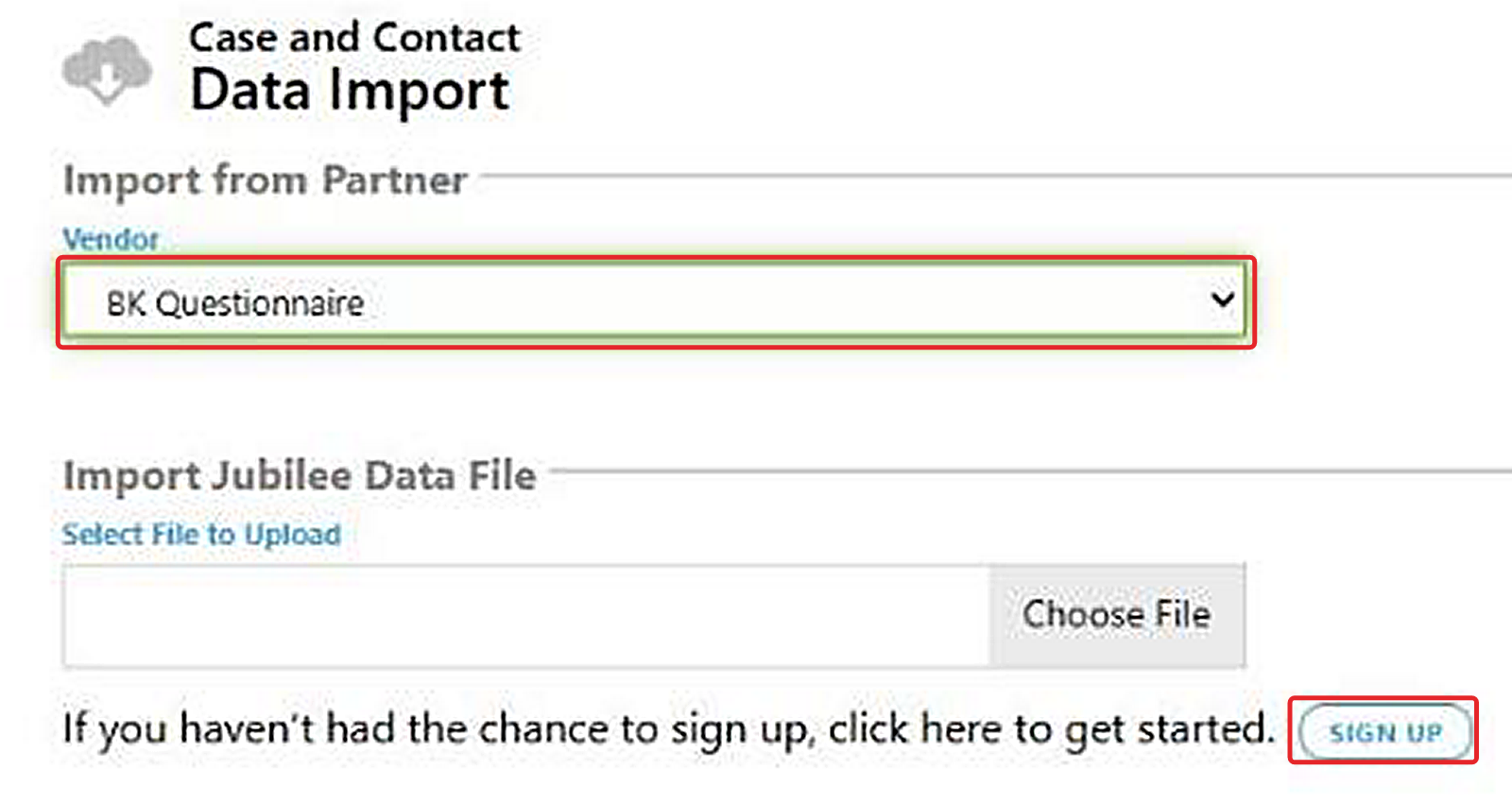
| No client questionnaire inside Jubilee | In our Jubilee trial on October 24, 2026, staff typed client facts in by hand. Jubilee's import screen names BK Questionnaire as the questionnaire source. | Add BK Questionnaire, or move to Best Case, NextChapter, or Fresh Start Finance. |
| The document chase stays with your staff | Requests are built one row at a time, need the client portal on, and save only by sending. No rule reminded anyone about a missing document. | An automation layer around Jubilee, or Fresh Start Finance or Glade AI. |
| The price shape | $95.00 per case, or packages from $995.00 to $4,995.00 a year, per Jubilee's pricing page, last reviewed November 14, 2026. | Per-user tools above a certain volume, or BlueStylus at a flat firm price. |
| Migration blocks | Imports come from Clio, PracticePanther, BK Questionnaire, BK Packet, and Lexria, or a Jubilee data file. TimeMatters is not a listed source. | Plan the export before you sign anything. |
| Depth for volume filers | Best Case scores 3.4 with full marks for practice depth, against Jubilee's 3.3. Most attorneys answering a September 2026 Facebook thread on volume filing named Best Case. | Best Case. |
| No open API | We saw partner connections with Setup buttons, and no API or developer settings. | NextChapter's Clio and Zapier routes, or an automation layer built around Jubilee. |
| Unease after a reported sale | One Reddit poster wrote "They upended their pricing recently", and an attorney in a Facebook bankruptcy group likes it less since a reported sale. | None on its own. |
Can we migrate our client database from TimeMatters into Jubilee or another bankruptcy software?
Not into Jubilee. Its import screen lists five partner products and a Jubilee data file, with no petition program or TimeMatters. A practitioner on Reddit hit that block in June 2026, and our trial matched the report. Elsewhere, NextChapter takes case shells by CSV through its shell case import, free for the first 100 cases on Pro Plus and Whoa.
Do I need a third-party client questionnaire with Jubilee?
Yes, if you want clients to enter their own facts. Our Jubilee trial showed no client questionnaire inside the product. Jubilee's import screen takes questionnaire data from BK Questionnaire. You can add BK Questionnaire, use Clio or PracticePanther intake, or move to Best Case, NextChapter, or Fresh Start Finance.
I use Jubilee and don't like it as much since it was bought out; is it time to switch?
Not on the sale alone. Switch when one of the pains in the table costs your team hours every week. The sale stays a report from practitioners, and we could not verify it.
Who This Guide Is For (and Not For)
This guide is written for these readers.
- Owner-attorneys and managing partners at boutique consumer bankruptcy firms that run Jubilee today.
- Operations leads who decide which petition tool or add-on the team runs for Chapter 7 and Chapter 13 cases.
It is not written for these readers.
- Consumers and DIY filers working on their own bankruptcy case.
- Petition preparers.
- Big law firms.
- Firms in other practice areas.
How We Scored These Options
We score every option on the same nine weighted criteria, from core job at 20% to security and ABA Opinion 512 posture at 5%.
We tested Jubilee, NextChapter, and Best Case on October 24, 2026, Clio on October 16, 2026, and PracticePanther on November 13, 2026. Every trial used synthetic Chapter 7 data.
We found the core tasks without the documentation, except two Best Case features, where we read Best Case's own pages. We scored Glade AI, Fresh Start Finance, BlueStylus, and BK Questionnaire from their vendors' pages and published screenshots. Glade AI and BK Questionnaire offer no trial. We did not run the BlueStylus or Fresh Start Finance trials, so we never call any of the four tested.
Dated prices and reviews we checked against each product fill in the rest. Clio, PracticePanther, and BK Questionnaire face the same rubric against the petition job, so their scores answer a different question: what they add beside Jubilee.
Jubilee Alternatives Compared
NextChapter leads the field on the weighted sum, and prices follow six shapes, so your yearly filing count decides which option costs least.
Every option appears in rank order with its class, starting price, and data path with Jubilee, and its own section shows its score on each weighted criterion.
| Product | Class | Pricing (USD, last reviewed November 14, 2026, or Not stated) | Overall (out of 5) | Data path with Jubilee | Best for |
|---|---|---|---|---|---|
| NextChapter | Petition software | $89 per user per month, 12-month contract | 3.6 | Switch; no Jubilee conversion documented, case shells by CSV | Firms that need different petition software |
| Best Case | Petition software | $99 per user per month | 3.4 | Switch; no Jubilee conversion documented | High-volume filers who want the deepest tooling |
| Clio Manage | Practice management, kept beside Jubilee | $49 per user per month on Starter | 3.2 | Jubilee import source; sync listed in Clio's App Directory | Intake and the matter record beside Jubilee |
| Glade AI | AI petition software | Not stated (negotiated per workflow, matter, or case) | 3.2 | Switch; no import from another petition tool described | One AI workspace from intake to filing |
| PracticePanther | Practice management, kept beside Jubilee | $49 per user per month, billed annually | 3.2 | Jubilee import source; integration described by PracticePanther | One cloud record at a published price |
| Fresh Start Finance | Petition software | $59 per user per month, billed annually, plus per-case add-ons | 3.2 | Switch; its importer names only NextGen XML files | Intake, the chase, and pay-stub figures in the petition tool |
| BlueStylus Case Builder Pro | Petition software | $50 per firm per month, up to 10 users | 2.8 | Switch; no import path named | A flat firm price with PACER downloads |
| BK Questionnaire | Client questionnaire, kept beside Jubilee | $39.99 per client | 2.6 | Jubilee import source (partner import per case) | A client questionnaire in front of Jubilee |
| Jubilee | Petition software, the tool you have (not ranked) | $95.00 per case, or $995.00 to $4,995.00 a year | 3.3 | Not applicable | Low-volume firms that pay per case |
Four options show 3.2 after rounding. Their weighted sums order them, and Glade AI and PracticePanther tie exactly at 319 out of 500. Glade AI's higher core-job score places it fourth.
The leader does not win every criterion, as each product's scorecard shows. Best Case's 5 for practice depth is the highest single score on the page. Clio leads security with a 4. Clio and PracticePanther lead interoperability with a 4 each, one point above NextChapter.
We scored Glade AI, Fresh Start Finance, BlueStylus, and BK Questionnaire from vendor pages and screenshots. The other four scores come from our trials. Jubilee itself scores 3.3 out of 5 on the same rubric, so it sits between Best Case and the four options at 3.2.
Volume decides the math at national scale too. U.S. Courts counted 375,784 Chapter 7 and 217,740 Chapter 13 nonbusiness filings in the 12 months ending September 30, 2026, per Table F-2.
If You Need a Different Petition Tool
Start here if Jubilee itself is your problem rather than a step around it.
These five are bankruptcy filing software for attorneys, ranked by our scores.
1. NextChapter: Best for Firms That Need Different Petition Software
Overview
NextChapter is cloud petition software for consumer bankruptcy firms, and its site footer calls it a Clio company. It prepares Chapter 7 and 13 petitions with guided forms, calculators, and e-filing from the case. In our trial, one entry carried into Form 101, the income chart, the means test, and the Schedule E/F totals.
It scored 3.6 out of 5 as petition software, first on this list. You can read its full limits and pricing in our NextChapter review.
NextChapter Bankruptcy Software Scorecard
NextChapter scores 3.6 out of 5 from our trial, with its best marks on core job, ease, depth, pricing, and support.
| Dimension | Weight | Score (1 to 5) | Basis |
|---|---|---|---|
| Core job performance | 20% | 4 | One entry carried into Form 101, the income chart, the means test, and Schedule E/F. Review & File gates filing. |
| Interoperability with your stack | 18% | 3 | A once-a-day Clio sync and CSV for claims and pay advices. No public API is documented. |
| Ease of use and setup | 12% | 4 | We found all 15 trial tasks without the help center. A case opens from one four-field window. |
| Practice-specific depth | 10% | 4 | A 14-item checklist, 13 default tasks, the means test, and federal and district forms. |
| Attorney review and AI controls | 10% | 3 | AI Connector values show for review before saving. We found no audit trail. |
| Pricing and cost structure | 10% | 4 | Published per-user prices on a 12-month contract. Credit reports are metered per pull. |
| Data ownership and portability | 8% | 3 | The terms say the data is yours. Export runs per case as a zip or as a case-list CSV. |
| Support and reliability | 7% | 4 | Weekday chat and email with published hours, webinars, and release notes. |
| Security and Opinion 512 posture | 5% | 3 | Encryption, daily backups, and required two-factor sign-in. No SOC 2 report is published. |
| Overall | 100% | 3.6 | Weighted sum 359 out of 500. |
Features
NextChapter's features center on entering data once and gating the filing.
- One entry, many forms: client facts, pay advices, and creditors flow into the petition, schedules, and means test.
- Review & File gate: Assemble and File stay inactive until the review cards pass.
- MyChapter client portal: per NextChapter's documentation, staff review and edit the client's answers before "Import Into NextChapter".
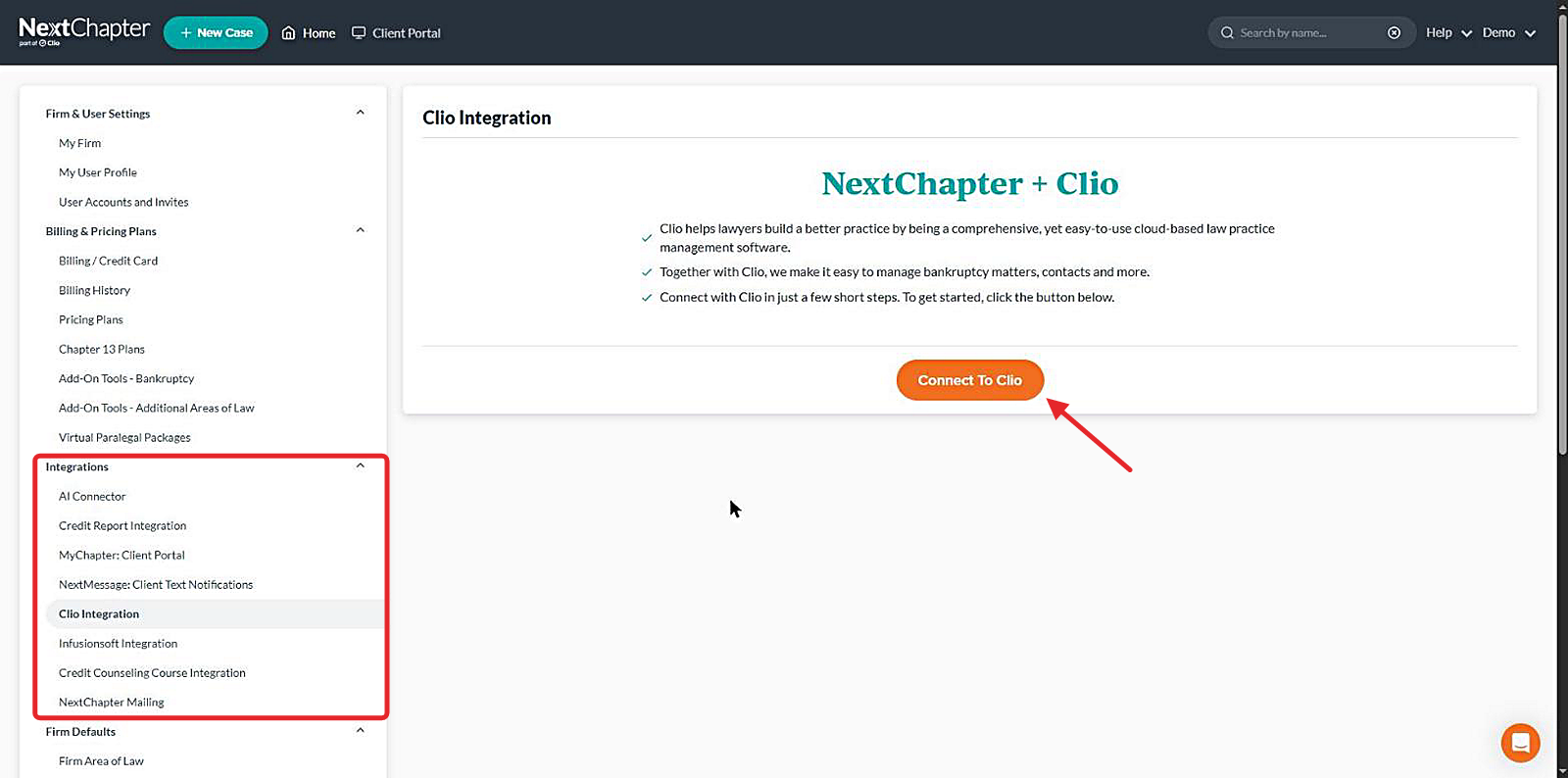
- Integration routes: a Clio connector, an Infusionsoft lead import, a Zapier API key, and an AI Connector for pay stubs.
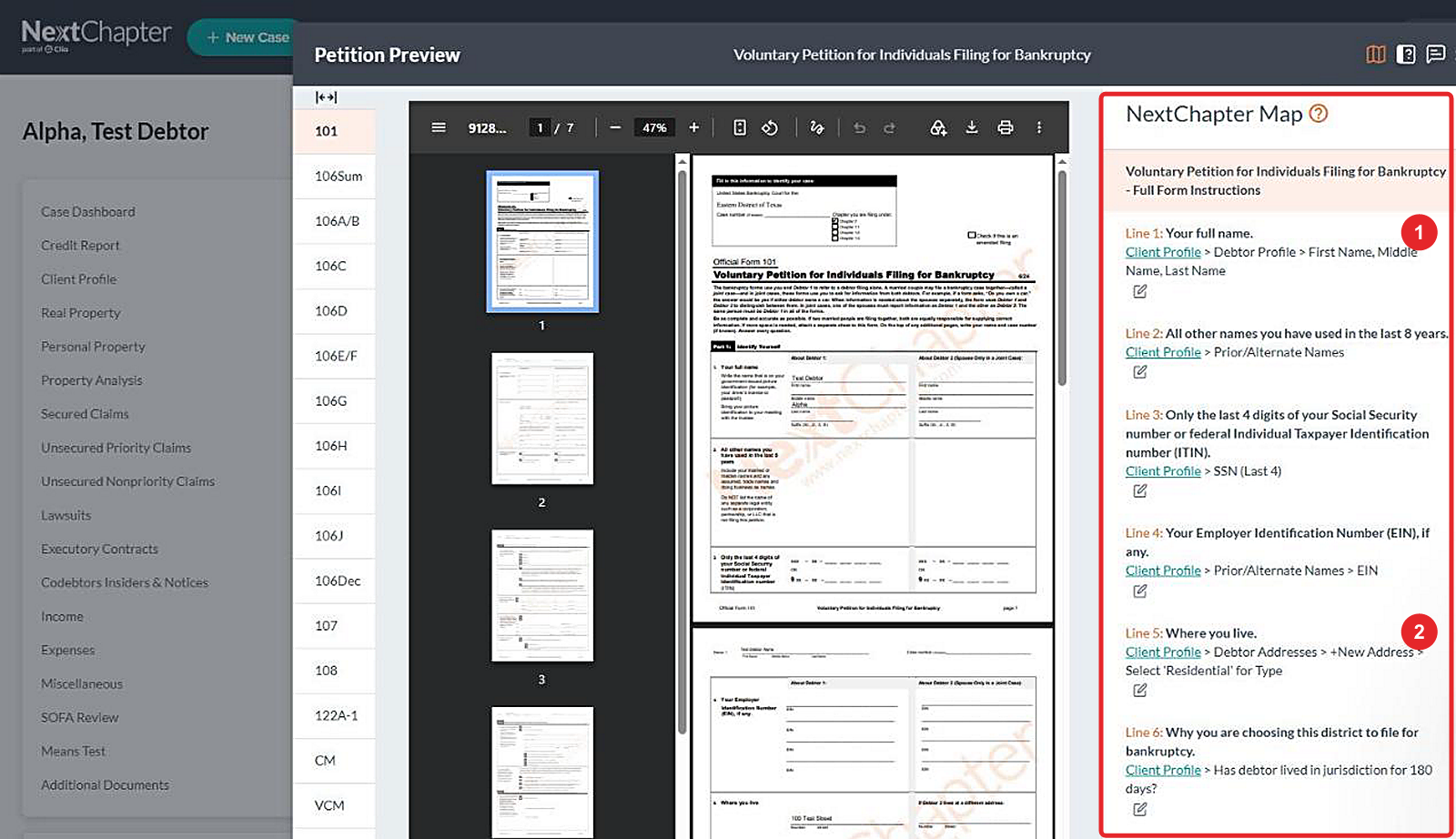
In our trial, the Petition Preview's map named the screen behind each form line, so staff can trace any value to its entry.
Pros
NextChapter's one-entry design pays off for your firm in these ways.
- You stop keying the same facts twice, because one entry feeds the petition, the schedules, and the means test.
- You can budget before you sign, because every plan price is published.
- Your Clio record stays in step with the case through the daily sync.
Cons
NextChapter's limits show up in its add-on pricing and in the document chase.
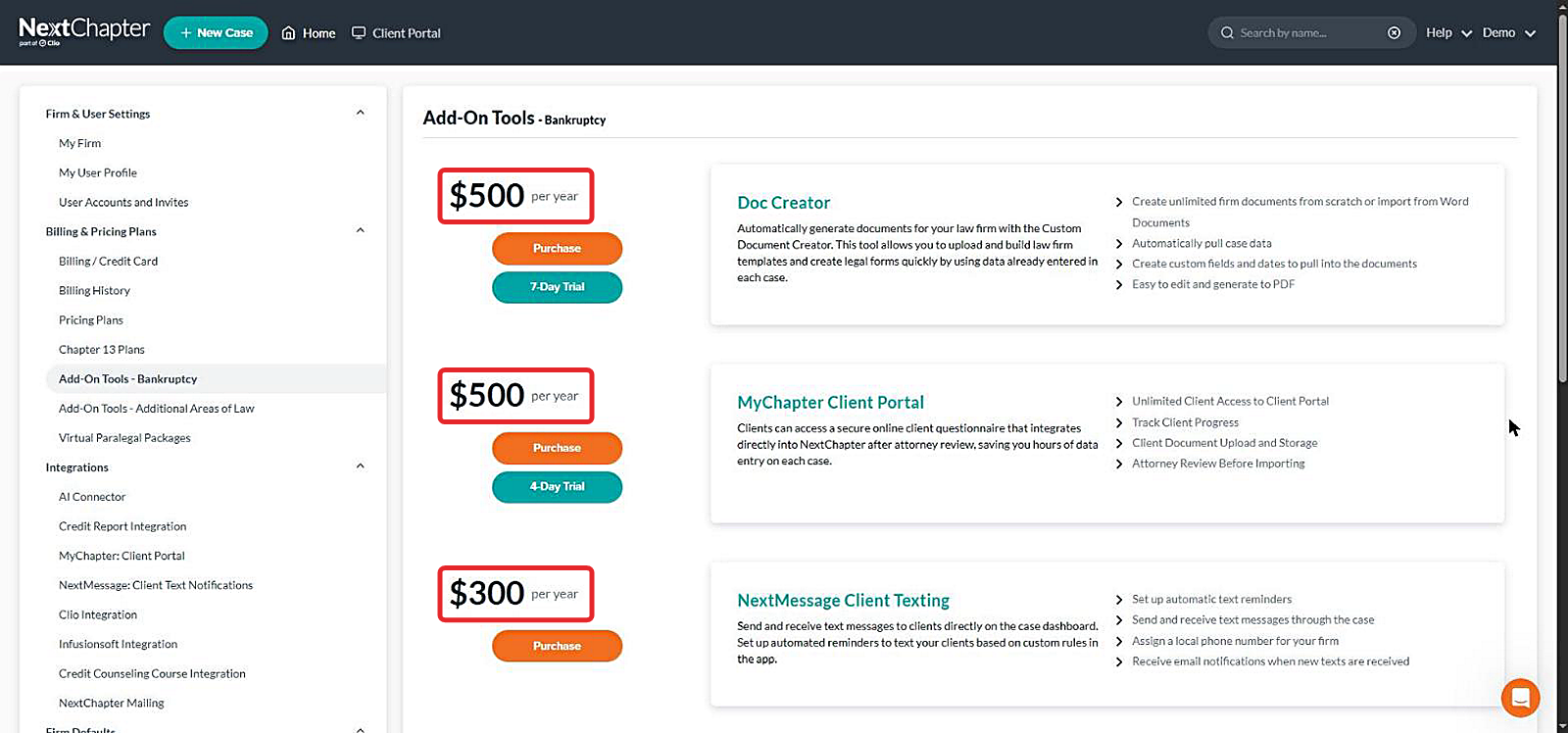
- Add-ons, stated two ways: our Pro Plus trial locked MyChapter, NextMessage, and Notices. It sold MyChapter at $500 and NextMessage at $300 a year, last reviewed October 24, 2026. NextChapter's pricing page lists all three in Pro Plus, so ask which applies.
- Chapter 13 Package: the pricing page says it is included in Pro Plus and Whoa. NextChapter's Chapter 13 pricing article says $250 per year, per district, not included, last reviewed November 14, 2026.
- Contract: every plan requires a 12-month contract, and downgrades are not available mid-contract.
- Document checklist: it is a staff tick list in our trial, with no button to request a document from the client.
Compare NextChapter alternatives for bankruptcy firms before you sign if those add-ons are your sticking point.
Pricing
NextChapter publishes a per-user price for every plan.
| Plan | Price per user per month | Paid annually per user |
|---|---|---|
| Pro Basic | $89 | $979 a year |
| Pro Plus | $129 | $1,399 a year |
| Whoa | $179 | $1,949 a year |
Every plan runs on a 12-month contract, with a 7-day free trial, per NextChapter's pricing page, last reviewed November 14, 2026.
How It Compares with Jubilee
Unlike Jubilee, NextChapter offers a Clio connector, a Zapier key, and an AI Connector, so it narrows the closed-API gap. Neither documents a public API, and our Jubilee trial showed no API or developer settings at all.
That gap matters most if you now run petition software with no open API. NextChapter also fixes the questionnaire gap in part, through its MyChapter portal.
Jubilee stays stronger in three places.
- It charges $95.00 per case on Jubilee's pricing page, last reviewed November 14, 2026, with no seat fee.
- It switches the client portal on for every new case.
- It presets your district's Chapter 13 plan form.
The switching cost is your open cases. No Jubilee conversion is documented. NextChapter's shell case import brings over each case's contact, filing type, hearing, and case number, and your team re-enters the rest. You can also buy NextChapter's Concierge setup at $200 one time, last reviewed November 14, 2026.
NextChapter fits a Jubilee firm that wants one-entry petition prep with a Clio connector and Zapier routes, and accepts an annual per-user contract.
2. Best Case: Best for High-Volume Filers Who Want the Deepest Tooling
Overview
Best Case is long-established petition preparation and e-filing software from Stretto, sold in desktop and cloud versions. It covers Chapter 7 and 13 work with district plans, exemption statutes, and document checklists with look-back periods. Most attorneys answering a September 2026 Facebook thread on volume filing named it.
It scored 3.4 out of 5 as petition software, with full marks for practice depth. You can read its limits in our Best Case review.
Best Case Bankruptcy Software Scorecard
Best Case scores 3.4 out of 5 from our trial, led by a 5 on practice depth and held back by a 2 on interoperability.
| Dimension | Weight | Score (1 to 5) | Basis |
|---|---|---|---|
| Core job performance | 20% | 4 | Client data carried into Form 101, and a paycheck fed the means test. Schedule I showed zero after the paycheck entry. |
| Interoperability with your stack | 18% | 2 | No CRM, practice-management, or storage connection appears, and Best Case documents no public API. |
| Ease of use and setup | 12% | 4 | We reached every area in one to four clicks. A case cannot start until an attorney user exists. |
| Practice-specific depth | 10% | 5 | Separate Chapter 7 and 13 form sets, district plans, exemption statutes, and look-back periods. |
| Attorney review and AI controls | 10% | 3 | An attorney is required on every case, and client documents wait for review by default. We found no activity log. |
| Pricing and cost structure | 10% | 3 | Cloud at $99 per user per month and Document Flow at $59 per case, both last reviewed November 14, 2026. |
| Data ownership and portability | 8% | 3 | Your firm owns its data. Export runs for 365 days after the term ends. |
| Support and reliability | 7% | 4 | Live training, tutorials, and remote support sit inside the product. Support hours are not stated. |
| Security and Opinion 512 posture | 5% | 3 | Cloud logins use multi-factor authentication. No independent attestation is named. |
| Overall | 100% | 3.4 | Weighted sum 341 out of 500. |
Features
Best Case's features center on intake depth and request rules.
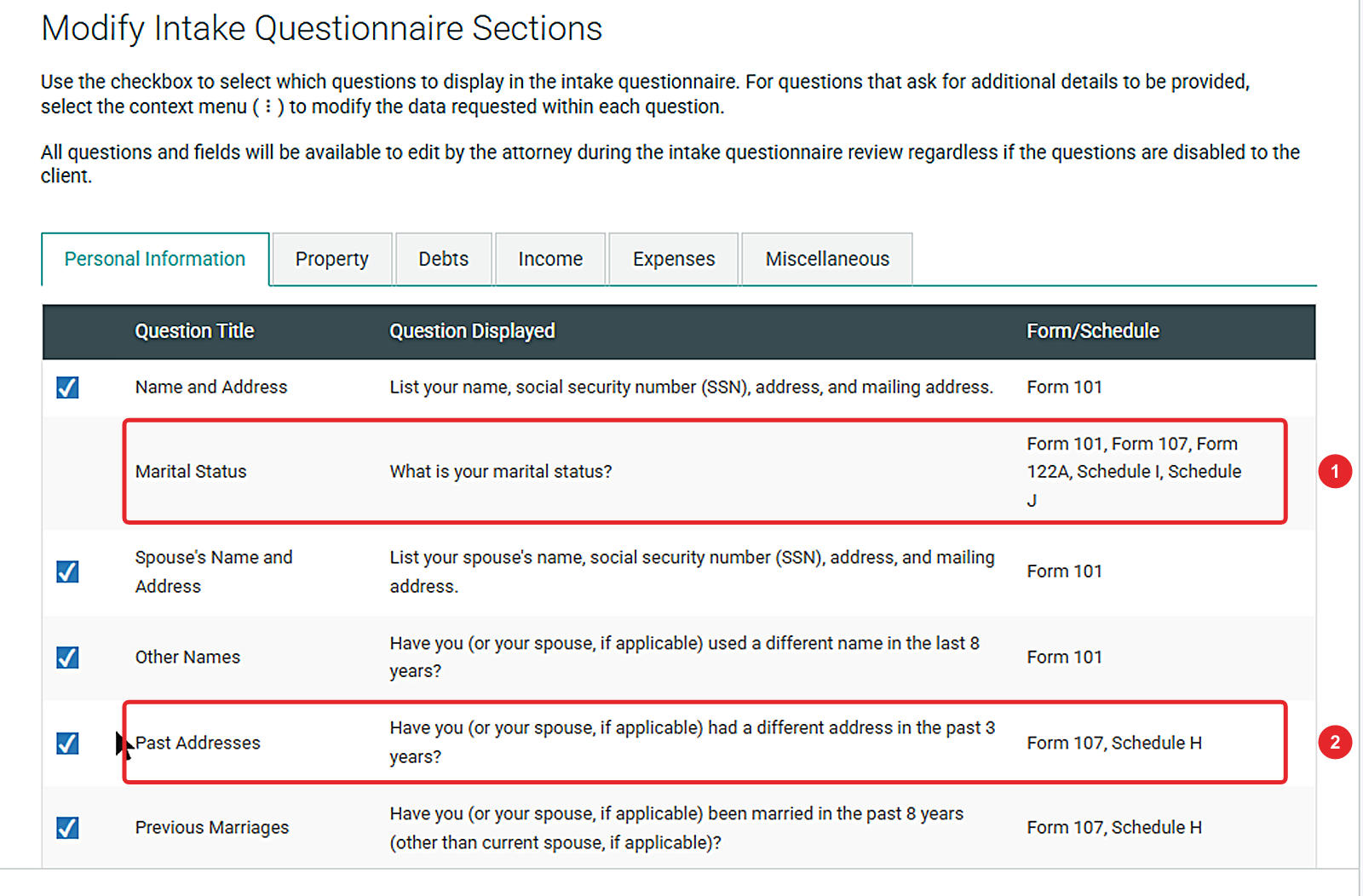
- Intake questionnaire: each question carries a tag naming the form or schedule it feeds.
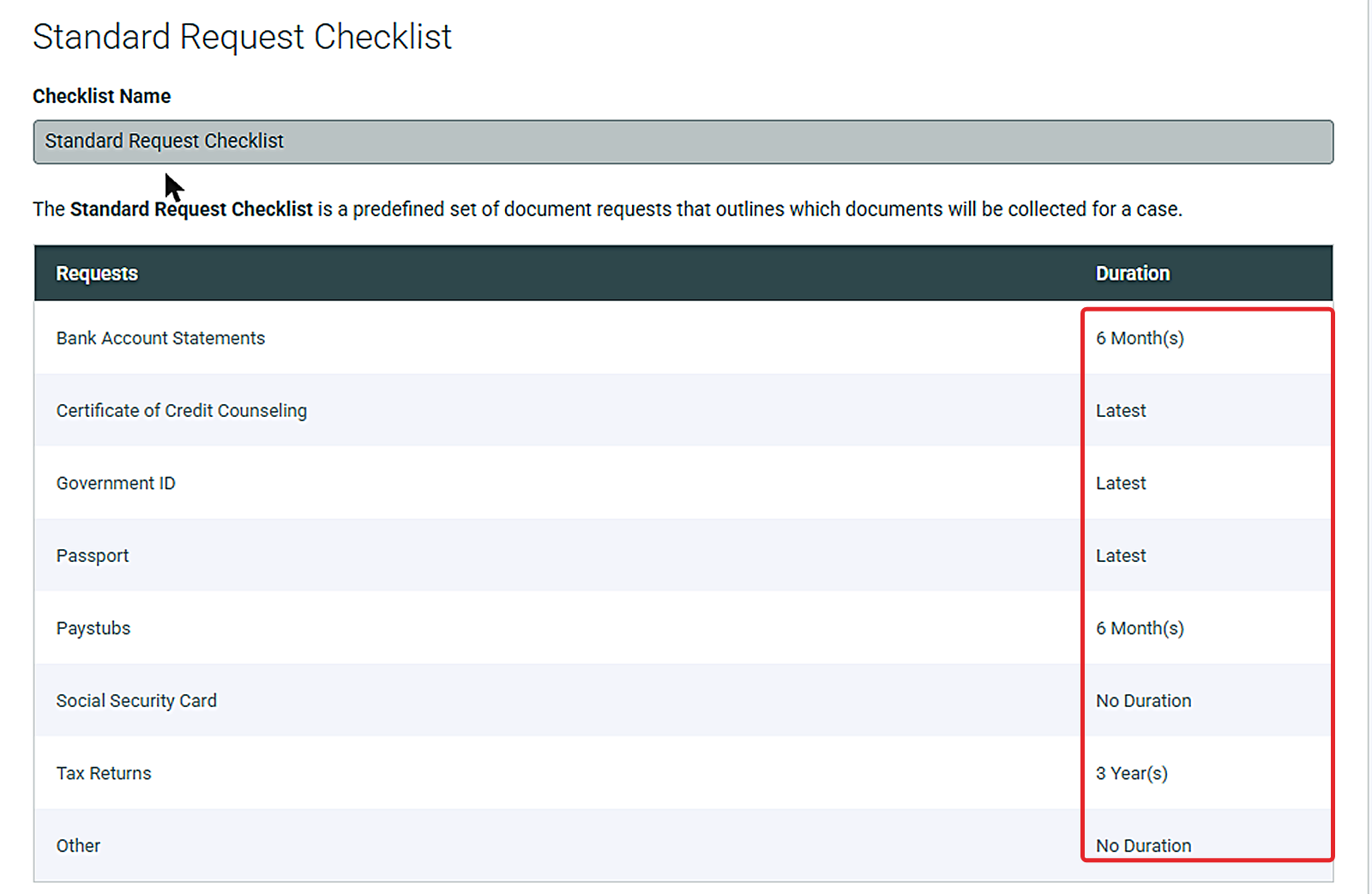
- Request checklists: inside Document Flow, the per-case add-on, each document type carries a look-back period, such as 6 months of bank statements.
- Review gate: client-submitted documents wait for staff review before import, on by default.
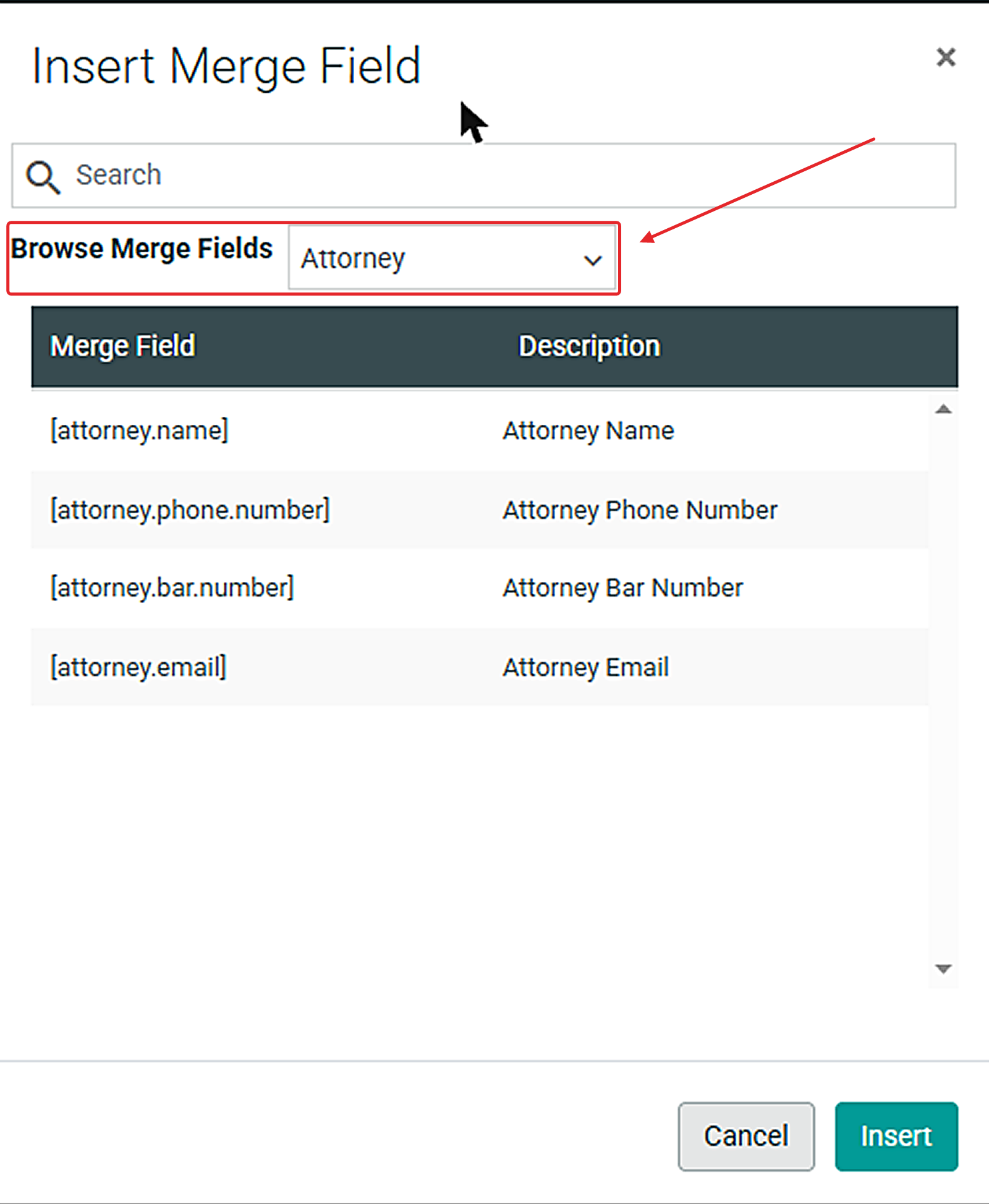
- Firm letters: an editor merges case data into your own templates from 15 field categories.
In our trial, the questionnaire settings showed the forms each question feeds.
Pros
Best Case saves your team keying and date checks.
- Questionnaire answers land in the right schedule without a second keying.
- With Document Flow, look-back periods stop your team checking statement dates by hand.
- Firm letters come out filled from the case instead of typed.
In our trial the default request checklist under the Document Flow settings set those periods, while sending a request stayed locked behind the add-on.
Cons
Best Case's limits are mostly about connections and contract terms.
- No connections: no CRM, practice-management, or storage connection appeared in our trial, and Best Case documents no public API.
- Error check: we could not find the error diagnostic tool outside the filing step, so we read Best Case's form prep page, which names it.
- AI: we found no AI feature in the trial, and Best Case's homepage names none. Its release notes describe Document Flow, an AI document processor sold as an upgrade.
- Lock-in: the cloud subscription becomes non-cancellable after 30 days of the first term, under sections 1.3 and 1.5 of the cloud agreement.
Firms already on Best Case can weigh Best Case alternatives for bankruptcy firms the same way.
Pricing
Best Case prices its cloud platform per user and its AI document add-on per case.
| Item | Price | Source |
|---|---|---|
| Best Case Cloud | $99 per user per month, monthly or annual installments | Best Case pricing |
| Document Flow | $59 per case, with 10 free cases to start | Document Flow page |
Both prices were last reviewed November 14, 2026, and the cloud platform offers a 30-day free trial.
How It Compares with Jubilee
On Jubilee vs Best Case, Best Case fixes three Jubilee pains.
- It carries an intake questionnaire, which Jubilee lacks.
- It sets look-back periods on document requests, through its per-case Document Flow add-on.
- It carries separate Chapter 7 and 13 form sets, district plans, and exemption statutes, the depth our scorecard marks 5.
Best Case also drafts firm letters from merge fields, which we did not find in Jubilee.
Jubilee stays stronger on pay-per-case pricing, on its Clio and PracticePanther imports, and on Schedule I. In our trial, one biweekly paycheck landed there as a monthly income figure, as our Jubilee bankruptcy software review and limitations shows.
Jubilee also locks a case until its filing issues clear, which caught a missing SSN, address, and creditors in our trial.

The switching trigger is volume work Jubilee slows down: questionnaires keyed by staff and statement dates checked by hand. The switching cost is high. Best Case's conversion service covers only its own desktop cases from after 2015 and Stretto's CINcompass, so no Jubilee conversion is documented. The annual term then locks you in.
Best Case fits a volume firm that wants the deepest bankruptcy tooling and runs intake inside the petition tool.
4. Glade AI: Best for One AI Workspace From Intake to Filing
Overview
Glade AI is an AI system for consumer bankruptcy firms that runs a matter from intake to PACER filing in one workspace. Its documentation shows AI reading client uploads, chasing clients by text and email, and filling the schedules from one case record.
Glade offers no trial, so we scored it at 3.2 out of 5 as AI petition software from its documentation and published screenshots. The scoring detail sits in our Glade AI review.
Glade AI Bankruptcy Software Scorecard
Glade AI scores 3.2 out of 5, scored from its documentation and published screenshots.
| Dimension | Weight | Score (1 to 5) | Basis |
|---|---|---|---|
| Core job performance | 20% | 4 | Questionnaire and credit report data fill the schedules, pay stubs feed the means test, and a pre-filing review gates submission. |
| Interoperability with your stack | 18% | 3 | PACER, QuickBooks Online, calendars, inbound Zapier, and an MCP server are documented. No connection to other petition or practice-management software is documented. |
| Ease of use and setup | 12% | 3 | The workflow is guided and ordered. Some features are switched on per firm or per district. |
| Practice-specific depth | 10% | 4 | Chapter 7 and 13 schedules, the means test, exemptions, credit counseling, court notices, and 341 calendaring. |
| Attorney review and AI controls | 10% | 3 | Glade requires review of everything it produces and logs attorney overrides. AI follow-ups carry no described approval step. |
| Pricing and cost structure | 10% | 2 | The fee basis is stated: per workflow, matter, or case, negotiated. No law-firm price or trial appears on its site. |
| Data ownership and portability | 8% | 2 | Your firm owns its content, and Glade owns its workflow templates. Export is per-document PDFs and a case ZIP. |
| Support and reliability | 7% | 4 | An in-app assistant hands off to a person, with support email and chat. No SLA or status page appears on its site. |
| Security and Opinion 512 posture | 5% | 3 | Glade names OpenAI and Anthropic with a no-training statement. No attestation, DPA, or hosting region is stated. |
| Overall | 100% | 3.2 | Weighted sum 319 out of 500. |
Features
Glade's documentation describes these functions; we did not test them.
- Document Intelligence: AI reads each upload, suggests a file name for your approval, and rejects blurry or expired documents with a reason.
- AI follow-ups: reminders go to clients by email and text on a cadence your firm sets.
- Intake: a booking triggers a questionnaire, and credit report data pre-fills the bankruptcy questionnaire.
- Schedules Builder: one guided questionnaire fills Schedules A/B through J, the statement of financial affairs, and the means test forms.
- Filing: cases file to PACER from the case documents screen.
The four document cards on Glade's product page sum up that chase.

Screenshot: Glade product page.
Pros
By Glade's description, these are the gains for your firm.
- One system holds intake, the document chase, and the schedules.
- Your staff stop moving documents between tools, since uploads are read and filed to the case.
Cons
Glade's limits sit mostly in price and access.
- No price: Glade shows no law-firm price and no self-serve trial on its site.
- No connections: its documentation shows no connection to Jubilee, NextChapter, Best Case, or Clio.
- Chapter 13: the plan calculator is rolling out district by district, per Glade's calculator article.
- Terms: Glade may end your access "at any time or without notice", and Glade owns its workflow templates.
Pricing
Glade states how it charges but not what it charges.
| Item | Price |
|---|---|
| Law-firm plans | Not stated on Glade's site |
| Fee basis | Per workflow, matter, or case, negotiated with each firm |
The fee basis comes from Glade's terms, last reviewed November 14, 2026.
How It Compares with Jubilee
By its documentation, Glade fixes three Jubilee pains.
- The missing client questionnaire.
- The document chase left to your staff.
- The closed API, in part, through an MCP server Glade labels an early release and inbound Zapier.
Jubilee stays stronger on published prices, a self-serve trial, its Clio sync listing, and the district plan preset. Jubilee also lets you keep other tools beside it, while Glade moves the whole case into one platform.
The switching trigger is a document chase that eats your staff's week across separate tools. The switching cost is the whole case file. Glade describes no import from another petition tool, and its export is per-document PDFs and a case ZIP.
Glade fits a Chapter 7 and 13 firm ready to run every case in one AI platform.
6. Fresh Start Finance: Best for Intake and the Document Chase Inside the Petition Tool
Overview
Fresh Start Finance is cloud petition software for consumer bankruptcy attorneys, sold as "Built for Attorneys by Attorneys". Its pages describe one case that holds intake answers, client documents, pay-stub figures, and the official forms, from intake through attorney review to e-filing.
It scored 3.2 out of 5 as petition software, sixth on this list by the weighted sum. We scored it from the vendor's pages and published screenshots, since it offers no documentation center.
Fresh Start Finance Bankruptcy Software Scorecard
Fresh Start Finance scores 3.2 out of 5, scored from its vendor pages and published screenshots.
| Dimension | Weight | Score (1 to 5) | Basis |
|---|---|---|---|
| Core job performance | 20% | 4 | Intake answers populate the forms, documents are matched and tracked, and pay stubs feed the means test. Error checks stop at a counseling-certificate age check. |
| Interoperability with your stack | 18% | 3 | Credit report and calendar integrations and a NextGen XML import. No public API or practice-management connector is documented. |
| Ease of use and setup | 12% | 3 | Guided intake and live-updating forms are described. No help center or onboarding program appears, and sign-up is limited. |
| Practice-specific depth | 10% | 4 | Chapter 7 and 13 forms, the means test, exemptions, local forms, proof-of-claim tracking, and 341 dates. |
| Attorney review and AI controls | 10% | 3 | Attorney Review comes before e-filing, and pay figures are reviewed before import. No approval step for client messages is described. |
| Pricing and cost structure | 10% | 3 | Every plan is priced publicly, but intake and document automation are charged per case on top. |
| Data ownership and portability | 8% | 2 | The terms license your content broadly to the company, and case-data export is not stated. |
| Support and reliability | 7% | 3 | Email and phone, with an account manager on Enterprise. No hours, help center, or status page. |
| Security and Opinion 512 posture | 5% | 2 | "Encrypted Data Storage" appears as a plan line only. No attestation or data path is stated. |
| Overall | 100% | 3.2 | Weighted sum 317 out of 500. |
Features
Fresh Start Finance's pages and published screenshots describe these features; we did not run a trial of it.
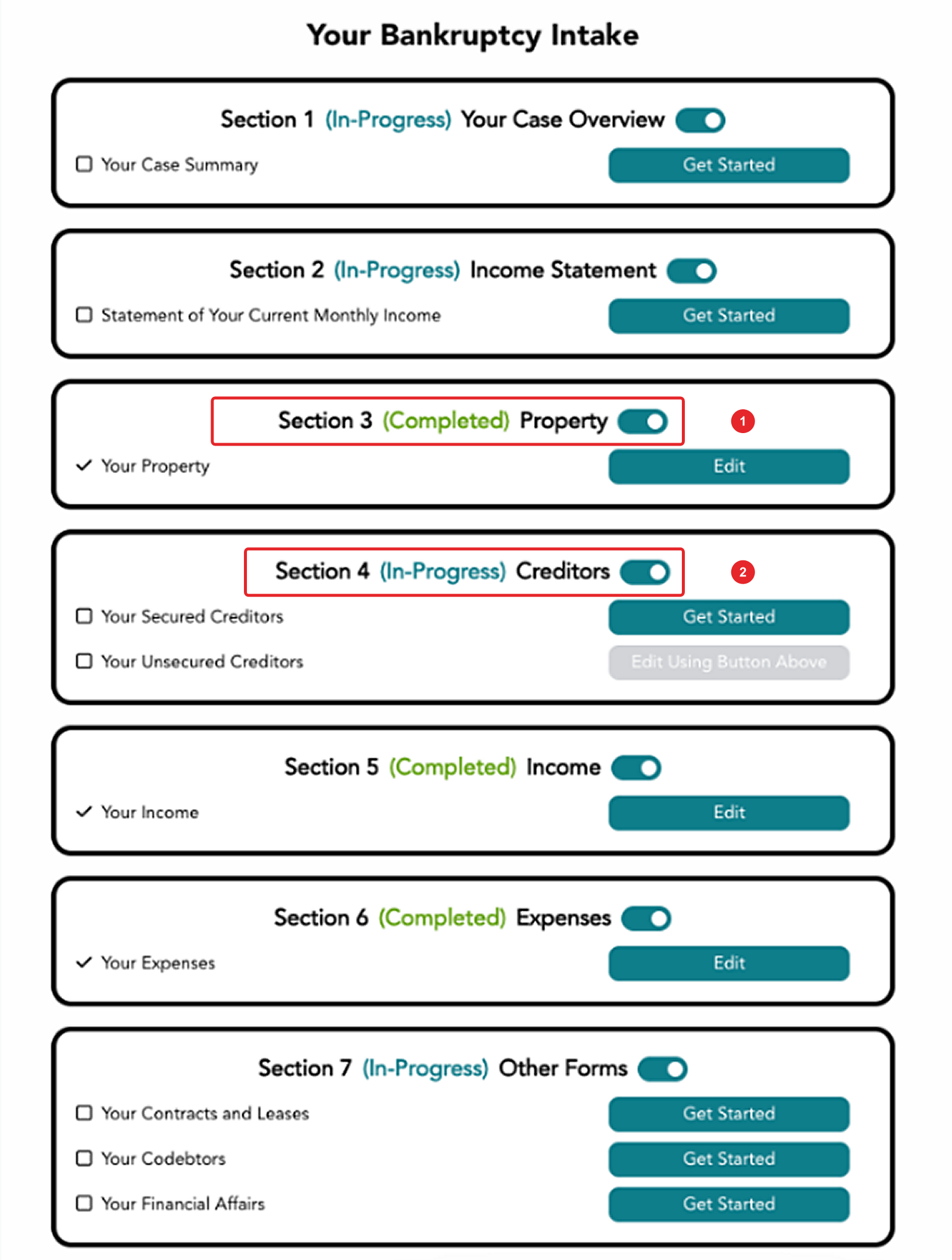
- Branded client intake: seven sections populate the forms, and clients can flag a question for the attorney.
- Document collection: a per-client email and upload, with matching, categories, renaming, completion bars, and a Request Documents action.
- Income Analyzer: pay stubs become a six-month figure for the means test and Schedule I, reviewed before import.
- Chapter 13 plan screen: scenarios with trustee, attorney, and monitoring fees.
- Filing and imports: Click-to-File e-filing, court notices as calendar events, your own DOCX templates, and NextGen XML case import.
The intake screen on Fresh Start Finance's intake article shows each section's progress to the client.
Screenshot: Fresh Start Finance.
The documents view on Fresh Start Finance's features page tracks each category's completion.
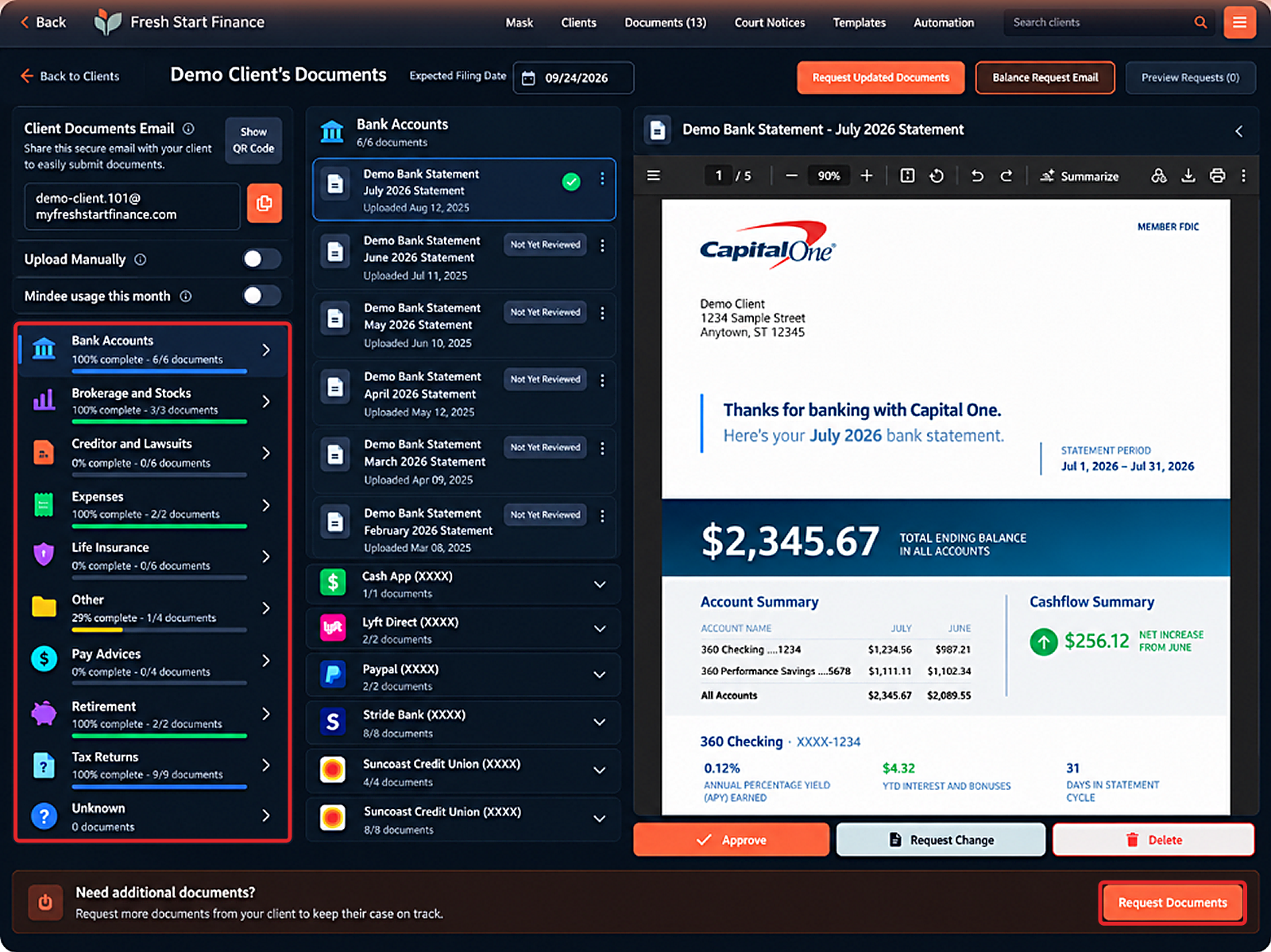
Screenshot: Fresh Start Finance.
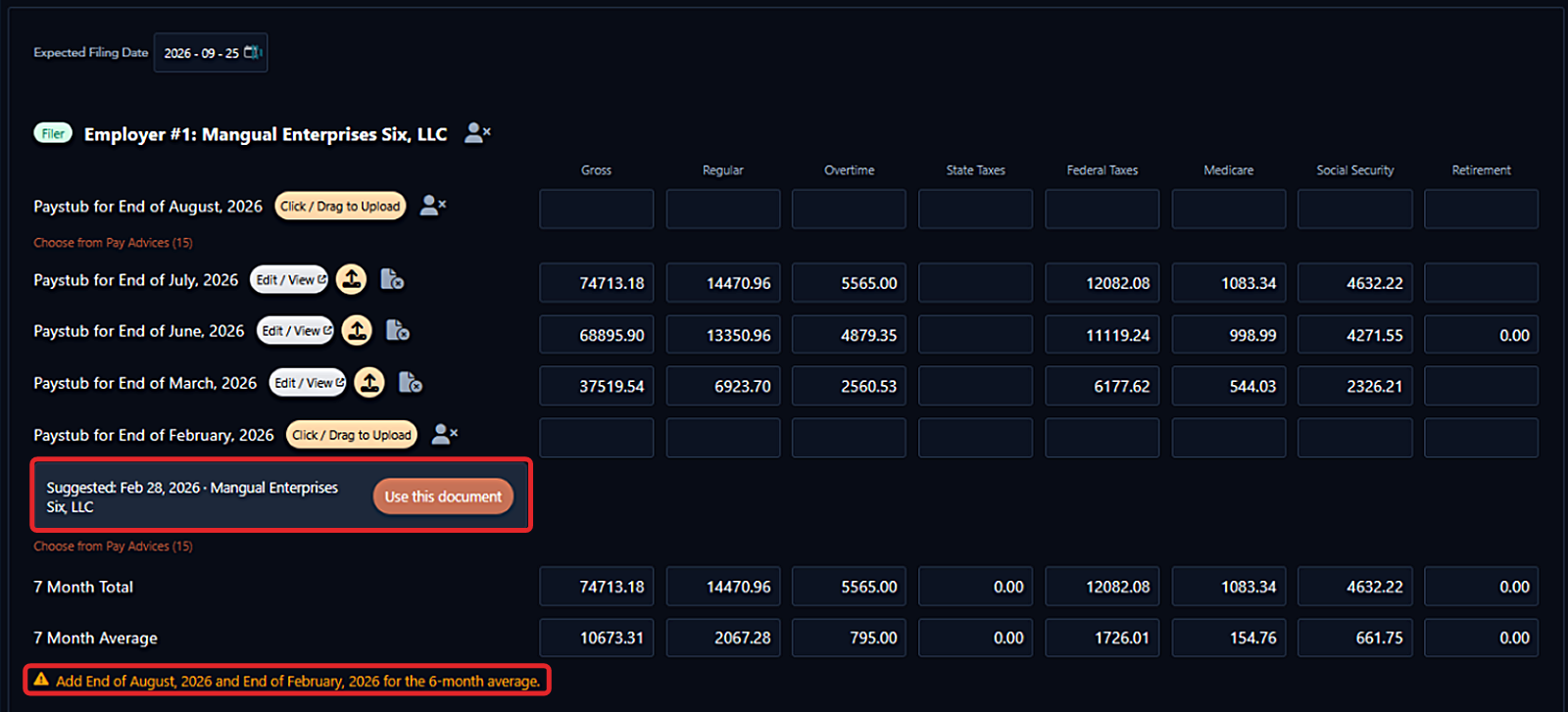
Screenshot: Fresh Start Finance features page.
Pros
Fresh Start Finance's own description points to these gains for your firm.
- Intake answers reach the forms without a second keying.
- Your staff see what is still missing by category instead of sorting a shared inbox.
- Pay figures arrive averaged for the means test, with a review step before they land.
- Existing cases can come in by file rather than by hand.
Cons
Fresh Start Finance's limits are mostly about connections and add-on charges.
- No connections: no public API, practice-management connector, or data-export description appeared on its pages, checked November 13, 2026.
- Per-case charges: intake ($7) and document automation with the Income Analyzer ($19) are charged per case on top of seats, last reviewed November 14, 2026.
- Controls: no roles, audit trail, or approval step for client messages is described.
- Terms: the terms of use date from 2024, hold no export terms for case data, and tell you to keep your own copy.
Pricing
Fresh Start Finance prices seats by plan and charges some features per case.
| Plan | Billed annually, per user per month (last reviewed November 14, 2026) | Billed monthly, per user per month (as shown November 13, 2026) |
|---|---|---|
| Starter | $59 | $79 |
| Growth | $79 | $99 |
| Enterprise | $99 | $119 |
Per-case add-ons, last reviewed November 14, 2026, are $19 for document automation with the Income Analyzer and $7 for client intake and portal access. Signed agreements cost $2 each. Every plan starts with a 14-day trial at no charge, and new firms can get up to 75% off the first year.
Annual prices come from Fresh Start Finance's pricing page, last reviewed November 14, 2026. The monthly prices are as the page showed them on November 13, 2026.
How It Compares with Jubilee
Unlike Jubilee, Fresh Start Finance holds a client questionnaire inside the petition tool, the first gap in our Jubilee trial. It also tracks missing documents, a chase Jubilee leaves to staff.
Jubilee stays stronger in three places.
- Its Clio sync listing and partner imports.
- Pay-per-case pricing: at 7 or fewer cases a year, $95.00 per case costs less than one $708 Starter seat (both last reviewed November 14, 2026).
- The district plan preset in our Jubilee trial.
The switching trigger is staff re-keying intake answers and sorting pay stubs by hand. The costs are per-user plus per-case charges and limited sign-up. Its importer also names only NextGen XML files, so check whether your Jubilee cases export in a format it reads.
Fresh Start Finance fits a Chapter 7 and 13 firm that wants intake, the document chase, and pay-stub figures inside the petition tool.
7. BlueStylus Case Builder Pro: Best for a Flat Firm Price With PACER Downloads
Overview
BlueStylus Case Builder Pro is cloud petition preparation and filing software from Houston-based Financial Software Solutions. It covers Chapter 7, 13, 11, and Subchapter V. It sells beside PACER downloads, time and billing, and a trustee upload area for solo and small firms.
It scored 2.8 out of 5 as petition software, seventh on this list. We scored it from the vendor's pages and published images.
BlueStylus Bankruptcy Software Scorecard
BlueStylus scores 2.8 out of 5, scored from its vendor pages and published images.
| Dimension | Weight | Score (1 to 5) | Basis |
|---|---|---|---|
| Core job performance | 20% | 3 | Official forms, a client document checklist, CM/ECF filing, and credit report import. No questionnaire, means test, or error check is described. |
| Interoperability with your stack | 18% | 3 | Office 365 email sync, Word and Outlook plugins, CM/ECF, and a credit report import. No public API or export terms. |
| Ease of use and setup | 12% | 3 | The vendor posts no setup steps, but claims a step-by-step migration and offers a 30-day trial. |
| Practice-specific depth | 10% | 4 | Chapter form sets, state exemption lists for every state, and filing in 22 listed districts. |
| Attorney review and AI controls | 10% | 1 | Not stated: no AI feature, approval step, or audit trail is described. |
| Pricing and cost structure | 10% | 4 | One flat firm price for up to 10 users and listed module prices. Renewal terms are not stated. |
| Data ownership and portability | 8% | 1 | Not stated: the license says nothing about who owns your data or how you get it back. |
| Support and reliability | 7% | 3 | Phone, chat, and email from 8 a.m. to 5 p.m. CST. No help center or SLA. |
| Security and Opinion 512 posture | 5% | 2 | "SOC Compliance" is claimed with no report type or auditor named. |
| Overall | 100% | 2.8 | Weighted sum 279 out of 500. |
Features
BlueStylus's pages and published images describe these features; we did not run a trial of it.
- Forms and filing: official forms with state exemption lists, and CM/ECF filing in 22 districts listed on the Case Builder page.
- Document checklist: clients get a list of required documents by invitation, with an upload prompt for each.
- Automated PACER: BlueStylus's PACER module downloads ECF documents with notifications.
- Credit reports and email: credit report import through a separate account, Office 365 email sync, and Word and Outlook plugins.
The checklist image on BlueStylus's time and billing page shows the client's view of a request.
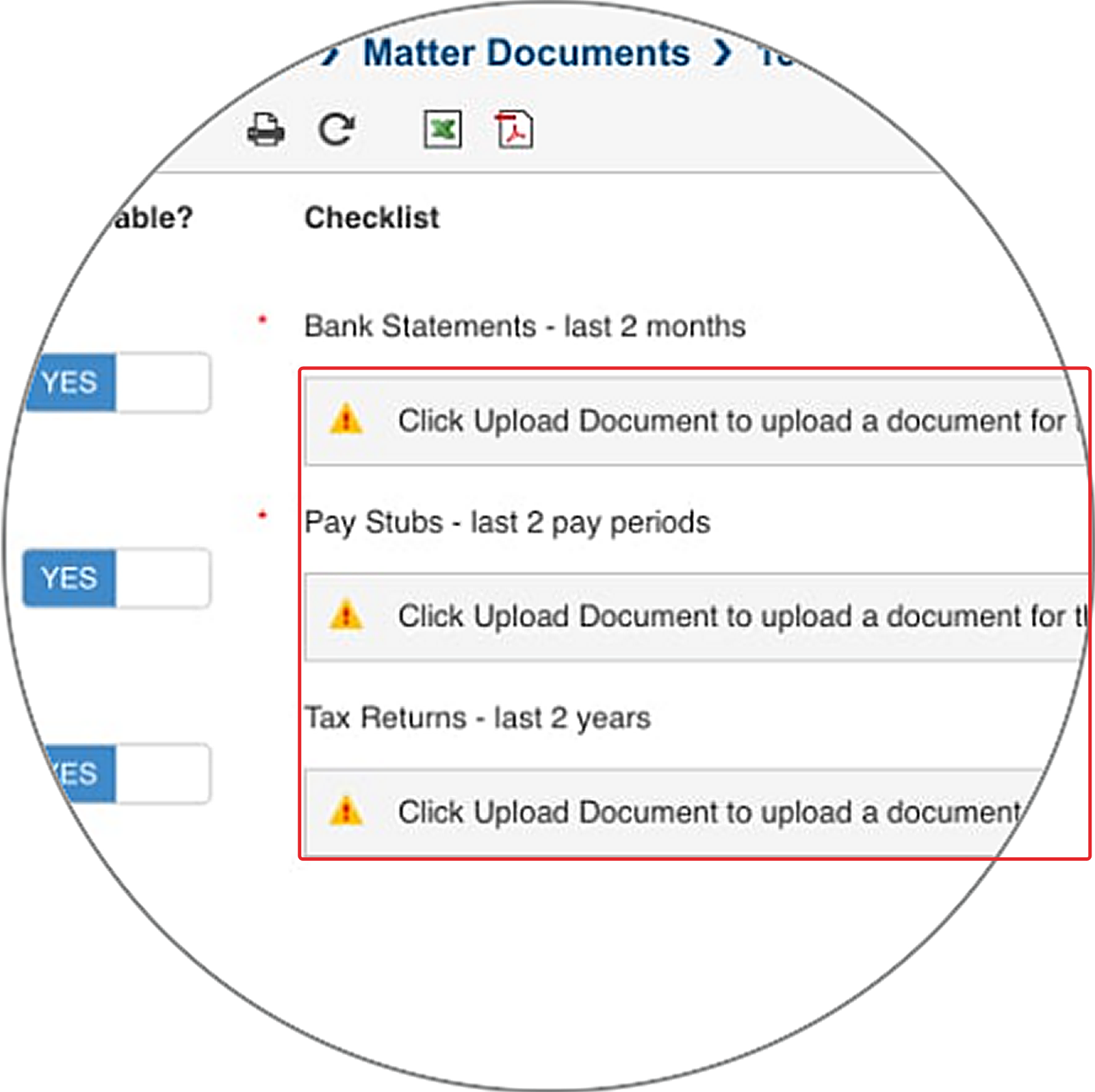
Screenshot: BlueStylus.
Pros
BlueStylus's own pages describe these gains for your firm.
- One flat firm price covers up to 10 users, so adding a paralegal adds no seat fee.
- The checklist shows your client which documents to upload.
- Court filings land in the case without a second PACER download.
Cons
BlueStylus's limits are mostly about automation depth and terms.
- Thin automation: no client questionnaire, means test, error check, template assembly, workflow automation, or AI is described on any vendor page.
- District list: filing covers only the 22 listed districts, so check yours first.
- No connections or data terms: the vendor states no public API. Its license agreement, last updated December 27, 2019, says nothing about who owns your data or how you get it back.
- Price conflict: the registration page lists Case Builder at no charge with plan amounts left blank. The homepage shows $50, last reviewed November 14, 2026, so ask which applies.
Every user review we found dates from 2017 to 2021, so none counts here as a current limitation.
Pricing
BlueStylus prices Case Builder per firm and its modules separately.
| Product | Price |
|---|---|
| Case Builder Pro | $50 per firm per month, up to 10 users |
| Automated PACER | $35 per month |
| Time and Billing | From $10 per user per month |
| Trustee Uploads | No charge |
Prices come from the BlueStylus homepage, last reviewed November 14, 2026, and the Case Builder page offers a 30-day trial at no charge.
How It Compares with Jubilee
BlueStylus charges one flat firm price instead of Jubilee's per-case or annual package pricing. Its client checklist also covers part of the chase.
Jubilee stays stronger on petition math and on its Clio sync listing and partner imports. It showed a means test and a district plan preset in our Jubilee trial, and BlueStylus describes neither.
The switching trigger is per-case cost that climbs with volume. The costs are re-entry of open cases, with no import path named, and filing only in listed districts. Data-return terms are also unstated.
BlueStylus fits a small Chapter 7 and 13 firm in a listed district that wants a flat price and PACER downloads in one place.
If Jubilee Works but One Step Around It Doesn't: Add-On Software
Start here if Jubilee does the petition well and the pain sits in intake, the questionnaire, or the client record.
All three add-ons below appear on Jubilee's own import screen, so Jubilee keeps the petition job.
Clio and PracticePanther are bankruptcy case management software in the broad sense: they hold the matter record, not the petition. Their scores, and BK Questionnaire's, measure them against the petition job, so read them as what each adds beside Jubilee.
3. Clio Manage: Best for Intake and the Matter Record Beside Jubilee
Overview
Clio Manage is horizontal practice-management software that sits beside Jubilee, while Jubilee keeps the petition. It holds matters, joint clients, custom fields, checklists, and automations, with intake forms in a quoted tier.
It scored 3.2 out of 5 as practice management, third on this list. The bankruptcy detail sits in our Clio review for bankruptcy firms.
Clio Bankruptcy Software Scorecard
Clio scores 3.2 out of 5 from our trial, with a 4 on interoperability from its petition-tool syncs.
| Dimension | Weight | Score (1 to 5) | Basis |
|---|---|---|---|
| Core job performance | 20% | 3 | Matters, joint clients, checklists, and automations ran in our test. No missing-item view showed. |
| Interoperability with your stack | 18% | 4 | NextChapter and Jubilee syncs and a public API with webhooks. |
| Ease of use and setup | 12% | 4 | The first matter took about 3 minutes, and the first templated matter about 21 minutes. |
| Practice-specific depth | 10% | 2 | Our new trial held no bankruptcy template, and Clio does not calculate the means test. |
| Attorney review and AI controls | 10% | 3 | Clio keeps a 90-day AI event log. No approval step held a client message in our test. |
| Pricing and cost structure | 10% | 2 | One public price, Starter at $49 per user per month, last reviewed November 14, 2026. Other tiers are quoted. |
| Data ownership and portability | 8% | 3 | Your content stays yours. CSV export covers ten data types, not documents. |
| Support and reliability | 7% | 4 | Phone, email, and chat on every plan, with guided migration from Core. |
| Security and Opinion 512 posture | 5% | 4 | SOC 2 Type II, AWS hosting, and listed subprocessors. |
| Overall | 100% | 3.2 | Weighted sum 322 out of 500. |
Features
Clio's features center on the matter record and repeatable steps.
- Custom field sets: intake facts such as the chapter live in fields grouped on the matter.
- Checklists and automations: task lists and matter templates apply your steps to each new matter.
- Jubilee sync: the Jubilee listing in Clio's App Directory names matter details, clients, notes, activities, tasks, and calendar events.
- Public API: OAuth and webhooks, for tools that need the matter record.
We built a Chapter 7 intake field set in our trial in about 7 minutes.
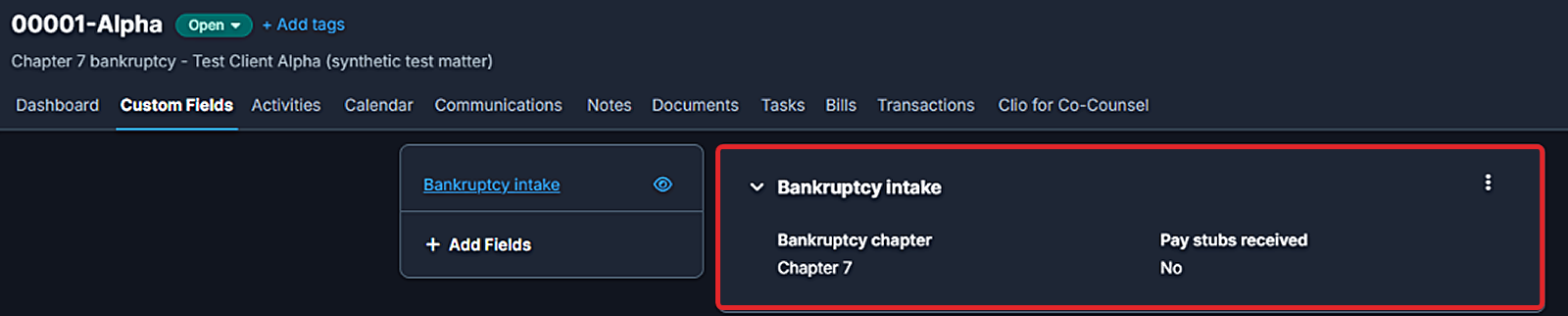
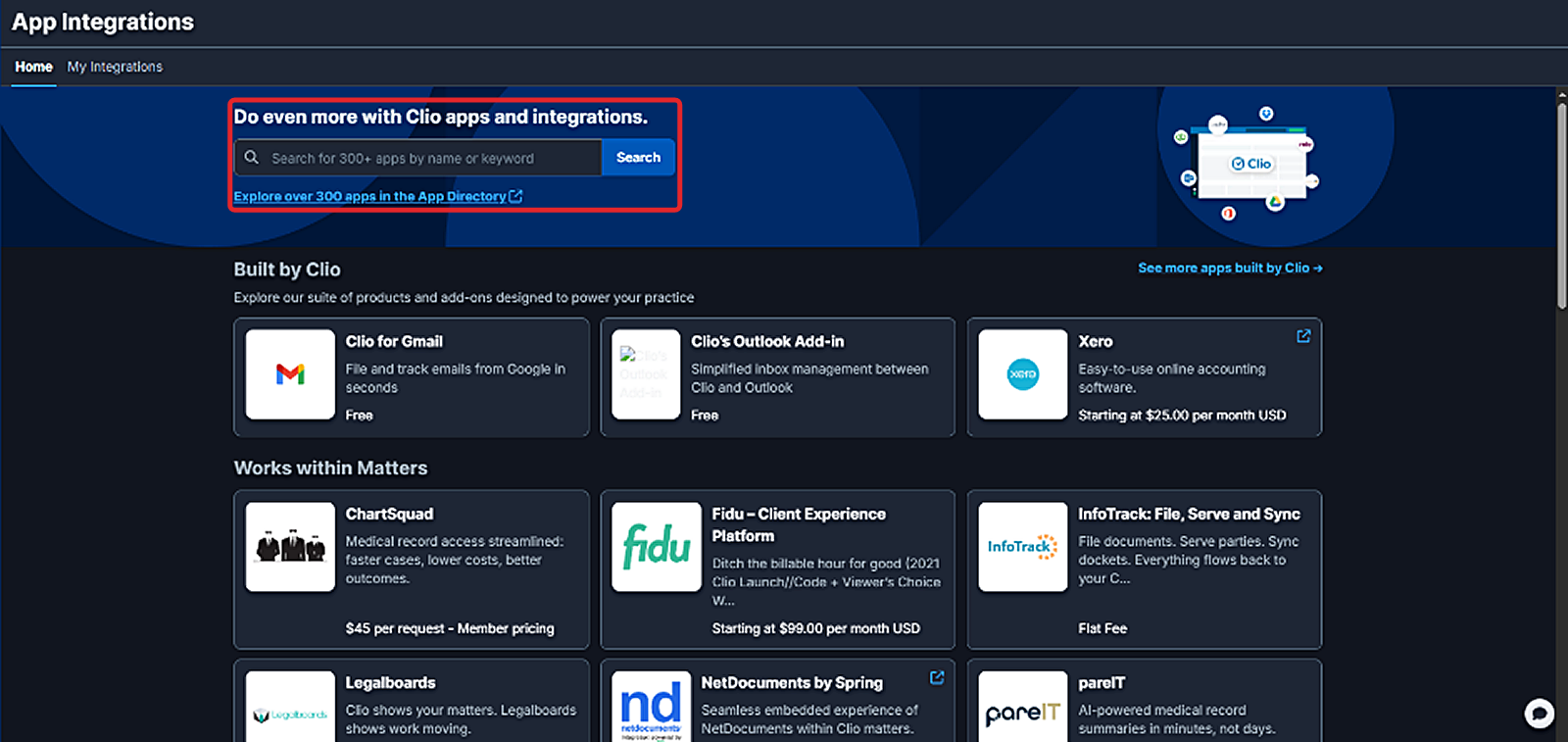
Clio's App Integrations home is the entry point for adding partner apps, petition tools among them.
Pros
Clio's matter record gives your firm these gains beside Jubilee.
- Your client record lives in one system your staff already know.
- Jubilee keeps the petition job, so nobody learns new forms software.
- Matter steps start the same way on every case through templates.
Cons
Clio's limits are about petition work and the document chase.
- No petition math: no means test, exemption, or plan calculation.
- No document request: our trial showed no way to ask the client for a document and no missing-item view.
- Quoted tiers: only Starter has a public price.
- Set-up link: the Jubilee listing's set-up link returned an error on October 24 and again on November 14, 2026.
Pricing
Clio lists one price and quotes the rest.
| Plan | Price |
|---|---|
| Starter | $49 per user per month |
| Core, Signature, and Elite | By quote |
Prices come from Clio's pricing page, last reviewed November 14, 2026, with a 7-day free trial.
How It Compares with Jubilee
Unlike Jubilee, Clio prepares no petition. It holds the intake and client record that Jubilee leaves thin, and Jubilee lists it as an import source. The switching trigger is intake facts that live in email and notes before anyone types them into Jubilee.
Jubilee stays stronger at the petition, the means test, and filing. There is no switching cost for Jubilee, only a second subscription.
Clio fits a Jubilee firm whose pain is intake and the record, not the petition.
5. PracticePanther: Best for One Cloud Record at a Published Price
Overview
PracticePanther is cloud practice-management software for solo and small firms, with matters, intake forms, workflows, a client portal on every plan, and billing. We set up a Chapter 7 test matter in about five minutes without the documentation.
Its bankruptcy page sells the general product plus a Jubilee integration, and the product ships no bankruptcy content. It scored 3.2 out of 5 as practice management and ranks fifth. It ties Glade AI at 319 out of 500, and Glade AI's higher core-job score breaks the tie.
PracticePanther Bankruptcy Software Scorecard
PracticePanther scores 3.2 out of 5 from our trial, with 4s on interoperability, ease, pricing, and support.
| Dimension | Weight | Score (1 to 5) | Basis |
|---|---|---|---|
| Core job performance | 20% | 3 | Intake forms link to contact and matter fields, and workflows apply task lists. We found no document request or missing-items view. |
| Interoperability with your stack | 18% | 4 | A Jubilee integration, storage sync, Zapier, and QuickBooks. API access starts with a request. |
| Ease of use and setup | 12% | 4 | We reached core records in two to four clicks without the documentation. |
| Practice-specific depth | 10% | 2 | No practice area or chapter field, and the stock intake form has no bankruptcy questions. |
| Attorney review and AI controls | 10% | 2 | No AI feature, and no hold-for-review step before a client send in our trial. |
| Pricing and cost structure | 10% | 4 | Listed per-user prices on every plan, with a monthly option. |
| Data ownership and portability | 8% | 2 | A copy of your data comes on written request within 90 days after termination. |
| Support and reliability | 7% | 4 | Unlimited support per the pricing page, an account manager, and a status page. |
| Security and Opinion 512 posture | 5% | 3 | Encryption in transit, two-factor sign-in, and IP restrictions. No SOC 2 report is named. |
| Overall | 100% | 3.2 | Weighted sum 319 out of 500. |
Features
PracticePanther's features center on intake forms and task workflows.
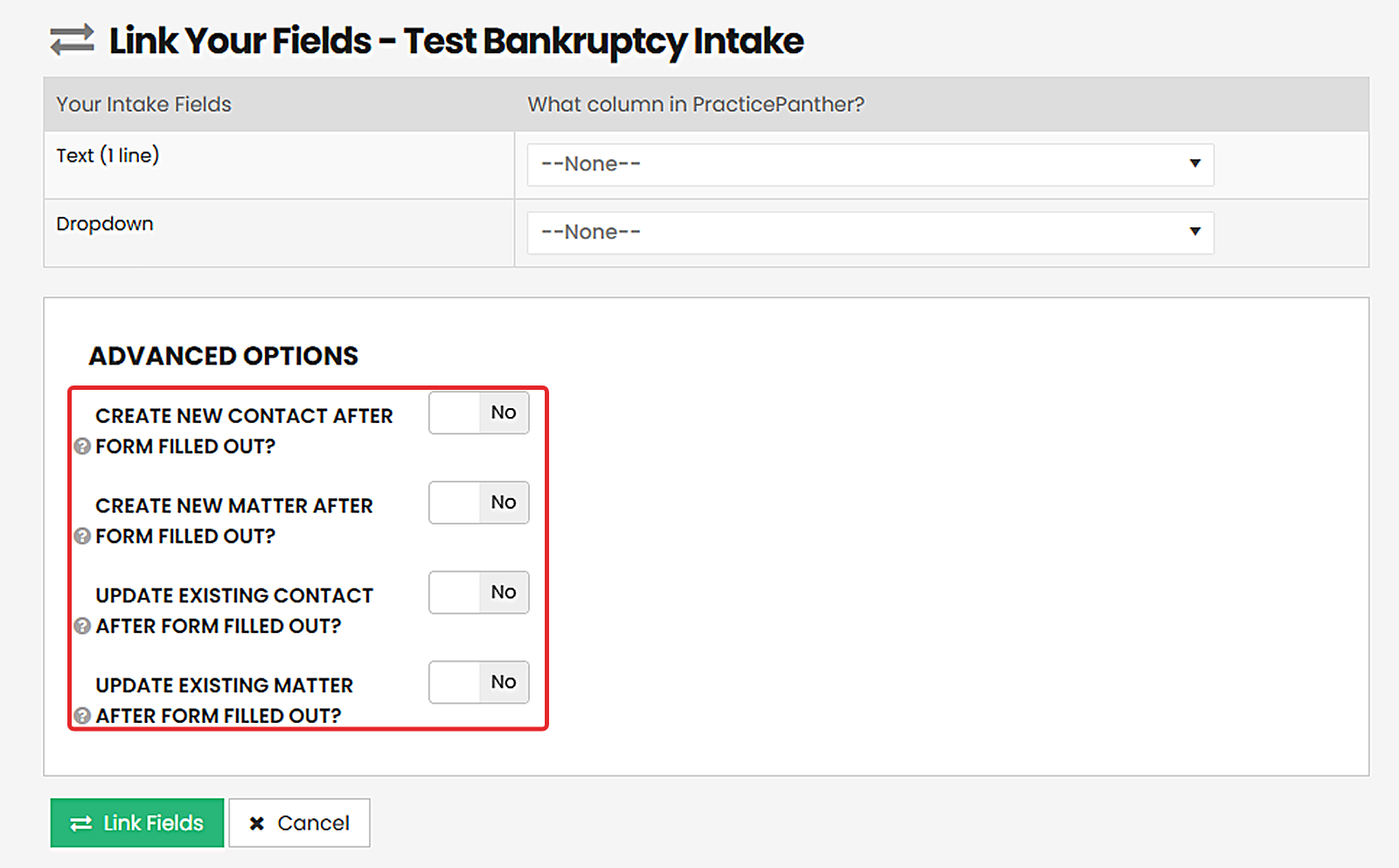
- Intake builder: nine field types, and a "Link Your Fields" step that creates or updates a contact or matter.
- Workflows: task lists with relative due dates, applied to a matter by a person.
- Reminders and templates: task reminders by email, and document templates from an uploaded file with merge tags.
- Jubilee integration: PracticePanther's Jubilee page promises real-time syncing of hearings and deadlines, syncing of contacts and tasks, and a transfer of matters into Jubilee.
We linked a test intake form's fields to PracticePanther's own columns in our trial.
Pros
PracticePanther's single cloud record brings your firm these gains.
- Intake answers land in the matter's own fields, so staff stop retyping the first facts.
- Your hearings and deadlines stay in step with Jubilee, as the vendor describes it.
- Every plan has a listed price with a monthly option.
Cons
PracticePanther's limits are mostly about intake depth and the document chase.
- Intake builder: it has no file upload field and no conditional logic.
- No document request: we found no document request, checklist request, or missing-items view. That matches a Capterra review from June 2026 citing a "lack of a robust client portal", for the document-request part.
- Reminders: they go to the task's assignee, never to a missing document.
- API and export: API access is a request, not a key, and section 16c of the PracticePanther terms returns your data only on written request.
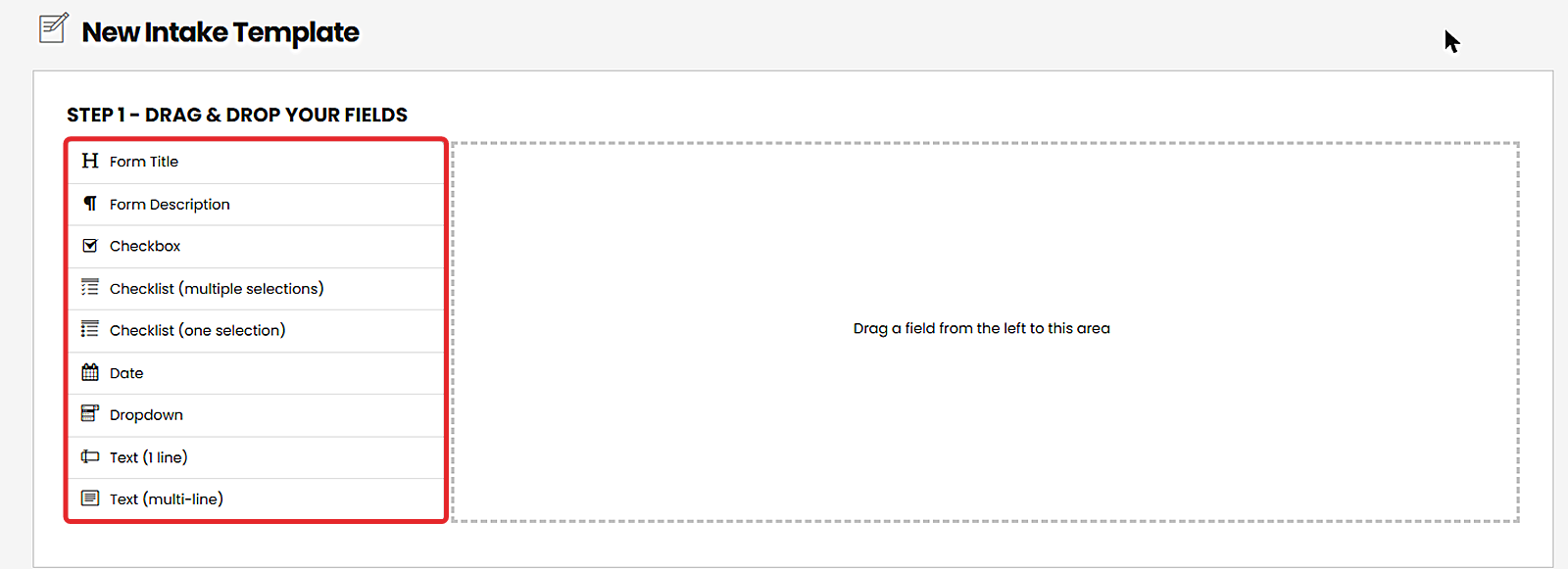
The matter's New menu runs from Task, Event, and Note to Apply Template, and no item requests a document from the client. The screen shows its lower part.

Pricing
PracticePanther lists every plan price, billed monthly or annually.
| Plan | Billed monthly, per user per month | Billed annually, per user per month |
|---|---|---|
| Solo | $59 | $49 |
| Essential | $79 | $69 |
| Business | $99 | $89 |
| Business Pro | $124 | $114 |
Intake forms, texting, and eSignature start on Business, with a 7-day trial at no charge. Prices come from PracticePanther's pricing page, last reviewed November 14, 2026.
How It Compares with Jubilee
Unlike Jubilee, PracticePanther prepares no petitions, so it fixes the intake and record work Jubilee leaves thin. Jubilee stays the petition tool and stays stronger at the forms, the means test, and filing.
Against Clio as the other record beside Jubilee, PracticePanther lists a price for every plan. Clio offers a public API, where PracticePanther's API starts with a request.
The switching trigger is phone intake retyped into Jubilee. There is no switching cost for Jubilee, only a second subscription and intake forms rebuilt without uploads or logic.
PracticePanther fits a small Chapter 7 practice on Jubilee that wants one cloud record at a listed price.
8. BK Questionnaire: Best for a Client Questionnaire in Front of Jubilee
Overview
BK Questionnaire is client questionnaire software from BK Assistant, Inc. that sits in front of petition preparation. It handles client intake, a debtor questionnaire, document collection, and a client portal, and its data imports into your existing petition software. Jubilee appears among its "Works With" logos and on Jubilee's own import screen.
It scored 2.6 out of 5 as a client questionnaire, eighth on this list, scored against the petition job it leaves to your petition tool. We scored it from the vendor's pages and published screenshots.
BK Questionnaire Bankruptcy Software Scorecard
BK Questionnaire scores 2.6 out of 5, and every score rests on the vendor's own pages.
| Dimension | Weight | Score (1 to 5) | Basis |
|---|---|---|---|
| Core job performance | 20% | 2 | It collects debtor data and runs an error check, but preparing the forms is not stated as a function. |
| Interoperability with your stack | 18% | 3 | CSV imports into "most major petition preparation systems". No public API is documented. |
| Ease of use and setup | 12% | 3 | Self-serve sign-up and guided client steps. The vendor shows no staff-side screens. |
| Practice-specific depth | 10% | 4 | Separate Chapter 7 and 13 flows, settings for all 91 districts, and over 6,000 common creditors. |
| Attorney review and AI controls | 10% | 1 | Not stated: no attorney approval step, roles, audit trail, or AI review control is described. |
| Pricing and cost structure | 10% | 3 | Public per-client prices, but the pricing page and the terms list different prices. |
| Data ownership and portability | 8% | 2 | A licensee agreement only, and data is deleted after 24 or 36 months unless you buy storage. |
| Support and reliability | 7% | 3 | Phone, text, and email, with hours not stated. No help center or status page. |
| Security and Opinion 512 posture | 5% | 2 | Encryption is described only in marketing terms. No attestation or DPA is stated. |
| Overall | 100% | 2.6 | Weighted sum 257 out of 500. |
Features
BK Questionnaire's pages and published screenshots describe these features; we did not run a trial of it.
- Adaptive questionnaire: separate Chapter 7 and 13 flows with settings for "All 91 Bankruptcy Districts".
- Document requests: itemized requests with text and email reminders, and a client app with a Documents tab.
- Data add-ons: payroll, bank statement, and credit report assistants, plus a "Paralegal Check" the terms call "an internal software algorithm".
- Export: a CSV into your petition software, with Best Case and Jubilee among the logos on its Chapter 7 page.
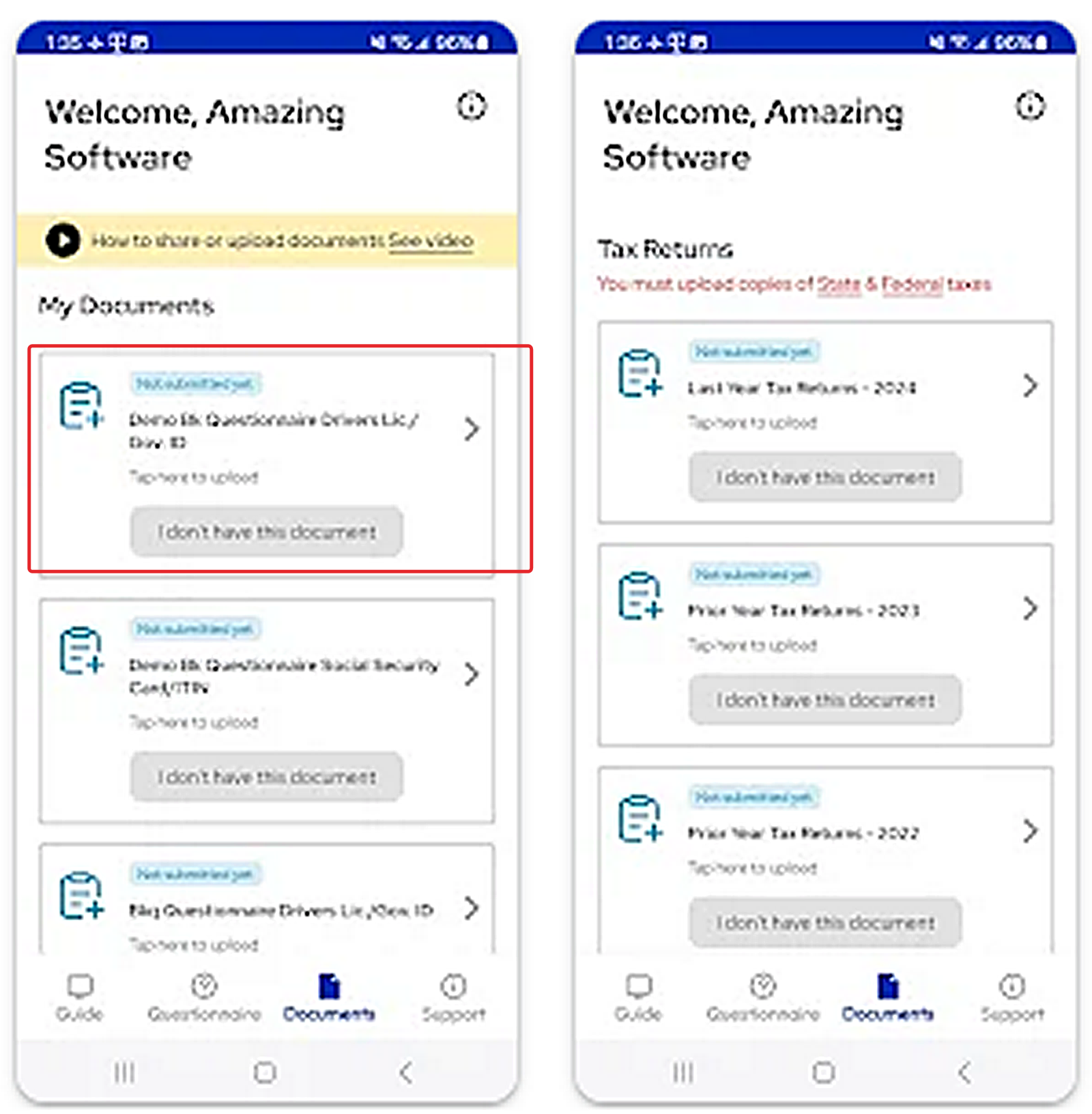
The client app on BK Questionnaire's Google Play listing marks what is still outstanding.
Screenshot: BK Assistant, Inc.
Pros
BK Questionnaire's own pages promise these gains for your firm.
- Staff stop typing facts your client already entered, once its data imports into Jubilee.
- A list of what is still missing ends the phone follow-up.
- Clients can finish on a phone, in Spanish if they need it.
- Cost follows clients rather than seats.
Cons
BK Questionnaire's limits start where intake ends.
- No petition work: petition preparation and e-filing are not stated as functions, so you keep paying for Jubilee. A customer statement on its homepage says it "does not yet support direct filing".
- No connections: no public API was documented on the pages checked November 4, 2026, and no practice-management or storage integration.
- No controls: no attorney approval step, roles, audit trail, or review control on its AI features is stated.
- Data deletion: the terms delete client data after 24 or 36 months unless you buy more storage, under a "licensee agreement only".
Pricing
BK Questionnaire prices per client, and its two price lists disagree.
| Plan | Pricing page, last reviewed November 14, 2026 | Terms, read November 4, 2026 |
|---|---|---|
| Standard | $39.99 per client | $39.99 per client |
| Premium | $89.99 | $69.99 |
| Ultimate, individual | $129.99 | $129.99 |
| Ultimate, joint | $159.00 | $159.99 |
Credit reports cost $15.99 per debtor on every plan, last reviewed November 14, 2026. The terms state "There are no set up fees", and no trial is offered. Neither page says which price governs, so ask before you sign.
The prices come from BK Questionnaire's pricing page, last reviewed November 14, 2026, and its terms, read November 4, 2026.
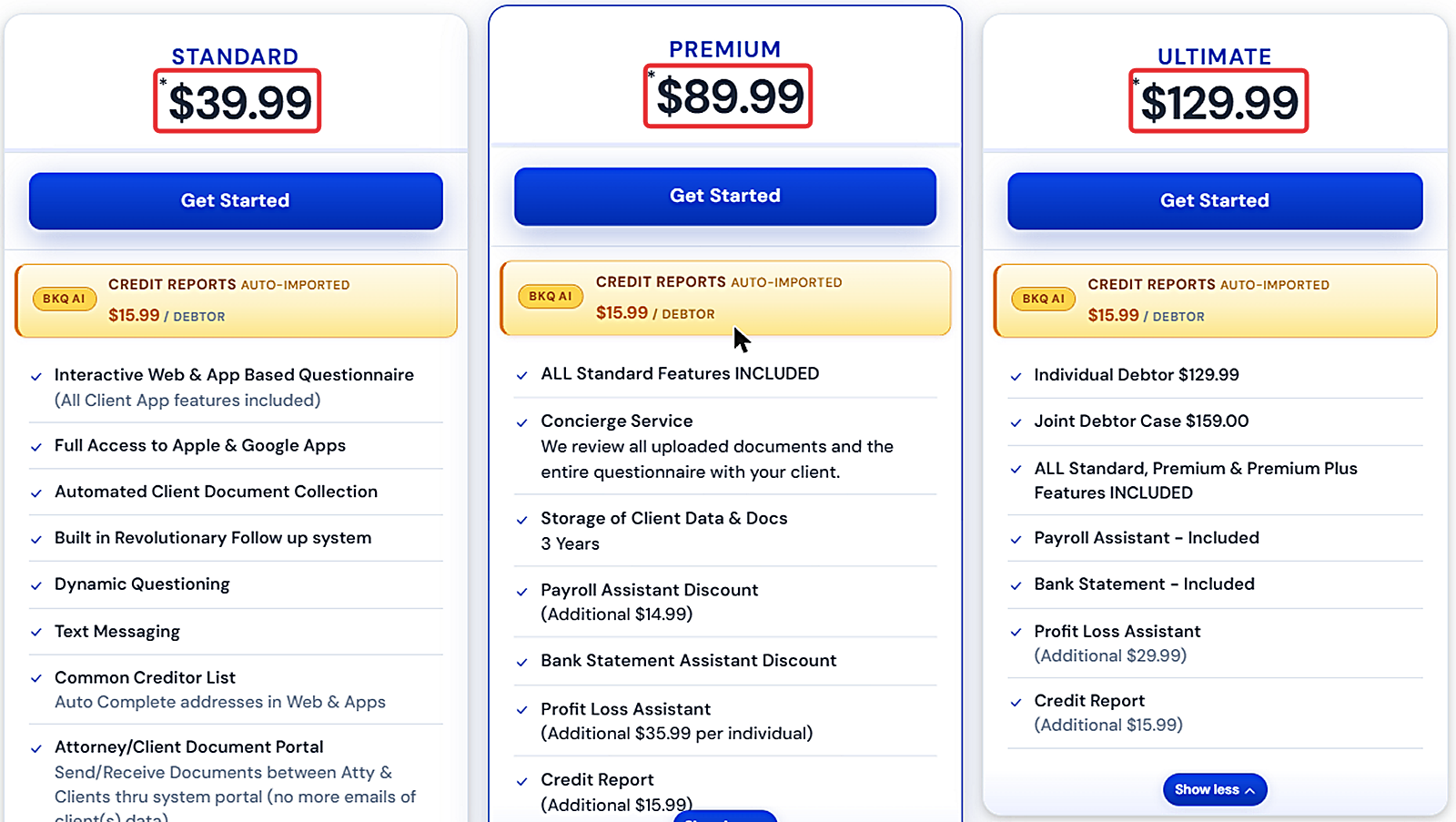
Screenshot: BK Assistant, Inc.
How It Compares with Jubilee
Unlike Jubilee, BK Questionnaire collects the client's answers itself, so it fixes the questionnaire Jubilee lacks without leaving Jubilee. It ends most re-keying client data into petition software, as long as the partner import into Jubilee works for your cases.
Jubilee stays the petition tool and stays stronger on everything after intake: the forms, the means test, and filing.
There is no switching cost for Jubilee, only a per-client charge and an import step per case.
BK Questionnaire fits a Jubilee firm whose top pain is collecting the client's answers and documents.
What to Ask Before You Switch From Jubilee
Ask these eight questions before you sign a new contract.
- Migration: how do our existing cases come over? Best Case converts only its own files, and Fresh Start Finance names NextGen XML files only.
- Export: can we export our open and closed cases from Jubilee, and in what format? No vendor here documents a Jubilee conversion, so ask Jubilee first. Then plan a petition software switch around open cases and re-entry.
- Intake: does the new tool hold a client questionnaire and document requests? Best Case, NextChapter, Fresh Start Finance, and Glade AI do, in different depth and on different plans.
- District: does it file in our district? BlueStylus files only in 22 listed districts, so check its list first.
- Chapter 13 plan: does it carry our district's plan form? Under Rule 3015.1, "a district may require that a single local form be used for a Chapter 13 plan".
- Price shape: what does each shape cost at our yearly filing count? Per case, per user, per firm, and per client each win at a different volume.
- Contract: what does it say about cancellation, data return, and deletion? For any tool that uses generative AI, ABA Formal Opinion 512, lawyers "should read and understand the Terms of Use, privacy policy, and related contractual terms".
- Support: what connects to our practice-management system, and who answers support, when? Ask for the documented connection and the published support hours in writing.
Which Option Fits Your Firm
Match the option to the pain that costs your team the most hours.
What are some good reasonably priced bankruptcy platforms besides Jubilee?
The best-priced platform besides Jubilee depends on your volume and team size. BlueStylus charges $50 per firm per month for up to 10 users, last reviewed November 14, 2026. NextChapter and Best Case charge per user, and Fresh Start Finance charges per user plus per case.
We have three systems that don't talk to each other; do we need new bankruptcy software?
Not always. A data layer around the tools you keep can join them, and the add-on software above fits when Jubilee does its petition job. New petition software fixes only the pains inside the petition tool.
- If you need different petition software, start with NextChapter at 3.6.
- If you file in volume and want the deepest tooling, start with Best Case at 3.4.
- If you want one AI workspace from intake to filing, start with Glade AI at 3.2.
- If you want intake, the document chase, and pay-stub figures inside the petition tool, start with Fresh Start Finance at 3.2.
- If you want a flat firm price with PACER downloads, start with BlueStylus at 2.8, after checking its district list.
- If Jubilee works and intake or the client record is the gap, start with Clio Manage or PracticePanther.
- If Jubilee works and the client questionnaire is the gap, start with BK Questionnaire.
On NextChapter vs Best Case, NextChapter wins on one-entry prep and its Clio and Zapier routes, while Best Case wins on practice depth. For every petition tool ranked side by side, see the best bankruptcy software for attorneys.
Keep Jubilee and Add an Automation Layer for Petition Prep
You can keep Jubilee for the forms, the means test, and filing, and automate the manual work around it. Aretech builds a data layer, AI agents, and automated workflows around the tool you keep. Your attorney reviews what the automation enters into Jubilee, and your firm submits each petition by hand.
Our petition software doesn't have an open API, so what are our options?
Keep the petition software and automate the work around it. Aretech builds petition data automation for bankruptcy firms around the tool you keep. The automation enters your data into it for your attorney to review.
You keep Jubilee for the forms, the means test, and filing. The manual work around it comes off your staff, so your firm can handle more matters and increase revenue without adding headcount.
Aretech builds the layer in three parts, in this order.
- A data layer: one record of each client across your practice-management system, petition software, storage, and phones. We connect through each vendor's own API where one exists, and we build around Jubilee where none is documented.
- AI agents: hosted frontier models read each upload and name the file from its content. They flag documents that are missing, incorrect, low-quality, or wrongly dated, and anything unreadable goes to a person.
- Automated workflows: the document chase runs from a portal checklist and follows up until each item is fixed. A reviewer at your firm checks each set before your attorney sees it.
Intake answers are captured once and carried into the matter and the petition inputs. Your attorney reviews what the automation enters into Jubilee, and your firm submits each petition by hand.
Nothing in the layer files, signs, takes payment, contacts a court or a trustee, or decides anything legal. Nothing renames automatically until you approve a propose-only pilot, and every rename is logged and can be reverted. SSNs taken from your CRM records are never stored.
The system runs in your own cloud account, and you own the code, data, workflows, and documentation.
You pay your model provider directly, with no subscriptions to us.
Cost follows the scope set after the workflow mapping session.
Free. The map is yours, even if you never hire us.
FAQs
What Is the Best Alternative to Jubilee for a Bankruptcy Firm?
NextChapter is the best alternative to Jubilee for most bankruptcy firms that want different petition software, at 3.6 out of 5 on our rubric. Best Case suits volume filers at 3.4. Add BK Questionnaire, Clio, or PracticePanther instead when Jubilee works for you.
Is There Better Bankruptcy Software Than Jubilee for a Firm Filing a Lot of 7s and 13s?
For volume, Best Case scores 3.4 with full marks for practice depth. Most attorneys answering a September 2026 Facebook thread on volume filing named it. NextChapter leads overall at 3.6 if you also want a Clio connection.
Can We Keep Jubilee and Add a Client Questionnaire?
Yes. Jubilee's import screen lists BK Questionnaire as a partner source, and Clio and PracticePanther also appear there. Each keeps Jubilee as your petition tool.
Does Jubilee Connect to Clio or PracticePanther?
Yes, both appear as import sources in Jubilee's own Case and Contact Data Import screen. Clio's App Directory lists a Jubilee sync, and PracticePanther describes a Jubilee integration for hearings, deadlines, contacts, and tasks. The Clio listing's set-up link returned an error on November 14, 2026, so confirm the connection with Jubilee before you rely on it.
How Does Jubilee Pricing Compare With NextChapter and Best Case?
Jubilee bankruptcy pricing runs $95.00 per case, or $995.00 to $4,995.00 a year by package. NextChapter charges $89 to $179 per user per month on a 12-month contract, and Best Case Cloud charges $99 per user per month. All were last reviewed November 14, 2026.
Can We Move Our Cases Out of Jubilee?
You can ask Jubilee for an export, but no vendor on this list documents a conversion from Jubilee. Ask the new vendor which file formats it reads, then plan re-entry for anything that does not convert.
Who Are Jubilee's Competitors?
Jubilee's main competitors are NextChapter, Best Case, Glade AI, Fresh Start Finance, and BlueStylus Case Builder Pro, the petition tools on this list. Clio, PracticePanther, and BK Questionnaire work beside it rather than against it.
Can Automation Get Our Data Into Our Petition Software?
Yes. The automation enters your client data into your petition software for your attorney to review, and your firm submits each petition by hand. It never files anything with a court.
What Does an Automation Layer Around Jubilee Cost?
The cost depends on the scope set after the workflow mapping session. It is a one-time build with no subscriptions to us, and you pay your model provider directly.
Do We Own What You Build?
Yes. You own the code, data, workflows, and documentation, and the system runs in your own cloud account.