DecisionVault is the top pick for your estate planning firm if you draft in separate software. It scores 3.5 out of 5 for deep intake that fills your design meeting. 8am MyCase follows at 3.4 if you want intake forms, a client portal, and billing in one per-user tier.
Smokeball (3.2), Clio (3.1), and Lawmatics (3.1) complete the ranking. We tested three of the five in trials with synthetic clients. For the other two we read the vendors' own documentation, and each finding says which. Prices were last reviewed between October 29 and November 14, 2026, and each Pricing section dates its own figures.
Aretech builds automation that works around the software it reviews; here is how we score software.
TL;DR
- Pick DecisionVault (3.5; Solo $99 a month, last reviewed November 2, 2026) if you draft in separate software.
- Pick 8am MyCase (3.4; Pro $120 per user per month, last reviewed November 14, 2026) for intake and billing in one system.
- Pick Smokeball (3.2) for a Windows office, or Lawmatics (3.1) if you market heavily.
- No vendor of the five shows a check of each upload against your request, so your staff still open every file. List the fields your staff retype, and ask each vendor where that data goes.
The Ranking at a Glance
The five products below rank by weighted score on our nine-dimension software rubric, read for an estate planning firm.
- DecisionVault, 3.5: best for firms that draft in separate software and need deep estate intake.
- 8am MyCase, 3.4: best for firms that want intake forms, a portal, and billing in one published tier.
- Smokeball, 3.2: best for Windows firms that keep their own will and trust language.
- Clio, 3.1: best for firms that want one client record and their pick of apps.
- Lawmatics, 3.1: best for firms that market actively and need fast inquiry follow-up.
What a CRM Has to Do in an Estate Planning Firm
Your estate planning CRM has to capture each client fact once and carry it from the first inquiry to the drafting software without retyping.
Whether you call it estate planning case management software or estate planning software for law firms, the job runs in six steps. Your attorney reviews at the design meeting and before anything reaches the client.
- Capture the inquiry: a web form or intake form creates the lead in your CRM.
- Run intake for joint clients: both spouses, children from each side, fiduciaries, and assets land in one questionnaire.
- Request documents and track what is missing: deeds, statements, and existing plans arrive through a portal or upload link.
- Move the matter forward: stages and tasks carry it from consult to design meeting, signing, and trust funding follow-up.
- Keep the client informed: email, text, and portal messages go out at each stage.
- Hand clean facts to drafting: the CRM pushes names, roles, and assets to your drafting software.
Your CRM feeds drafting software such as WealthCounsel or InterActive Legal. Even the CRMs that fill Word templates are not full estate drafting systems, so the hand-off in step 6 decides how much your staff retype.
Who This Ranking Is For (and Not For)
This ranking is for the people who choose and run software at a boutique wills and trusts firm.
For:
- Owner-attorneys choosing a CRM or auditing the one they run.
- Operations leads who set up intake, stages, and templates.
- Intake staff who chase client documents and retype facts.
Not for:
- Consumers planning their own estate, and their families.
- Do-it-yourself will makers and non-attorney document preparers.
- Financial advisors choosing an advisor CRM.
- Large firms and other practice areas.
How We Scored
We scored each product on the nine weighted dimensions of our published software rubric, read for an estate planning firm.
Every price carries its review date, and the scores rest on three kinds of evidence.
- Trials with synthetic test clients: DecisionVault on October 27 and 28, 2026, 8am MyCase on October 24, 2026, and Clio Manage on October 16, 2026.
- One Clio Work drafting request on November 10, 2026.
- Vendor documentation, release notes, and published screenshots for Lawmatics, Smokeball, Clio Grow, and the legacy Clio Draft, labeled on each entry.
Estate Planning CRM Software Compared
DecisionVault leads the table at 3.5, and each column header carries that dimension's weight.
| Product | Core job 20% | Interoperability 18% | Ease of use 12% | Practice depth 10% | Review and AI 10% | Pricing 10% | Data 8% | Support 7% | Security 5% | Overall | Best for |
|---|---|---|---|---|---|---|---|---|---|---|---|
| DecisionVault | 3 | 3 | 4 | 4 | 3 | 4 | 4 | 3 | 4 | 3.5 | Separate drafting software, deep estate intake |
| 8am MyCase | 3 | 3 | 4 | 3 | 3 | 4 | 3 | 5 | 4 | 3.4 | Intake, portal, and billing in one published tier |
| Smokeball | 3 | 3 | 3 | 4 | 3 | 2 | 3 | 5 | 4 | 3.2 | Windows firms with their own will and trust language |
| Clio | 3 | 3 | 4 | 3 | 3 | 2 | 3 | 4 | 4 | 3.1 | One client record and your pick of apps |
| Lawmatics | 4 | 3 | 3 | 2 | 3 | 2 | 3 | 4 | 4 | 3.1 | Active marketing and fast inquiry follow-up |
Lawmatics scores highest on core job, at 4, for its front-door intake and follow-up. 8am MyCase and Smokeball share the top support score of 5. Clio and Lawmatics both round to 3.1, and Clio ranks fourth on the unrounded sum, 314 against 312.
1. DecisionVault: Best for Deep Intake That Feeds Your Drafting Software
Overview
DecisionVault is estate planning intake and design-meeting software, not a full CRM.
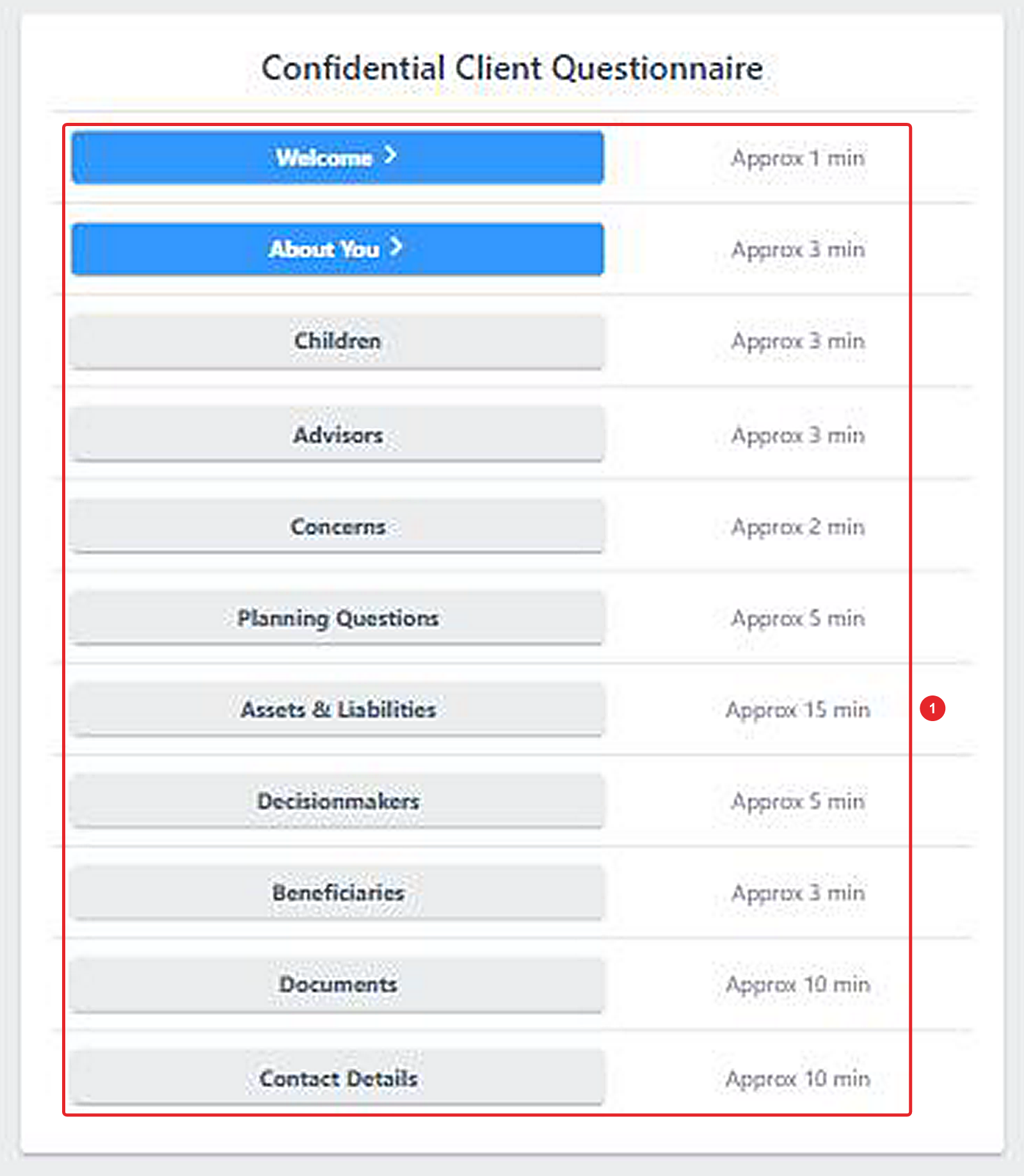
It serves boutique estate firms that draft in a separate platform such as WealthCounsel or InterActive Legal. Its 11-section client questionnaire fills the attorney's design sheet, and it pushes the matter one way to your other tools.
DecisionVault scores 3.5 out of 5. It leads on data terms and ties for the top practice-depth and pricing scores; our full DecisionVault review covers each finding.
DecisionVault Estate Planning Software Scorecard
DecisionVault scores 3.5 out of 5 overall for your estate planning firm, weighted across nine dimensions.
| Dimension | Weight | Score (1 to 5) | Basis |
|---|---|---|---|
| Core job performance | 20% | 3 | Estate intake runs deep for joint clients. Inquiry capture is absent, fee installment tracking is not stated, and document requests are typed one at a time. |
| Interoperability with your stack | 18% | 3 | A long list of integrations, plus an API, webhooks, and Zapier. Every sync pushes one way out. |
| Ease of use and setup | 12% | 4 | We found every area without documentation, and a matter took us 4 actions. Merge templates and connections need admin setup. |
| Practice-specific depth | 10% | 4 | Built for estate planning, with trust design, guardians, funding, and blended families. No will-only template ships. |
| Attorney review and AI controls | 10% | 3 | No AI runs inside the app. Automatic client emails send on their settings, with no per-message approval. |
| Pricing and cost structure | 10% | 4 | Every plan a boutique firm needs is published, with upgrade and notice terms. Enterprise is by quote. |
| Data ownership and portability | 8% | 4 | User Data stays the property of your firm or its client under the Terms. Exports run matter by matter. |
| Support and reliability | 7% | 3 | An in-app button, email, a help center, and office-hours webinars. No support hours or uptime guarantee are published. |
| Security and ABA Opinion 512 posture | 5% | 4 | A SOC 2 Type II audit is stated, with the report on request. No subprocessor list or data processing agreement is published. |
| Overall | 100% | 3.5 | 60 + 54 + 48 + 40 + 30 + 40 + 32 + 21 + 20 = 345 of 500, or 3.45 before rounding. |
Features
DecisionVault covers the estate intake steps in depth and stops short of the CRM's front door.
- Inquiry capture: not covered; we found no lead pipeline in our October 27, 2026 trial.
- Joint-client intake: covered; the questionnaire runs 11 sections with time estimates, and each child ties to both spouses or one.
- Document requests: partial; staff type each request one at a time, and a standing list can sit on each questionnaire.
- Upload links: staff can create a one-time upload link for a document request that needs no account and stays valid for 7 days.
- Matter stages: partial; six stages run from Invite to Data Gathering, Meeting, Follow-up, Drafting, and Signing.
- Reminders: partial; one reminder for an unsubmitted questionnaire ties to the meeting date and is off by default. The Follow-up stage says DecisionVault "will keep following up" on the data points staff flag, which we did not see run in our trial.
- Drafting hand-off: partial; Document Merge fills Word templates you upload, and integrations push to drafting tools.
Pros
DecisionVault takes typing and rework off your staff before the design meeting.
- Your staff stop typing intake from paper, because the couple answers in one shared questionnaire.
- Your design meeting starts with the facts already on the attorney's design sheet.
- Your staff fix assets after the client submits, with no new form sent.
- Your whole team gets in on any plan, because every plan includes unlimited users.
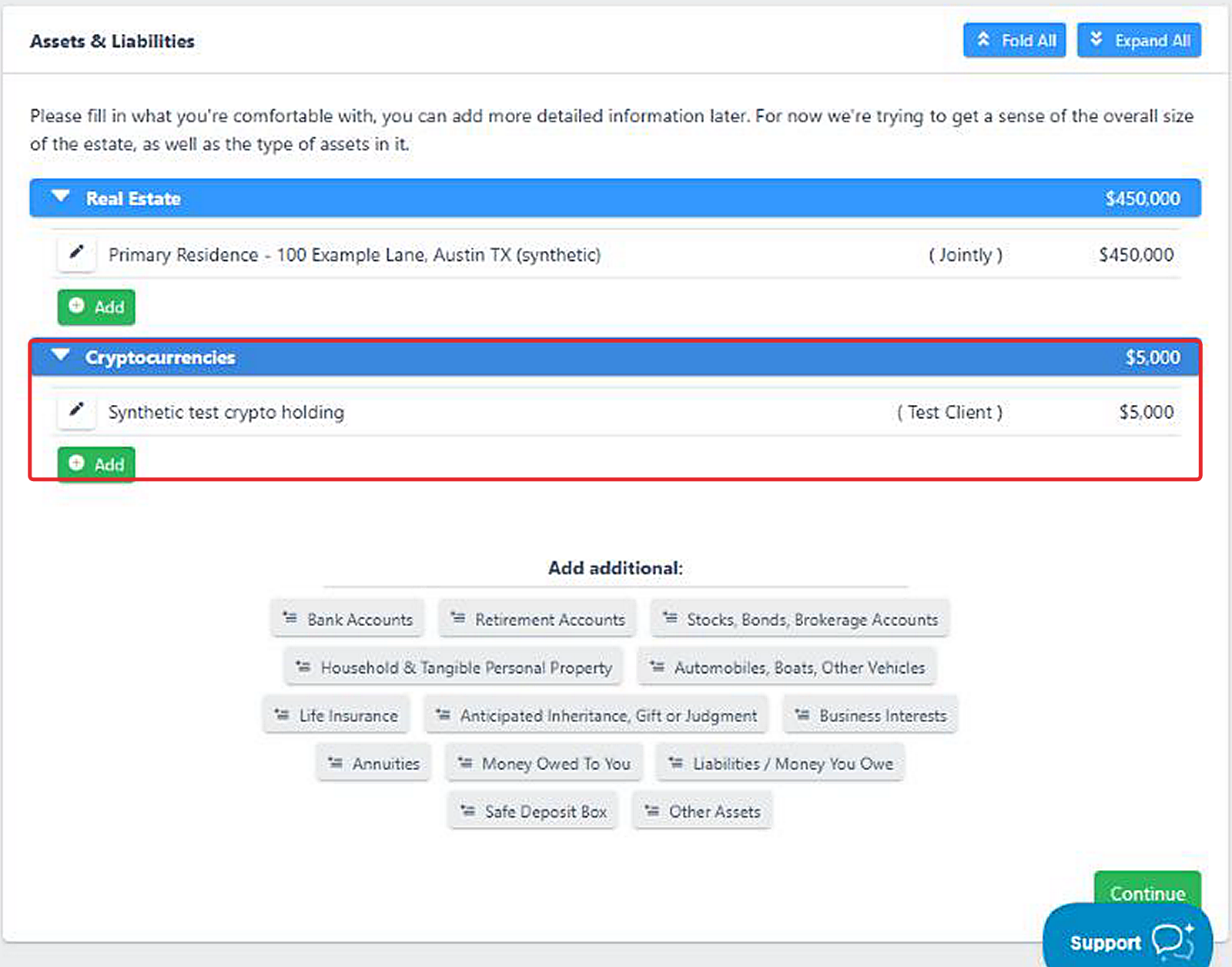
On October 28, 2026, we added a Cryptocurrencies item and changed a residence value on a submitted, locked matter as a staff user. Both changes saved at once, and no form went back to the client.
Cons
DecisionVault leaves the sync, the drafting, and the upload check to other tools or your staff.
- Every integration pushes one way: the in-app Integrations page says they sync "from DecisionVault to the other tool(s)". Its sync support article covers the push.
- No drafting screen and no e-signature sit inside the app, so the documents come from another tool.
- Your staff run each sync by hand from the matter, and no check of what a client uploads is stated.
- Clients create an account to answer the questionnaire; only a document request's upload link skips it.

Pricing
DecisionVault publishes every plan except Enterprise on its pricing page, last reviewed November 2, 2026, and every plan includes unlimited users.
| Plan | Monthly billing | Billed annually (per month) | New matters a month | Last reviewed |
|---|---|---|---|---|
| Solo | $99 | $83 | up to 10 | last reviewed November 2, 2026 |
| Team 30 | $199 | $165 | up to 30 | last reviewed November 2, 2026 |
| Team 60 | $299 | $249 | up to 60 | last reviewed November 2, 2026 |
| Team 120 | $499 | $415 | up to 120 | last reviewed November 2, 2026 |
| Team 250 | $899 | $749 | up to 250 | last reviewed November 2, 2026 |
| Enterprise | by quote | by quote | by quote | last reviewed November 2, 2026 |
The Solo and Team plans offer a 14-day trial, and our own trial account showed the same length.
2. 8am MyCase: Best for Intake Forms, a Portal, and Billing in One Published Tier
Overview
8am MyCase is cloud practice management for every practice area, with intake forms, workflows, a client portal, billing, and 8am IQ AI.
It serves solo and small firms, and its own estate planning page lists DecisionVault for estate questionnaires. In our October 24, 2026 trial, it held both spouses on one Estate Planning case and ran a conditional intake form.
On Capterra, 8am MyCase holds 4.6 from 807 reviews, one pool shared with Software Advice, as read October 24, 2026. It scores 3.4 out of 5, led by its support and its published per-user prices.
8am MyCase Estate Planning Software Scorecard
8am MyCase scores 3.4 out of 5 for your estate firm.
Eight of the nine scores match our 3.3 scoring for bankruptcy firms (331 of 500). Practice depth moves from 2 to 3 here, for 341.
| Dimension | Weight | Score (1 to 5) | Basis |
|---|---|---|---|
| Core job performance | 20% | 3 | Conditional intake forms and both spouses on one case. No document request or missing-items view; we applied each workflow by hand; reminders go to firm users only. |
| Interoperability with your stack | 18% | 3 | An Open API with webhooks on Advanced; listed integrations include DecisionVault, Lawmatics, and Zapier. No estate drafting software card in our trial. |
| Ease of use and setup | 12% | 4 | We found every task without the documentation, and a joint estate case took about 4 minutes. You build your own fields, forms, workflows, and templates. |
| Practice-specific depth | 10% | 3 | One Estate Planning practice label and both spouses on one case; sample estate templates on Advanced. No estate document set came in our trial. |
| Attorney review and AI controls | 10% | 3 | A firm-wide AI switch and citations, per the vendor's documentation. No approval step before client sends in our trial. |
| Pricing and cost structure | 10% | 4 | Every tier is priced publicly, with no setup fee. Fees are final and non-refundable, and prices can change on notice. |
| Data ownership and portability | 8% | 3 | You own your Customer Content. Self-serve CSV export and a full backup kept seven days; documents and invoices download separately. |
| Support and reliability | 7% | 5 | Guided implementation on every plan, phone, chat, and email, data migration included on Pro and Advanced, and public release notes. |
| Security and ABA Opinion 512 posture | 5% | 4 | SOC 2 Type 2 listed in the trust center, OpenAI named, and a written no-training statement. No subprocessor list. |
| Overall | 100% | 3.4 | 60 + 54 + 48 + 30 + 30 + 40 + 24 + 35 + 20 = 341 of 500, or 3.41 before rounding. |
Features
8am MyCase covers intake and the case record from Pro up, and leaves estate intake depth to a partner.
- Intake forms: a conditional builder with mapped fields, multi-file upload, and a preview of what the client sees, from Pro.
- Joint estate case: we put both spouses on one Estate Planning case in about 4 minutes.
- Leads: a leads board tracks inquiries before they become cases.
- Workflows: checklist workflows set tasks with due dates relative to a date on the case.
- Documents: templates you upload merge case data into a new document.
- Backup: you can create one self-serve full backup a day, kept seven days.
- Estate partners: DecisionVault and Eternal Pro cards sit in the integrations list.

Pros
8am MyCase gives you one bill and fast setup instead of a stack of add-ons.
- You buy intake forms, the portal, e-signature, and billing in one per-user tier, with no separately priced intake product.
- Your staff can start a new couple's matter the same day they call.
- You pull your own data out whenever you want, without a support ticket.
- A person walks your firm through implementation at no added cost.
Cons
8am MyCase leaves the document chase and the estate drafting set to your staff.
- No document request screen, client checklist, or missing-items view appeared in our October 24, 2026 trial. MyCase's documentation shows client tasks as its route for asking a client for documents, which we did not test.
- Task reminders in our trial went only to firm users (Me, Attorneys, Paralegals, or Staff), never to the client.
- We applied each workflow to a case by hand in our trial. MyCase's workflow page lists triggers such as a court date or an intake submission.
- No estate document set ships, templates are Word files you upload, and nothing waits for attorney approval before a share or message.
Because MyCase's own estate page points to DecisionVault for questionnaires, your estate intake depth sits in a partner tool.
Pricing
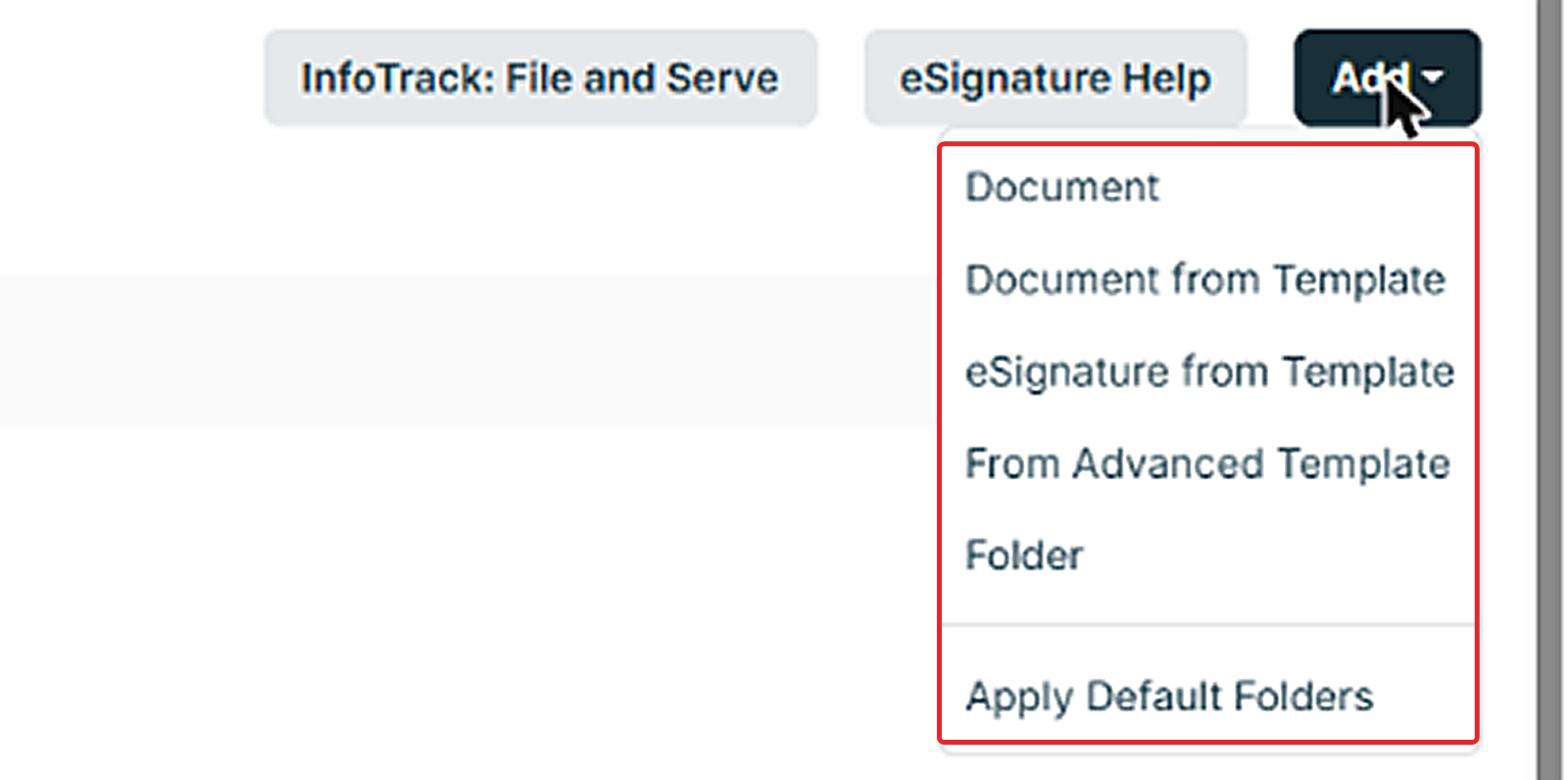
8am MyCase publishes every tier per user per month on its pricing page, last reviewed November 14, 2026.
| Tier | Billed monthly | Billed annually | What starts here | Last reviewed |
|---|---|---|---|---|
| Basic | $60 | $50 | case management, portal, billing | last reviewed November 14, 2026 |
| Pro | $120 | $100 | intake forms and workflows | last reviewed November 14, 2026 |
| Advanced | $150 | $130 | the Open API | last reviewed November 14, 2026 |
| MyCase Accounting | $39 added | $39 added | an add-on for Pro or Advanced | last reviewed November 14, 2026 |
The pricing page offers a 10-day trial with no credit card and no setup fee.
3. Smokeball: Best for Estate Matters, Intake, and Templates in One Windows System
Overview
Smokeball practice management ships estate matter types, an Estate Details layout, intake forms, and Word template automation in one system.
It serves estate firms that run Windows and keep their own will and trust language. We did not test Smokeball. Every product finding below comes from Smokeball's own pages and published screenshots, read between October 21 and November 1, 2026.
On G2, Smokeball holds 4.7 from 389 reviews, as read November 1, 2026. It scores 3.2 out of 5, led by included onboarding and phone support; our Smokeball review for estate planning firms covers the rest.
Smokeball Estate Planning Software Scorecard
Smokeball scores 3.2 out of 5 for your estate firm, and every score rests on Smokeball's own documentation.
| Dimension | Weight | Score (1 to 5) | Basis |
|---|---|---|---|
| Core job performance | 20% | 3 | Estate matters, intake forms, workflows, and a client portal cover most steps. Your staff still run the document chase and the drafting hand-off by hand. |
| Interoperability with your stack | 18% | 3 | A documented API and partner listings exist. Firm API access needs Prosper+ and developers. |
| Ease of use and setup | 12% | 3 | The Firm Owner builds custom intake forms, templates are Word files, and Grow and Prosper+ need Windows 11. |
| Practice-specific depth | 10% | 4 | Estate matter types, Estate Details, couples, and a sample estate workflow ship ready. No ready-made trust template is documented. |
| Attorney review and AI controls | 10% | 3 | Archie cites sources and can be switched off per user. No review step for non-AI client messages is documented. |
| Pricing and cost structure | 10% | 2 | Smokeball shows no price, add-ons stack by plan, and fees can rise on 60 days' notice. |
| Data ownership and portability | 8% | 3 | You own your data. Export covers structured records, and documents come through a backup request. |
| Support and reliability | 7% | 5 | Onboarding is included, phone support runs US business hours, three migration packages exist, and release notes are public. No uptime guarantee is stated. |
| Security and ABA Opinion 512 posture | 5% | 4 | ISO 27001 is stated, with AES-256 and TLS 1.2+ encryption and zero data retention for Archie. No SOC 2 report is stated. |
| Overall | 100% | 3.2 | 60 + 54 + 36 + 40 + 30 + 20 + 24 + 35 + 20 = 319 of 500, or 3.19 before rounding. |
Features
Smokeball's documentation shows the estate matter built in, with the chase and the trust template left to your firm.
- Intake forms: a form builder with conditional logic that shows or hides sections, groups, or questions.
- Couples: both spouses sit on one matter as Client 1 and Client 2, per Smokeball's couples article.
- Estate workflow: a sample Estate Planning workflow runs from the first meeting to signing, with a one-year client reminder.
- Client portal: a to-do list carries intake forms and documents on Boost and up.
- Document chase: not covered; Smokeball's intake forms article, updated January 30, 2026, shows a manual Send Reminder.
- Drafting: partial; TemplateLab fills your own Word templates, and no ready-made trust template is documented.
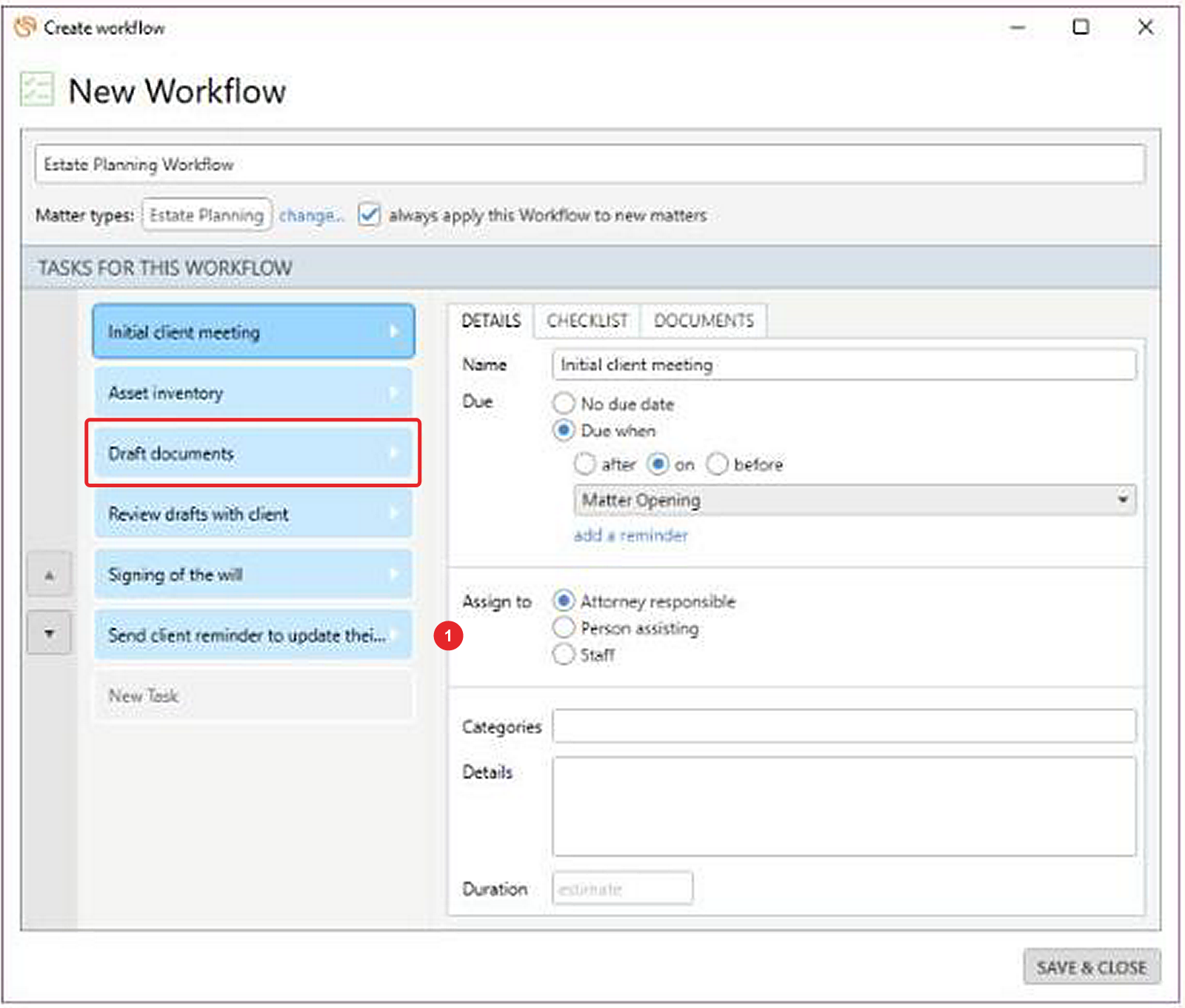
Smokeball's sample estate workflow in the builder. Screenshot: Smokeball documentation.
Pros
Smokeball keeps an estate matter in one record and your own language in its templates.
- Your staff work one record from intake to signing, so nothing is rebuilt in a second tool.
- Your own will and trust language fills from the matter once your templates are set up.
- A prompt to contact past clients a year after signing brings plan reviews back to your desk.
- A person answers the phone Monday to Friday, 8 am to 7 pm CST, per Smokeball's account management page.
Cons
Smokeball's documentation leaves the client chase manual and ties the upper plans to Windows.
- No automatic client document chase is documented on the pages read.
- Grow and Prosper+ need Windows 11 with locally installed Office 365 for Business, per the System Requirements article updated August 14, 2026. Mac OS is unsupported.
- Pricing is quote-only, and the terms renew a 12-month subscription unless you give notice 30 days before the renewal date.
- Export covers structured records, and documents come through a Data Backup request.
Pricing
Smokeball's pricing page shows GET PRICING on every plan, last reviewed October 29, 2026.
G2's pricing listing shows Bill at $49 and Boost at $89 per user per month, a third-party listing read November 1, 2026. Intake is an add-on on Boost and Grow and is included on Prosper+.
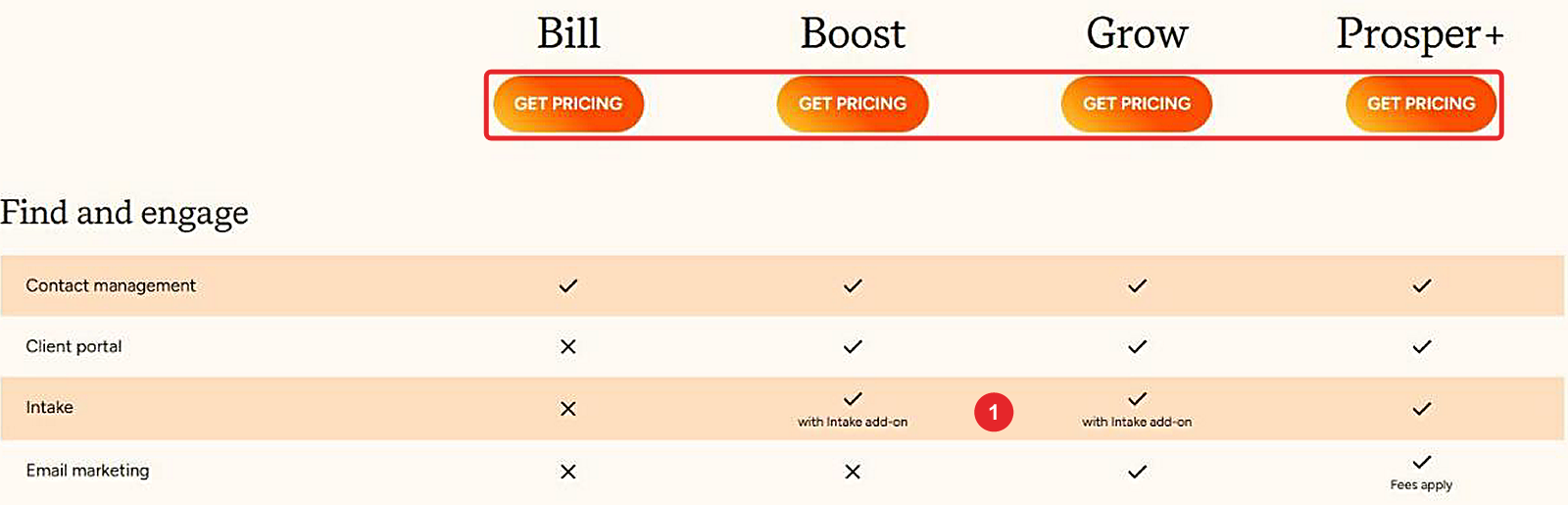
Smokeball's pricing page shows GET PRICING on every plan. Screenshot: Smokeball's pricing page, linked above.
4. Clio: Best for One Client Record and Over 300 Apps
Overview
Clio is cloud practice management in Clio Manage, with intake and CRM in Clio Grow and drafting logic in Clio Draft.
It serves estate firms that want one matter and client record and choose their own drafting and intake apps. In our October 16, 2026 trial, Clio Manage held a married couple on one matter.
On Software Advice, Clio holds 4.7 from 1,751 ratings, as read October 29, 2026. It scores 3.1 out of 5; our Clio review for estate planning firms has the full test.
Clio Estate Planning Software Scorecard
Clio scores 3.1 out of 5 for your estate firm, weighted across nine dimensions.
| Dimension | Weight | Score (1 to 5) | Basis |
|---|---|---|---|
| Core job performance | 20% | 3 | Tested: two spouses on one matter, checklists, and matter templates. No intake form or document request in Manage. |
| Interoperability with your stack | 18% | 3 | Over 300 apps and an open API. WealthCounsel receives Clio contacts and matters one way. |
| Ease of use and setup | 12% | 4 | First matter in about 3 minutes without the documentation. About 21 minutes to the first templated matter. |
| Practice-specific depth | 10% | 3 | Separate Trusts and Wills and Estates practice areas. Nothing estate-specific came preloaded in our trial. |
| Attorney review and AI controls | 10% | 3 | AI extraction highlights what it fills, per Clio's documentation. No approval step before a portal share in our trial. |
| Pricing and cost structure | 10% | 2 | One published price. Higher tiers are quoted, and fees are subject to change upon notice. |
| Data ownership and portability | 8% | 3 | Content stays yours. Ten CSV exports, with documents not on the list. |
| Support and reliability | 7% | 4 | Live support 24 hours a day, 5 days a week. In-app chat opens with an AI support agent. |
| Security and ABA Opinion 512 posture | 5% | 4 | SOC 2 Type II stated by Clio. Its subprocessor list names its AI providers. |
| Overall | 100% | 3.1 | 60 + 54 + 48 + 30 + 30 + 20 + 24 + 28 + 20 = 314 of 500, or 3.14 before rounding. |
Features
Clio covers the client record well and spreads intake, chasing, and drafting across add-ons.
- Inquiry and intake forms: in Clio Grow, which Clio's documentation shows building forms from field blocks.
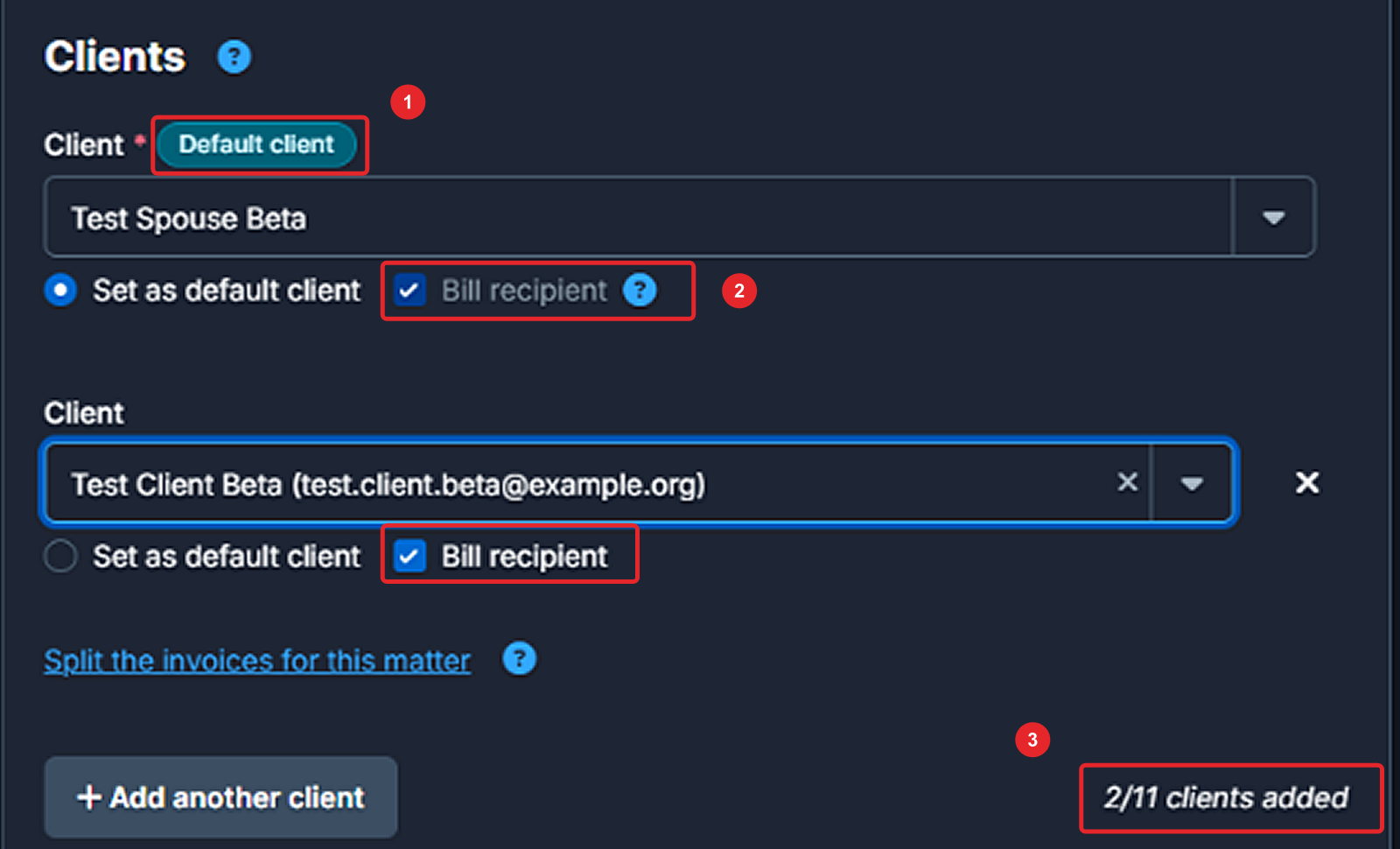
- Joint clients: one matter holds up to 11 clients, and we tested two on October 16, 2026.
- Document requests: our trial found no request or missing-items view in Manage; Clio's documentation shows single client tasks in the portal on select plans.
- Matter automation: partial; we found three triggers and three actions, and our test run failed on a matter with no responsible attorney.
- Drafting: Manage merges your uploaded Word or PDF templates, and Clio Draft adds conditional logic, per Clio's documentation.
- Clio Work: on November 10, 2026, we sent one request with synthetic names to Vincent, Clio Work's AI assistant, and got a two-page California will draft in about 35 seconds of working time. It arrived in the Editor as tracked changes, marked not for signing.
- Apps: the App Integrations home lists over 300 apps, and Clio documents an open API.
We made no claim about that draft's law, and we did not test drafting from a Clio Manage matter.
Pros
Clio keeps a couple's plan in one file and keeps your current drafting tool in place.
- Your staff keep one file per couple, not two, with a bill recipient for each spouse.
- Your team opened a first matter in about 3 minutes in our trial, so training time stays low.
- Your firm keeps the drafting tool it already uses and picks intake apps from the directory.
- Your staff get live help when they are stuck, 24 hours a day, 5 days a week, per Clio's support page.
Cons
Clio puts intake forms in Clio Grow, outside every Manage plan below Elite, and leaves Manage fields without conditions.
- Intake forms sit in Clio Grow, which is included in Elite and sold as an add-on for Core and Signature.
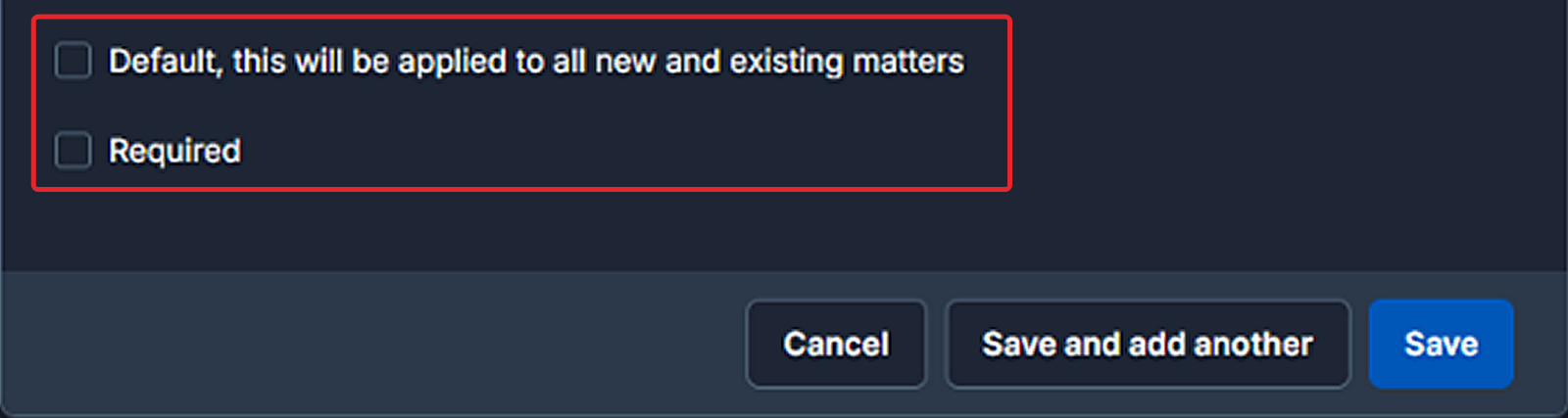
- Manage custom fields offered only Default and Required in our trial, with no conditional option.
- Tasks in a task list cannot be re-ordered, per Clio's task lists article, and they listed alphabetically in our trial.
- A Grow matter converts to Manage one matter at a time, per Clio's Convert Matters article.
Our page on Clio alternatives for estate planning firms weighs each option against Clio when these limits push you to look elsewhere.
Pricing
I use very few of the features in Clio. Which tier fits?
Match the tier to the steps you actually use. Clio Grow and Clio Draft are priced apart from Clio Manage. Clio's pricing page publishes one price, Starter at $49 per user per month, last reviewed November 14, 2026. Core, Signature, and Elite read "Get pricing", and Clio Draft has no published price.
Starter leaves out custom fields, document templates, matter templates, apps and integrations, and the client portal, which start at Core. Automated workflows start at Signature, so your estate firm cannot stop at the one published price.
That add-on structure matches a wider trend. The ABA's 2024 Practice Management TechReport found solo use of case/practice management software fell from 45% in 2022 to 37% in 2024. It tied the drop first to price: vendors "often charge users 'a la carte,' or individually per add-on to the original product".
5. Lawmatics: Best for Fast Follow-Up on Every New Inquiry
Overview
Lawmatics is a legal CRM and intake platform that runs each matter from first inquiry to hire.
It serves estate firms that market actively and want follow-up to run without staff watching the inbox. We did not test Lawmatics. Every product finding below comes from Lawmatics' own documentation and pricing pages, read between October 21 and November 14, 2026.
On G2, Lawmatics holds 4.6 from 251 reviews, as read October 29, 2026. It scores 3.1 out of 5; our Lawmatics review for estate planning firms covers each limit.
Lawmatics Estate Planning Software Scorecard
Lawmatics scores 3.1 out of 5 for your estate firm, and every score rests on Lawmatics' own documentation.
| Dimension | Weight | Score (1 to 5) | Basis |
|---|---|---|---|
| Core job performance | 20% | 4 | Forms, follow-up, file requests, and automations cover the front door. Your staff check file contents by hand. |
| Interoperability with your stack | 18% | 3 | Matters push one way to practice-management tools, the WealthCounsel sync is closed to new customers, and the API is open. |
| Ease of use and setup | 12% | 3 | Vendor pages describe days to weeks of setup, paid onboarding phases, and Word field codes copied by hand. |
| Practice-specific depth | 10% | 2 | A general tool: you build your estate stages, forms, and funding follow-up. No will or trust library or funding checklist ships. |
| Attorney review and AI controls | 10% | 3 | Review exists for Engage, Copilot, and draft signature documents. Automated forms, emails, and texts send without approval. |
| Pricing and cost structure | 10% | 2 | Every plan is quote-only, seats are committed for the term, and add-ons are priced by use. |
| Data ownership and portability | 8% | 3 | You own your Customer Data and can export CSV. Files and documents cannot be bulk exported. |
| Support and reliability | 7% | 4 | Email support, an account manager, weekday live office hours, dated help articles, and quarterly release notes. |
| Security and ABA Opinion 512 posture | 5% | 4 | SOC 2 Type 2 on request, mandatory MFA, and a written no-training policy. Merlin sat outside the audited period. |
| Overall | 100% | 3.1 | 80 + 54 + 36 + 20 + 30 + 20 + 24 + 28 + 20 = 312 of 500, or 3.12 before rounding. |
Features
Lawmatics' documentation shows a strong front door and a status-only document request.
- Inquiry capture: forms, booking, and follow-up automations start the moment a lead arrives.
- Joint-client intake: partial; relationship blocks make each spouse or child a contact, and collection blocks hold repeated items.
- Conditions: a form question shows or hides only on true/false, picklist, or multi-picklist answers.
- File requests: partial; each request lists named files and moves from Pending to Submitted to Completed, a status rather than a content check.
- Hand-off at hire: partial; the matter pushes to your practice-management system, and Clio sends back only a closed status.
- Engagement letters: covered, with e-signature from document templates.
- Drafting: not covered; the estate page leaves wills and trusts to your drafting tool.

Lawmatics' blank file request template, where each requested file takes a name and a file type. Screenshot: Lawmatics documentation.
Pros
Lawmatics takes routine follow-up off your staff and shows which marketing pays.
- Your staff stop sending each follow-up by hand, because automations send forms and reminders when a trigger fires.
- Your intake enters each spouse once as a related contact who can sign the fee agreement.
- Your Clio firm skips re-entering the client at hire, per Lawmatics' Clio integration article.
- You see which sources bring signed matters, so marketing money goes where it pays.
Cons
Lawmatics' documentation stops the intake data at the drafting hand-off and commits you to seats.
- WealthCounsel, which the estate page names as a drafting tool, is missing from the integrations page, and the WealthCounsel sync is closed to new customers.
- Collections cannot map to integrations or be used as document merge fields.
- Files on an abandoned form are lost, because the autosave article saves uploads only when the client clicks Submit.
- Seats are committed for the term, with a 3-user minimum on Essential and Premium.
For a solo firm weighing that 3-seat minimum, our page on Lawmatics alternatives for estate planning firms compares the options.
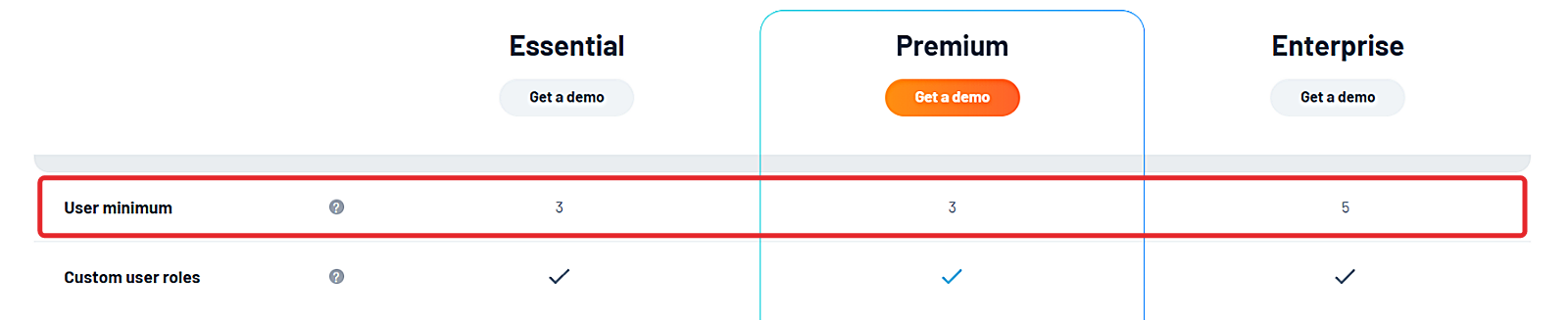
Lawmatics' plan table with the user minimums. Screenshot: Lawmatics' pricing page, linked below.
Pricing
Lawmatics quotes every plan through sales on its pricing page, last reviewed October 29, 2026, and publishes its add-ons.
- Merlin AI Outcomes: $149 a month for 50 outcomes up to $1,999 for 2,000, last reviewed November 14, 2026. The Merlin Pricing article is dated September 9, 2026.
- Premium Implementation: $999 one time on Lawmatics' Premium Implementation page, last reviewed October 29, 2026.
- Premium Data Migration: $500 in Lawmatics' Premium Onboarding article, last reviewed October 29, 2026.
The 50-outcome Merlin tier is an AI add-on, not a plan price. All prices are in US dollars.
Best Estate Planning CRM by Firm Situation
Pick the CRM by the job your firm needs done first, then add intake depth where your record is thin.
Right now I am contemplating DecisionVault or Lawmatics and Clio Manage. Which do I need?
They do different jobs. DecisionVault fills your design meeting and pushes one way into Lawmatics or Clio Manage, while Lawmatics or Clio Manage holds the client record. Pick the record first, then add DecisionVault if intake depth is your gap.
- You draft in WealthCounsel or InterActive Legal and want deep intake: DecisionVault.
- You want intake, a portal, and billing in one published tier: 8am MyCase.
- You want one Windows system with estate matter types and included onboarding: Smokeball.
- You want one client record and freedom to pick intake and drafting apps: Clio.
- You market heavily and need fast lead follow-up: Lawmatics.
- You run a Mac office: Clio, 8am MyCase, or Lawmatics, which run in the browser, rather than Smokeball's desktop plans.
- You practice solo with fewer than three users: DecisionVault Solo or 8am MyCase Pro, since Lawmatics bills at least 3 seats.
Your intake tool, CRM, and drafting software still have to work as one stack. Our guide to how the estate planning tech stack fits together maps those pairings.
Add an Automation Layer Around Your CRM for Estate Planning Intake
Whichever CRM you pick, keep it and automate around it. Capture each client fact once, then carry it to your CRM, your practice-management system, and your drafting inputs.
Aretech builds that layer for boutique firms, and our automated intake for estate planning firms starts where the CRM leaves staff retyping.
Your firm handles more estate matters and increases revenue without adding headcount.
We build the layer in this order.
- The data layer: one source of truth across your CRM, drafting software, storage, and phones.
- AI agents: software that reads what arrives and applies your firm's rules, with hosted frontier models doing the AI work.
- Automated workflows: the steps that act on that record, with your staff in control.
Whatever CRM you keep, we build the connection or work around the tool, as part of the build we deliver. The build is a one-time project priced to scope, with no subscriptions, and your firm pays its own model provider.
Re-Keying Client Data Into Drafting Software Is the Time Suck: What Fixes It?
Capturing each fact once and sending it to your drafting inputs fixes it, so no one retypes a name, a child, or an asset.
The data layer gives your CRM, drafting software, storage, and phones one record of each client. Before you buy another add-on, weigh Clio vs custom automation for estate planning to see what automating around the CRM changes.
What the Layer Takes Off Your Staff
The layer takes the retyping, the chasing, and the blank first page off your staff.
- Intake capture: your client answers once, with conditional questions. Aretech built and handed over a custom intake system for an estate planning firm, with staff-only sections and staff-editable forms.
- Document chase: the system finds what is missing, wrong, unreadable, or out of date, and chases your client through your own channels.
- No repeat requests: the chase never re-asks for what already arrived, and your staff see what is ready for attorney review.
- First drafts: assembled from your own templates and precedent, with missing details flagged, for your attorney to approve.
- Staff control: your staff change reminder wording, timing, and frequency, and the switch to a phone call, without a developer.
- Uncertain items: anything the system is unsure about goes to a person.
Each line cuts the data entry estate planning software leaves to staff, so retyped answers stop eating your week.
Where the Attorney Reviews
Your attorney reviews everything, and nothing the system does signs, files, submits, takes a payment, contacts a court or trustee, or decides anything legal.
Your firm owns the code, data, workflows, and documentation. The system lives in your firm's own cloud account, hosted frontier models do the AI work, and no firm's data trains anything.
FAQs
Is There a CRM Specifically Built for Estate Planners?
None of the five ranked here is a CRM built only for estate planning. DecisionVault is estate-only intake software that feeds a CRM, and Smokeball ships estate matter types inside a general practice system. 8am MyCase's estate page says it is not specifically designed for estate planning and lists DecisionVault for questionnaires.
What Client CRM Do Estate Planning Law Firms Use, and Which Do You Recommend?
DecisionVault, 8am MyCase, Smokeball, Clio, and Lawmatics recur across the estate CRM listicles, AI answers, and practitioner threads we read. We recommend DecisionVault if you draft in separate software and 8am MyCase if you want one system. Choose Smokeball for Windows, Clio for its app directory, or Lawmatics for marketing-led intake.
Does DecisionVault Work With Clio?
Yes, one way: DecisionVault's in-app Integrations page lists Clio Manage, not Clio Grow, with a note that Clio Manage "Essentials" or higher is needed. Your staff run each sync from the matter, and we ran no push in our trial. Clio's App Directory listing for DecisionVault says contacts sync over. Ask DecisionVault which current Clio plan its note means, because Clio now sells Starter, Core, Signature, and Elite.
Does Lawmatics Have a Clio Integration?
Yes, and the data mostly moves one way. Lawmatics pushes the matter to Clio Manage when a lead converts, or earlier when staff sync it. Mapped fields go across, plus optional documents, notes, and relationships. An optional setting sends a closed matter's status back to Lawmatics.
How Much Does an Estate Planning CRM Cost?
An estate planning CRM costs $49 to $150 per user per month on published per-user plans. DecisionVault instead charges $99 to $899 a month for the whole firm.
- 8am MyCase: $60 to $150 per user per month, billed monthly, last reviewed November 14, 2026.
- Clio: Starter at $49 per user per month, the only published Clio price, last reviewed November 14, 2026.
- DecisionVault: $99 to $899 a month for the whole firm, priced by new matters a month with unlimited users, last reviewed November 2, 2026.
- Lawmatics and Smokeball: every plan quoted through sales.
Is There a Free Estate Planning CRM?
None of the five lists a free plan on its pricing page as we read them. DecisionVault offers a 14-day trial on its Solo and Team plans, and 8am MyCase offers a 10-day trial with no credit card. Lawmatics and Smokeball show no self-serve trial on the pages read.
What If the Data Is Not Captured as Fully and Completely as We Would Like?
Deepen your intake with conditional questions and a staff part of the form. DecisionVault's questionnaire covers blended families and assets in 11 sections, and your staff can correct a locked submission. 8am MyCase and Lawmatics build conditional intake forms inside the CRM.
For a True Solo Estate Planning Attorney, What CRM Do You Recommend?
A true solo fits DecisionVault Solo at $99 a month, last reviewed November 2, 2026. 8am MyCase Pro also fits at $120 per user per month, last reviewed November 14, 2026, as the first tier with intake forms. Clio Starter at $49 per user per month, last reviewed November 14, 2026, has no custom fields, document templates, client portal, or automated workflows. Lawmatics bills at least 3 seats.
Does Clio Work for Estate Planning?
Clio works for estate planning as your matter and client record, with both spouses on one matter in our trial. Intake forms sit in Clio Grow, drafting logic sits in Clio Draft, and the document chase stays with your staff in Clio Manage.
Can Our CRM Send Intake Data Straight to Our Drafting Software?
Only partly, and only one way. DecisionVault lists pushes to WealthCounsel and InterActive Legal, and Clio's WealthCounsel listing pushes contacts and matters into WealthCounsel. Lawmatics' WealthCounsel sync is closed to new customers, so a new Lawmatics firm gets no direct path from Lawmatics into WealthCounsel.
Which Estate Planning CRM Should You Pick?
Pick the CRM by the job you need done, then automate around it. DecisionVault leads at 3.5 for deep intake, and 8am MyCase follows at 3.4 for one system.
The next step is mapping where your intake data stalls before it reaches the drafting software.
Free. The map is yours, even if you never hire us.