Clio is the top-scoring AI software for estate planning firms, at 3.1 out of 5, because its AI sits inside your existing client record. LegalGEN (3.1) and Relaw (3.1) follow if you want AI intake that ends in first drafts from your own templates. Luminary (3.0) suits you when you mostly inherit plans drafted elsewhere, because it reads existing trusts with a source citation on each answer.
Every tool here leaves your attorney responsible for what its AI produces. We tested Clio and Gavel in trial accounts with synthetic clients. For the other six, we read each vendor's documentation and published screenshots, and each entry says which.
Aretech builds automation that works around the software it reviews; here is how we score software. We score every product here on the same published rubric, and we never score ourselves.
Last reviewed: November 14, 2026.
TL;DR
- Clio leads at 3.1 out of 5 if your matters already live in Clio Manage.
- For first drafts from your own templates, LegalGEN (3.1) holds every package for attorney approval, at $220 a month billed annually or $275 billed monthly, last reviewed November 4, 2026.
- Luminary (3.0) and Trust & Will for Attorneys (2.3) read existing plans but draft no estate planning documents.
- Keep general chatbots away from final legal language, because every output still needs your review.
The Ranking at a Glance
Clio ranks first at 3.1 out of 5, and LegalGEN and Relaw also score 3.1 and follow it on the unrounded total. Gavel, Luminary, and WealthCounsel follow at 3.0, then InterActive Legal at 2.8 and Trust & Will for Attorneys at 2.3.
AI has gotten so good at identifying and processing documents, so which tool should my estate firm actually use?
Start with Clio or LegalGEN. Clio fits AI on the record you already run, while LegalGEN and Relaw fit first drafts from your own templates. The best AI tool for estate planning still depends on that first job, so the list below shows each tool's type and fit.
- Clio, practice management with built-in AI: 3.1 out of 5, best for AI inside the client record you already run.
- LegalGEN, an AI intake and drafting platform on your own templates: 3.1, best for AI intake that ends in first drafts from your templates.
- Relaw, a practice platform with AI intake, drafting, and meeting notes: 3.1, best for an all-in-one platform whose AI asks before it writes.
- Gavel, document automation with AI help building interviews: 3.0, best for building interviews on your own wording.
- Luminary, AI plan analysis and estate modeling: 3.0, best for reading existing trusts and modeling the estate.
- WealthCounsel, a drafting library with an AI research assistant: 3.0, best for a maintained library with AI research beside it.
- InterActive Legal, interview-based drafting software with named AI features: 2.8, best for complex, elder law, and special-needs plans.
- Trust & Will for Attorneys, an AI plan review and referral platform: 2.3, best as a free way to review plans you did not draft.
What AI Software Has to Do in an Estate Planning Firm
AI in your estate planning firm does three jobs, and each one ends at an attorney review point.
How to use AI for estate planning comes down to picking the job first, then the tool. Estate planning AI tools split along these jobs as follows.
| Job | What the AI does | Where your attorney reviews | Listed tools that cover it |
|---|---|---|---|
| First drafts from templates | Assembles the will set and trusts from interview answers, or suggests interview questions | On the full draft, before anything leaves your firm | LegalGEN and Relaw from your templates; Gavel by your logic; Clio through Clio Draft templates and its Vincent assistant; WealthCounsel and InterActive Legal from vendor libraries |
| Intake capture | Validates client answers, flags missing ones, and fills the client record | Before the design meeting | LegalGEN and Relaw |
| Reading existing plans and client documents | Extracts fiduciaries, dates, and provisions, with sources where the tool shows them | Before any advice relies on the summary | Luminary and Trust & Will for Attorneys |
An estate planning AI agent is one kind of tool inside these jobs. Relaw's matter assistant and LegalGEN's AI Agent both act on the record. LegalGEN holds every package for an attorney, and Relaw's sends wait for a person unless you set Auto-send for content your firm already approved. AI estate planning software that skips that review point does not belong in your firm.
A lot of times I find errors in the documents our drafting software produces. Can AI help with that?
AI can summarize a document and flag gaps with a source for each point, yet your review still stays. Luminary shows a citation to the source paragraph on every summarized data point, according to its documentation.
Adoption is still uneven by firm size. The ABA's 2024 Artificial Intelligence TechReport found AI-based tools in 17.7% of solo offices, against 47.8% at the largest firms.
Who This Ranking Is For (and Not For)
This ranking serves the people who choose and run AI in a boutique estate planning firm.
- Owner-attorneys and managing partners choosing AI for drafting, intake, and plan review
- Operations leads who run the firm's software and intake
It does not serve these readers:
- People drafting their own will or trust with a consumer tool
- Document and petition preparers
- Financial advisors choosing planning software
- Big law knowledge teams and other practice areas
Compare your full software stack first when you are choosing your whole system rather than its AI.
How We Scored
At Aretech, we scored eight AI tools on our nine-dimension rubric for software, with each weight published on our methodology page.
We tested Clio on October 16, 2026, and Gavel on October 27, 2026, in trial accounts with synthetic data. We read their documentation only after a task failed without it, or for a task the trial could not reach. Each such finding says so.
We scored LegalGEN, Relaw, Luminary, WealthCounsel, InterActive Legal, and Trust & Will for Attorneys from each vendor's documentation, pricing pages, and published screenshots. We did not test those six. Clio, Gavel, WealthCounsel, and InterActive Legal keep the scores from our estate planning reviews of each.
Do the rules of professional conduct let us just press the button on AI drafts?
No. ABA Formal Opinion 512 (July 29, 2024) expects lawyers to review AI output independently, so attorney review and AI controls carry weight here. Accuracy is also the top AI concern firms report, at 74.7% in the ABA TechReport. A dimension with no evidence scores 1, marked Not stated.
AI Tools for Estate Planning Attorneys Compared
Clio is the top-ranked option at 3.1 out of 5, ahead of LegalGEN and Relaw on the unrounded total.
The table shows each product's type, its nine dimension scores, and its overall score.
| Product | Type | Core job 20% | Interoperability 18% | Ease of use 12% | Practice depth 10% | Review and AI controls 10% | Pricing 10% | Data ownership 8% | Support 7% | Security 5% | Weighted sum of 500 | Overall |
|---|---|---|---|---|---|---|---|---|---|---|---|---|
| Clio | Practice management with built-in AI | 3 | 3 | 4 | 3 | 3 | 2 | 3 | 4 | 4 | 314 | 3.1 |
| LegalGEN | AI intake and drafting platform on your templates | 3 | 3 | 2 | 4 | 4 | 3 | 3 | 3 | 3 | 308 | 3.1 |
| Relaw | Practice platform with AI intake, drafting, and notes | 3 | 3 | 3 | 3 | 4 | 4 | 2 | 2 | 3 | 305 | 3.1 |
| Gavel | Document automation with AI help building interviews | 3 | 3 | 3 | 3 | 2 | 4 | 2 | 4 | 4 | 304 | 3.0 |
| Luminary | AI plan analysis and estate modeling | 3 | 2 | 3 | 4 | 4 | 2 | 3 | 3 | 4 | 297 | 3.0 |
| WealthCounsel | Drafting library with an AI research assistant | 3 | 3 | 3 | 4 | 2 | 2 | 3 | 3 | 4 | 295 | 3.0 |
| InterActive Legal | Interview-based drafting with named AI features | 3 | 3 | 3 | 5 | 1 | 1 | 2 | 4 | 3 | 279 | 2.8 |
| Trust & Will for Attorneys | AI plan review and referral platform | 2 | 1 | 3 | 3 | 2 | 3 | 2 | 3 | 3 | 226 | 2.3 |
Equal rounded scores are ordered by the unrounded weighted sum in the second-to-last column. Three patterns in the dimension scores explain the order.
- Clio leads because it scores 4 on ease of use, support, and security without a weak core job.
- InterActive Legal scores highest on practice depth, at 5.
- LegalGEN, Relaw, and Luminary score highest on review controls, at 4.
1. Clio: Best for AI Inside the Client Record You Already Run
Overview
Clio Manage is practice-management software with built-in AI across matters and documents, and Clio Draft builds document templates and questionnaires mapped to fields.
Its type here is practice management with built-in AI. It serves firms that want AI on the client record they already run.
Clio scores 3.1 out of 5, the top score on this list, led by ease of use, support, and security at 4 each. Pricing holds it back at 2. Best for AI inside the client record you already run, as our Clio review for estate planning firms explains in full.
Clio Estate Planning AI Scorecard
Clio scores 3.1 out of 5 for estate planning firms on our rubric, from our trial.
| Dimension | Weight | Score | Basis |
|---|---|---|---|
| Core job performance | 20% | 3 | We ran two spouses on one matter, checklists, and matter templates. Manage showed no intake form or document request. |
| Interoperability with your stack | 18% | 3 | Over 300 apps and an open API. WealthCounsel receives Clio contacts and matters one way. |
| Ease of use and setup | 12% | 4 | Our first matter took about 3 minutes without the documentation. |
| Practice-specific depth | 10% | 3 | Separate Trusts and Wills and Estates practice areas. Nothing estate-specific came preloaded in our trial. |
| Attorney review and AI controls | 10% | 3 | AI extraction highlights what it fills, per Clio's documentation. Our trial showed no approval step before a portal share. |
| Pricing and cost structure | 10% | 2 | One published price. Higher tiers are quoted, and fees change on notice. |
| Data ownership and portability | 8% | 3 | Your content stays yours. Ten CSV exports, with documents not on the list. |
| Support and reliability | 7% | 4 | Live support around the clock on weekdays. In-app chat opens with an AI support agent. |
| Security and Opinion 512 posture | 5% | 4 | SOC 2 Type II stated by Clio. Its subprocessor list names its AI providers. |
| Overall (weighted) | 100% | 3.1 | Weighted sum of 314 out of 500. |
Features
Clio's AI touches each of your three jobs in a different way.
- New-matter extraction: the Set up from documents panel pulls data from uploaded documents into matter fields. We at Aretech saw it in our October 16, 2026 trial, but we could not run it, because the trial held no document.
- Clio Work drafting: on November 10, 2026, Clio Work's Vincent assistant drafted a two-page California will in about 35 seconds in our new trial. The draft was marked not for signing, and we did not check its clauses for legal accuracy.
- Clio Draft templates: Clio Draft's page shows questionnaires generated from your templates, with each answer mapped to a field. Clio's Draft product pages now lead to Clio Work, the drafting surface we tested.
- Joint matters: our trial ran two spouses on one matter with a matter template.
- Support: the in-app chat opens with an AI support agent.
Drafting is partly covered, intake is not covered in Manage, and document extraction fills matter fields only.
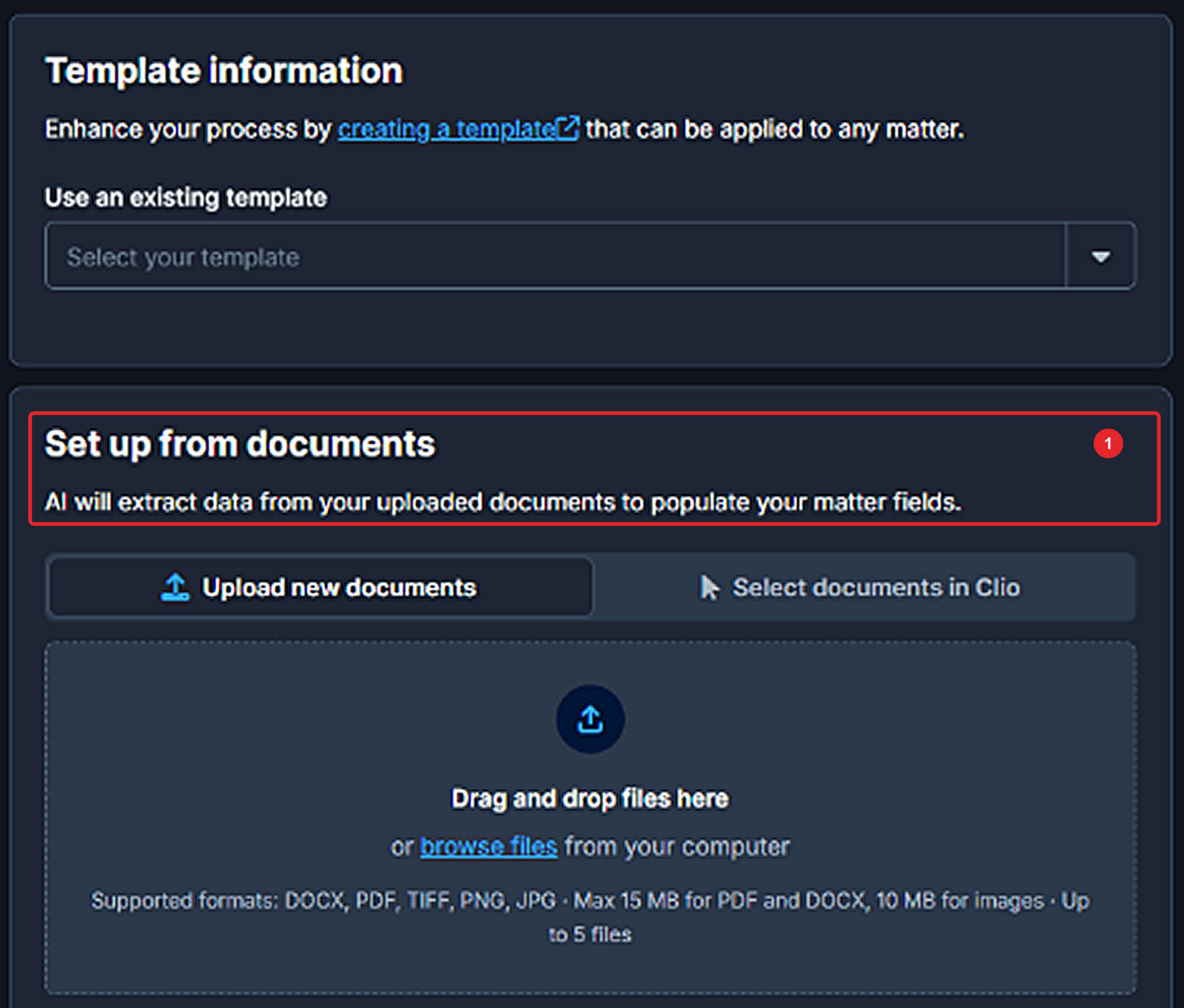
Screenshot: our Clio trial, October 16, 2026.
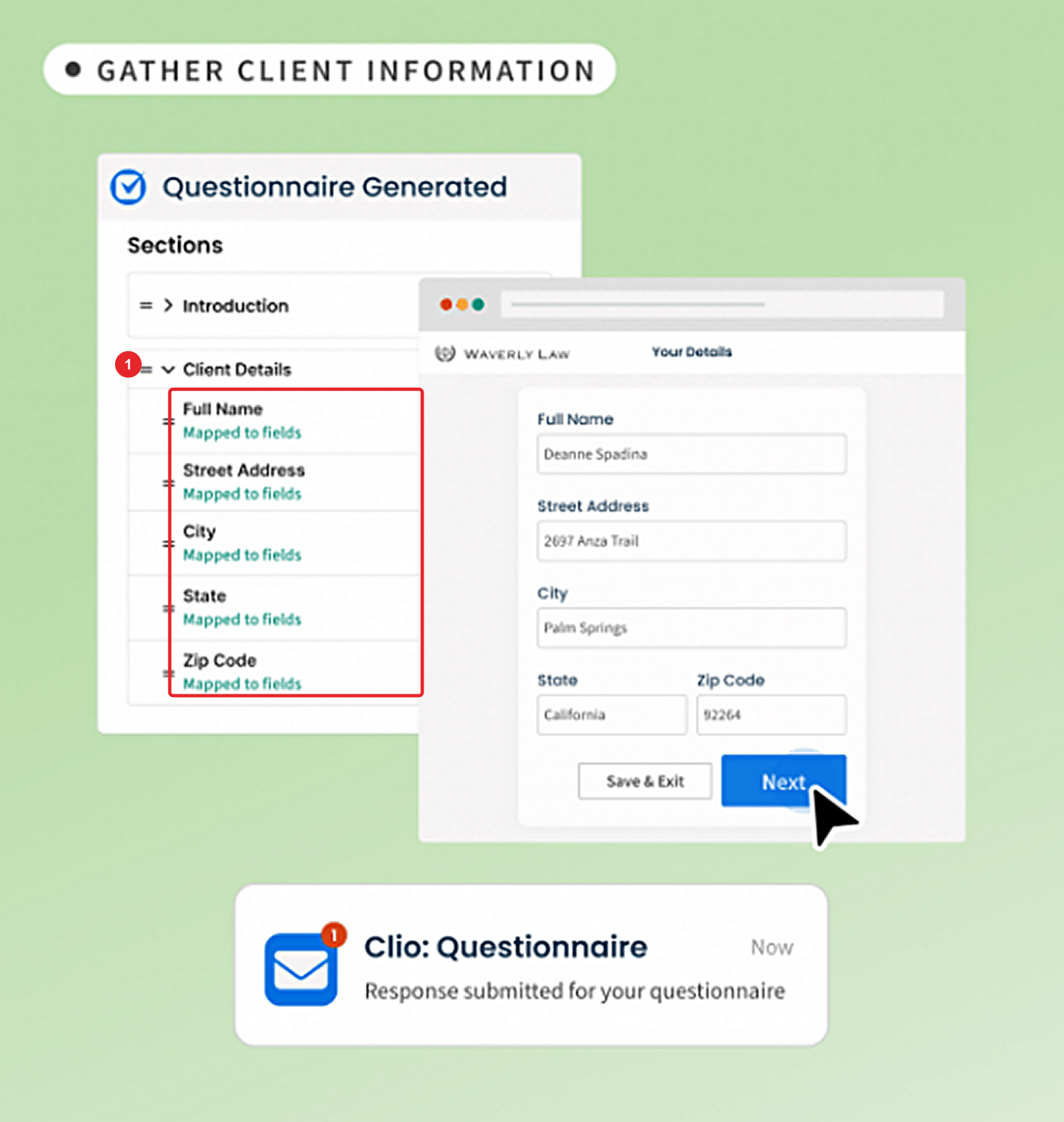
Screenshot: Clio documentation, from the Clio Draft page linked above.
Pros
Clio gives your firm these gains.
- Contacts, matters, and AI extraction share one record, so client facts are typed once instead of once per system.
- Your first matter runs in minutes, so setup costs your team little time.
- SOC 2 Type II and named AI subprocessors shorten your vendor diligence.
Cons
Three limits showed up in Aretech's trial and on Clio's pages.
- Manage showed no intake form or document request in our trial, so your staff still chase missing deeds and statements by hand when plans stall on them.
- Documents are not among Clio's ten CSV exports, which matters when you may change systems later.
- Higher tiers are quoted, and Clio's fees change on notice, which makes your AI costs hard to budget a year ahead.
Pricing
Clio publishes one price, Starter at $49 per user per month, last reviewed October 29, 2026, on Clio's pricing page.
Every other tier reads Get pricing.
2. LegalGEN: Best for AI Intake That Ends in Drafts From Your Own Templates
Overview
LegalGEN is an attorney-branded AI intake and drafting platform built for estate planning.
It serves solo and small estate firms that want clients to finish intake online. The firm then gets a first draft package from its own Word or PDF templates.
Its AI Agent validates intake answers, maps them into your templates with conditional clauses, and holds every package for attorney approval. It scores 3.1 out of 5, strong on practice depth and attorney review at 4 each, and held back by ease of use at 2. Best for AI intake that ends in drafts from your own templates.
The scores rest on LegalGEN's documentation and published screenshots, and we did not test it.
LegalGEN Estate Planning AI Scorecard
LegalGEN scores 3.1 out of 5 for estate planning firms on our rubric, from its documentation and published screenshots.
| Dimension | Weight | Score | Basis |
|---|---|---|---|
| Core job performance | 20% | 3 | Drafts from your own templates with conditional clauses, and intake with AI answer validation. No summary of existing client documents is described. |
| Interoperability with your stack | 18% | 3 | Clio (native), MyCase (bi-directional sync), WealthCounsel, and Stripe named, with the fields not stated. The REST API is an add-on. |
| Ease of use and setup | 12% | 2 | LegalGEN's team maps your templates, and template changes go through the vendor. |
| Practice-specific depth | 10% | 4 | Estate packages for wills, powers of attorney, directives, and revocable trusts, with conditional clauses. |
| Attorney review and AI controls | 10% | 4 | Attorney approval is mandatory and technically enforced. No administrator switch for AI is described. |
| Pricing and cost structure | 10% | 3 | Two plans priced monthly and annually. Add-ons are priced on request. |
| Data ownership and portability | 8% | 3 | You own your templates and generated documents. Export within 30 days after termination. |
| Support and reliability | 7% | 3 | Email and chat by plan, with a reply within 1 business day. No hours or SLA. |
| Security and Opinion 512 posture | 5% | 3 | AWS, TLS 1.3, AES-256, and no cross-customer AI training. No model provider or subprocessor list named. |
| Overall (weighted) | 100% | 3.1 | Weighted sum of 308 out of 500. |
Features
LegalGEN's documentation shows an intake-to-draft path with an attorney gate at the end.
- Guided mobile intake: AI validates answers and follows up when a client abandons midway, per LegalGEN's Digital Intake page.
- The AI Agent: it maps intake answers into your own Word or PDF templates with conditional clauses, per LegalGEN's AI page.
- Template mapping: LegalGEN's team maps your templates at onboarding, including bypass trusts, sub-trusts, and minor beneficiaries.
- Attorney portal: you preview each package, approve it, or request revisions before delivery.
- Payment: Stripe collects the fee before your attorney spends review time.
- Connections: Clio, MyCase, and WealthCounsel are named as native or bi-directional links, with the fields not stated.
Drafting from your templates is covered, intake is covered, and review of existing documents is not described.
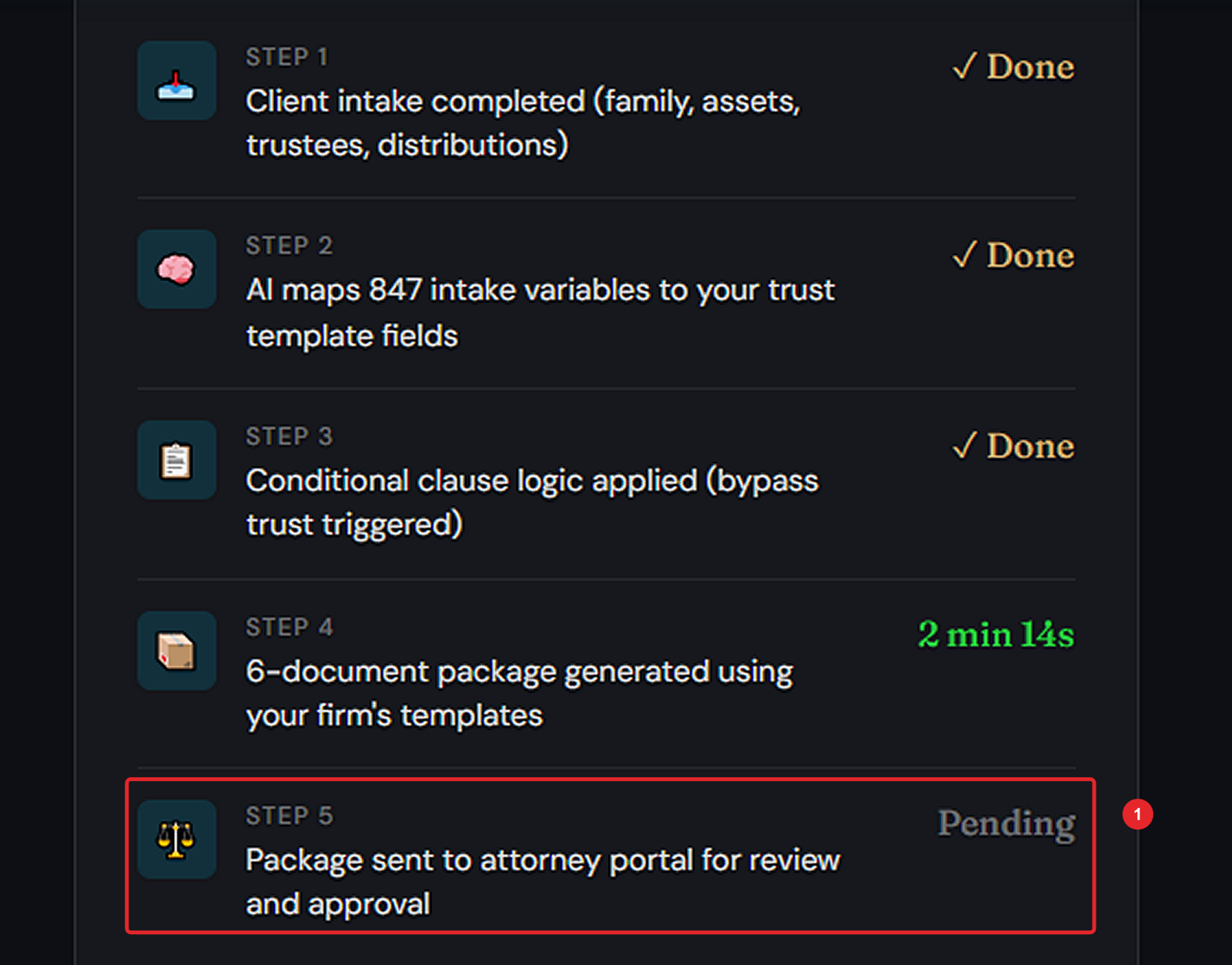
Screenshot: LegalGEN documentation, from the AI page linked above.
Pros
LegalGEN gives your firm these gains.
- Clients finish intake before the design meeting, so your team stops retyping their answers.
- Drafts come out in your own language, so review checks facts instead of unfamiliar clauses.
- You stop chasing unpaid fees once the drafts are done.
Cons
Three limits appear on LegalGEN's own pages.
- Every template or rule change goes through LegalGEN's team, usually within 1 to 2 business days, per the same AI page, which slows you down when you revise clauses often.
- The platform describes no client document request or stale-document chase, only abandoned-intake follow-up, per its how it works page, so your staff still chase deeds and statements by hand.
- Every link in its documentation index led nowhere on our November 4, 2026 read, the API reference included, so you cannot read the integration specs before you buy.
Pricing
LegalGEN's pricing page listed these plans, last reviewed November 4, 2026.
| Plan | Billed monthly | Billed annually |
|---|---|---|
| Smart Intake | $99 a month | $79 a month |
| Smart Estate Planning | $275 a month | $220 a month |
| White Label | $500 a month or volume-based, plus an implementation fee for custom options | Not stated |
Add-ons are priced on request, and a 30-day money-back guarantee applies, last reviewed November 4, 2026. LegalGEN's own pages disagree on price, because the Digital Intake page read Starting at $90/month, last reviewed November 4, 2026.
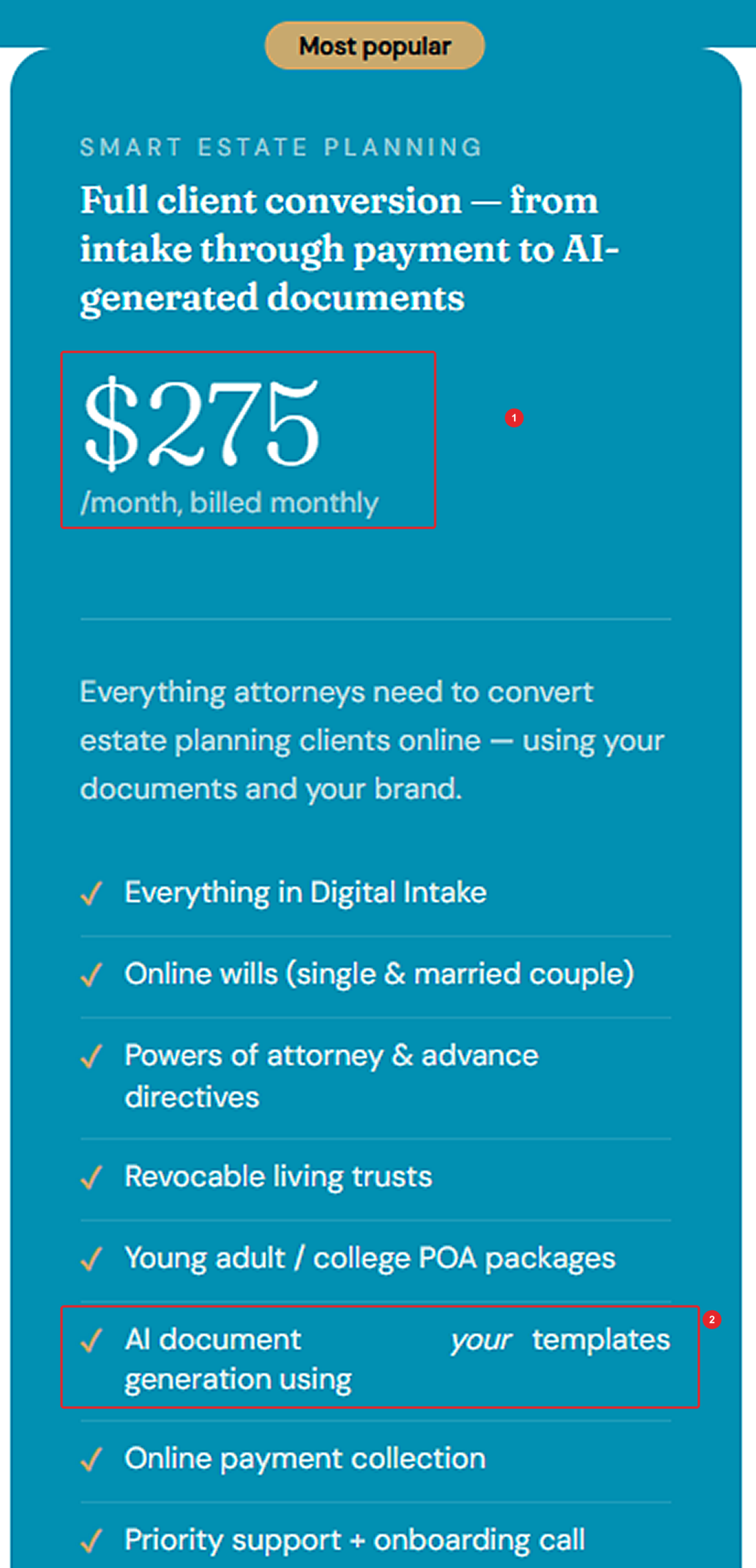
Screenshot: LegalGEN's pricing page, linked above.
3. Relaw: Best for an All-in-One Platform Whose AI Asks Before It Writes
Overview
Relaw is an all-in-one practice platform it calls a legal operating system.
It offers AI intake, document generation from your templates, a matter assistant, and a meeting notetaker. Its type here is a practice platform with AI intake, drafting, and meeting notes. It serves estate firms that want one system with AI across the matter.
Its AI writes to the record only after you confirm, and each automation sends, drafts, or asks first. It scores 3.1 out of 5, with 4 on attorney review and pricing and 2 on support and data ownership. Best for an all-in-one platform whose AI asks before it writes. The scores rest on Relaw's documentation and published screenshots, and we did not test it.
Relaw Estate Planning AI Scorecard
Relaw scores 3.1 out of 5 for estate planning firms on our rubric, from its documentation and published screenshots.
| Dimension | Weight | Score | Basis |
|---|---|---|---|
| Core job performance | 20% | 3 | Intake with AI pre-review, document sets from your templates, and a matter assistant. No summary of existing client documents is shown. |
| Interoperability with your stack | 18% | 3 | Clio, Lawmatics, and InterActive Legal shown connected, plus email, calendar, and storage tools. The integrations page's 20+ count is not itemized, and no public API is documented. |
| Ease of use and setup | 12% | 3 | Vendor-led setup and training at no charge. No screen of its builders is published. |
| Practice-specific depth | 10% | 3 | An estate planning page with a household record and funding stages. No legal forms are bundled. |
| Attorney review and AI controls | 10% | 4 | The assistant writes only after Confirm, with three send levels per automation. |
| Pricing and cost structure | 10% | 4 | Two tiers priced monthly and annually. Enterprise is by quote. |
| Data ownership and portability | 8% | 2 | The privacy policy lists deletion and portability rights, and you can cancel at any time. Ownership, export format, and exit terms are not stated. |
| Support and reliability | 7% | 2 | Setup and training at no charge. No help center, support hours, or SLA published. |
| Security and Opinion 512 posture | 5% | 3 | TLS, AES-256, and role-based access. SOC 2 Type II is named for the hosting providers only. |
| Overall (weighted) | 100% | 3.1 | Weighted sum of 305 out of 500. |
Features
Relaw's documentation shows AI across intake, drafting, and meetings, with a person in charge of each send.
- Intake: a client questionnaire in 38 languages with AI pre-review before submission, per Relaw's home page.
- Document sets: a Generate Documents tab fills a revocable living trust, pour-over will, and three ancillaries from your own Word and PDF templates, per Relaw's estate planning page.
- Send levels: each automation runs as Auto-send, Draft only, or Confirm first.
- Meetings: an AI notetaker writes meeting notes onto the client record.
- Connections: Clio, Lawmatics, and InterActive Legal are shown connected.
Drafting from your templates is covered, intake is covered, and review of existing documents is not shown.
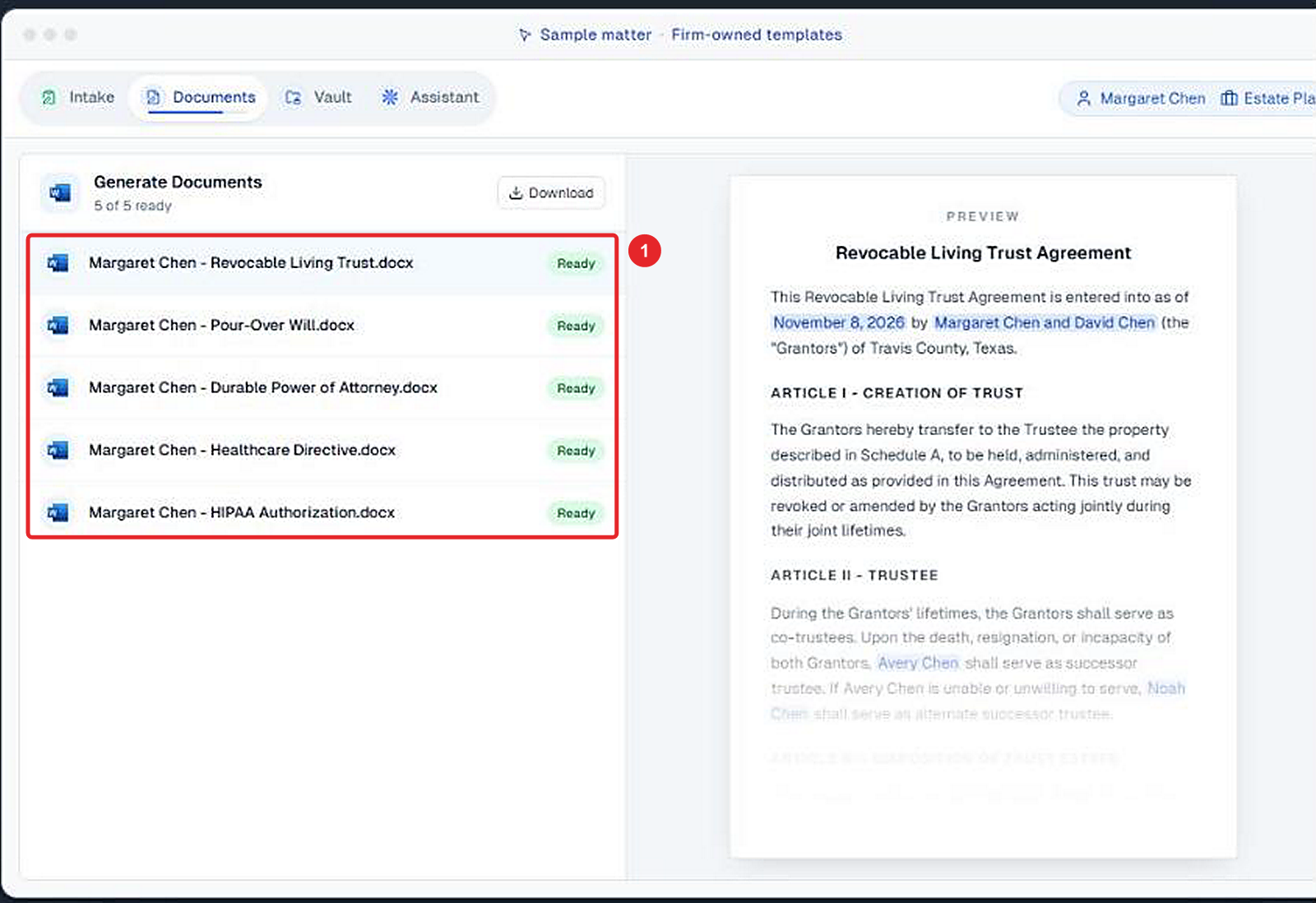
Screenshot: Relaw documentation, from the estate planning page linked above.

Screenshot: Relaw documentation, from the home page linked above.
Pros
Relaw gives your firm these gains.
- Intake, drafts, and meeting notes share one record, which cuts re-keying between systems.
- Confirm-first sends keep anything unreviewed from reaching a client.
- Your first matter is configured for you, so your staff start on live work instead of setup.
Cons
Three limits appear on Relaw's own pages.
- Relaw shows no per-document request tracker, and its roadmap marks the follow-up that chases missing answers as Planned, so your staff still track each requested document by hand.
- No help center, support hours, or SLA is published, which leaves you guessing how fast help arrives when you have no in-house tech staff.
- Its terms do not state that your firm owns its data, and they let Relaw use your firm's name in marketing unless you opt out, which matters when you need data ownership settled before signing.
Pricing
Relaw's pricing page listed these plans, last reviewed November 13, 2026.
| Plan | Billed monthly | Billed annually |
|---|---|---|
| Standard | $299 a month | $269 a month |
| Pro | $399 a month | $349 a month |
| Enterprise | By quote | By quote |
A 14-day trial starts after onboarding, with setup and training included, last reviewed November 13, 2026.

Screenshot: Relaw's pricing page, linked above.
4. Gavel: Best for Building Interviews on Your Own Wording
Overview
Gavel Workflows is document automation for estate drafting and client intake, and Relativity acquired Gavel on June 12, 2026, per Relativity's release.
Its type here is document automation with AI help building interviews. It serves firms that build interviews on their own wording.
Its AI suggests interview questions from an uploaded template, while your logic, not AI text, produces the drafts. Gavel scores 3.0 out of 5, best for building interviews on your own wording, as our Gavel review for estate planning firms details.
Gavel Estate Planning AI Scorecard
Gavel scores 3.0 out of 5 for estate planning firms on our rubric, from our trial.
| Dimension | Weight | Score | Basis |
|---|---|---|---|
| Core job performance | 20% | 3 | The library's couple trust interview and the joint-client logic ran as built. Intake re-asks facts, and the pre-signing check happens outside the product. |
| Interoperability with your stack | 18% | 3 | Native links to Clio Manage and DocuSign. Other tools connect through Zapier, webhooks, or an API on the Scale plan. |
| Ease of use and setup | 12% | 3 | We found core tasks without the documentation. A three-page conditional workflow took us about 35 minutes. |
| Practice-specific depth | 10% | 3 | Deep estate packages for California firms. Elsewhere you build your own estate logic. |
| Attorney review and AI controls | 10% | 2 | Holding finished documents for attorney review is a setting you must turn on, and the only built-in gate is the answer review page. We did not run the AI question suggestions. |
| Pricing and cost structure | 10% | 4 | Four plans are public, three with a monthly option. Prices change on notice. |
| Data ownership and portability | 8% | 2 | You keep ownership of what you upload. Gavel publishes no export procedure. |
| Support and reliability | 7% | 4 | Phone, e-mail, and screen share support seven days a week by Gavel's account. No uptime commitment. |
| Security and Opinion 512 posture | 5% | 4 | AWS hosting, TLS, AES-256, a named model provider, and a written no-training statement. SOC 2 Type II is stated for Gavel Exec only. |
| Overall (weighted) | 100% | 3.0 | Weighted sum of 304 out of 500. |
Features
Gavel's AI sits at the start of a build, not inside the draft.
- Start with documents (Beta): AI suggests interview questions from an uploaded template. In the October 27, 2026 trial we at Aretech ran, it was the only AI entry point, and nothing in the interview or the output was AI-written.
- Interview logic: the library's couple trust interview and our own joint-client logic ran as built in our trial.
- Connections: Clio Manage and DocuSign links, plus a Zapier webhook for each workflow.
- Gavel Exec: a separate contract tool in Word, which a Reddit user says knows state rules. It sits outside the Workflows trial, so we did not test it.
- Documentation use: we needed Gavel's help center for two setup tasks, a document request and a reminder. It showed a one-file upload question with nothing that tracks what is outstanding, and confirmed no reminder exists.
Drafting is covered by your logic, intake is covered, and plan review is not offered.
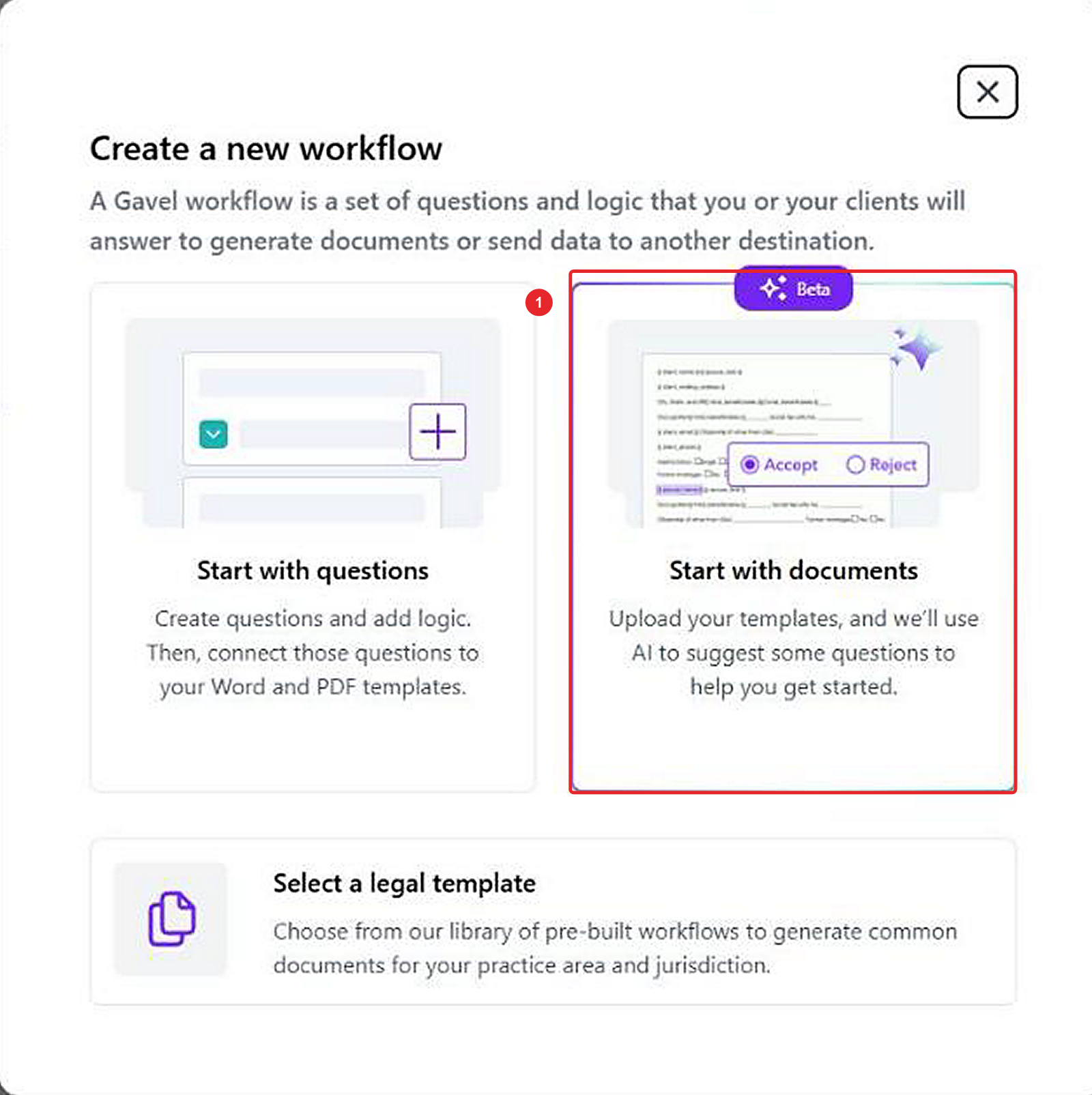
Screenshot: our Gavel trial, October 27, 2026.
Pros
Gavel gives your firm these gains.
- Drafts stay in your wording, which answers your attorneys' accuracy objection.
- Every tier a boutique firm needs is priced publicly, with a monthly option.
- Help is reachable on weekends too, when you build interviews after hours.
Cons
Three limits showed up in Aretech's trial and on Gavel's pages.
- The AI only suggests interview questions and writes no part of the draft, so you gain little when you want AI to speed up the drafting itself.
- Holding finished documents for your attorney is a setting you must turn on, and a builder can skip the final answer review page with one switch. A completed workflow can then e-mail documents with no person in between, which matters when more than one person on your staff builds workflows.
- Ownership of built workflows is not stated, export runs per session, and SOC 2 Type II is stated for Gavel Exec only, which matters when you need to take your workflows with you or show a security report.
Pricing
Gavel's pricing page listed these plans, with annual-billed prices last reviewed November 14, 2026, and monthly prices from Aretech's November 2, 2026 read.
| Plan | Billed annually | Billed monthly |
|---|---|---|
| Lite | $83 a month | $99 a month |
| Standard | $210 a month, while the page's comparison block shows $165 | $250 a month |
| Pro | $290 a month | $350 a month |
| Scale | From $417 a month | Not stated |
Standard's two annual figures conflict on the same page, last reviewed November 14, 2026. Gavel Exec costs $160 per user a month, last reviewed October 27, 2026.
5. Luminary: Best for Reading Existing Trusts and Modeling the Estate
Overview
Luminary is AI estate-plan analysis and modeling software that reads existing trusts and wills into a source-cited plan view.
It models estate tax outcomes and produces client presentations, and it sells to wealth managers as well as law firms.
It does not draft, per Luminary's law-firm page, which says Luminary "does not offer document drafting or other legal services". It scores 3.0 out of 5, best for reading existing trusts and modeling the estate.
Practice depth, review controls, and security score 4, while interoperability and quote-only pricing score 2. The scores rest on Luminary's documentation and published screenshots, and we did not test it.
Luminary Estate Planning AI Scorecard
Luminary scores 3.0 out of 5 for estate planning firms on our rubric, from its documentation and published screenshots.
| Dimension | Weight | Score | Basis |
|---|---|---|---|
| Core job performance | 20% | 3 | Summaries and extraction of existing trusts with source citations, plus memos. It drafts no legal documents. |
| Interoperability with your stack | 18% | 2 | Portfolio and planning integrations, Salesforce, and an undocumented API. No practice-management, drafting, or storage connection for law firms. |
| Ease of use and setup | 12% | 3 | An onboarding checklist. Implementation is sold as Professional Services. |
| Practice-specific depth | 10% | 4 | Built around estate documents and a tax engine for federal estate, state estate, inheritance, and GST taxes. |
| Attorney review and AI controls | 10% | 4 | Citations on every summarized point, and assistant data waits for confirmation. SmartReview auto-approves above 95% confidence when on. |
| Pricing and cost structure | 10% | 2 | Quote only, with no trial. Fees can change at renewal on 60 days' notice. |
| Data ownership and portability | 8% | 3 | Your information is your exclusive property. Twenty days to retrieve data after the term. |
| Support and reliability | 7% | 3 | Email support on weekdays, a knowledge base, and in-app help. |
| Security and Opinion 512 posture | 5% | 4 | US hosting, OpenAI named with a DPA, and a written no-training policy. Its security report sits in a Trust Center we could not read. |
| Overall (weighted) | 100% | 3.0 | Weighted sum of 297 out of 500. |
Features
Luminary's documentation shows AI that reads and models plans your firm already holds.
- Source-cited answers: AI summaries and extraction of trusts carry a citation to the source paragraph on each data point, per Luminary's citations article.
- Tax engine: a deterministic engine models federal estate, state estate, inheritance, and GST taxes.
- Client deliverables: the Estate Waterfall, entity diagrams, and presentations for client meetings.
- Memos: cover letters, document comparisons, executive summaries, and fiduciary overviews.
- SmartReview: it auto-approves extractions above 95% confidence when on, and saves nothing automatically when off, per the SmartReview article.
Drafting is not offered, intake is partly covered from existing documents, and plan review is covered.
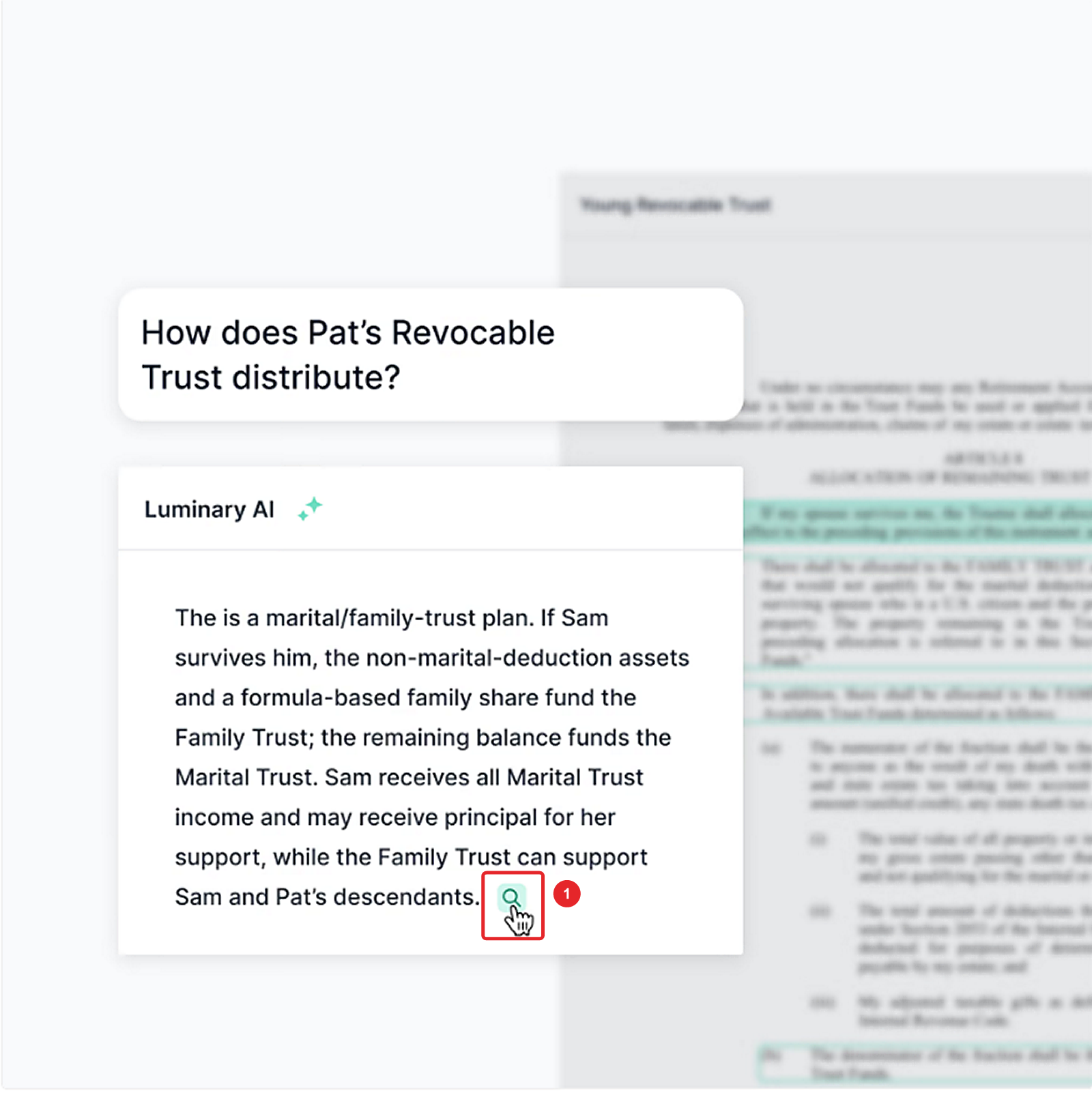
Screenshot: Luminary documentation, from the law-firm page linked above.

Screenshot: Luminary documentation, from the law-firm page linked above.
Pros
Luminary gives your firm these gains.
- You check an inherited plan against its source paragraphs instead of reading every page cold.
- Tax scenarios and diagrams are ready before the design meeting.
- Your vendor review closes faster, because the data terms you need are already published.
Cons
Three limits appear on Luminary's own pages.
- It drafts no estate planning documents, so you still need one of the estate planning drafting software tools for attorneys when you draft your own plans.
- Its integrations are portfolio, planning, and CRM systems, with no practice-management, drafting, or storage connection for law firms, so your staff re-enter client data between systems.
- Pricing is quote-only on one-year auto-renewing terms, with fee changes at renewal on 60 days' notice, per its customer agreement, which matters when you want to try it before a year's commitment.
Pricing
Not stated. Luminary's pricing page offers a custom proposal and no trial, last reviewed November 4, 2026.
6. WealthCounsel: Best for a Maintained Library With AI Research Beside It
WealthCounsel ranks sixth at 3.0 out of 5, for firms that want AI research beside a maintained drafting library.
Overview
WealthCounsel is a membership drafting platform, Wealth Docx, built on a large maintained estate library.
Its type here is a drafting library with an AI research assistant. It serves firms drafting complex or taxable plans.
Its documentation shows LawY, an AI assistant that answers estate planning questions with optional lawyer verification. It also shows Flowcharts, AI diagrams of trusts and wills. WealthCounsel scores 3.0 out of 5, best for a maintained library with AI research beside it, as our WealthCounsel review covers in depth.
WealthCounsel Estate Planning AI Scorecard
WealthCounsel scores 3.0 out of 5 for estate planning firms on our rubric, from its documentation and published screenshots.
| Dimension | Weight | Score | Basis |
|---|---|---|---|
| Core job performance | 20% | 3 | Assembly from a large maintained library. Joint-client logic and a quality check before signing are not described. |
| Interoperability with your stack | 18% | 3 | A one-way Clio push, partner syncs, and an API for contacts and matters that needs partner approval. |
| Ease of use and setup | 12% | 3 | Cloud, no install, and monthly live training. No onboarding program is published. |
| Practice-specific depth | 10% | 4 | Estate document systems, state documents, Elder Docx, and trust administration tasks. |
| Attorney review and AI controls | 10% | 2 | The EULA leaves checking AI output to the user, and LawY verification is opt-in. |
| Pricing and cost structure | 10% | 2 | Every tier is quote-only on a renewing term. |
| Data ownership and portability | 8% | 3 | Your firm owns its client data and can download it. Templates stay WealthCounsel's. |
| Support and reliability | 7% | 3 | Free unlimited support and monthly training. No published hours or status page. |
| Security and Opinion 512 posture | 5% | 4 | A SOC 2 Type 2 attestation and a SOC 3 report. The AI model provider is not named. |
| Overall (weighted) | 100% | 3.0 | Weighted sum of 295 out of 500. |
Features
WealthCounsel's documentation shows AI tools beside the drafting library rather than inside the draft.
- LawY: answers estate planning questions from a legal knowledge base, with optional verification by one of LawY's lawyers, which the page does not offer in every state, per the LawY page.
- Flowcharts: AI diagrams of a client's trust or will, built into drafting, per the Flowcharts page.
- Matter AI: the WealthCounsel plus LEAP tier adds LEAP's Matter AI, reached through that bundle.
- Client Intake: collected data transfers into the drafting system as contacts, on the upper tiers.
- Data terms: the Trust Center lists Anthropic as a subprocessor for Engineering, and the Security Policy states no training on member or client data.
Drafting from the library is covered, intake is partly covered, and plan review is not described.

Screenshot: WealthCounsel documentation.
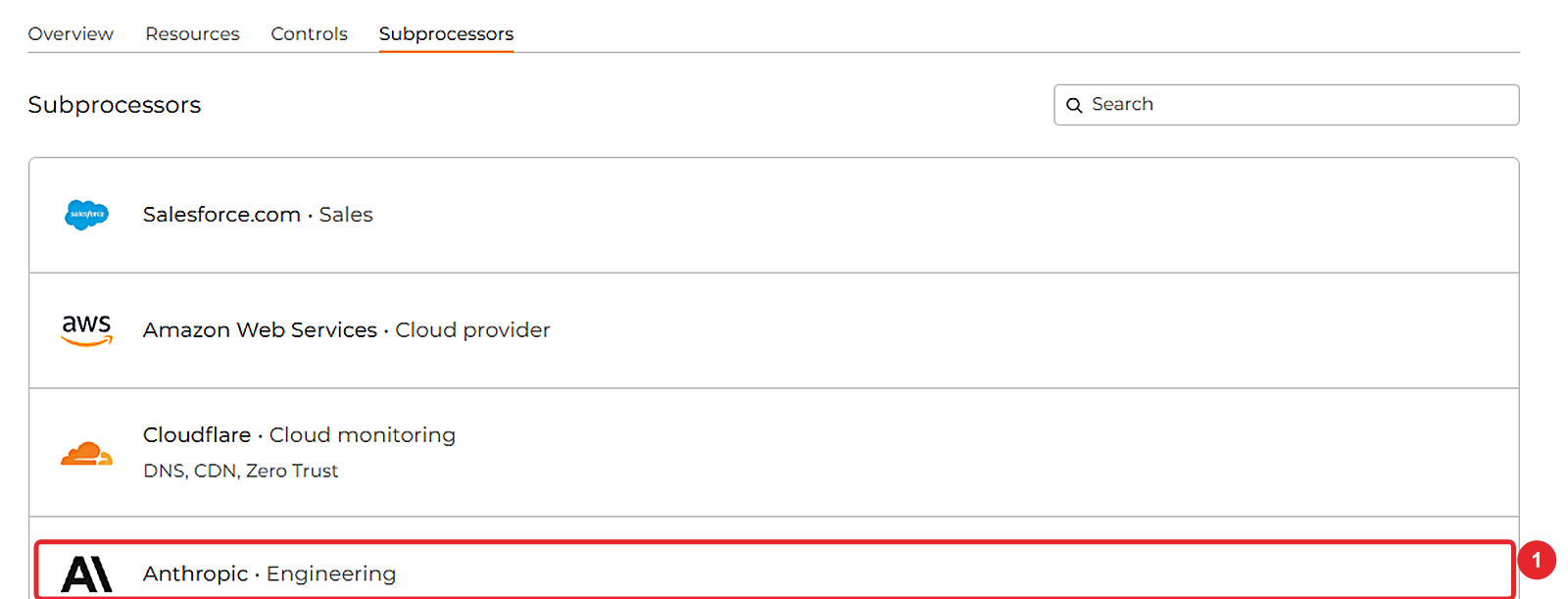
Screenshot: WealthCounsel documentation, from the Trust Center linked above.
Pros
WealthCounsel gives your firm these gains.
- Research answers and plan diagrams sit beside the drafting library, so you check a question without leaving the system.
- An attested security program shortens your diligence.
- The maintained library keeps documents current without your team editing the language.
Cons
Three limits appear on WealthCounsel's own pages.
- Every tier is quote-only on a renewing term, so you cannot compare its cost before a sales conversation.
- Checking AI output is your job under the EULA, and LawY verification is opt-in, which matters most when you lean on LawY answers for client advice.
- The templates stay WealthCounsel's property, so you lose the library your plans were drafted on when you leave.
Pricing
Not stated. Every WealthCounsel tier is quote-only, last reviewed November 1, 2026.
7. InterActive Legal: Best for Complex, Elder Law, and Special-Needs Plans
Overview
InterActive Legal is interview-based drafting software with deep estate, elder law, Medicaid, and special-needs content.
Its type here is interview-based drafting with named AI features. It serves firms whose plans need that library, and one practitioner on Reddit calls it "by far the best option".
Its site names AI-driven summaries and AI-powered research without describing either. It scores 2.8 out of 5, best for complex, elder law, and special-needs plans, as our InterActive Legal review for estate planning firms explains.
InterActive Legal Estate Planning AI Scorecard
InterActive Legal scores 2.8 out of 5 for estate planning firms on our rubric, from its documentation and published screenshots.
| Dimension | Weight | Score | Basis |
|---|---|---|---|
| Core job performance | 20% | 3 | Interview assembly and a client intake form cover the drafting steps. Staff handle other intake and the pre-signing check. |
| Interoperability with your stack | 18% | 3 | A one-way Clio Manage import, three partner logos with no description, no public API, and Word output. |
| Ease of use and setup | 12% | 3 | A guest post on the vendor's blog says the first month is setup. |
| Practice-specific depth | 10% | 5 | Wills, 11 revocable and 32 irrevocable trust documents, plus special needs, Medicaid, VA, and firearms trusts. |
| Attorney review and AI controls | 10% | 1 | Not stated. AI features are named, not described, and no review control appears in any published terms. |
| Pricing and cost structure | 10% | 1 | Not stated. No price for any package, last reviewed October 21, 2026. |
| Data ownership and portability | 8% | 2 | Ownership terms are not public. Export is readable only by the vendor's online system. |
| Support and reliability | 7% | 4 | A weekday phone line, four email departments, a help center, and an Academy. No SLA. |
| Security and Opinion 512 posture | 5% | 3 | AWS, TLS 1.3, a firewall, optional MFA, and a third-party penetration test. No SOC 2, subprocessor list, or DPA. |
| Overall (weighted) | 100% | 2.8 | Weighted sum of 279 out of 500. |
Features
InterActive Legal's documentation shows drafting depth, with its AI named but not explained.
- Interview assembly: four packages for wealth transfer, elder law, essential estate, and firearms trust planning.
- Client intake form: clients can enter data through the online edition's intake form.
- Clio Manage import: contacts move one way into the Client Interview over OAuth 2.0.
- AI claims: the homepage lists AI-driven summaries, and no page describes what they do.
- Attorney completion: a vendor blog post says a generated document is usually 90% complete, with the attorney supplying the rest.
Drafting is covered from the vendor library, intake is partly covered, and plan review is not described.
Screenshot: InterActive Legal's homepage, linked above.
Pros
InterActive Legal gives your firm these gains.
- Depth for complex, elder law, and special-needs plans means fewer clauses your team builds itself.
- A weekday phone line and an Academy shorten staff training.
Cons
Three limits appear on InterActive Legal's own pages.
- Its AI features carry no description, model name, or review control, so you cannot vet them against your firm's AI policy.
- No price is published for any package, so you cannot budget it before a demo.
- No public API is documented, and its retention policy says an export is readable only by its own online system, which matters when you may switch drafting software later.
Pricing
Not stated. InterActive Legal sells by demo, with no price for any package, last reviewed October 21, 2026.
8. Trust & Will for Attorneys: Best Free Tool for Reviewing Plans You Did Not Draft
Overview
Trust & Will for Attorneys, the Attorney Platform powered by EstateOS, is an AI plan review and referral platform, separate from Trust & Will's consumer plans.
It reads uploaded wills, trusts, and powers of attorney into an editable Estate Plan Summary and answers questions in an Attorney Assistant.
Its help center says it does not generate documents "at this time". It scores 2.3 out of 5, held back by interoperability at 1, marked Not stated. Best as a free way to review plans you did not draft. The scores rest on its documentation and published screenshots, and we did not test it.
Trust & Will for Attorneys Estate Planning AI Scorecard
Trust & Will for Attorneys scores 2.3 out of 5 for estate planning firms on our rubric, from its documentation and published screenshots.
| Dimension | Weight | Score | Basis |
|---|---|---|---|
| Core job performance | 20% | 2 | AI extraction into an Estate Plan Summary, an assistant, and life event detection. No drafting at this time. |
| Interoperability with your stack | 18% | 1 | Not stated. No integrations page or API documentation for attorneys. |
| Ease of use and setup | 12% | 3 | Free self-serve sign-up and an onboarding call. Nothing to configure. |
| Practice-specific depth | 10% | 3 | Estate documents only, with fiduciaries, dates, and missing signatures extracted. No drafting logic. |
| Attorney review and AI controls | 10% | 2 | The terms make you solely responsible for verifying extracted information. No approval step is stated. |
| Pricing and cost structure | 10% | 3 | Free to join and use. Paid tiers are planned without prices. |
| Data ownership and portability | 8% | 2 | You keep your content and own AI output. Export is a PDF summary and AI output download. |
| Support and reliability | 7% | 3 | An account manager, a help center, and an AI assistant. No hours or SLA. |
| Security and Opinion 512 posture | 5% | 3 | AWS, AES-256, and no training of external AI models. SOC 2 is described differently across its pages. |
| Overall (weighted) | 100% | 2.3 | Weighted sum of 226 out of 500. |
Features
Trust & Will's documentation shows AI that reads and monitors plans, not AI that drafts them.
- Upload and extraction: AI classifies each document and extracts type, roles, dates, and missing signatures into a summary, per its account guide.
- Attorney Assistant: a chat answers questions across your client documents and summaries, per the vendor's attorney page.
- Life events: client statuses read Active, Needs Updates, Deceased, or Archived.
- Referrals: Trust & Will members are matched to attorneys by state licensure and practice area.
Drafting is not offered, intake is partly covered through uploads, and plan review is covered.

Screenshot: Trust & Will documentation, from the account guide linked above.
Pros
Trust & Will for Attorneys gives your firm these gains.
- You get a free first read of a new client's existing plan before the design meeting.
- Life event alerts surface plan updates you can offer.
- Referrals arrive with no fee to Trust & Will.
Cons
Three limits appear on Trust & Will's own pages.
- It offers no drafting, intake form, or document chase for your firm, so you still need other software for every step before signing.
- No integration or API connects it to your practice-management or drafting software, so your staff re-enter what it extracts.
- The terms put all checking of extracted information on you, so you still read each inherited plan yourself before advising on it.
Pricing
The Attorney Platform is free to join and use.
Additional features and pricing tiers are planned for future phases, per the launch post of January 12, 2026. We last reviewed this on November 4, 2026.
Can ChatGPT or Claude Draft Estate Planning Documents for Your Firm?
ChatGPT and Claude can help your firm with research and correspondence, but they draft without your templates or logic.
Consumer tiers raise confidentiality questions, and every output still needs your independent review. We have not scored either assistant on this page.
ChatGPT leads tool adoption, at 52.1% of tools adopted or seriously considered across all practices in the ABA TechReport. General models hallucinated on 69% to 88% of specific legal queries in Stanford HAI's January 11, 2024 study. That study tested older models, GPT 3.5, Llama 2, and PaLM 2.
We at Aretech tested ChatGPT ourselves on November 13, 2026, with synthetic facts. One prompt returned a will draft headed DRAFT FOR ATTORNEY REVIEW, NOT FOR SIGNING. The app also told us it cannot reliably remember the matter between sessions without a saved record.
Using Claude for estate planning work follows the same rule as ChatGPT. Can AI do estate planning drafting for your firm on its own? No, because a person still reviews every document before it reaches a client.
Confidentiality and Review
Do you have any concern about using the public or frontier models from a privacy perspective?
Only with the right account and terms. Check the tool's terms, data path, and training settings first. A tool that learns from what you enter needs your client's informed consent under Opinion 512.
Opinion 512 asks you to read a tool's terms of use and privacy policy before client data goes in. Our guide to the ethics duties that govern AI in estate planning practice covers the review and confidentiality duties in full.
When Clients Bring AI Drafts
Estate attorneys on Reddit describe clients who arrive with AI-generated question lists and drafts.
A spring 2026 article in the Washington Journal of Law, Technology & Arts proposes that wills written wholly with AI disclose that use and the prompt. It is a proposal, not law.
Your own team's use of AI raises a separate question about client consent before using AI.
Best AI for Estate Planning Attorneys by Firm Situation
The table matches each firm situation to the software that fits it, without changing the ranking.
| Your situation | Software that fits | Why |
|---|---|---|
| Your matters live in one practice-management record | Clio | Its AI extraction and drafting sit inside that record |
| You want online intake that ends in drafts from your templates | LegalGEN | Its AI Agent maps intake into your templates and waits for attorney approval |
| You want one platform with AI that asks before it writes | Relaw | Its assistant writes only after Confirm |
| You build interviews on your own wording | Gavel | Its AI suggests questions and your logic drafts |
| You inherit complex plans and present tax scenarios | Luminary | It reads trusts with source citations and models taxes |
| You draft complex or taxable plans from a maintained library | WealthCounsel | Its library sits beside LawY and Flowcharts |
| You need elder law and special-needs depth | InterActive Legal | Its packages carry that content |
| You want a free first read of existing plans | Trust & Will for Attorneys | It summarizes uploaded plans at no cost |
| You are choosing your whole system rather than its AI | See the full estate planning software stack | It compares the systems your firm runs on |
Add an Automation Layer Around Your Estate Planning Software for Intake and First Drafts
You keep the software you pick, and Aretech's automation works around it, so your firm handles more matters and increases revenue without adding headcount.
We build it in three layers, always in this order.
- The data layer: one source of truth across your practice-management system, drafting software, storage, and phones. It is the foundation, and it works around the software you already run.
- AI agents: they read what clients send, fill in the routine work, and mark each answer for your staff to review.
- Automated workflows: intake capture, the client document chase, and first drafts from your own templates.
For first drafts, the legal language comes from your own templates, and your attorney reviews and edits every draft before it goes anywhere. Anything the AI is unsure about goes to a person for review.
An attorney reviews everything, and nothing the system does signs, files, submits, or decides anything legal.
Your firm owns what is built, and it lives in your own cloud account.
Hosted frontier models do the AI work, and your firm pays the model provider directly.
You pay no Aretech subscription, because your firm owns the build, which is scoped after the workflow mapping session. See how automation around your estate planning software works for estate planning firms.
Pick the AI that fits the job you need done first, and keep the attorney review point wherever AI touches a draft.
Your next step is estate planning law firm automation around the software you choose.
Free. The map is yours, even if you never hire us.
FAQs
What Is the Best AI for Estate Planning Law Firms?
Clio leads at 3.1 out of 5 for AI inside the record you already run. LegalGEN and Relaw, also at 3.1, lead for AI intake that ends in drafts from your own templates.
Can AI Do Estate Planning Documents Without an Attorney Reviewing Them?
No. ABA Formal Opinion 512 expects independent review of AI output, and every tool on this list leaves your attorney responsible for the result.
I Want a Template Based Document Assembly System, Using My Own Language. Which AI Tools Do That?
LegalGEN and Relaw draft from your own Word and PDF templates with AI, according to their documentation. Gavel and Clio Draft assemble from your templates too, with AI in Gavel only suggesting interview questions.
Is It Safe to Put My Estate Planning Clients' Data Into an AI Tool?
Only after you read the tool's terms and data path. Luminary names OpenAI with a DPA, and Gavel names OpenAI with zero data retention. WealthCounsel does not name the provider behind its AI tools. All three state that client data does not train models.
We Know AI Makes Stuff Up. How Do Estate Planning Firms Use It for Drafts Anyway?
Keep AI out of the legal language and let your templates and logic draft. Then use AI for questions, summaries, and extraction, with an attorney reviewing each output.
Does AI Take Over the Estate Planning Attorney's Work?
No. The tools on this list draft, extract, and summarize, while the judgment, the advice, and the final review stay with the attorney.
Will Standard Wills Be Mostly AI Generated, and Do We Still Need a Human to Review Them?
Tools on this list already assemble standard wills from templates, and a person still reviews every document. Opinion 512 expects that review whichever tool produces the draft.
Which AI Tool Do Estate Planning Attorneys Use Most?
ChatGPT leads at 52.1% of tools adopted or seriously considered, across all practices, in the ABA TechReport. CoCounsel follows at 26.0% and Lexis+ AI at 24.3%, and those research tools sit outside this ranking.
Does WealthCounsel Have AI?
Yes. WealthCounsel's documentation shows LawY for research and Flowcharts for plan diagrams, and the WealthCounsel plus LEAP tier adds LEAP's Matter AI.
Does Luminary or Trust & Will Draft Estate Planning Documents?
No. Luminary states that it "does not offer document drafting", and Trust & Will's help center says its attorney platform does not generate documents at this time. Both read existing plans instead.